"Caps Lock" key stuck in the center of the screen
Solved
halil1512
-
pistouri Posted messages 19010 Registration date Status Contributor Last intervention -
pistouri Posted messages 19010 Registration date Status Contributor Last intervention -
Hello,
I can't get rid of the "Caps Lock On" message that stays displayed in the center of the screen... with Windows 10. I couldn't find a solution on CCM where the topic has been discussed...
https://forums.commentcamarche.net/forum/affich-34638843-carre-touche-verr-maj-active-bloquee-au-centre-de-l-ecran
Thank you for your help.
Best regards
Configuration: Windows / Chrome 63.0.3239.84
I can't get rid of the "Caps Lock On" message that stays displayed in the center of the screen... with Windows 10. I couldn't find a solution on CCM where the topic has been discussed...
https://forums.commentcamarche.net/forum/affich-34638843-carre-touche-verr-maj-active-bloquee-au-centre-de-l-ecran
Thank you for your help.
Best regards
Configuration: Windows / Chrome 63.0.3239.84
4 answers
-
pistouri Posted messages 19010 Registration date Status Contributor Last intervention Ambassador 8 732
Another point to check
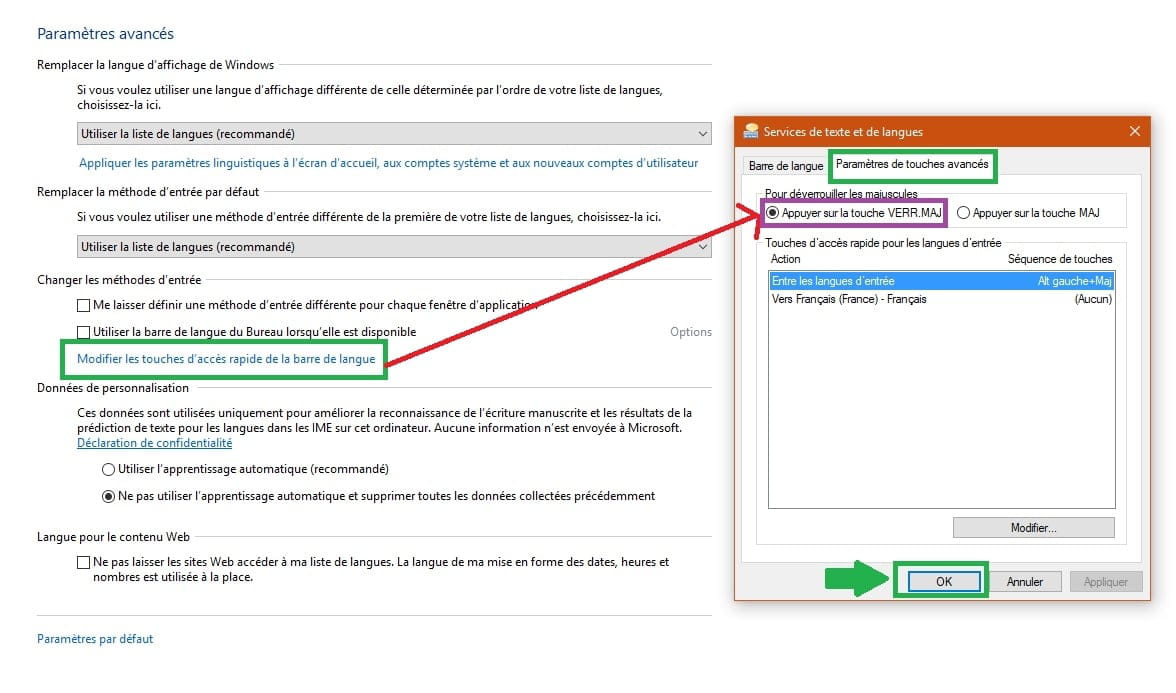
Go to Control Panel
Language
Go to the line → Advanced settings
Click on the line → Change the key sequence for the language bar

A small window opens
Go to the tab → Advanced key settings
Check the box → Press the CAPS LOCK key
Finish with → OK
Restart the PC if necessary

--
scalpel