Key Case Inversion When Typing
Hello,
When the (uppercase) indicator is on, I am actually typing in lowercase, and when it is off (turned off), I am typing in uppercase.
What can I do to get it back to normal?
Thank you for your help.
Configuration: Windows / Chrome 78.0.3904.87
When the (uppercase) indicator is on, I am actually typing in lowercase, and when it is off (turned off), I am typing in uppercase.
What can I do to get it back to normal?
Thank you for your help.
Configuration: Windows / Chrome 78.0.3904.87
1 answer
-
ContributorHello ,
1- Try the combinations of these keyboard keys:
Shift + caps lock
Maj + caps lock
CTRL + Shift lock
ALT + SHIFT

2- Press the shift key 5 or 8 times.
If you get a message about sticky keys:
Control Panel → Ease of Access.
Click on Make the keyboard easier to use
Section Make typing easier → make sure that the boxes for Turn on Sticky Keys and Turn on Filter Keys are unchecked.
3- Change the shortcut keys for the language bar
Control Panel → Language
Go to the line → Advanced settings
Click on the line → Change the shortcut keys for the language bar
A small window opens
Go to the tab → Advanced key settings
Check the box → Press the CAPS LOCK key
Finish with → OK
Restart the PC if necessary
Source.
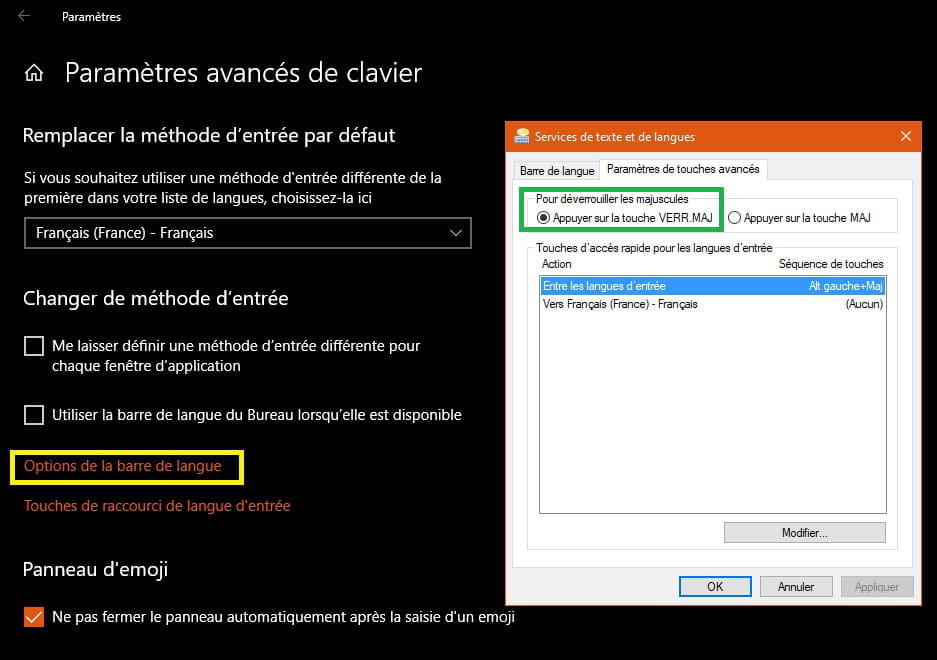
With W 10:
Settings then type in the search field → keyboard
Click on the line → Advanced keyboard settings
Click on → Language bar options
Tab → Advanced key settings
Section → To unlock advanced keys.
Select → Press the CAPS LOCK key
4- If this happened with Word.
Go to file then select Options.
Select proofreading.
Click on the AutoCorrect Options button.
Disable the checkbox correct accidental use of the CAPS LOCK key.
Click OK.
A+
--
pistouri