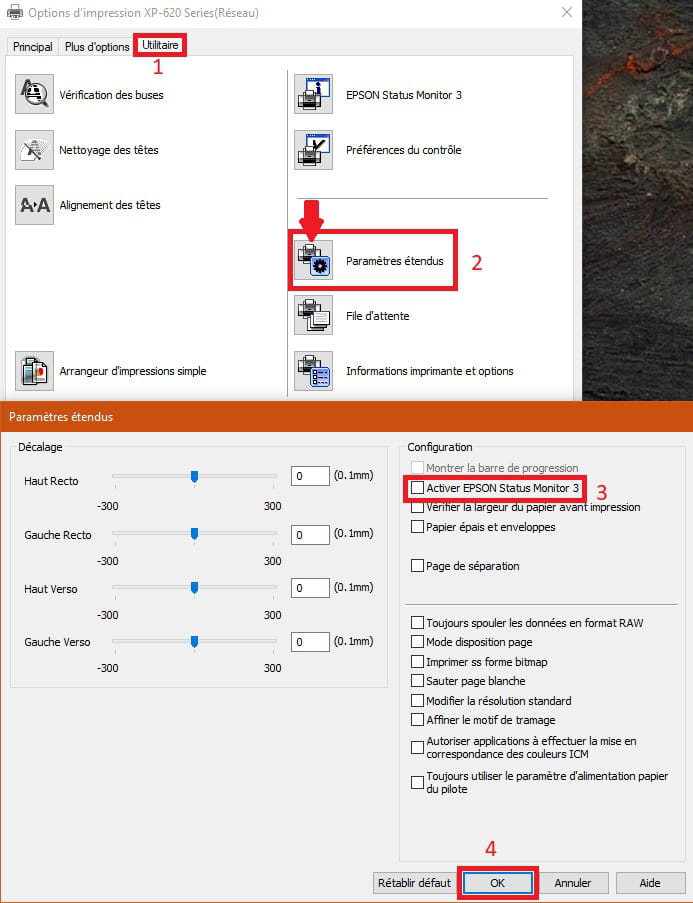
Unable to disable EPSON Status Monitor 3
Solved
albatros
-
pistouri Posted messages 19010 Registration date Status Contributor Last intervention -
pistouri Posted messages 19010 Registration date Status Contributor Last intervention -
Hello,
Hello everyone,
I am on Windows 7 and would like to disable EPSON Status Monitor 3 for my Epson XP 225 printer.
I read: "Instructions:
Go to 'Start' > 'Settings' > 'Printers and Faxes'
Right-click on the relevant Epson printer
Then go to the 'Properties' tab > 'Printing Options' > 'Utilities' > 'Speed and Progress'
Click 'Disable Epson Status Monitor 3' and 'OK'
"
BUT I can't find "Speed and Progress".
Here's what I have:
[URL=https://www.hostingpics.net/viewer.php?id=746225monitor.jpg][IMG]https://img4.hostingpics.net/thumbs/mini_746225monitor.jpg[/IMG][/URL]
Can someone help me?
Thank you ;)
Configuration: Windows / Chrome 59.0.3071.115
Hello everyone,
I am on Windows 7 and would like to disable EPSON Status Monitor 3 for my Epson XP 225 printer.
I read: "Instructions:
Go to 'Start' > 'Settings' > 'Printers and Faxes'
Right-click on the relevant Epson printer
Then go to the 'Properties' tab > 'Printing Options' > 'Utilities' > 'Speed and Progress'
Click 'Disable Epson Status Monitor 3' and 'OK'
"
BUT I can't find "Speed and Progress".
Here's what I have:
[URL=https://www.hostingpics.net/viewer.php?id=746225monitor.jpg][IMG]https://img4.hostingpics.net/thumbs/mini_746225monitor.jpg[/IMG][/URL]
Can someone help me?
Thank you ;)
Configuration: Windows / Chrome 59.0.3071.115