Blocked on local administrator account
paucaliro
Posted messages
26
Status
Member
-
Malekal_morte- Posted messages 178136 Registration date Status Moderator, Security Contributor Last intervention -
Malekal_morte- Posted messages 178136 Registration date Status Moderator, Security Contributor Last intervention -
Hello,
like many, I migrated from Win 8 to Win 10 a few months ago and everything was going very well. Yesterday morning I turned on my PC and couldn't log in with my Microsoft account, it opens with a temporary account. I've tried several times but nothing works. I then followed Microsoft's procedure (https://support.microsoft.com/fr-fr/help/947242) but now I log in to a local administrator account where, of course, my folders are missing, and I can't do anything (i.e., it is not possible to create another user or change account). I also cannot perform a system recovery or a Windows reset....
I've searched the web for hours again and looked back in the registry, but I no longer have a .BAK of the SID in question.
I don't know what to do anymore, I am counting on you to provide me with a solution.
Thank you.
Configuration: Windows / Chrome 51.0.2704.79
like many, I migrated from Win 8 to Win 10 a few months ago and everything was going very well. Yesterday morning I turned on my PC and couldn't log in with my Microsoft account, it opens with a temporary account. I've tried several times but nothing works. I then followed Microsoft's procedure (https://support.microsoft.com/fr-fr/help/947242) but now I log in to a local administrator account where, of course, my folders are missing, and I can't do anything (i.e., it is not possible to create another user or change account). I also cannot perform a system recovery or a Windows reset....
I've searched the web for hours again and looked back in the registry, but I no longer have a .BAK of the SID in question.
I don't know what to do anymore, I am counting on you to provide me with a solution.
Thank you.
Configuration: Windows / Chrome 51.0.2704.79
6 answers
-
Hello,
With a Microsoft account, there's a chance that your documents are not on your computer but on OneDrive.
> https://www.malekal.com/onedrive-windows-10/
It depends on how it was configured.
It would be good to log in to OneDrive online with your account to see if the documents are there.
Why can't you create a new user?
Do you have an error message?
Please press a key to continue the disinfection...-
Hello Malekal, and thank you for giving me some of your time. I went on OneDrive and most of the documents are indeed there, but some are missing. For creating a new user or "sign in with a Microsoft account instead," I click on it but I get no error message or window; nothing happens at all.
- Ok, the option you're talking about "connect with a Microsoft account"
is to create a Microsoft account.
Otherwise, you can create a local account.
It seems that the connection with Microsoft accounts is not working, which is also why it's impossible to connect.
We should see if a system restore of Windows is possible to a point before all the issues. - First of all, I have another computer and I tested my Microsoft account, which works well. Then I tried system restoration but 1. I only have one possible date, which is 10/26, and 2. I started it, and upon restarting the computer, I have a message saying that the restoration could not be completed.......
-
-
No, I'm talking about your computer; the connection to Microsoft doesn't seem to be working anymore.
So you can no longer log into a Microsoft account
or add a new one.
It's a shame the restore function isn't working.
1/
Go to Event Viewer
Display the critical events and check if there are any that may be related to Microsoft accounts.
2/
Windows 10 Settings Menu
Privacy
Location, is it enabled?
3/
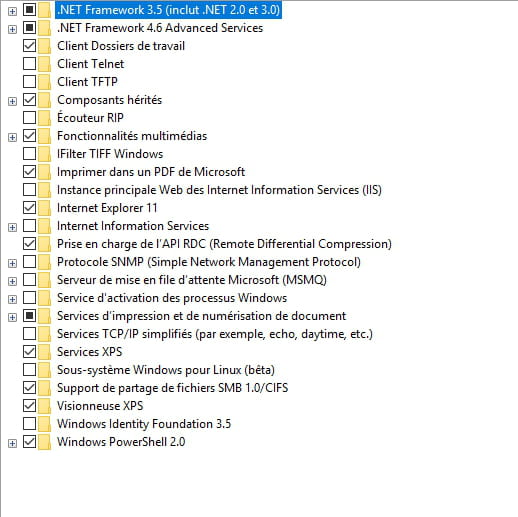
Control Panel
Programs and Features.
On the left, add/change Windows features.
Enlarge the window and take a screenshot with the complete list.
4/
Windows key + R
type services.msc
is the "User Profile Service"
running and set to automatic startup?
--
Please press any key to continue the disinfection... -
-
Ok, we have the same thing.
What antivirus do you have?
--
Please press a key to continue the disinfection... -
Try this:
Press Windows + R
type msconfig
Services tab.
At the bottom, uncheck the option that hides Microsoft services... if it is checked.
Check everything to ensure all Microsoft services are active.
Restart the computer.
If it doesn't improve:
Start Menu
Windows Powershell
right-click on it > More > then Run as Administrator.
Paste this command:Get-AppXPackage -AllUsers | Foreach {Add-AppxPackage -DisableDevelopmentMode -Register "$($_.InstallLocation)\AppXManifest.xml"}
Restart the computer.
Please press a key to continue the cleanup... -
yes, that's already something.
Can you reactivate the location?
In the Windows 10 settings => Account
On the left, synchronization
Is everything enabled?
--
Please press a key to continue the disinfection...