
My PC crashes - chrome.exe Application Error
Hello,
For a few days now, my PC has been crashing after displaying the following message (this happens when I browse on Google Chrome):
chrome.exe - Application Error
The instruction at 0x0000000073958A2C referenced memory at 0x0000000073958A2C. The required data was not placed into memory because of an I/O error status of 0xc00000c0.
Click OK to terminate the program.
Then my PC shuts down and a blue screen appears.

After seeing "chrome.exe", I uninstalled Google Chrome and ran a Malwarebytes scan. I also changed my antivirus (from MS Essentials to Avast).
I was on Internet Explorer when the same thing happened; I received the same message, with only one change. It said "iexplorer.exe" instead of "chrome.exe".
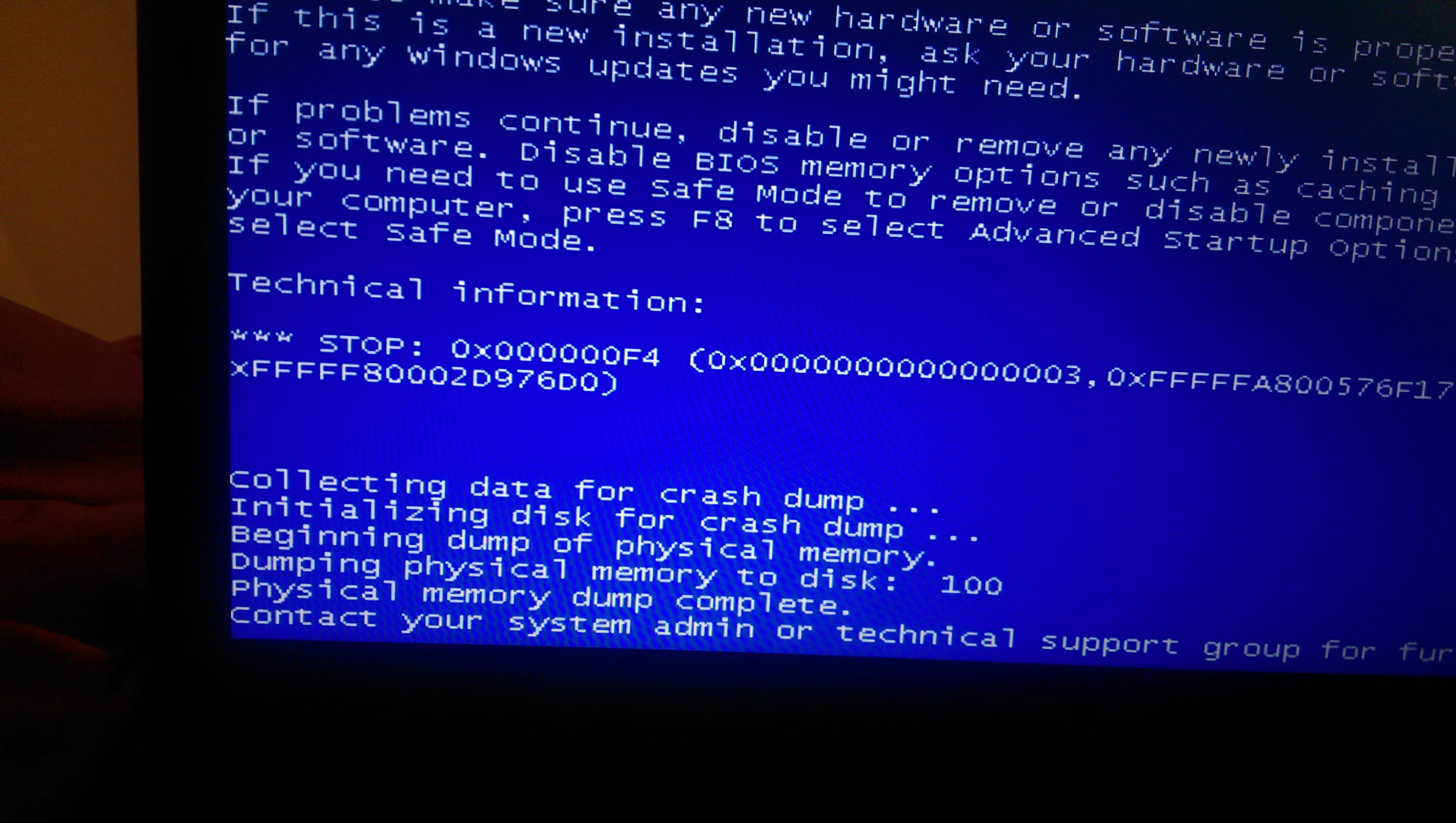
And this time, something else was written on the blue screen:

I apologize as I don't know much about this. I don't even know if this problem could be due to a virus or a bad update...
Thank you.
Configuration: Windows 7 / Mozilla 11.0
For a few days now, my PC has been crashing after displaying the following message (this happens when I browse on Google Chrome):
chrome.exe - Application Error
The instruction at 0x0000000073958A2C referenced memory at 0x0000000073958A2C. The required data was not placed into memory because of an I/O error status of 0xc00000c0.
Click OK to terminate the program.
Then my PC shuts down and a blue screen appears.
After seeing "chrome.exe", I uninstalled Google Chrome and ran a Malwarebytes scan. I also changed my antivirus (from MS Essentials to Avast).
I was on Internet Explorer when the same thing happened; I received the same message, with only one change. It said "iexplorer.exe" instead of "chrome.exe".
And this time, something else was written on the blue screen:

I apologize as I don't know much about this. I don't even know if this problem could be due to a virus or a bad update...
Thank you.
Configuration: Windows 7 / Mozilla 11.0
6 answers
-
Security ContributorGood evening
Does your computer start up or not?
Because it seems to me like it's a memory issue
--
If there is a problem, there is always a solution
~~~~~~ Cs ~~~~~~ -
Security ContributorYou can already see the blue screens with Whocrashed
https://www.commentcamarche.net/telecharger/utilitaires/23795-whocrashed-free-home-edition/
--
If there is a problem, there is always a solution
~~~~~~ Cs ~~~~~~ -
Security Contributorntfs is your hard drive
This problem might be caused by a thermal issue.*
Could it be overheating?
In any case, I'm moving your topic to Windows 7
Did Mbam detect anything?
--
If there is a problem there is always a solution
~~~~~~ Cs ~~~~~~-
I changed my hard drive in October; it's brand new. I even took my PC to the technician who replaced it, just in case it was related to this change.
He analyzed my hard drive and found no issues. But the crash happened on December 5th, I don't even remember it. Those that I'm describing are due to the ntoskrnl.exe and ntkrnlmp.exe modules.
I often have my PC on my blanket, so it is possible that it indeed overheats. I will pay more attention to that. Thank you.
-
-
I'm following up on my issue because my PC has crashed again. I don't think it could be a overheating problem since I had just turned it on.
On Sun 20/12/2015 08:56:07 GMT your computer crashed
crash dump file: C:\Windows\memory.dmp
This was probably caused by the following module: ntkrnlmp.exe (nt!KeBugCheckEx+0x0)
Bugcheck code: 0xF4 (0x3, 0xFFFFFA8005BE7B10, 0xFFFFFA8005BE7DF0, 0xFFFFF80002DD06D0)
Error: CRITICAL_OBJECT_TERMINATION
Bug check description: This indicates that a process or thread crucial to system operation has unexpectedly exited or been terminated.
This appears to be a typical software driver bug and is not likely to be caused by a hardware problem. This problem might be caused by a thermal issue.
The crash took place in the Windows kernel. Possibly this problem is caused by another driver that cannot be identified at this time.
How can I check what updates were made on 15/12 or just before (the day my computer crashed for the first time)? -
Up... No response?
-
Security ContributorTest your memory sticks and check that it's not overheating too much.
--
If there's a problem, there is always a solution
~~~~~~ Cs ~~~~~~
