Resetting My Compaq Mini PC that I lost the password for
Solved
Eperdu
Posted messages
14
Status
Member
-
Eperdu Posted messages 14 Status Member -
Eperdu Posted messages 14 Status Member -
Hello everyone! My problem is not as simple as stated above. Indeed, I want to reset this PC (netbook) to install Ubuntu (Linux), but I do not have the password for the administrator session.
Knowing that:
-At startup, the F11 key = A normal startup after choosing the "reset" option.
-The command prompt in safe mode does not launch and asks me again for the password.
-The only session IS the administrator session.
-Netbooks (a human creation error) do not have a CD drive.
-I am apparently running W7 Starter, but the session screen says W7 Pro (O.O)
-I have been browsing forums for several hours trying all solutions without success...
I really hope to find a solution, thanks in advance :)
Knowing that:
-At startup, the F11 key = A normal startup after choosing the "reset" option.
-The command prompt in safe mode does not launch and asks me again for the password.
-The only session IS the administrator session.
-Netbooks (a human creation error) do not have a CD drive.
-I am apparently running W7 Starter, but the session screen says W7 Pro (O.O)
-I have been browsing forums for several hours trying all solutions without success...
I really hope to find a solution, thanks in advance :)
11 answers
-
She is connected thanks to the small white connector. It's this connector that you unplug. This action resets the motherboard and erases the administrator passwords. If you do this, be prepared to reinstall all the drivers; have you done it before?
-
-
-
No problem regarding the drivers or any other data, I don't care about anything on this PC, it was my sister's and I know how to make everything work again afterwards :)
Battery removed, plug disconnected, all that's left is to wait 30 minutes and we'll know for sure.
And I'm going to try to remove the photo (even though between us I couldn't care less about this key).
-
-
Hello, I have already opened it once but are you just removing the battery? I'm not sure I did it right where I needed to (see attached part
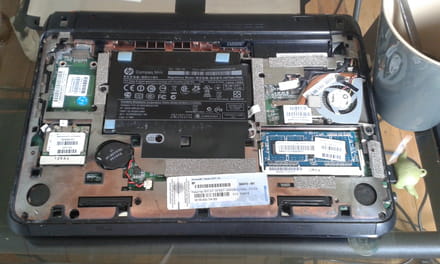 )
)
-
Hello, when it annoys me for hours, I remove the motherboard battery for 30 minutes, and then I reinstall everything...
-
-
The Cmos is the battery; it can only be invalid if it is improperly connected or dead.
-
Don't necessarily wait for 30 minutes (that's the time to be sure there's no more juice in the circuits); theoretically, 5 minutes is enough. You can press power 2 or 3 times to drain the capacitors.
And let's start again, come on, hang in there... -
So he tells me to check my BIOS to see if something has changed, what is the next step?
-
Après having crashed once, a CHKDSK launched... Good or bad news?
-
-
And you don't have access to the BIOS to boot from the installation CD?
-
I finally hooked up an external CD drive to the notebook and then ran a Windows 7 CD, so my problem is solved, but thanks anyway for your help.