Affichage de pub "Ad by Strom Alert"
Résolu
Nanax76
Messages postés
13
Statut
Membre
-
Malekal_morte- Messages postés 178136 Date d'inscription Statut Modérateur, Contributeur sécurité Dernière intervention -
Malekal_morte- Messages postés 178136 Date d'inscription Statut Modérateur, Contributeur sécurité Dernière intervention -
Bonjour à tous !
Voilà tout est presque expliquer dans le titre de ma demande...
Depuis quelques jours, des pub de Strom Alert, s'affiche sur certain sites internet (Google chrome, est mon navigateur par défaut et je précise que ce truc, envahi tout type de navigateur).
J'ai essayer de passé par CCleaner, pour retirer ce... spyware mais rien n'y fait. Même SpyBot ne le trouve pas. Je suis même passée par la commande "regedit" j'ai beau avoir supprimer ce qu'il fallait, il est toujours là ! Et ça commence sérieusement à m'énerver car il fait ramer bêtement mon pc qui ce dernier ce fait déjà assez vieux.
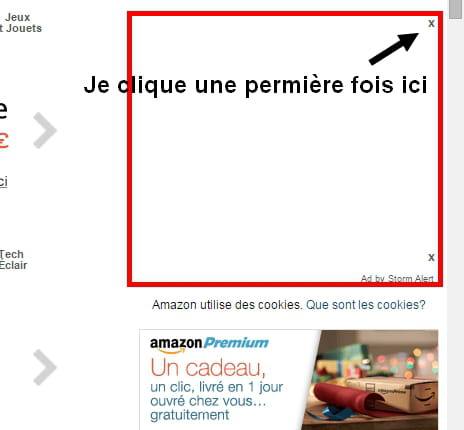
D'autant plus que quand je clique pour fermer la "pub" une autre réapparais derrière et des fois elles s'affiche en bouble.
Strom Alert ne s'affiche pas sur Youtube et Facebook...
J'espère que quelqu'un pourra m'aider.
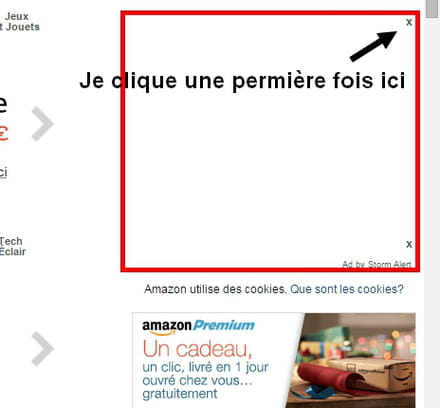
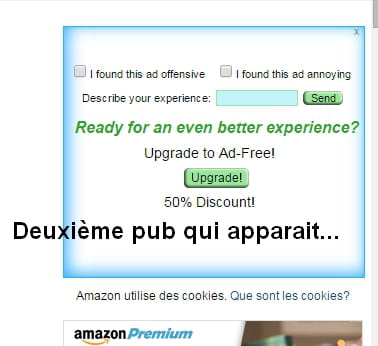
Voilà tout est presque expliquer dans le titre de ma demande...
Depuis quelques jours, des pub de Strom Alert, s'affiche sur certain sites internet (Google chrome, est mon navigateur par défaut et je précise que ce truc, envahi tout type de navigateur).
J'ai essayer de passé par CCleaner, pour retirer ce... spyware mais rien n'y fait. Même SpyBot ne le trouve pas. Je suis même passée par la commande "regedit" j'ai beau avoir supprimer ce qu'il fallait, il est toujours là ! Et ça commence sérieusement à m'énerver car il fait ramer bêtement mon pc qui ce dernier ce fait déjà assez vieux.
D'autant plus que quand je clique pour fermer la "pub" une autre réapparais derrière et des fois elles s'affiche en bouble.
Strom Alert ne s'affiche pas sur Youtube et Facebook...
J'espère que quelqu'un pourra m'aider.
10 réponses
-
Salut,
Tu as installé des adwares et programmes parasites sur ton PC qui ouvrent des publicités et ralentissent l'ordinateur et les navigateurs WEB.
Voici la procédure à suivre pour les supprimer :
Commence par ceci :
Suis le tutorial AdwCleaner https://www.malekal.com/adwcleaner-supprimer-virus-adwares-pup/?t=33839&start= ( d'Xplode )
Télécharge le sur ton bureau ou dossier de téléchargement.
Lance AdwCleaner, clique sur [Scanner].
L'analyse peux durer plusieurs minutes, patiente.
Une fois le scan terminé, ne décoche rien, clique sur [Nettoyer]
Une fois le nettoyage terminé, un rapport s'ouvrira. Copie/colle le contenu du rapport dans ta prochaine réponse par un copier/coller.
Si cela ne fonctionne pas, utilise le site http://pjjoint.malekal.com pour héberger le rapport, donne le lien du rapport dans un nouveau message.
Note : Le rapport est également sauvegardé sous C:\AdwCleaner[S1].txt
-
Je suis en train d'essayer ton conseil.
Je n'ai rien installer c'est dernier jours. La seule choses que j'ai eu c'est des tonnes de mise à jour de Windows... Et c'est d'ailleurs à ce moment là que le problème est survenu. J'ai tenter une restauration du système mais elle ne fonctionne pas et ça à n'importe quelle date.
Sur internet, j'ai vue que "YAC" qui est un peu comme CCleaner mais en mieux, pouvait régler la problème... Cela à été le cas, pendant 24h je n'ai plus rien eu de Strom Alert et le lendemain il est revenu. J'ai refais les scans via YAC mais rien n'y fait.-
-
D'accord, je vais le faire.
Voilà le résultat :
# AdwCleaner v4.105 - Rapport créé le 17/12/2014 à 17:25:14
# Mis à jour le 08/12/2014 par Xplode
# Database : 2014-12-16.1 [Live]
# Système d'exploitation : Windows 7 Home Premium Service Pack 1 (64 bits)
# Nom d'utilisateur : Christina - CHRISTINA-HP
# Exécuté depuis : C:\Users\Christina\Downloads\adwcleaner_4.105.exe
# Option : Nettoyer
***** [ Services ] *****
***** [ Fichiers / Dossiers ] *****
Dossier Supprimé : C:\ProgramData\Fighters
Dossier Supprimé : C:\ProgramData\Microsoft\Windows\Start Menu\Programs\YAC
[!] Dossier Supprimé : C:\Program Files (x86)\Elex-tech
Dossier Supprimé : C:\Users\CHRIST~1\AppData\Local\Temp\iSafeRightKeyScan
Dossier Supprimé : C:\Windows\SysWOW64\config\systemprofile\AppData\Roaming\Fighters
Dossier Supprimé : C:\Users\Aion\AppData\Local\StormAlert
Dossier Supprimé : C:\Users\Aion\AppData\Roaming\Elex-tech
Dossier Supprimé : C:\Users\Christina\AppData\Local\StormAlert
Dossier Supprimé : C:\Users\Christina\AppData\Roaming\eCyber
Dossier Supprimé : C:\Users\Christina\AppData\Roaming\Elex-tech
Dossier Supprimé : C:\Users\Christina\AppData\Roaming\Fighters
Fichier Supprimé : C:\Users\Public\Desktop\YAC.lnk
Fichier Supprimé : C:\Windows\System32\drivers\iSafeKrnlBoot.sys
Fichier Supprimé : C:\Windows\System32\log\iSafeKrnlCall.log
Fichier Supprimé : C:\Users\Christina\AppData\Roaming\Microsoft\Internet Explorer\Quick Launch\User Pinned\StartMenu\YAC.lnk
Fichier Supprimé : C:\Users\Christina\AppData\Roaming\Mozilla\Firefox\Profiles\b1kfnnmk.default\searchplugins\astromenda.xml
Fichier Supprimé : C:\Users\Christina\AppData\Roaming\Mozilla\Firefox\Profiles\b1kfnnmk.default\searchplugins\WSE Rocket.xml
Fichier Supprimé : C:\Users\Aion\AppData\Local\Google\Chrome\User Data\Default\Local Storage\hxxp_www.superfish.com_0.localstorage
Fichier Supprimé : C:\Users\Christina\AppData\Local\Google\Chrome\User Data\Default\Local Storage\hxxp_www.superfish.com_0.localstorage
Fichier Supprimé : C:\Users\Aion\AppData\Local\Google\Chrome\User Data\Default\Local Storage\hxxp_www.superfish.com_0.localstorage-journal
Fichier Supprimé : C:\Users\Christina\AppData\Local\Google\Chrome\User Data\Default\Local Storage\hxxp_www.superfish.com_0.localstorage-journal
Fichier Supprimé : C:\Users\Aion\AppData\Local\Google\Chrome\User Data\Default\Local Storage\hxxp_static.audienceinsights.net_0.localstorage
Fichier Supprimé : C:\Users\Aion\AppData\Local\Google\Chrome\User Data\Default\Local Storage\hxxp_static.audienceinsights.net_0.localstorage-journal
***** [ Tâches planifiées ] *****
Tâche Supprimée : SomotoUpdateCheckerAutoStart
***** [ Raccourcis ] *****
***** [ Registre ] *****
Valeur Supprimée : HKCU\Software\Mozilla\Firefox\Extensions [{B64982B1-D112-42B5-B1E4-D3867C4533F8}]
Valeur Supprimée : HKLM\SOFTWARE\Mozilla\Firefox\Extensions [lightningnewtab@gmail.com]
Clé Supprimée : HKCU\Software\Google\Chrome\Extensions\bbjciahceamgodcoidkjpchnokgfpphh
Clé Supprimée : [x64] HKLM\SOFTWARE\Google\Chrome\Extensions\bbjciahceamgodcoidkjpchnokgfpphh
Clé Supprimée : HKCU\Software\Google\Chrome\Extensions\bdhffggcfjnkigeciffmipblemhphbjl
Clé Supprimée : HKCU\Software\Google\Chrome\Extensions\cjpglkicenollcignonpgiafdgfeehoj
Clé Supprimée : HKCU\Software\Google\Chrome\Extensions\elhjaoldnkkbifioodjndkijecdeinld
Clé Supprimée : HKCU\Software\Google\Chrome\Extensions\hakpajgggjjcjmidfbnnncnbaihjneaj
Clé Supprimée : HKCU\Software\Google\Chrome\Extensions\ibnjmihbbanannlbobkbmnmckjnmdnom
Clé Supprimée : [x64] HKLM\SOFTWARE\Google\Chrome\Extensions\ibnjmihbbanannlbobkbmnmckjnmdnom
Clé Supprimée : HKCU\Software\Google\Chrome\Extensions\pflphaooapbgpeakohlggbpidpppgdff
Clé Supprimée : [x64] HKLM\SOFTWARE\Google\Chrome\Extensions\pflphaooapbgpeakohlggbpidpppgdff
Clé Supprimée : HKLM\SOFTWARE\Google\Chrome\Extensions\dcmagccbogebndpoodhhhafmofelpffh
Clé Supprimée : HKCU\Software\5e57dc8ab338bf41
Clé Supprimée : [x64] HKLM\SOFTWARE\Classes\CLSID\{5411D116-5A37-47D4-B154-5F7FCD9062F0}
Clé Supprimée : [x64] HKCU\Software\Microsoft\Internet Explorer\SearchScopes\{0633EE93-D776-472F-A0FF-E1416B8B2E3A}
Clé Supprimée : [x64] HKLM\SOFTWARE\Microsoft\Internet Explorer\SearchScopes\{0633EE93-D776-472F-A0FF-E1416B8B2E3A}
Clé Supprimée : [x64] HKLM\SOFTWARE\Microsoft\Internet Explorer\SearchScopes\{0633EE93-D776-472f-A0FF-E1416B8B2E3A}
Clé Supprimée : HKCU\Software\AppDataLow\Software\Crossrider
Clé Supprimée : HKLM\SOFTWARE\Microsoft\Windows\CurrentVersion\Uninstall\iSafe
Clé Supprimée : [x64] HKLM\SOFTWARE\Microsoft\Windows\CurrentVersion\Installer\UserData\S-1-5-18\Components\0238BBE24EA3A70408B81E4BB89C15E5
Clé Supprimée : [x64] HKLM\SOFTWARE\Microsoft\Windows\CurrentVersion\Installer\UserData\S-1-5-18\Components\29799DE249E7DBC459FC6C8F07EB8375
Clé Supprimée : [x64] HKLM\SOFTWARE\Microsoft\Windows\CurrentVersion\Installer\UserData\S-1-5-18\Components\CA0054A5AB3EFFE4CB5660E44A1E7DCC
***** [ Navigateurs ] *****
-\\ Internet Explorer v11.0.9600.17496
Paramètre Restauré : HKLM\SOFTWARE\Microsoft\Internet Explorer\Main [Search Page]
Paramètre Restauré : [x64] HKLM\SOFTWARE\Microsoft\Internet Explorer\Main [Default_Search_URL]
Paramètre Restauré : [x64] HKLM\SOFTWARE\Microsoft\Internet Explorer\Main [Search Page]
-\\ Mozilla Firefox v31.0 (x86 fr)
[b1kfnnmk.default\prefs.js] - Ligne Supprimée : user_pref("extensions.astrmndasr.hmpgUrl", "hxxp://astromenda.com/?f=1&a=ast_tele_14_41_ch&cd=2XzuyEtN2Y1L1Qzu0A0CzztCtCtB0CtD0A0AzyyByByE0CtDtN0D0Tzu0StCtDtCtAtN1L2XzutAtFyDtFtCtFtBtN1L1CzutCyEtBzytD[...]
[b1kfnnmk.default\prefs.js] - Ligne Supprimée : user_pref("extensions.astrmndasr.newTabUrl", "hxxp://astromenda.com/?f=2&a=ast_tele_14_41_ch&cd=2XzuyEtN2Y1L1Qzu0A0CzztCtCtB0CtD0A0AzyyByByE0CtDtN0D0Tzu0StCtDtCtAtN1L2XzutAtFyDtFtCtFtBtN1L1CzutCyEtBzy[...]
[b1kfnnmk.default\prefs.js] - Ligne Supprimée : user_pref("extensions.astrmndasr.prtnrId", "WSE_Astromenda");
[b1kfnnmk.default\prefs.js] - Ligne Supprimée : user_pref("extensions.astrmndasr.srchPrvdr", "Astromenda");
[b1kfnnmk.default\prefs.js] - Ligne Supprimée : user_pref("extensions.astrmndasr.tlbrSrchUrl", "hxxp://astromenda.com/?f=3&a=ast_tele_14_41_ch&cd=2XzuyEtN2Y1L1Qzu0A0CzztCtCtB0CtD0A0AzyyByByE0CtDtN0D0Tzu0StCtDtCtAtN1L2XzutAtFyDtFtCtFtBtN1L1CzutCyEtB[...]
-\\ Google Chrome v39.0.2171.95
-\\ Chromium v
*************************
AdwCleaner[R0].txt - [350 octets] - [10/12/2014 16:16:45]
AdwCleaner[R1].txt - [7108 octets] - [17/12/2014 17:16:57]
AdwCleaner[S0].txt - [6458 octets] - [17/12/2014 17:25:14]
########## EOF - C:\AdwCleaner\AdwCleaner[S0].txt - [6518 octets] ##########
-
-
Suis ce tutoriel FRST: https://www.malekal.com/tutoriel-farbar-recovery-scan-tool-frst/
Cela va générer trois rapports FRST :
* FRST.txt
* Shortcut.txt
* Additionnal.txt
Envoie comme expliqué, ces trois rapports sur le site pjjoint et donne les trois liens pjjoint de ces rapports afin qu'ils puissent être consultés.
-
Rapport FRST
https://pjjoint.malekal.com/files.php?id=20141217_g7g7u6i12y5
Rapport Addition
https://pjjoint.malekal.com/files.php?id=20141217_o13p11j10m14z10
Rapport Shortcut
https://pjjoint.malekal.com/files.php?id=20141217_o9e12u10o6z15 -
Vous n’avez pas trouvé la réponse que vous recherchez ?
Posez votre question -
Voici la correction à effectuer avec FRST.
Tu peux t'inspirer de cette note explicative avec des captures d'écran pour t'aider: https://www.malekal.com/tutoriel-farbar-recovery-scan-tool-frst/#fix
Ouvre le bloc-notes : Touche Windows + R, dans le champs executer, tape notepad et OK.
Copie/colle dedans ce qui suit :
R2 AQisqh; C:\ProgramData\bkdMqY\AQisqh.exe [2726776 2014-12-05] (Rational Thought Solutions)
2014-12-17 17:30 - 2014-12-17 17:47 - 00000000 ____D () C:\Users\Christina\AppData\Local\StormAlert
2014-12-05 15:38 - 2014-12-05 15:39 - 00000000 ____D () C:\ProgramData\bkdMqY
Une fois, le texte coller dans le bloc-note.
Menu Fichier puis Enregistrer sous.
A gauche, place toi sur le bureau.
Dans le champs en bas, nom du fichier mets : fixlist.txt
Clic sur Enregistrer - cela va créer un fichier fixlist.txt sur le bureau.
Relance FRST et clic sur le bouton Fix
Selon comment un redémarrage est nécessaire (pas obligatoire).
Un fichier texte apparaît, copie/colle le contenu ici dans un nouveau message.
Redémarre l'ordinateur.
-
==============================================
Content of fixlist:
*****************
R2 AQisqh; C:\ProgramData\bkdMqY\AQisqh.exe [2726776 2014-12-05] (Rational Thought Solutions)
2014-12-17 17:30 - 2014-12-17 17:47 - 00000000 ____D () C:\Users\Christina\AppData\Local\StormAlert
2014-12-05 15:38 - 2014-12-05 15:39 - 00000000 ____D () C:\ProgramData\bkdMqY
*****************
AQisqh => Unable to stop service
AQisqh => Service deleted successfully.
C:\Users\Christina\AppData\Local\StormAlert => Moved successfully.
"C:\ProgramData\bkdMqY" directory move:
Could not move "C:\ProgramData\bkdMqY\AQisqh.dat" => Scheduled to move on reboot.
C:\ProgramData\bkdMqY\AQisqh.exe => Moved successfully.
C:\ProgramData\bkdMqY\AQisqh.exe.config => Moved successfully.
Could not move "C:\ProgramData\bkdMqY\info.dat" => Scheduled to move on reboot.
Could not move "C:\ProgramData\bkdMqY\dat\JYBGjUP.exe" => Scheduled to move on reboot.
Could not move "C:\ProgramData\bkdMqY\dat\JYBGjUP.exe.config" => Scheduled to move on reboot.
Could not move "C:\ProgramData\bkdMqY\dat\kUiOCmv.dll" => Scheduled to move on reboot.
Could not move "C:\ProgramData\bkdMqY\dat\uWawuT.exe" => Scheduled to move on reboot.
Could not move "C:\ProgramData\bkdMqY\dat\uWawuT.exe.config" => Scheduled to move on reboot.
Could not move "C:\ProgramData\bkdMqY\dat\Zvrkww.dll" => Scheduled to move on reboot.
Could not move "C:\ProgramData\bkdMqY" directory. => Scheduled to move on reboot.
=> Result of Scheduled Files to move (Boot Mode: Normal) (Date&Time: 2014-12-17 18:29:50)<=
C:\ProgramData\bkdMqY\AQisqh.dat => Is moved successfully.
C:\ProgramData\bkdMqY\info.dat => Is moved successfully.
C:\ProgramData\bkdMqY\dat\JYBGjUP.exe => Is moved successfully.
C:\ProgramData\bkdMqY\dat\JYBGjUP.exe.config => Is moved successfully.
C:\ProgramData\bkdMqY\dat\kUiOCmv.dll => Is moved successfully.
C:\ProgramData\bkdMqY\dat\uWawuT.exe => Is moved successfully.
C:\ProgramData\bkdMqY\dat\uWawuT.exe.config => Is moved successfully.
C:\ProgramData\bkdMqY\dat\Zvrkww.dll => Is moved successfully.
C:\ProgramData\bkdMqY => Is moved successfully.
==== End of Fixlog ==== -
plus de pubs?
-
-
super :)
Voila, c'est terminé, tu peux supprimer les programmes utilisés.
Quelques conseils :
Installe Malwarebyte's Anti-Malware : https://www.malekal.com/tutoriel-malwarebyte-anti-malware/
Fais des scans réguliers avec, il est efficace.
(sauf si tu es sur un netbook)
Pour prévenir les sites malicieux, tu peux installer Blockulicious : https://forum.malekal.com/viewtopic.php?t=46656&start=
Pour ne plus te faire avoir.
A lire - Programmes parasites / PUPs : https://www.malekal.com/adwares-pup-protection/
-