Ethernet network in a new house
Solved
SymonStrueux
Posted messages
15
Status
Member
-
SymonStrueux Posted messages 15 Status Member -
SymonStrueux Posted messages 15 Status Member -
Hello,
I moved into a new house in 2011. I will soon have fiber optic installed, and I would like to place my box at the entrance of the house to distribute telephone, Internet, and TV via the RJ45 cables running from the VDI cabinet to each room.
I currently have:
- Category 5e FTP cables with 4 pairs.
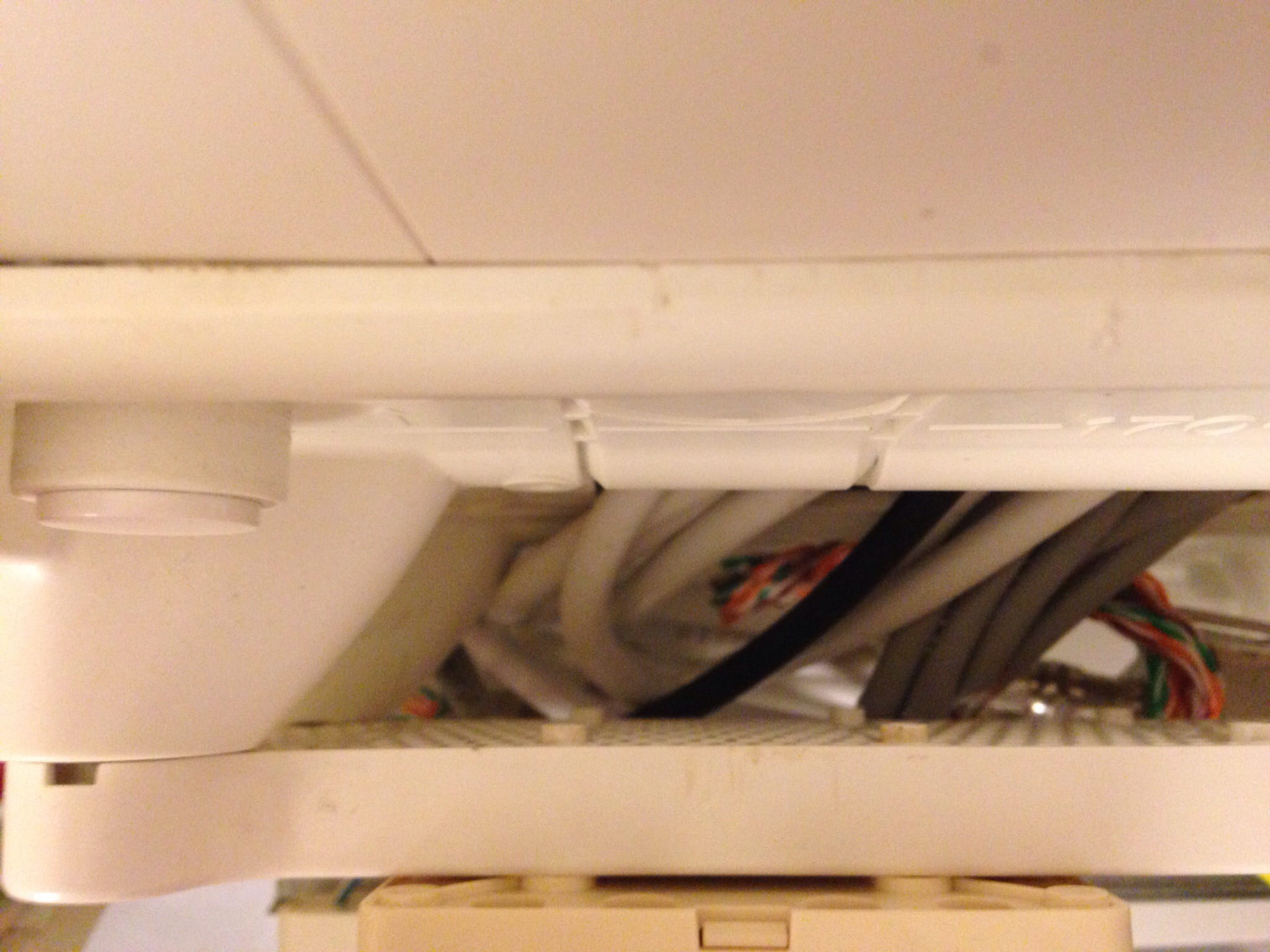
- A DTI box with 2 incoming wires and 2 outgoing wires (see photo)
- A box that connects these 2 outgoing wires from the DTI to 1 pair for each RJ45 (see photo)
My questions are:
- Do I necessarily need a grade 3 VDI cabinet for 800€?
If not:
- How can I upgrade this cabinet to a grade 3 cabinet?
Or
- How can I connect my box directly at the output of the DTI? (put an RJ11 at the end of these 2 outgoing wires from the DTI?)
- Can I connect the house's RJ45 directly to the box?
- If I don’t have RJ45 sockets on the box, can I add a switch in the VDI cabinet?
- Since I have only 1 RJ45 socket in each room, how do I connect multiple devices?
- Are the network cables I have sufficient for telephone, high-speed Internet, and TV?
Thank you in advance for your answers!

Configuration: iPad / Safari 8.0
I moved into a new house in 2011. I will soon have fiber optic installed, and I would like to place my box at the entrance of the house to distribute telephone, Internet, and TV via the RJ45 cables running from the VDI cabinet to each room.
I currently have:
- Category 5e FTP cables with 4 pairs.
- A DTI box with 2 incoming wires and 2 outgoing wires (see photo)
- A box that connects these 2 outgoing wires from the DTI to 1 pair for each RJ45 (see photo)
My questions are:
- Do I necessarily need a grade 3 VDI cabinet for 800€?
If not:
- How can I upgrade this cabinet to a grade 3 cabinet?
Or
- How can I connect my box directly at the output of the DTI? (put an RJ11 at the end of these 2 outgoing wires from the DTI?)
- Can I connect the house's RJ45 directly to the box?
- If I don’t have RJ45 sockets on the box, can I add a switch in the VDI cabinet?
- Since I have only 1 RJ45 socket in each room, how do I connect multiple devices?
- Are the network cables I have sufficient for telephone, high-speed Internet, and TV?
Thank you in advance for your answers!

Configuration: iPad / Safari 8.0
9 answers
-
-
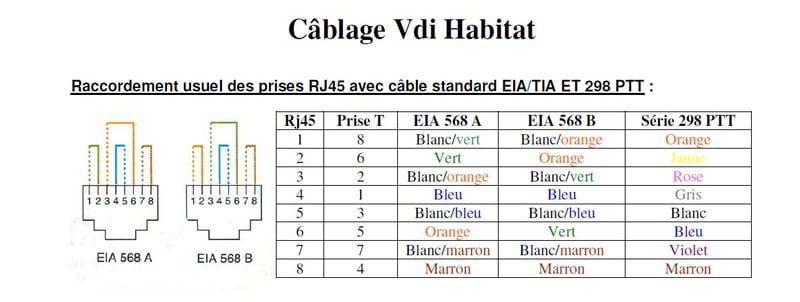
To add to Brupala (whom I greet in passing), here is the wiring for RJ45 sockets with either Ethernet cables or PTT cable.

Installing "flying" sockets would be cheaper and faster than setting up a proper patch panel. -
Hi there,
you have a DTI and a 12-way patch panel (a kind of telephone distributor).
this installation only works for telephone or ADSL exclusively; you won't turn it into a VDI network supporting Ethernet without major modifications.
you only have RJ45 sockets in the rooms, none in the cabinet?
Grade 3 is not essential, especially since you already have distributors for the phone jacks.
Grade 3 is just for the TV antenna through the RJ45s too, with adapters (baluns).
if you’re using the TV from a box with its TV unit, there’s no need.
Especially since we're moving more and more towards smart TVs, which only need Ethernet access.
and ... There you go! -
Thank you brupala,
I do have the network cables that arrive at the cabinet but everything is messy (there are no RJ45 connectors at the end, they are directly connected to the splitter with bare wires - in the photo you can see the gray cables coming from behind the splitter).
You were right, my goal is indeed to use the TV from my TV box.
Could you please clarify what you mean by "major modifications"?
Thank you again for your response!

-
ok,
big changes...
actually, the ideal would be to replace the communication cabinet with a grade 1 or grade 2 equipped with an RJ45 patch panel, but you can save money and install temporary RJ45 connections in your cabinet.
However, if you need to add a switch, you'll need to find a place to install and power it anyway, although there are solutions with POE.
See if you can also run your fiber to this cabinet.
I assume your cable is PTT298, which is a bit limited for fully utilizing fiber (limited to 100Mbit/s); it would be better to use real cat5 or cat5E to have a gigabit network behind it.
If you keep this cable, make sure that all 4 pairs are correctly wired in the wall sockets.
-
-
Hello,
I will respond to you regarding the switch and cable part; I don't know enough about the rest.
You can connect as many switches as you want behind your box; this has no influence (as long as you stay within the address range of your DHCP integrated into your box).
And you can also plug your RJ45 cables behind your box; it's not a problem.
However, I advise against using RJ11, as you will lose a lot of bandwidth (the fiber being limited by your subscription, with RJ45 having a maximum distance of 100m for a theoretical bandwidth of 10 to 1000 Mbits/s, depending on your box (which I think has 100 Mbits/s ports)). The RJ11 cable has a lower bandwidth, which will directly reduce your speed.
To multiply your Ethernet ports, you always have the option of hubs or switches for more ports (working in networks, I recommend switches, as they avoid constant broadcasting and thus network overload (even if I'm not sure you'll notice a difference in terms of bandwidth at your place)).
To answer your last question, yes, your cat 5 RJ45 cables are sufficient for high-speed internet (within the limit of 100m maximum).
For your information, be careful not to have more than 95 devices connected to your box (both via Wi-Fi and wired). This is due to the number of possible IPv4 addresses by default on your box.
Good luck and welcome to the world of fiber =)-
Hi,
just to clarify a few things:
RJ11 and RJ45 are not about the quality of the cable, which can vary, but rather the format of the plugs at the end; the plugs don't change anything about the speed, except in the sense that you need 4 pairs to achieve gigabit.
Instead of RJ11 or RJ45, we should use the terms 6P4C or 8P8C which are more expressive and describe it much better.
On the other hand,
I don't know where you got this legend of 95 devices behind a box... it doesn't correspond to anything at all, it could be the size of the DHCP range, but it varies depending on the router configuration.
The real limits are the size of the /24 network (253 available addresses) or the memory size for NAT tables, but that also varies.
Many routers will crash well before reaching a hundred machines behind them, and I’m not even talking about Wi-Fi, which becomes hardly usable after around ten devices. -
RJ11 or RJ45 connectors also have their limits. They vary the throughput from one to another, no matter what cable you use.
As for your IP address range, most of the time, all internet service provider boxes have these variable address ranges of about a hundred, at most. If you want more, don't stick to a class C subnet mask; use a class A (10.x.x.x) which allows for 16,777,214 addressable devices (16,777,215 if you're using zero subnetting). The size of your router's buffer can be changed.
Routers are designed for routing, and thus with the proper protocols. If your router is well configured, it will summarize routes and thus your table is not overloaded.
As for Wi-Fi, nothing prevents you from using repeaters while taking care to change the channel.
So, you will have understood, I did not appreciate your response. However, feel free to verify my statements if you like; they are accurate.- Whoa...
I don't need to waste my time checking your nonsense, faunx (is the n extra?)
Everyone who knows the network properly knows that you are making incorrect approximations. If you are new to the job, I suggest you finish your training before coming here to showcase your very limited knowledge.
And I warn you that if you continue to troll, your messages will go straight to the trash.
-
-
Thank you both for all this information.
I don't want to exceed 10 connected subscribers, so no issues with the box (if I understood correctly).
Just to recap, regarding the kit, I will need:
- 1 RJ11 connector to connect the 2 wires of the DTI to my box.
- as many RJ45 sockets as there are cables to connect these cables to my internet box (use a switch if there are more cables than sockets on the box)
I still have a question: how do I connect multiple devices from a single wall RJ45 socket (specifically, 1 TV box, 2 devices for internet access, and 1 phone)?
And just to be 100% sure, is the cable I have sufficient to connect the TV box to my box (is a category 5e cable enough for HD TV)?
Thank you in advance.-
no,
if you switch to fiber, you can forget about the DTI connection to the box, the telephone line is no longer needed for internet, if you are fully unbundled and do not have Orange's traditional telephony, the DTI will no longer be of any use.
Next, where do you plan to place your box?
If it's in the cabinet (with the fiber arriving in the cabinet as well),
there are pair separators available to run both telephone and ethernet 100 from the same socket.
Then you can add a switch at the wall socket level to connect multiple ethernet devices to the same socket.
Where do you plan to bring in your fiber optic?- Thank you again for this information.
For now, I don’t have fiber (not before June 2015…). I was thinking of bringing it to the VDI cabinet.
So, in the meantime, I was planning to put the box next to the VDI cabinet, connecting it between the DTI cabinet (using RJ11) and the RJ45 cables (by connecting RJ45 to the cables).
Last question (I think): how do I wire my RJ11 socket at the box input and my RJ45 at the output (crossed/straight)?
-
-
It seems very clear to me, thank you very much for all these details!
I will try to do this this weekend or at worst during the Christmas holidays. I will keep you updated on this progress.
I don't understand why the seller at LM told me it wasn't possible without a grade 3 VDI box...
Thanks again for everything!-
A salesperson is a salesperson...
to each their own profession ;-)
Grade 3 is for running a TV antenna through a twisted pair, which is handy (that’s what I did at home, but I don’t use it because I left the coaxial cable) this wiring also supports 10GbaseT, like cat7, but well, it will still take another ten years before we see it on consumer PCs, gigabit is just beginning to become widespread on routers.
-
-
Hello, I finally finished my little DIY project to set up my box at the entrance of my house.
The good news is that the box has connected to the Internet.
The bad news is that the TV box is not connecting to the Internet box...
Can you help me?
Here’s my setup:
I have adapted a strip of 8 RJ45 connectors, Grade 3, for Casanova enclosures which I connected to my 6 RJ45 cables in my house.
Then I connected my DTI box to the main box and the box to each female RJ45 of the strip (one after the other) with Cat6 RJ45 SFTP cables, molded, halogen-free.
And my TV box cannot find the ADSL signal...
Do you have any suggestions, please?
Thanks in advance.-
Hi,
weird setup on your first photo, did you put one pair of each cable on the same socket?
the one on the left looks correct
otherwise, you shouldn’t separate the pairs of the same cable over such a long distance.- Hi brupala and thanks again!
Actually, in the first photo I was connecting the strip to the house cables (don't worry, the cables coming from the female RJ45 have been cut flush).
Regarding the separation of the pairs, the electrician who worked on my house had stripped them over a long length. I shortened them as much as possible...
Everything is fine now, everything is working!
Thank you very much for everything!
-
-
I found it, I redid my connections on my 8 connector strip and it works!
Thank you all for your advice and kindness!