McAfee Internet Security and Firewall
Solved
Hello,
I have several questions:
1°) I just bought a PC and it has McAfee Internet Security on it, which I haven't activated yet, and it occasionally sends me messages saying that I shouldn't delay activating it. Do I really need to activate it? Can I do without it? I've already installed Avast as my antivirus, Spybot, etc.!
2°) Then, when I check the status of my Windows firewall, I see that it says "settings are managed by McAfee Personal Firewall." Is there a connection with the first "McAfee" mentioned, and will I have issues with my firewall if I don't activate that one?
3°) In this window, the boxes with "home networks..." and "public networks" display small icons of a "red shield with white crosses," but I can't click on anything... Is there a problem?
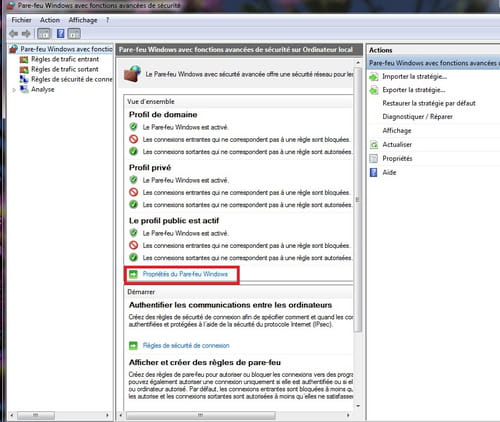
4°) If I go to the left in "advanced settings," it says that the Windows firewall is active in all three given profiles. So am I protected or not?
Thank you for any answers you can provide, even if it only addresses one of my points.
Configuration: Windows 7 / Internet Explorer 8.0
I have several questions:
1°) I just bought a PC and it has McAfee Internet Security on it, which I haven't activated yet, and it occasionally sends me messages saying that I shouldn't delay activating it. Do I really need to activate it? Can I do without it? I've already installed Avast as my antivirus, Spybot, etc.!
2°) Then, when I check the status of my Windows firewall, I see that it says "settings are managed by McAfee Personal Firewall." Is there a connection with the first "McAfee" mentioned, and will I have issues with my firewall if I don't activate that one?
3°) In this window, the boxes with "home networks..." and "public networks" display small icons of a "red shield with white crosses," but I can't click on anything... Is there a problem?
4°) If I go to the left in "advanced settings," it says that the Windows firewall is active in all three given profiles. So am I protected or not?
Thank you for any answers you can provide, even if it only addresses one of my points.
Configuration: Windows 7 / Internet Explorer 8.0
4 answers
-
ContributorHello,
If the computer comes with the McAfee security suite, it is pre-installed and therefore operational, which does not mean it is activated.
1) The activation requests correspond to the fact that this suite is only a limited version, which will work for a few weeks (from 1 to 3 months depending on the manufacturers, rarely 1 year), after which it will stop and the PC will no longer be protected. Activation corresponds to the online registration of the license (code found in the documents or written in the software), which allows for automatic software updates and virus signatures and will also allow you to extend (for a fee) beyond the trial period mentioned above.
First, you should check if you are still within the trial period and how much time you have left; otherwise, activation will only occur in paid mode.
Additionally, it is imperative to avoid having two antivirus programs running simultaneously, as this causes malfunctions rather than enhancing security. This can lead to blocking Windows. It can be corrected, but it is problematic.
It can sometimes be difficult to get rid of these programs. McAfee provides a tool for this purpose: http://download.mcafee.com/products/licensed/cust_support_patches/MCPR.exe
2) The McAfee suite consists of, among other things, the antivirus and a firewall, operational as indicated by Windows. You should either disable the suite, which will prevent it from starting when the machine boots, or uninstall it via the program uninstallation module. This would mean that you choose Avast as your antivirus, but you will also need to select the Windows firewall to replace the uninstalled McAfee firewall, using an "activate" button in the Windows settings window; however, this is not the same type of activation as the one I mentioned earlier.
The combination of antivirus + firewall is a minimum. Therefore, you need to ensure there are no two antivirus programs or two firewalls running at the same time.
3) Not having W7, I cannot check, but if you cannot click on the icons, this would suggest they are indicators of the status of these networks. You will need to see if these indicators change with only one antivirus and one firewall. It could indicate that there are currently multiple programs serving the same function.
4) If I understand correctly, the 3 profiles correspond to the main user, usually you, and two other users listed in the profile manager. You are therefore protected with the reservations mentioned above.
You can also access the McAfee suite window by double-clicking on the corresponding icon in the taskbar at the bottom right. You will have access to all indicators regarding the status of the antivirus and the firewall.
A comment on Mac Adam's comment, every user defends the security suite they have chosen. Avast releases new versions every year, like all its competitors. Spybot is an antispyware program, and depending on the version of the McAfee suite, antispyware functions may be integrated, which would avoid burdening the system. As for me, I use BitDefender (paid) on some machines and Microsoft Security Essentials (free antivirus) on others.
Best regards-
-
Thank you for this very comprehensive explanation.
As I am quite a novice in computing, I prefer to ask too many questions rather than not enough, so...
If I understood correctly:
1°) I currently have 2 antivirus programs, so I definitely need to deactivate one; then, the activation (which must be done within 11 days) is just to "access" a part of my free offer, and this will be for a limited time (before it becomes paid). So I choose the antivirus that will ultimately become paid after some time, or the free one, which might be weaker...
If I do not activate on time, what happens to McAfee?
(I was already aware of the issue of not having multiple antivirus programs and the difficulty of uninstalling certain programs.)
4°) Here is my window when I click on "advanced settings":
http://static.commentcamarche.net/...
With one difference: between Overview and Domain Profile, I have a message highlighted in yellow saying: "These settings are managed by the McAfee Personal Firewall application."
Anyway, thank you for your help.
And also to Mac Adam for the assistance. -
-
-
Hi,
McAfee is better than Avast and Spybot, the two old duds of protection, if there is any protection with them. McAfee comes with a bidirectional firewall, silent proactive defense, web protection, etc... like any serious antivirus, but of course, it's paid. -
Contributor1) Yes, you can disable one. And you can even uninstall it when you're sure you don't want to use it (although you can download it again later). You are already in the free trial period with all the functions of the antivirus and firewall except for the most important one, the updates (unless they are provided by default - I don't know about McAfee, but I doubt it because internet activation involves registering your temporary license number specifically to customize your updates as you go along). So you have only 11 days of free use left; after that, it will continue to operate, but the virus signatures (which allow for identifying the thousands of variants created) will no longer be up to date, in other words, it will be as if you are no longer protected as soon as you connect, especially on shady sites or if you plug in an infected USB drive, for example. After those 11 days, you should be bombarded with offers to extend your McAfee installation license (usually for a year) at a cost. If you don't respond, the program remains installed, but the protection becomes obsolete due to the lack of daily updates (not nonexistent, but insufficient to stop new virus variants).
4) Your window completely reassures me. It indicates that the checked items are validated, those with a crossed-out sign carry a comment indicating that for domain names (connection with service providers) and for private profiles (your network) and public (internet), McAfee firewall rules will be automatically set up (through recognition of new software installed, for example) or based on your specific authorization (additional computer, for instance).
That is why Windows Vista and 7 ask the user for permission on certain actions to verify that it is not someone taking control remotely.
So, you should not disable this function, even if it seems tedious to resort to it.
I see that my explanations have not been useless, and this encourages me to continue.
Hyonix's comment: Avira Free = Avast = Microsoft Security Essentials. Not all free antivirus programs are equal in all their characteristics, but one can use either as long as they are rigorous in their updates and do not visit any shady sites.
Best regards. -
I have McAfee Total Protection, the best of the best, the only downside is the price.