
Avast pop-up virus: how to get rid of it?
bazfile Posted messages 58516 Registration date Status Moderator Last intervention -
Hello,
While browsing the internet and looking for information about a video game called "The mound Omen of Cthulhu," I came across a pop-up Avast window that appeared and reported a viral application found.
And there was a button to delete the virus.
I clicked the button.
And since then I have these pop-up windows "viruses found; viral application found; the system is infected" that regularly appear on the right side of my screen.
It regularly shows these messages: "d9fnluqnaffc73a6f8i0.fpcp-protect.co.in"
I started a full scan with Windows but the scan finds nothing abnormal.
I retrieved from history the path where my computer was infected (I don't know if it can help): "
I managed to delete the notifications by right-clicking on these pop-up windows and selecting delete all notifications from "d9fnlu..."
The problem seems to be resolved but I think it can't be that simple.
Should I do anything else to verify that the problem is really fixed?
How to know if my computer is infected and what should I do if it is infected?
Thanks in advance for any help you can provide.
2 answers
-
Hello,
These are Browser notifications parasites that you have registered in your browser
You can delete them via your browser's Security & Privacy settings
Or run a full scan, the notifications are in tab #5 of RegRun Reanimator (Search Settings)
https://forums.commentcamarche.net/forum/affich-38206831-alors-vous-voulez-supprimer-les-virus-vous-meme-comment -
Hello.
These are parasitic notifications that you have registered in your web browser.
Two solutions are available to you.
- Either delete the parasitic notifications yourself, for that read this page and also this page .
Or manually or with Reset Browser reset the concerned browser.
- If it’s still the same, download FRST.
Once downloaded, save FRST on the desktop then right-click FRST and choose Run as administrator which results in this:
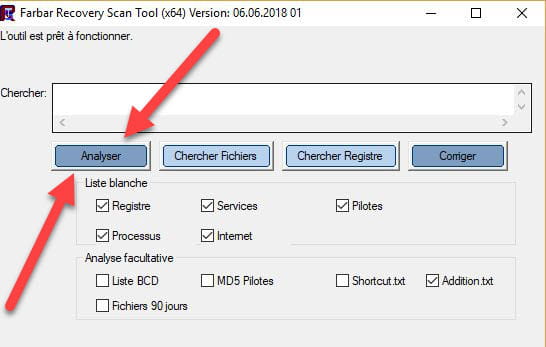

 Attendre que le message l'outil est prêt à fonctionner s'affiche puis cliquer sur Analyser.
Attention, wait until the messages saying that the analysis is complete appear.
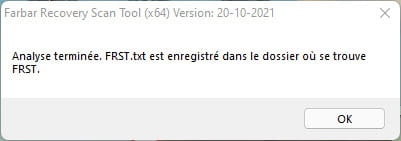

At the end of the analysis both FRST and Addition reports will be on the desktop.

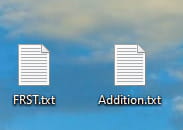

Send the FRST and ADDITION reports to https://pjjoint.malekal.com/.
Then include the two links generated by https://pjjoint.malekal.com/ in your reply.
For information:

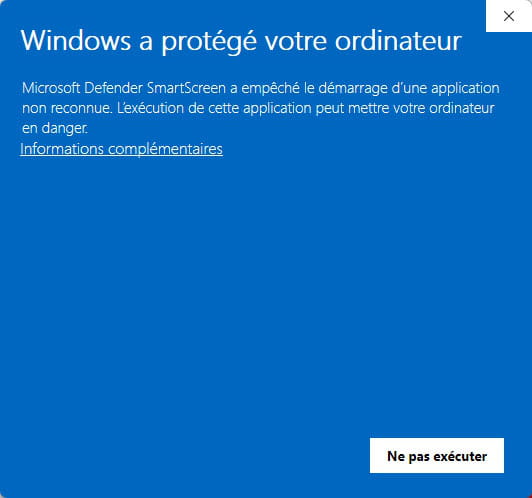
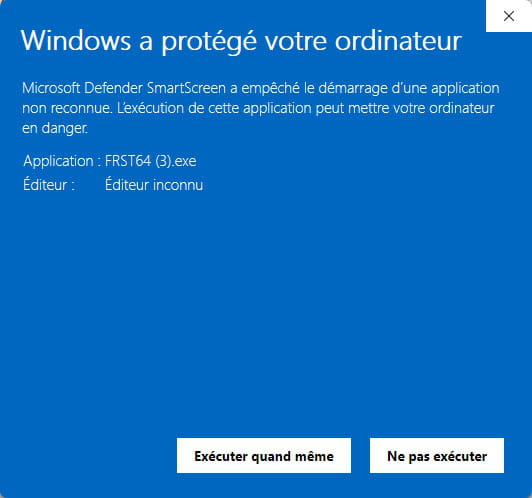
If opening FRST triggers a Microsoft Defender alert, ignore it and click on More information then on Run anyway, see below.


bazfile
Moderator/Security Contributor.
a hello, a reply, a thank you always pleases.

