
Unwanted McAfee pop-up
Solved
bazfile Posted messages 58534 Registration date Status Moderator Last intervention -
Hello,
I don't have McAfee installed on my computer, but in the Chrome browser, I keep getting security pop-ups from McAfee saying that my computer is infected. Of course, there is no trace of McAfee in applications and programs. How do I get rid of this? Malwarebytes found some PUPs and quarantined them, but it didn't help.
Do you have a solution?
Thank you for your help.
5 answers
-
Hello.
Download FRST once downloaded save it on the desktop then right-click on FRST and choose Run as administrator you will see this:
Click on Analyze

Note, wait for the messages indicating that the analysis is complete to show up.

At the end of the analysis, you will have two text files on the desktop FRST and Addition.

Then send the FRST and ADDITION reports to PJJOINT then provide the two links generated by PJJOINT in your reply.
bazfile
Moderator/Security Contributor.
a hello, a reply, a thank you are always appreciated. -
Thank you bazfile,
https://pjjoint.malekal.com/files.php?id=20221103_j8n11w7v10r13
https://pjjoint.malekal.com/files.php?id=FRST_20221103_n5w8u7l12e14
Well I hope I followed the steps correctly.
Thanks again...
-
Procedure to follow in the indicated order:
1- Open FRST as an administrator by right-clicking on FRST and choosing run as administrator
2 - Copy the entire script that is in the box below:Start:: CreateRestorePoint: CloseProcesses: CHR Notifications: Profile 1 -> hxxps://hzgsp3.lundiapoditing.com; hxxps://lundiapoditing.com; hxxps://www.facebook.com; hxxps://www.youtube.com HKLM\SOFTWARE\Microsoft\Windows Defender: [DisableAntiSpyware] Restriction HKLM\SOFTWARE\Microsoft\Windows Defender: [DisableAntiVirus] Restriction EmptyTemp: End::3- Once the script is copied, click on Fix, FRST will automatically take the script from the clipboard.

Let the correction take place, once it's done you will be asked to restart your PC, do it as soon as prompted, see below.
Then once your computer is restarted:
4- You will have a Fixlog file on your desktop, then send this fixlog report to PJJOINT then provide the generated link from PJJOINT in your response.5- CHECK AND TELL ME IF YOUR ISSUE IS STILL PRESENT
bazfile
Moderator/Security Contributor.
A hello, a reply, a thank you are always appreciated. -
Thank you bazfile,
https://pjjoint.malekal.com/files.php?id=20221104_f6l5j11w13u15
Thank you very much for your help. I opened Chrome, browsed a bit, and no more unwanted pop-ups.
Thanks again, you're really a champ...
-
The fixlog is OK.
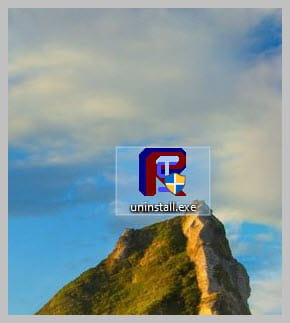
You can uninstall FRST, rename the FRST file you downloaded touninstall, then once the file is renamed, open it; the uninstallation will happen automatically via a reboot of the PC.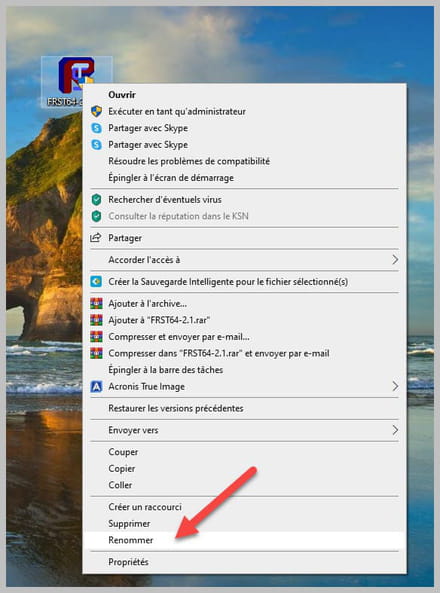
bazfile
Moderator/Security Contributor.
A hello, a response, a thank you are always appreciated.

