
PC audio connection: jack ports, hi-fi chain
georges97 Posted messages 14627 Registration date Status Contributor Last intervention -
Hello everyone,
I have a few audio tapes to digitize. At least partially.
A friend digitized some from a mini-cassette player, via a male/male jack. The idea is to configure the microphone/headphone jack (one on my PC) as input and then use a voice recorder.
I tried from my mini system to my PC, from the headphone output to the headphone-microphone input, I tried changing the input in the audio settings, but it didn't work. Nothing is heard. It records emptiness.
(Conversely, I managed to hear my neighbor's TV through my PC speakers!)
Does anyone have any idea what I could do?
Another technique?
Thanks.
7 answers
-
Hello,
To verify that the microphone input works, first try recording sounds (speech) from the microphone.
Next, you need to find the right cable because a male-to-male mono cable is not suitable.
You need a 3.5 mm stereo mini-jack cable plus a 3.5 mm stereo female mini-jack to 6.35 mm male stereo jack adapter (amplifier output).
The problem is that the so-called "combo" mic/headphone outputs are not wired in a standard way, hence the large gap observed.
Another solution is to use an external USB sound card (sugar packet size) that will replace the internal sound card but especially provide a separate microphone input and headphone output, which allows using the standard connection described above.
-
Thank you very much.
So, it doesn’t work with a male-to-male jack like this.My mini-system is a Panasonic equipped with a standard 3.5 jack.
https://s1.qwant.com/thumbr/474x275/1/7/4946ec88aa46e65288004c8f43bd6e1330c0af2ca5f64b9ed01cd13eaff069/OIP.J_fbq9iBmm-yhLxeHd_uPgHaET.jpg?u=https%3A%2F%2Ftse.mm.bing.net%2Fth%2Fid%2FOIP.J_fbq9iBmm-yhLxeHd_uPgHaET%3Fr%3D0%26pid%3DApi&q=0&b=1&p=0&a=0Est-ce que ce genre de carte son suffira ?
Il suffirait de brancher la jack mâle-mâle dedans ?
https://www.amazon.fr/Adaptateur-MOSWAG-adaptateur-convertisseur-auxiliaire/dp/B09874Q33W/ref=sr_1_9
Ou bien faudrait-il en acheter avec deux entrées et changer de jack avec deux sorties ?
https://www.amazon.fr/UGREEN-Adaptateur-Compatible-Raspberry-Microphone/dp/B01N905VOY/ref=sr_1_6
Thank you for your help. -
Hello,
The cord is standard but not at fault. It’s the wiring of the single input/output jack (combo) that doesn’t match. This output should work as an output if you plug in headphones or if you connect it (stereo mini-jack male to a line input cinch/RCA on the mini-system if one exists).
I can’t know from just a photo, but I doubt it with this entry-level equipment.
Anyway, the problem is at the micro/line input on the PC.
The sound card you mention has no input, only an output, so it isn’t suitable like some others I see on this page.
You would need a model like the Ugreen in your last link, which has not two inputs but one input and one output. Only one stereo cable is enough (to the red jack) since, in principle, you will listen on the PC. In any case, the mini-system jack only works as an output.
Don’t say you’ve tried the built-in microphone on the PC, to be sure you know how to trigger a recording. Plugging in isn’t enough.
Looking forward to hearing from you. -
I will try the microphone, but I need to find one in my family.
I don’t have one, otherwise. :)I’ll show you what equipment I have in a follow-up post.
I’m coming :)-
Hello,
I understood that you have a laptop. The microphone is therefore built-in. on all the equipment of this type that I know but there may be exceptions. Furthermore, you did not say with which software you intended to perform the recording. That is to know, isn’t it? How did you proceed during your unsuccessful attempt?
Based on the photo of your last post, there is a USB (playback) port on the mini hi-fi. Why not use it with a USB/USB cord. And still knowing which software for the recording.
I don’t know what this “music port” port is. It could be a line-in to use the mini hi-fi as an amplifier for an audio source (smartphone, transistor radio, computer, etc..). To specify (see user manual).
I have never bought dedicated consumer devices (cassette to MP3) because I had the hi-fi system.
Do you mean that you were making recordings with this old amplifier?
How? wiring and software.
-
Hello,
Yes, I have a laptop. there is an invisible microphone and a single input-output jack.
So, for the K7s, they are simply audio tapes recorded over time. Before the appearance of mp3s.
Either radio broadcasts, or recordings on a simple cassette tape recorder, or, again, recordings from old answering machines.A few little things I want to preserve.
I know they sell devices to read and record, but...
- it offered a player and I had one,
- so I thought I would find a way to transfer from the mini-system to the computer,
- I was given software for video with equipment that never worked >> So I was wary of those tools.
To record, I used Windows Voice Recorder and Windows Movie Maker. I know there are other options, but these are two programs that don’t require learning, since I use them frequently (especially Movie Maker, which has a narration function).
But a friend recommended Audacity. I could also do that.:)
Why not use it with a USB/USB cord
I don’t know at all.
But I think the USB of the system is only read-only, not writeable.
I don’t think it could output sound to the outside.
Am I perhaps wrong? -
the USB on the system is read-only
this should be checked in the manual because if it has input/output, it may accommodate a USB key but in that case the mini-system must have playback/recording functions for audio cassettes.
The hidden microphone must be checked before anything else.
The idea is to configure the mic/headphone jack (a single one on my PC) as input and then use a voice recorder.
Yes, but which one? Have you installed one?
Type "microphone" in the Taskbar search area and enable the microphone to try recording your voice (this function is limited to 2 minutes of memory but will allow testing the audio recording function.https://forums.commentcamarche.net/forum/affich-38298998-connexion-audio-pc-prises-jack-chaine-hifi
Indeed Audacity is the most appropriate and allows a graphical visualization of the audio signal.
On the other hand, if you are used to Windows Sound Recorder and Windows Movie Maker, they are suitable once this input combo problem is resolved.
The external sound card should allow it provided you select the right setting in the sound card driver, once installed.see:
https://fr.wikihow.com/enregistrer-sa-voix-sur-un-ordinateur-Windows
https://forums.commentcamarche.net/forum/affich-38298998-connexion-audio-pc-prises-jack-chaine-hifi
https://fr.wikihow.com/enregistrer-un-flux-audio-avec-VLC
https://wiki.libraries.coop/public/nnels/livre-audio/6_enregistrement_et_montage_audio
-
Yes, the hidden microphone works perfectly.
I just rechecked.I had another Zoom meeting last week. It works.
For the Jack microphone, I don’t know if it works.
I haven’t found a headset/microphone in working condition.
As mentioned yesterday, around me, it’s either wireless or with the new USBs from mobile phones.So I tried the VLC formula.
The problem, repeated four times to stay, is that when I click stop, VLC crashes. And I haven’t found the cache memory.Thank you
-
-
-
Here are 4 photos in one.
At the top, the jack cable ^^ and the computer port.
At the bottom, the two ports of the hi-fi system.
Afterward, if it's impossible or too complicated, I would be willing to buy a USB adapter for a few euros.
I have never bought dedicated devices from commerce (K7 to MP3) because I had the hi-fi system.
I will still try to check that the ports work, but I think I no longer have a headset with a jack.thank you
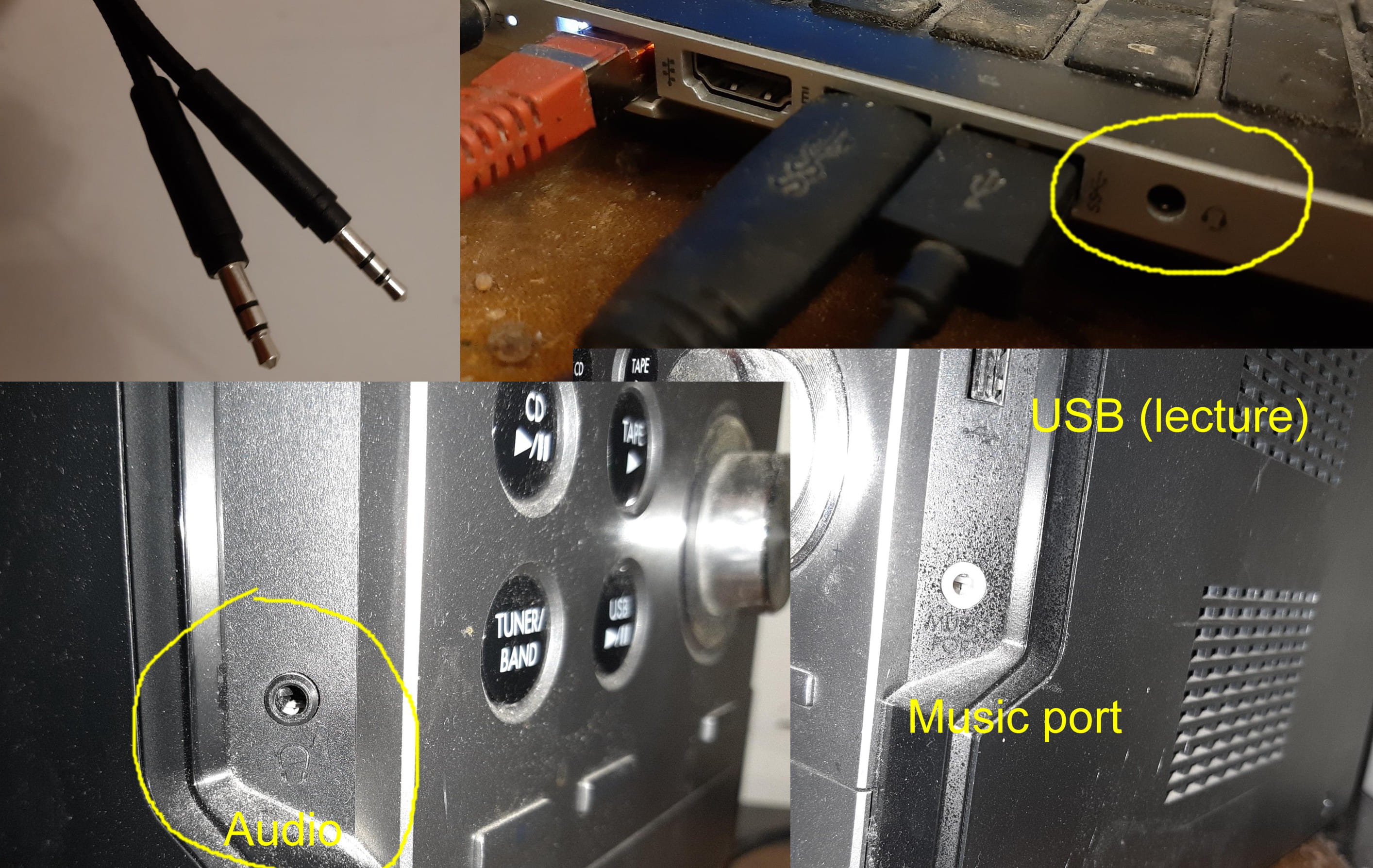
-
I suggest that you avoid switching from one software to another. If Audacity works, use it for your tests. But you should use a simple microphone and not a headset microphone, and find the parameter to enable to use the mini-jack microphone input.
If by jack mic you mean a headset mic, the problem with the combo jack remains the same. They are not wired to operate on a single jack.
I can understand that you don’t want to spend the ten euros that an external sound card costs.
Not to mention there is no guarantee it will work (even though I have already used this configuration a few years ago). For my part, I remain convinced this is a route worth testing.
Perhaps another participant can propose another solution. -
Hello,
So, this morning I was able to test with a mobile phone headset in a 3.5mm jack.
The headphone function of the hi-fi system works.
Already, that isn’t the problem.
I then tested my single microphone-headset jack on the computer: as a headset, it works very well. As a microphone, it was completely mediocre. A lot of noise, crackling, and you can hardly hear my voice. Barely.
So the problem must come from the jack.
Well, by deduction.I can spend about ten euros for a sound card.
The question is to find the right product, which works, of course, but, above all, not to buy the wrong one.
It should therefore have two inputs?that kind of thing https://www.amazon.fr/MOSWAG-Externe-Adaptateur-St%C3%A9r%C3%A9o-Windows/dp/B0DZHCFYZS
???(before buying it, I’ll still test plugging the jack into another computer, if someone in my family agrees to lend me theirs :)
Thanks-
Hello,
I was able to test with a portable phone headset using a 3.5mm jack
That is what I indicated in post no. 3 :
This output should work when you connect a headset
The mixed jack of a PC always works for listening on headset or speakers (unless there is a contact problem in the jack). It is the input that poses a problem.
From the moment when the two jacks are separated, either the driver of the external sound card does not match the Windows version used (to be checked on the sound card description), or the input of the software used (for example Audacity) is not correctly configured.
-