CPU/GPU thermal paste review
Winux01 Posted messages 268 Registration date Status Member Last intervention -
Hello,
This weekend I replaced the thermal paste on my ASUS All-in-One PC V241FF.
Looking for a paste that cools my CPU and GPU well, I was tempted by the brand Thermal Grizzly - Kryonaut. From the moment of application, I noticed its strange consistency, quite “dry” (lacking hydration), and the difficulty of spreading it evenly.
I still continued the application and fully reassembled the PC. Yesterday, while simply browsing YouTube (HD video playback), I wanted to check the temperatures using the software HWMonitor. And there, big surprise: the CPU reached 98°C!
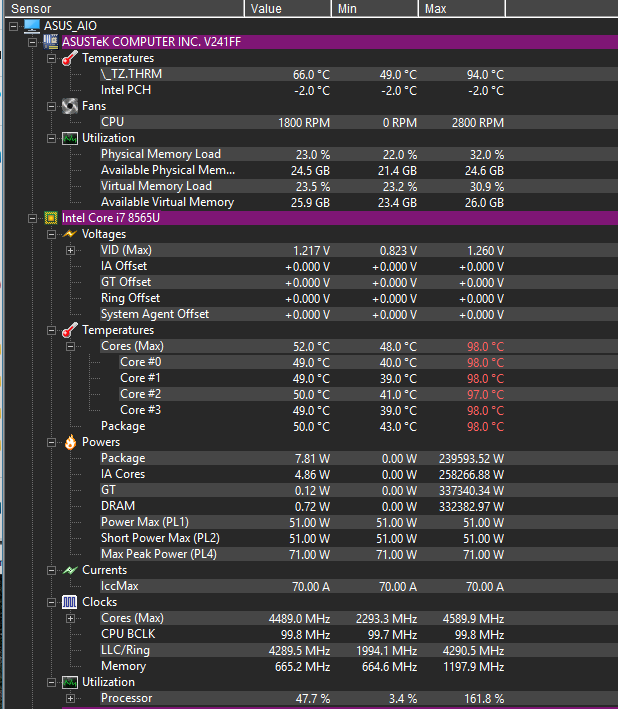
Screenshot 2026-07-05 220714618×709 31.1 KB
Your opinion:
- Should I change the thermal paste?
- Or is it normal for the PC to reach such a temperature at the start, while the paste cures?
If you think it should be changed, I found Alphacool Apex (17W/mK). What do you think?
I look forward to your opinions and feedback. Thanks in advance for your help!
1 answer
-
Hello,
It would be complicated to examine how the dough and the procedure were carried out properly, especially remotely.
However I believe you are worrying for nothing.
Because according to HWmonitor, your processor is running at 162% of its capacity, which makes it heat up more; it's factory overclocking. If you want to lower the temperature, you should tweak the power-saving modes as on laptops to reduce the frequency and thus the heat.