
Dell PC crashing on startup and updates
Sakura_01 Posted messages 118 Registration date Status Member Last intervention -
Hello,
On Wednesday, my computer asked me for an update, and I accepted as usual. In less than a minute it was done (I clicked Restart).
I didn't pay attention, but it seems that Windows 11 installed version 25H2.
On Thursday, the computer was fine.
Yesterday, when I turned on the power strip, the computer turned on by itself for a second or two, then turned off and then turned on again. I let it go despite the strange behavior.
And then a white screen with an English message that mentioned the BIOS.
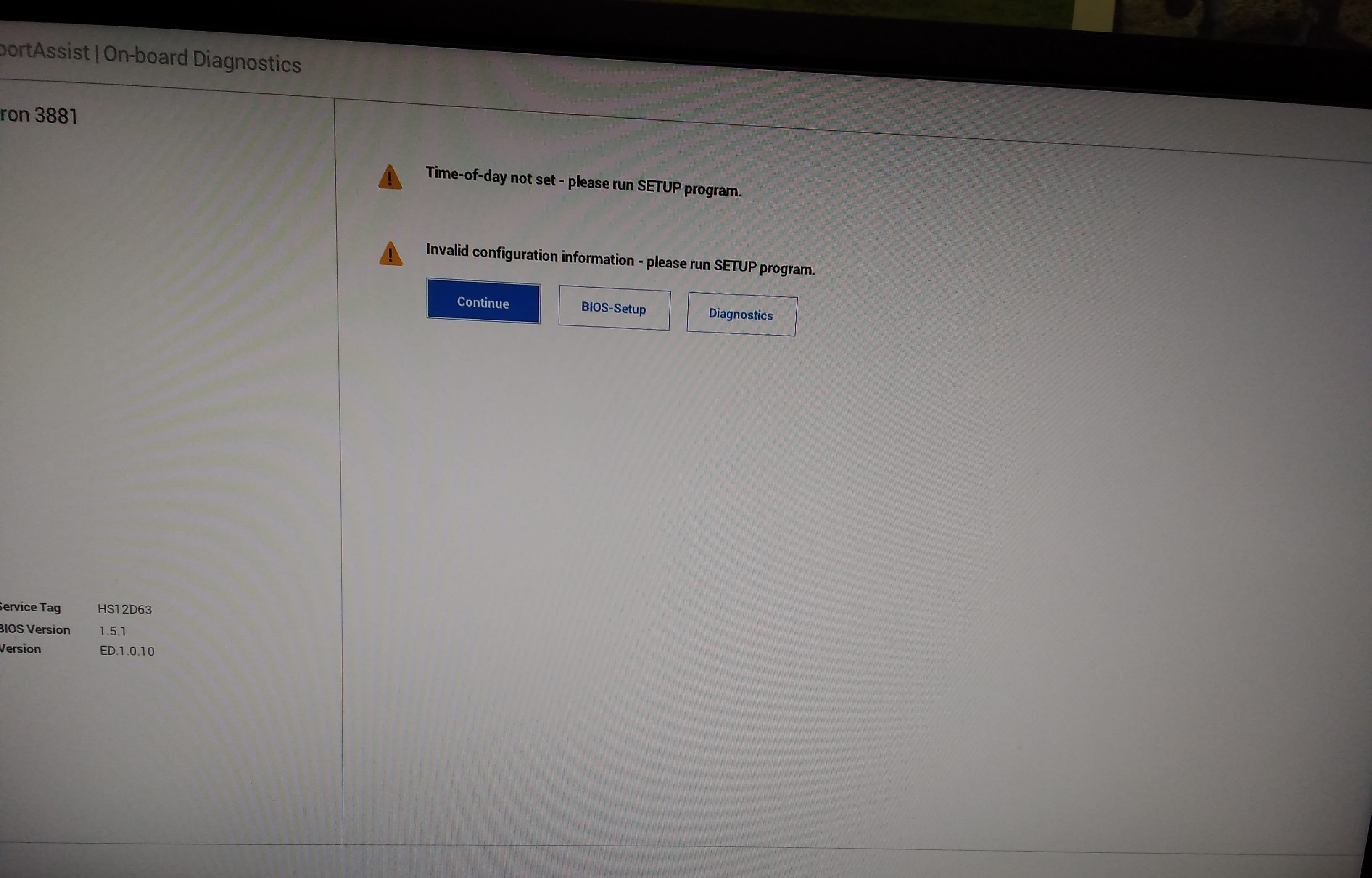
Just in case, I waited a moment to see if it would disappear after a while. I ultimately turned off the computer by holding the power button and turned off the power strip.
I waited about a minute, then turned the power strip back on, waited several seconds, and the computer did not turn back on by itself. I turned it on as usual.
The computer started up very well, no bugs or slowdowns. Just it was set to the wrong time zone, so I changed it and it was all good.
Today, the same behavior with that white screen.
When I turned it back on, the time zone was correct, but the time was not right.
Could this be from that notorious update? I had read that version 25 could cause bugs, but it's strange that everything was fine on Thursday.
Could it be from another more serious issue like a virus or something else?
When I go to Windows Update, there is a failure message on the update search. Update of the disjoint selection for Microsoft Defender Antivirus (are other updates in progress?? I didn't get it).
Thanks in advance :)
6 answers
-
Hello,
One possibility is that the PC's battery is dead. When cutting off the power supply via a power strip, without power, battery or mains, the BIOS configuration and the time are lost.
To confirm this diagnosis, the power strip should be left on, so the PC is still minimally powered. If it is indeed the battery, the startup issue should not occur again.
-
Thank you. It's information I found yesterday for the few messages in French, but it's about a desktop PC... is there a battery in a tower? My question might be silly.
-
Yes, there is a battery in all PCs. It is responsible for maintaining the BIOS configuration. It is actually more essential in a desktop PC than in a laptop, which has a battery that primarily takes over from the battery. What is the exact model of the Dell to check the shape of this battery? In the past, it was a simple 2032 button cell. Perhaps it is still the case on your PC. In laptops, this is no longer the case and it is complicated to find and replace.
Where is the battery located in a tower?
Since this almost corresponds to the latest update, I would have really thought that the issue was with version 25H2.It's an Inspiron 3881, 64-bit.
Intel(R) Core(TM) i5-10400F CPU @ 2.90GHz processor
Installed RAM memory 8 GB
Is that enough information?Just in case, could this also explain why it starts making noise (without lagging) for about 20 - 30 minutes a day or even twice a day? Generally, it does this 1 hour after I've turned it on, and if I turn it off very late, it can do it too... as if it's doing something in the background. Right now, for example, it's making noise but isn't lagging or anything; it should finish soon.
I haven't found a solution since this summer.
-
-
On this PC it's simple, and it really is a 2032 battery: https://www.dell.com/support/contents/fr-fr/videos/videoplayer/comment-remplacer-la-pile-bouton-sur-inspiron-38803881/6206621695001
The noise is often from a fan; if it is misaligned, it may be hitting something. But it should be constant. There can be multiple fans, from the case, the processor, and the graphics card.
When the noise occurs after a period of use, it’s usually because the PC or a component is overheating, and thus the fans kick in. This can be normal for intensive use, like gaming. Alternatively, the PC may be dirty, with dust obstructing airflow. Just opening the case to have a look is enough. A PC on the floor sucks in air along with surrounding dust. It needs to be cleaned. A small, low-power car vacuum is sufficient because the components are fragile. I prefer to use a brush above the bathtub to knock off the dust.
There could also be a background program using the processor and causing it to heat up, triggering the fan.
-
Thanks for the video, I'll go watch it. If it could last a few weeks without any issues, that would be ideal, but given my luck, I don't hold out much hope!
The noise happens within an hour after I turn it on, but most of the time when I turn it on, I use it very little: I check my emails, have a quick look at Facebook, and then leave the room for a while. Nothing too complicated, and when I come back, I still don't do much.
I don't play any games, no matter the time of day :)
I'll try to keep in mind the cleaning needed on the fan side. I've been putting it off for so long...
-
-
Hello,
25h2, are you really sure? It’s been a while since it should have been installed.
I would point to the BIOS; it might need an update.
-
Almost sure yes :) until Wednesday he was giving me the choice and the updates were related to version 24H (I assume 24H2).
That's why I would lean more towards cause 25H since it's a known issue, but there is probably also a cause-and-effect relationship with the BIOS or the battery.How can I know if an update is needed? I found a video where the person explains how to change the time in "BIOS setup" related to the image I posted, is that just it?
I guess there's a risk it could break down? I would have liked it to wait a few weeks before I look into the issue (that way I could get help presumably).
-
The message is clear: Time of day not set: the time is not set, erased due to lack of power.
I indicated an operation to perform: To confirm this diagnosis, it would be necessary to leave the power strip on, so the PC is always minimally powered. If it is indeed the battery, the startup anomaly should not occur again.
-
-
The question is mainly about eliminating suspicions.
Your problem is very likely related to the motherboard if the time is changing.
Yes, there is a risk, but generally depending on usage, it may be mandatory. For example, for those who play Warzone, a BIOS update was requested on certain motherboard platforms for security reasons related to recent TPM vulnerabilities and anti-cheat measures. TPM is also useful to counter brute force attacks and for the use of BitLocker; otherwise, locally it is extremely easy to bypass whatever you want if you have a minimum of knowledge.
-
I'm going to try the tip mentioned above and see if it helps or not. Fingers crossed.
Then, I'll assess... if all goes well, someone I know should be able to lend a hand (the trick of keeping the power strip on that this person mentioned). It would help me out and save me from having to do any tweaks, as long as the PC can hold up until the Christmas holidays. We'll see...
-
