CG problème avec le pilote ou virus
Résolu
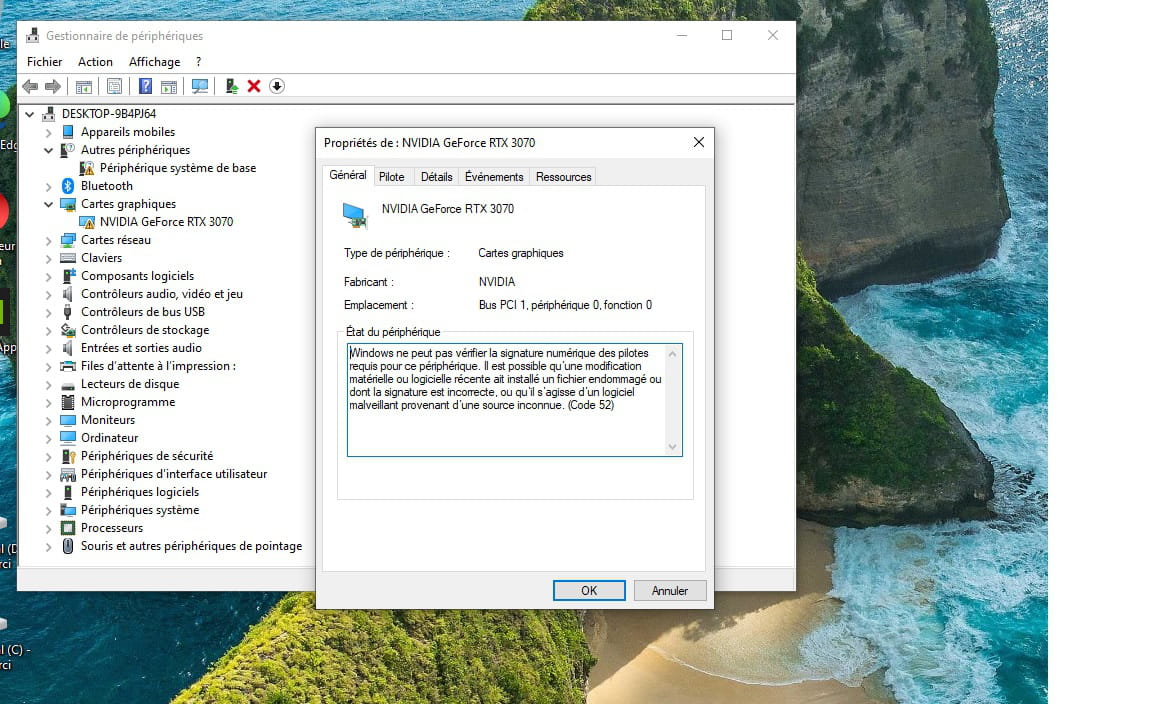
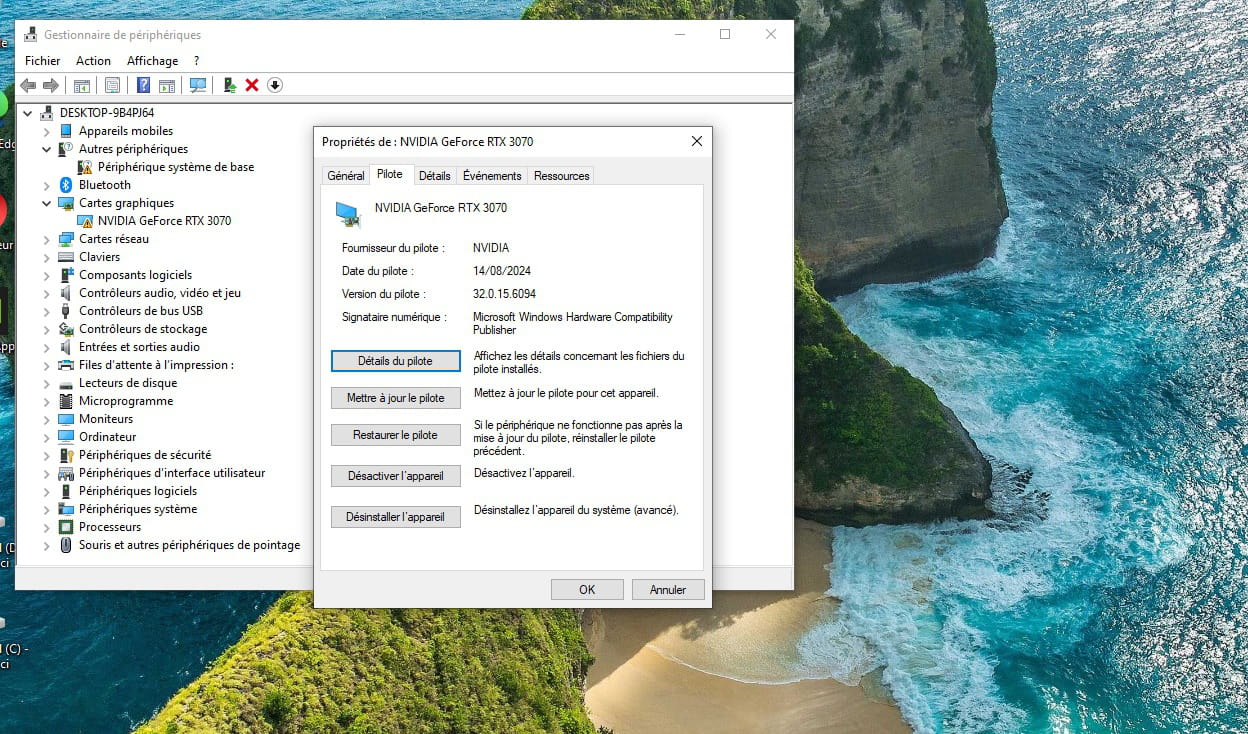
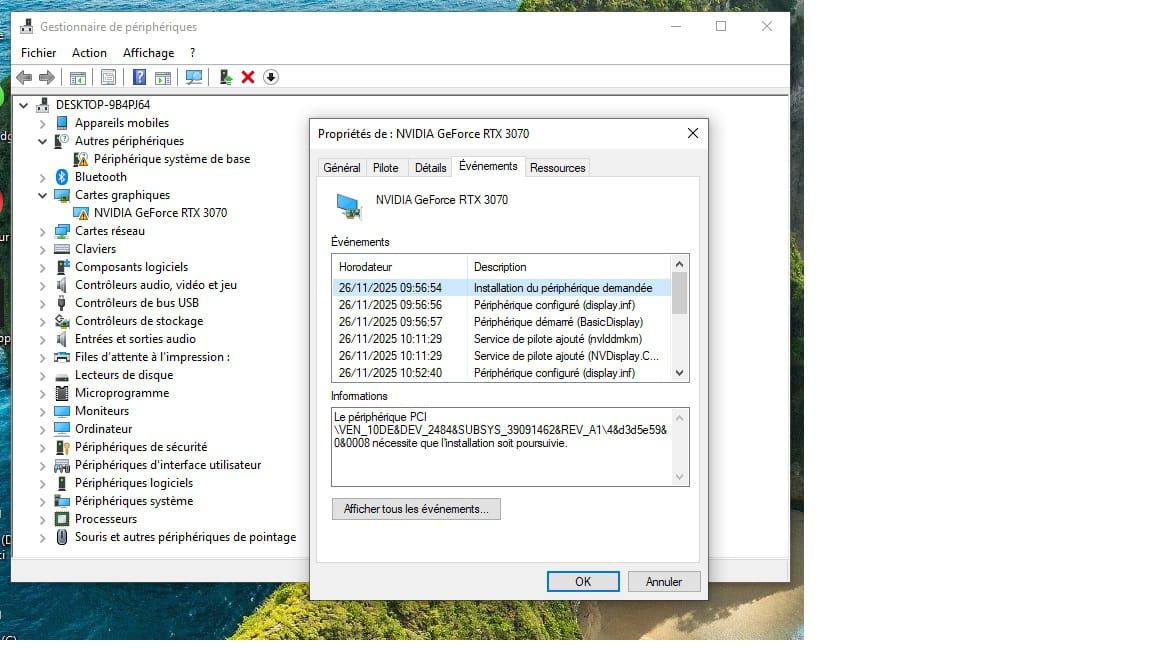
Bonjour, j'ai dû réinitialiser (fichier iso sur clé usb) ce pc suite à une vente à venir. J'ai eu pas mal de souci mais j'ai bien internet et il a choisi lui meme les pilotes. Que vaut il mieux faire a pérsent svp ?
c'est un msi mpg trident A10TD sous w10
Ci dessous 2 photos merci de votre aide
Windows / Firefox 145.0
"Il faut avoir déjà beaucoup appris de choses pour savoir demander ce qu’on ne sait pas"
20 réponses
Réinitialiser un MSI MPG Trident A10TD sous Windows 10 et préparer la vente soulève des choix entre rester sur Windows 10 ou passer à Windows 11, tout en vérifiant les pilotes. Des échanges suggèrent d’utiliser WhyNotWin11 pour évaluer la compatibilité avec Windows 11, d’installer via ISO et Rufus, et de tester les composants avec Memtest86 ou comparer les RAM 3200 MHz et 2400 MHz. Des réponses évoquent aussi le passage à Windows 11 pour une éventuelle revente, et des conseils pratiques sur la gestion des partitions lors d’une installation personnalisée. Une contrainte pratique demeure: créer un support USB bootable et choisir entre installation personnalisée et mise à niveau, selon le public visé et les exigences du client.
-
Modérateur
Si vous vérifiez avec WhyNotWin11.exe est-il compatible pour Windows 11
https://github.com/rcmaehl/WhyNotWin11/releases
Sinon pourquoi ne pas y aller directement, ça ne coûtera rien, la licence numérique de Win10 serait ok pour Win11
Puis Windows 11 serait peut être plus stable.
Pour une installation fraicheUtilisez le lien pour télécharger l'ISO Windows pour créer une Clé USB (8Go Minimum) pour mettre à jour, réparer, ou installer Windows
https://www.microsoft.com/fr-fr/software-download/windows11
Quand on a le fichier ISO de Windows, on peut créer une clé USB Amorçable (Bootable) avec Rufus
En mode GPT pour EFI
Démarrez dessus par la touche Boot Menu du PC
On peut chercher sur Google "[Marque Modèle] Boot Menu Key"
Cliquez (Si proposé) : Version précédente de la configuration
Choisissez "Installation personnalisée" (Pas mise à niveau)
Supprimez toutes les partitions système (3 ou 4 incluant la partition on se trouve Windows) et créez en une nouvelle (Supprime les données).
-
Tu es vraiment génial de m'aider <3
Je vais continuer à faire ce que tu me dis mais c'est la 1ere fois qu'il ne crash pas (pc allumé de 08h15 à 12h10) les fichiers corrompus réparés ont peut etre fait du bien
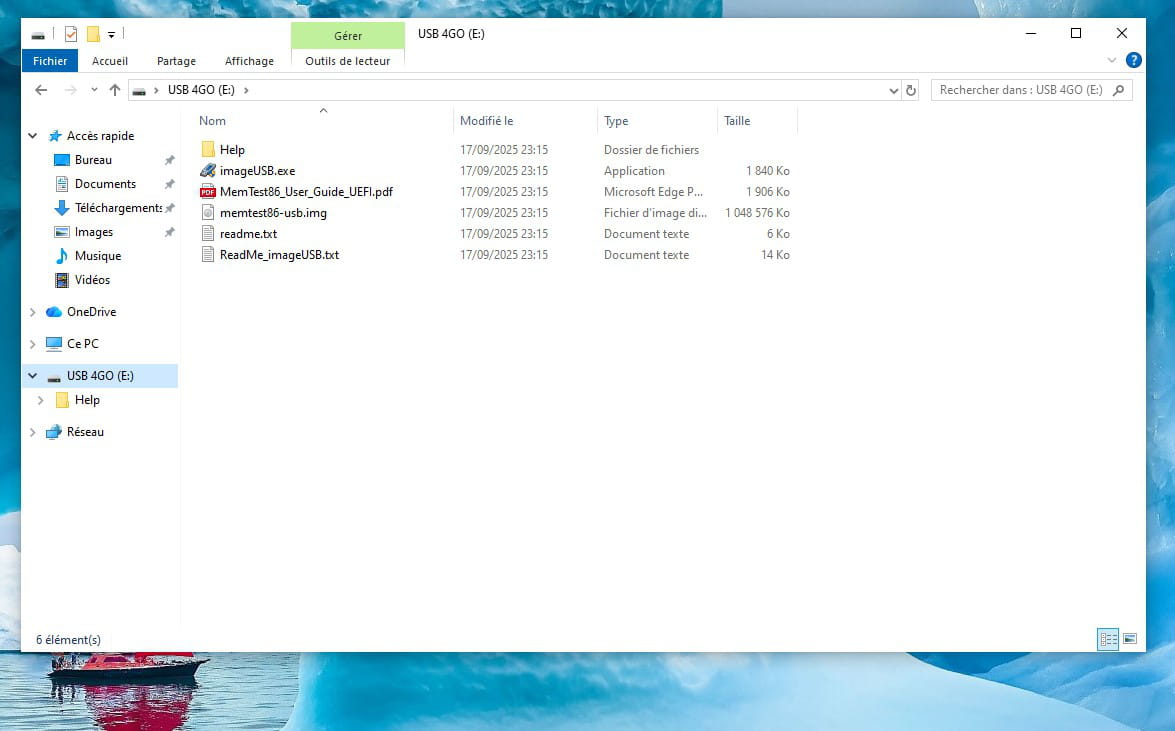
excuse moi j'ai bien téléchargé ton memtest86, ci joint, mais je fais comment stp je reste sur le bureau et clic sur le fichier exe ?
-
Modérateur@ludoAR
Il faut préparer / formater (Ça efface tout) la clé USB avec ImageUSB.exe
Avec le fichier memtest86-usb-free.img
Pour un PC MSI, dés l'allumage du PC, avant le démarrage du Windows, il faut appuyer F11 je crois,
Quand vous voyez le logo ou enfin le démarrage de Memtest, ne touchez à rien, le test standard commence, et fini par lui même.
Si vous voyez passer des lignes Rouges, d'erreurs RAM, éteignez le avec le bouton d'allumage maintenu et testez une partie des barrettes à la fois. -
Contributeur Ambassadeur@fabul
Pour w11 je lui avais suggéré déjà ici en "49"
Mais comme c'est pour le revendre, il voulait rester en w10.
-
Modérateur@flo88
Windows 10 ne se vend plus, plus d’intérêt en 2025.
Sinon la version 32 bit pour des applications bien particulières MS-DOS ?
Vendre un PC compatible avec Windows 11 serait plus vendeur aujourd'hui.
-
-
-
-
Contributeur Ambassadeur
Bjr
Essayes ce pilote :
https://www.nvidia.com/fr-fr/geforce/drivers/results/257586/
Si à un moment il t'es demandé de créer un compte nvidia c'est normal, c'est pour l'appli associée, il est devenu presque impossible de s'en passer. Ou tu choisis "installation personnalisée" et tu ne l'installer pas, je ne sais plus si c'est possible. Sinon faudra la desinstaller elle uniquement après si tu vend le pc.
-
Bonjour,
Ou bien le pilote même sur le site officiel du fabricant n'est pas signé.
Voir:
https://www.malekal.com/desactiver-signature-numerique-pilotes-windows-10/ -
Contributeur Ambassadeur@brucine
Salut
Celui que j'ai mis en lien est WHQL, il est donc signé.
Par contre le pilote inclus dans la base Microsoft aurait du l'être aussi...
Vu que le pc est un assemblé MSI, il est pas impossible que la carte graphique ne soit pas un modèle standard, auquel cas si le pilote que j'ai mis ne règle pas le problème il faudra aller le chercher sur le site de msi.
-
-
grand merci à vous comme vous le voyez grace à vous ca marche <3
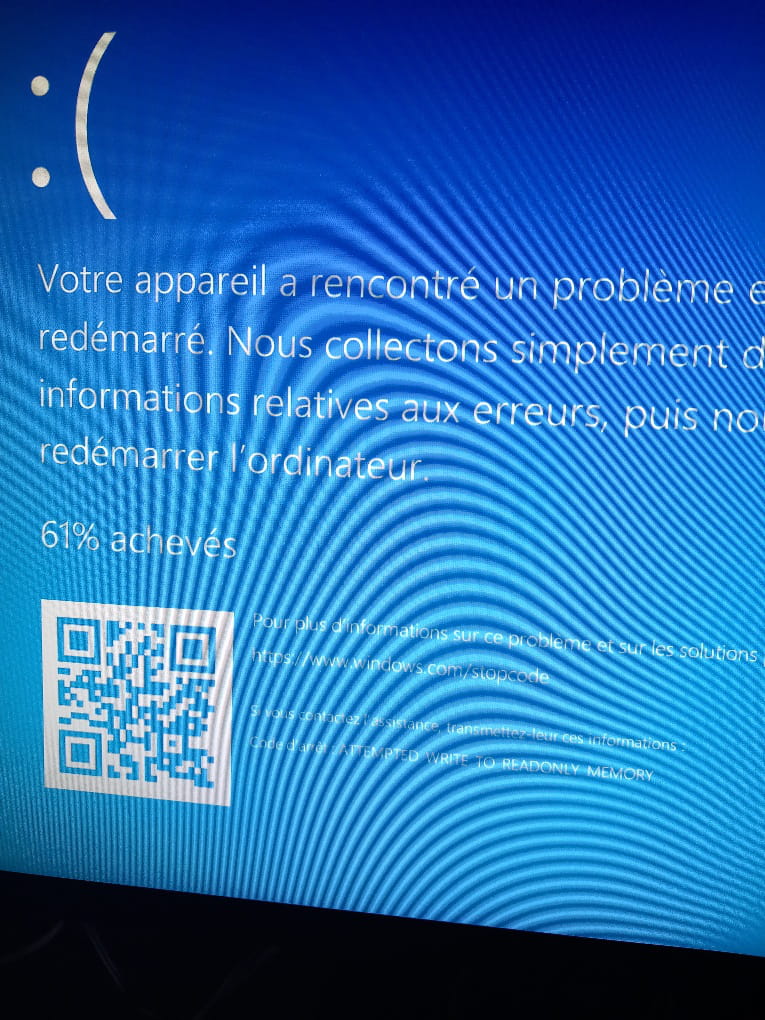
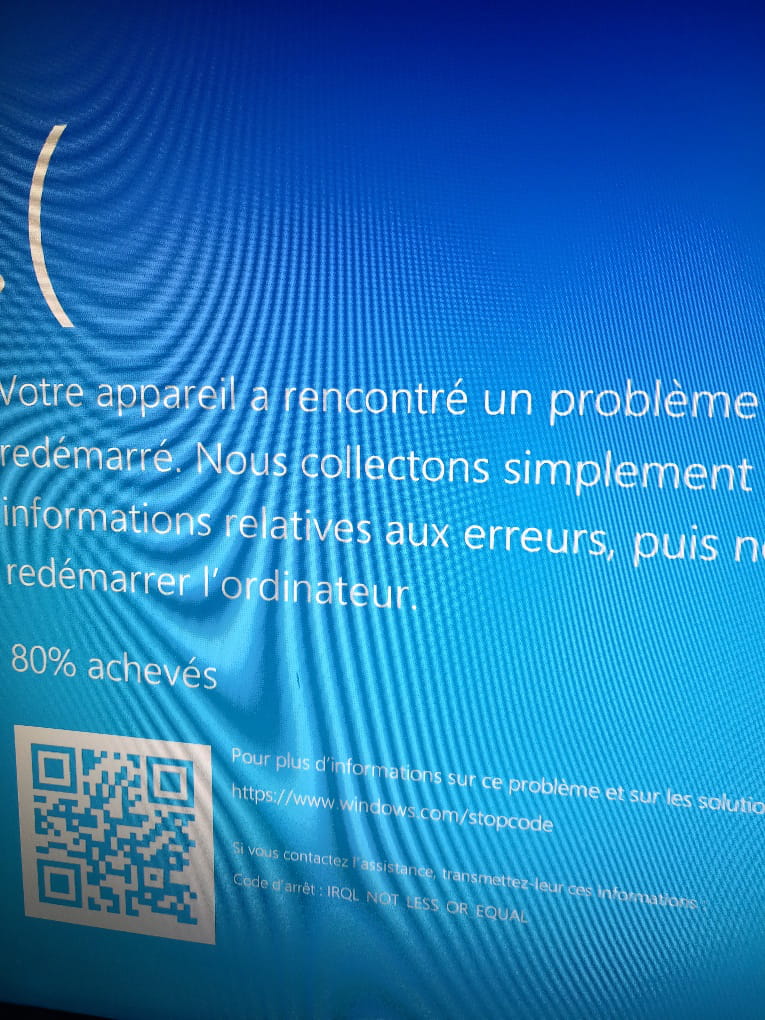
gros hic parfois au bout de 2mn parfois 10mn parfois 5mn il s'eteint et avec un message différent parfois écran bleu ci dessous

-
-
-
Contributeur Ambassadeur
Cet écran bleu apparait d'emblé en marche ou lors du démarrage après un arrêt ?
-
aléatoirement, cad j'allume le pc, et je regarde juste wupdate ou un périphérique ou rien parfois et ca crashe :-(
tu penses à un virus ? sinon j'emmène chez un informaticien mais va t'il obligatoirement trouver la cause ?
-
Modérateur
Bonjour,
Analysez avec WhoCrashed Free Home Edition
https://forums.commentcamarche.net/forum/affich-38251615-cg-probleme-avec-le-pilote-ou-virus#
Qu'on voie de quel driver le problème viens si c'est un driver.
Idéalement je trouve une clé "Key" de IOBit Driver Booster Pro (En Giveaway)
https://www.google.com/search?q=IOBit+Driver+Booster+Giveaway
Et j'installe la version Free du site Officiel pour entrer la clé
/!\ Attention > En installant pas d’autre logiciel à l'installation Il faut décocher et ne pas cliquer 2 fois installer de suite (C'est pour proposer un autre logiciel) /!\
Ensuite il laisse des tâches planifiées à désactiver.
-
oh merci trop bien, on va y arriver, merci merci merci
voilà t'en dis quoi du coup ?
System Information (local)
Computer name: DESKTOP-9B4PJ64
Windows version: Windows 10, 10.0, version 2009, build: 19045
Windows dir: C:\Windows
Hardware: MPG B460 Trident A (MS-B926), Micro-Star International Co., Ltd., MPG B460I GAMING EDGE WIFI (MS-7C86)
CPU: GenuineIntel Intel(R) Core(TM) i7-10700F CPU @ 2.90GHz 8664, level: 6
16 logical processors, active mask: 65535
RAM: 17102823424 bytes (15,9GB)
Crash Dump Analysis
Crash dumps are enabled on your computer.
Crash dump directories:
C:\Windows
C:\Windows\Minidump
On Fri 28/11/2025 18:39:51 your computer crashed or a problem was reported
crash dump file: C:\Windows\Minidump\112825-8421-01.dmp
This was probably caused by the following module: ntoskrnl.exe (nt+0x3FE580)
Bugcheck code: 0xA (0x38, 0x2, 0x0, 0xFFFFF802457340E1)
Error: IRQL_NOT_LESS_OR_EQUAL
file path: C:\Windows\system32\ntoskrnl.exe
product: Microsoft® Windows® Operating System
company: Microsoft Corporation
description: NT Kernel & System
Bug check description: This indicates that Microsoft Windows or a kernel-mode driver accessed paged memory at DISPATCH_LEVEL or above. This is a software bug.
This bug check belongs to the crash dump test that you have performed with WhoCrashed or other software. It means that a crash dump file was properly written out.
The crash took place in the Windows kernel. Possibly this problem is caused by another driver that cannot be identified at this time.
On Fri 28/11/2025 18:39:51 your computer crashed or a problem was reported
crash dump file: C:\Windows\MEMORY.DMP
This was probably caused by the following module: ntfs.sys (Ntfs+0x15D128)
Bugcheck code: 0xA (0x38, 0x2, 0x0, 0xFFFFF802457340E1)
Error: IRQL_NOT_LESS_OR_EQUAL
file path: C:\Windows\system32\drivers\ntfs.sys
product: Système d’exploitation Microsoft® Windows®
company: Microsoft Corporation
description: Pilote du système de fichiers NT
Bug check description: This indicates that Microsoft Windows or a kernel-mode driver accessed paged memory at DISPATCH_LEVEL or above. This is a software bug.
This bug check belongs to the crash dump test that you have performed with WhoCrashed or other software. It means that a crash dump file was properly written out.
The crash took place in a file system driver. Since there is no other responsible driver detected, this could be pointing to a malfunctioning drive or corrupted disk. It's suggested that you run CHKDSK.
On Fri 28/11/2025 18:36:28 your computer crashed or a problem was reported
crash dump file: C:\Windows\Minidump\112825-7171-01.dmp
This was probably caused by the following module: ntoskrnl.exe (nt+0x3FE580)
Bugcheck code: 0xBE (0xFFFF97C00509FFE0, 0x8A00000000200121, 0xFFFFEB01AB944050, 0xA)
Error: ATTEMPTED_WRITE_TO_READONLY_MEMORY
file path: C:\Windows\system32\ntoskrnl.exe
product: Microsoft® Windows® Operating System
company: Microsoft Corporation
description: NT Kernel & System
Bug check description: This is issued if a driver attempts to write to a read-only memory segment.
This appears to be a typical software driver bug and is not likely to be caused by a hardware problem.
The crash took place in the Windows kernel. Possibly this problem is caused by another driver that cannot be identified at this time.
On Fri 28/11/2025 18:35:42 your computer crashed or a problem was reported
crash dump file: C:\Windows\Minidump\112825-7296-01.dmp
This was probably caused by the following module: ntoskrnl.exe (nt+0x3FE580)
Bugcheck code: 0xBE (0xFFFFF8C005003FE0, 0x8A00000000200121, 0xFFFFBA0FF1832050, 0xA)
Error: ATTEMPTED_WRITE_TO_READONLY_MEMORY
file path: C:\Windows\system32\ntoskrnl.exe
product: Microsoft® Windows® Operating System
company: Microsoft Corporation
description: NT Kernel & System
Bug check description: This is issued if a driver attempts to write to a read-only memory segment.
This appears to be a typical software driver bug and is not likely to be caused by a hardware problem.
The crash took place in the Windows kernel. Possibly this problem is caused by another driver that cannot be identified at this time.
On Fri 28/11/2025 18:34:26 your computer crashed or a problem was reported
crash dump file: C:\Windows\Minidump\112825-6765-01.dmp
This was probably caused by the following module: ntoskrnl.exe (nt+0x3FE580)
Bugcheck code: 0xBE (0xFFFFE04005063FE0, 0x8A00000000200121, 0xFFFFB987C465A050, 0xA)
Error: ATTEMPTED_WRITE_TO_READONLY_MEMORY
file path: C:\Windows\system32\ntoskrnl.exe
product: Microsoft® Windows® Operating System
company: Microsoft Corporation
description: NT Kernel & System
Bug check description: This is issued if a driver attempts to write to a read-only memory segment.
This appears to be a typical software driver bug and is not likely to be caused by a hardware problem.
The crash took place in the Windows kernel. Possibly this problem is caused by another driver that cannot be identified at this time.
On Fri 28/11/2025 09:44:55 your computer crashed or a problem was reported
crash dump file: C:\Windows\Minidump\112825-6968-01.dmp
This was probably caused by the following module: ntoskrnl.exe (nt+0x3FE580)
Bugcheck code: 0xA (0x48, 0x2, 0x1, 0xFFFFF8068045871A)
Error: IRQL_NOT_LESS_OR_EQUAL
file path: C:\Windows\system32\ntoskrnl.exe
product: Microsoft® Windows® Operating System
company: Microsoft Corporation
description: NT Kernel & System
Bug check description: This indicates that Microsoft Windows or a kernel-mode driver accessed paged memory at DISPATCH_LEVEL or above. This is a software bug.
This bug check belongs to the crash dump test that you have performed with WhoCrashed or other software. It means that a crash dump file was properly written out.
The crash took place in the Windows kernel. Possibly this problem is caused by another driver that cannot be identified at this time.
Conclusion
6 crash dumps have been found and analyzed. No offending third party drivers have been found. Connsider using WhoCrashed Professional which offers more detailed analysis using symbol resolution. Also configuring your system to produce a full memory dump may help you.
Read the topic general suggestions for troubleshooting system crashes for more information.
Note that it's not always possible to state with certainty whether a reported driver is responsible for crashing your system or that the root cause is in another module. Nonetheless it's suggested you look for updates for the products that these drivers belong to and regularly visit Windows update or enable automatic updates for Windows. In case a piece of malfunctioning hardware is causing trouble, a search with Google on the bug check errors together with the model name and brand of your computer may help you investigate this further.
On Fri 28/11/2025 18:39:51 your computer crashed or a problem was reported
crash dump file: C:\Windows\Minidump\112825-8421-01.dmp
This was probably caused by the following module: ntoskrnl.exe (nt+0x3FE580)
Bugcheck code: 0xA (0x38, 0x2, 0x0, 0xFFFFF802457340E1)
Error: IRQL_NOT_LESS_OR_EQUAL
file path: C:\Windows\system32\ntoskrnl.exe
product: Microsoft® Windows® Operating System
company: Microsoft Corporation
description: NT Kernel & System
Bug check description: This indicates that Microsoft Windows or a kernel-mode driver accessed paged memory at DISPATCH_LEVEL or above. This is a software bug.
This bug check belongs to the crash dump test that you have performed with WhoCrashed or other software. It means that a crash dump file was properly written out.
The crash took place in the Windows kernel. Possibly this problem is caused by another driver that cannot be identified at this time.
On Fri 28/11/2025 18:39:51 your computer crashed or a problem was reported
crash dump file: C:\Windows\MEMORY.DMP
This was probably caused by the following module: ntfs.sys (Ntfs+0x15D128)
Bugcheck code: 0xA (0x38, 0x2, 0x0, 0xFFFFF802457340E1)
Error: IRQL_NOT_LESS_OR_EQUAL
file path: C:\Windows\system32\drivers\ntfs.sys
product: Système d’exploitation Microsoft® Windows®
company: Microsoft Corporation
description: Pilote du système de fichiers NT
Bug check description: This indicates that Microsoft Windows or a kernel-mode driver accessed paged memory at DISPATCH_LEVEL or above. This is a software bug.
This bug check belongs to the crash dump test that you have performed with WhoCrashed or other software. It means that a crash dump file was properly written out.
The crash took place in a file system driver. Since there is no other responsible driver detected, this could be pointing to a malfunctioning drive or corrupted disk. It's suggested that you run CHKDSK.
On Fri 28/11/2025 18:36:28 your computer crashed or a problem was reported
crash dump file: C:\Windows\Minidump\112825-7171-01.dmp
This was probably caused by the following module: ntoskrnl.exe (nt+0x3FE580)
Bugcheck code: 0xBE (0xFFFF97C00509FFE0, 0x8A00000000200121, 0xFFFFEB01AB944050, 0xA)
Error: ATTEMPTED_WRITE_TO_READONLY_MEMORY
file path: C:\Windows\system32\ntoskrnl.exe
product: Microsoft® Windows® Operating System
company: Microsoft Corporation
description: NT Kernel & System
Bug check description: This is issued if a driver attempts to write to a read-only memory segment.
This appears to be a typical software driver bug and is not likely to be caused by a hardware problem.
The crash took place in the Windows kernel. Possibly this problem is caused by another driver that cannot be identified at this time.
On Fri 28/11/2025 18:35:42 your computer crashed or a problem was reported
crash dump file: C:\Windows\Minidump\112825-7296-01.dmp
This was probably caused by the following module: ntoskrnl.exe (nt+0x3FE580)
Bugcheck code: 0xBE (0xFFFFF8C005003FE0, 0x8A00000000200121, 0xFFFFBA0FF1832050, 0xA)
Error: ATTEMPTED_WRITE_TO_READONLY_MEMORY
file path: C:\Windows\system32\ntoskrnl.exe
product: Microsoft® Windows® Operating System
company: Microsoft Corporation
description: NT Kernel & System
Bug check description: This is issued if a driver attempts to write to a read-only memory segment.
This appears to be a typical software driver bug and is not likely to be caused by a hardware problem.
The crash took place in the Windows kernel. Possibly this problem is caused by another driver that cannot be identified at this time.
On Fri 28/11/2025 18:34:26 your computer crashed or a problem was reported
crash dump file: C:\Windows\Minidump\112825-6765-01.dmp
This was probably caused by the following module: ntoskrnl.exe (nt+0x3FE580)
Bugcheck code: 0xBE (0xFFFFE04005063FE0, 0x8A00000000200121, 0xFFFFB987C465A050, 0xA)
Error: ATTEMPTED_WRITE_TO_READONLY_MEMORY
file path: C:\Windows\system32\ntoskrnl.exe
product: Microsoft® Windows® Operating System
company: Microsoft Corporation
description: NT Kernel & System
Bug check description: This is issued if a driver attempts to write to a read-only memory segment.
This appears to be a typical software driver bug and is not likely to be caused by a hardware problem.
The crash took place in the Windows kernel. Possibly this problem is caused by another driver that cannot be identified at this time.
On Fri 28/11/2025 09:44:55 your computer crashed or a problem was reported
crash dump file: C:\Windows\Minidump\112825-6968-01.dmp
This was probably caused by the following module: ntoskrnl.exe (nt+0x3FE580)
Bugcheck code: 0xA (0x48, 0x2, 0x1, 0xFFFFF8068045871A)
Error: IRQL_NOT_LESS_OR_EQUAL
file path: C:\Windows\system32\ntoskrnl.exe
product: Microsoft® Windows® Operating System
company: Microsoft Corporation
description: NT Kernel & System
Bug check description: This indicates that Microsoft Windows or a kernel-mode driver accessed paged memory at DISPATCH_LEVEL or above. This is a software bug.
This bug check belongs to the crash dump test that you have performed with WhoCrashed or other software. It means that a crash dump file was properly written out.
The crash took place in the Windows kernel. Possibly this problem is caused by another driver that cannot be identified at this time.
Conclusion
6 crash dumps have been found and analyzed. No offending third party drivers have been found. Connsider using WhoCrashed Professional which offers more detailed analysis using symbol resolution. Also configuring your system to produce a full memory dump may help you.
Read the topic general suggestions for troubleshooting system crashes for more information.
Note that it's not always possible to state with certainty whether a reported driver is responsible for crashing your system or that the root cause is in another module. Nonetheless it's suggested you look for updates for the products that these drivers belong to and regularly visit Windows update or enable automatic updates for Windows. In case a piece of malfunctioning hardware is causing trouble, a search with Google on the bug check errors together with the model name and brand of your computer may help you investigate this further.
-
Modérateur
No offending third party drivers have been found.
Ça veut dire que les drivers ne sont peut être pas en cause, aucun problème lié directement, mais essayez IOBit quand même.
Surchauffe-il ? Vous pouvez vérifier avec OCCT Per (Personnal Edition)
https://www.ocbase.com/download
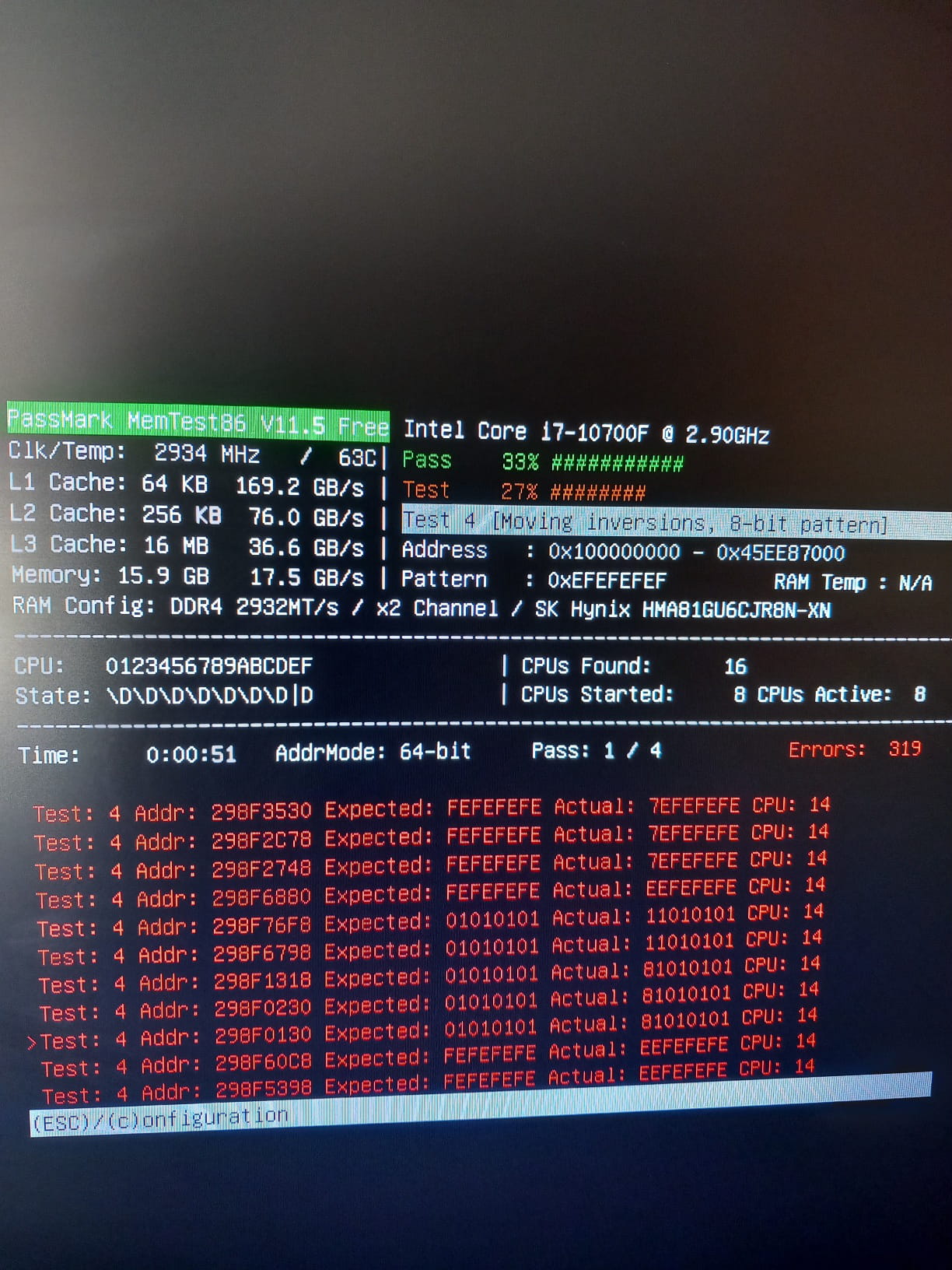
Et/Ou vérifiez la RAM en bootant sur une clé USB Memtest86 Free avec le programme inclus.
https://www.memtest86.com/download.htmDémarrez dessus par la touche Boot Menu du PC
On peut chercher sur Google "[Marque Modèle] Boot Menu Key"
Vérifier le disque / SSD avec CrystalDiskInfo (C'est peut être le bobo)
https://crystalmark.info/en/software/crystaldiskinfo/
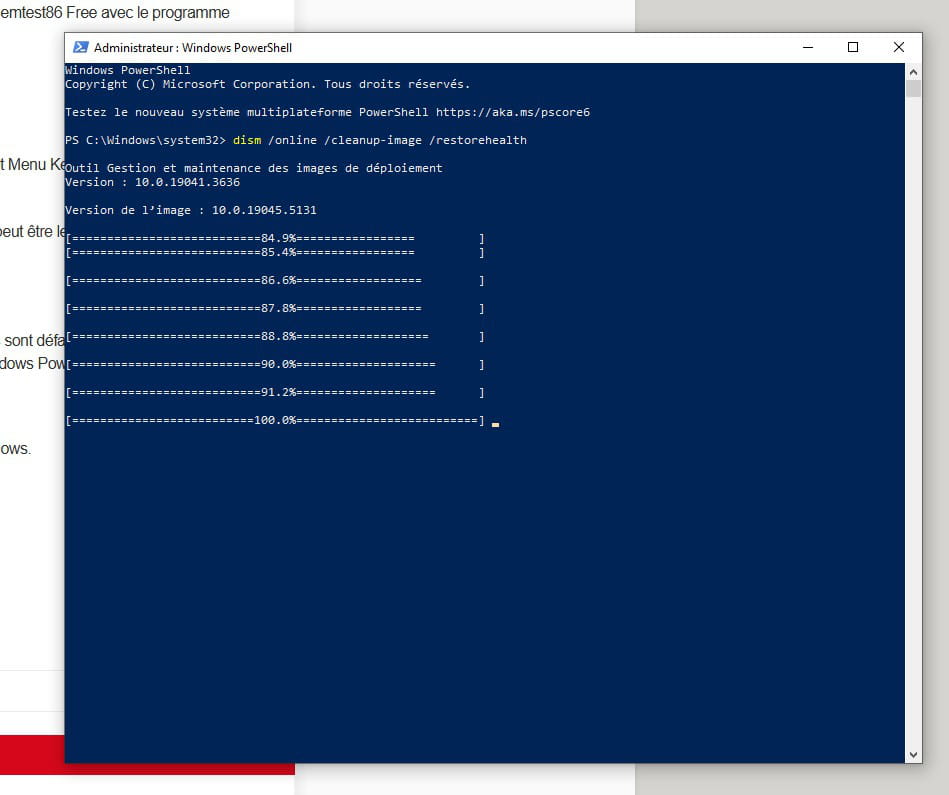
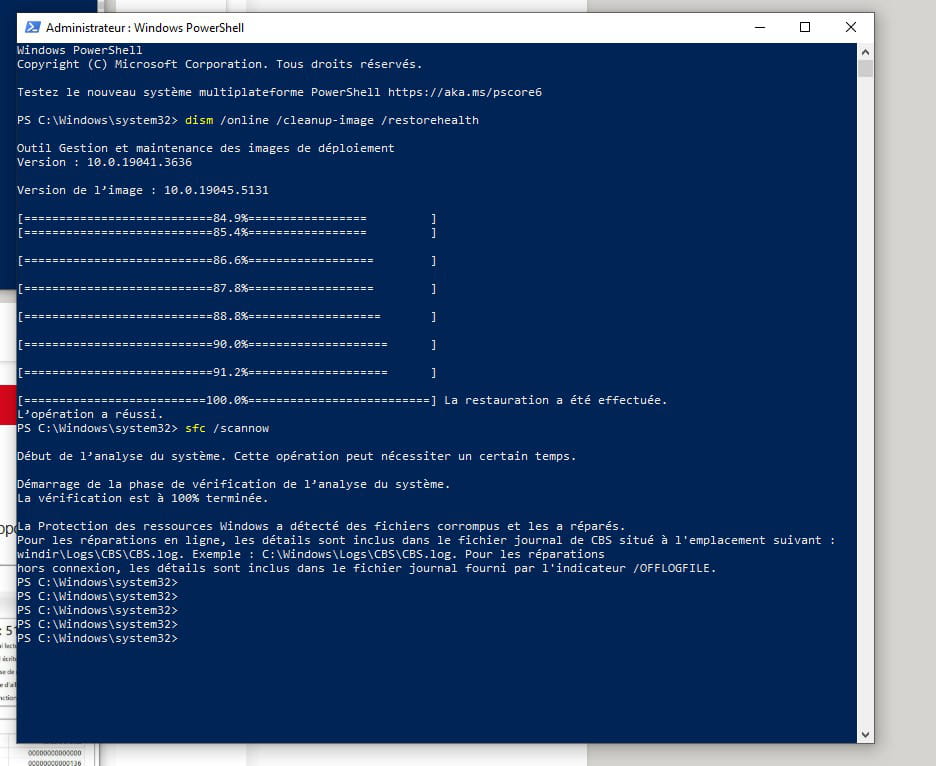
Sinon pour tenter de réparer Windows si des fichiers sont défaillants, par clic droit sur le bouton démarrer, utilisez cette commande avec Windows PowerShell (Terminal Admin)CHKDSK /F C:
Répondre O pour Oui pour ensuite redémarrer Windows.
Ensuite
Dism /Online /Cleanup-Image /RestoreHealth
Ensuite
sfc /scannow
-
merci bcp de ton aide précieuse <3 déjà un 1er rapport
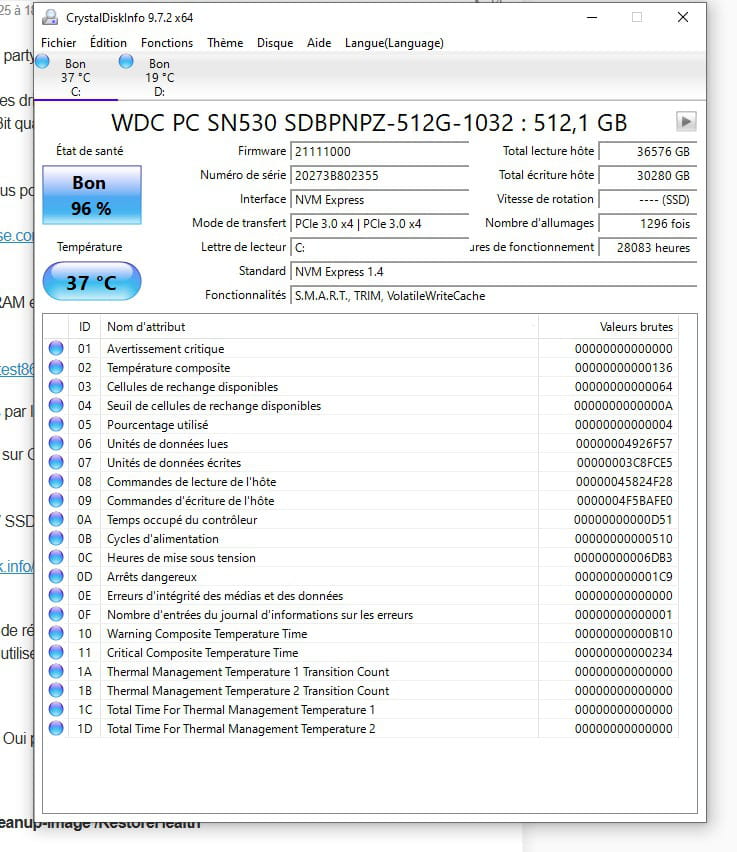
-
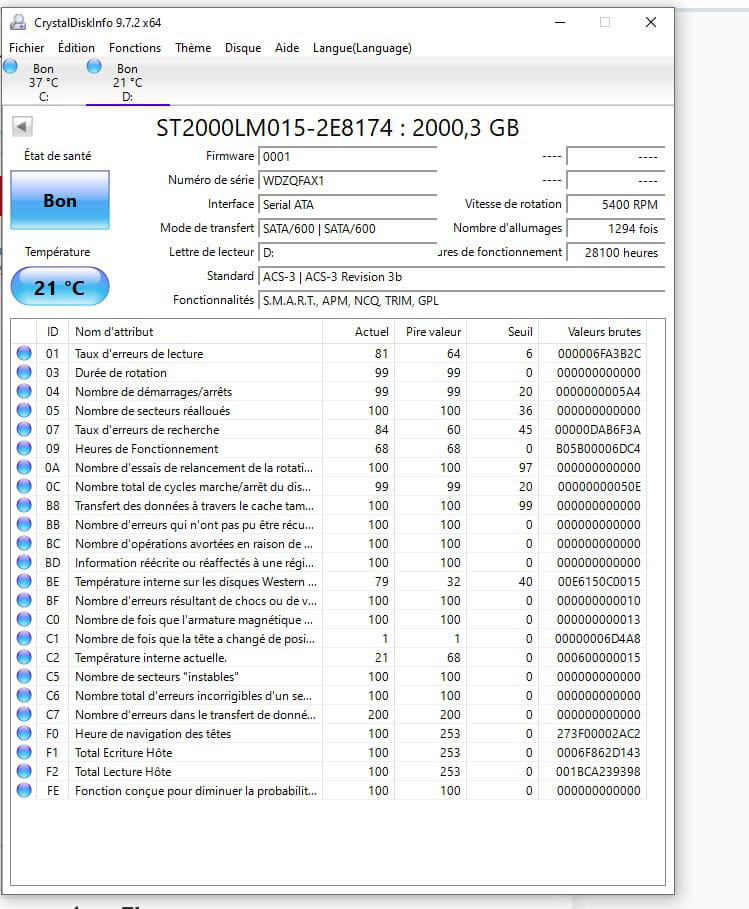
-
Contributeur Ambassadeur
Bonjour
Le sujet de départ portant sur la carte graphique, les écrans bleus c'est autre chose, pour la cohérence de la discussion se serait mieux de mettre celle-ci en résolu et de faire un autre sujet sur les plantages uniquement. qu'en dit-tu ?
-
Modérateur
Bonjour flo88, je préfèrerais qu'on continue ici, parce qu'on a déjà essayé plusieurs choses.
SSD OK
Fichiers système réparés
Reste à faire le test de RAM (Memtest86 Free USB) (Peut être en dernier)
Vérifier les températures en charge (OCCT Personal)
Puis mettre à jour le maximum de pilotes (IOBit Driver Booster Giveaway)Il y a des clés ici https://techno360.in/driver-booster-13-pro-free-6-month-license/
Ici: https://softopaz.com/giveaway/iobit/driver-booster/
Et ici: https://tickgiveaway.com/iobit-driver-booster-pro-license-key-free/
Puis ensuite si les BSOD se font encore, ça sera plus difficile.
Enlever et replacer les RAM aux bons emplacements peut être si problème de contacts ou si pas dans les bons emplacements si 2 barrettes sur 4 sont installées. -
ps: j'ai parlé trop vite il vient de crasher là grrrrrrrr
merci pour la manip <3 je vais la faire
oui c'est tout à fait ca, déjà que ca été compliqué je vais me limiter à w10 :-)
-
-
Contributeur Ambassadeur@fabul
Pour passer à w11 s'il veut vendre le pc il y aura quand même quelques manip pour se passer d'un compte microsoft, c'est pas toujours évident, surtout que depuis quelques semaine cela c'est particulièrement compliqué et qu'à ma connaissance seul la manip via rufus est encore fonctionnelle.
-
Modérateur@flo88
Il m'a semblé (En Virtuel ou en WinToUSB) que Shift+F10 fonctionne encore (Au moment ou il veut nous forcer à nous connecter à un réseau ou WiFi (Ethernet déconnecté)) avec ensuite la commande: oobe\bypassnro
-
@fabul
Merci en tt cas vous etes adorable
J'ai validé la partition 1, faut il que je fasse également la partition 2 svp ?
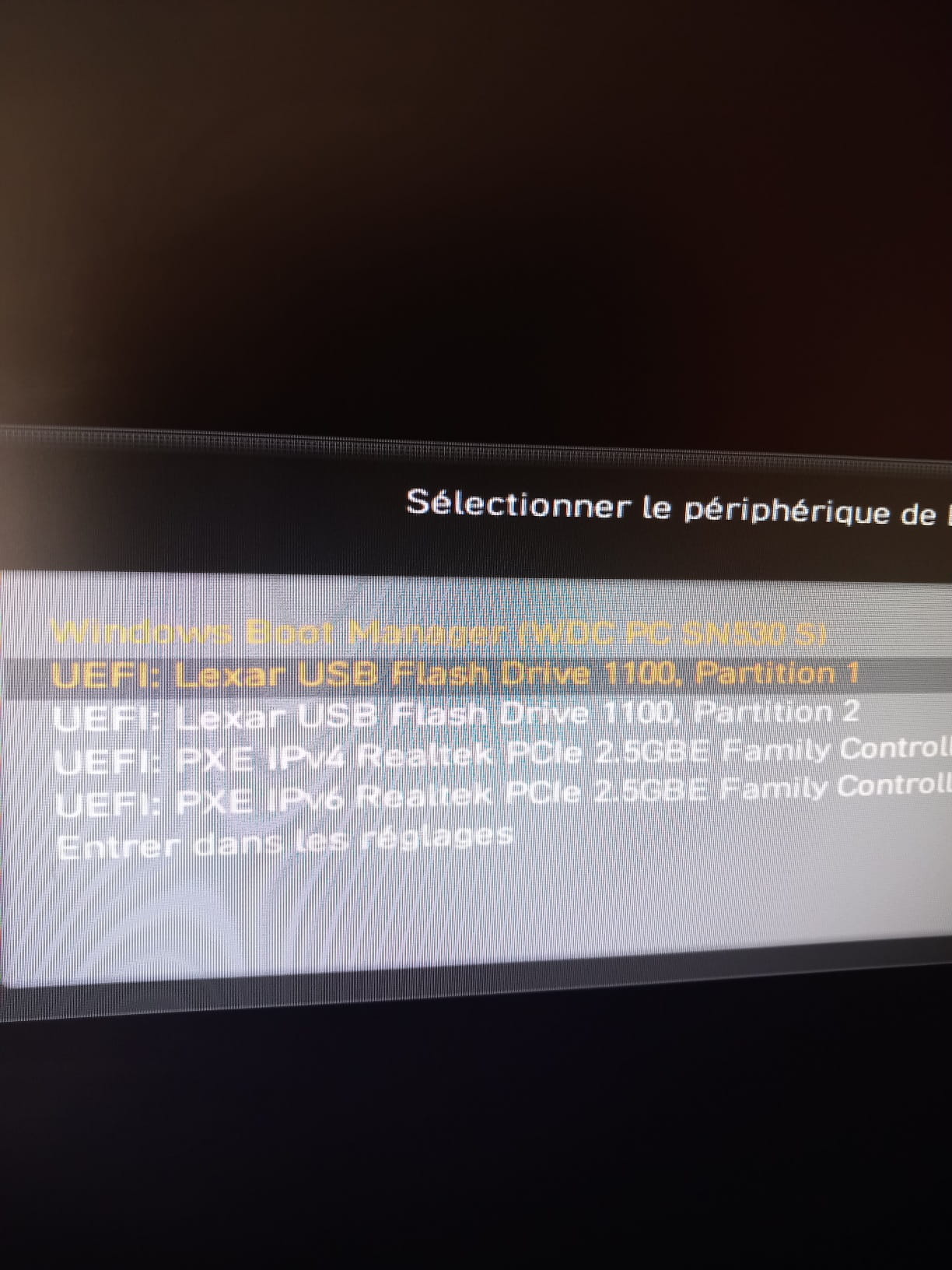
-
Contributeur Ambassadeur@fabul
Le dernier que j'ai passé a été récalcitrant et seul la clé réalisé depuis l'iso avec rufus à fonctionner, j'ai depuis vu un article quelque part comme quoi Microsoft avait fortement restreint la facilité de de contourner ça avec les dernières iso en ligne depuis leur site, il faut soit en trouver une ailleur plus ancienne soit prendre rufus.
Mais sur le fond, je suis 100% d'accord avec toi, w11 pour revendre est un plus indéniable, son pc est compatible , j'avais vérifier coté matériel, à voir quand même si le disque est bien en GPT et le bios en uefi.
-
-
Pour l'instant
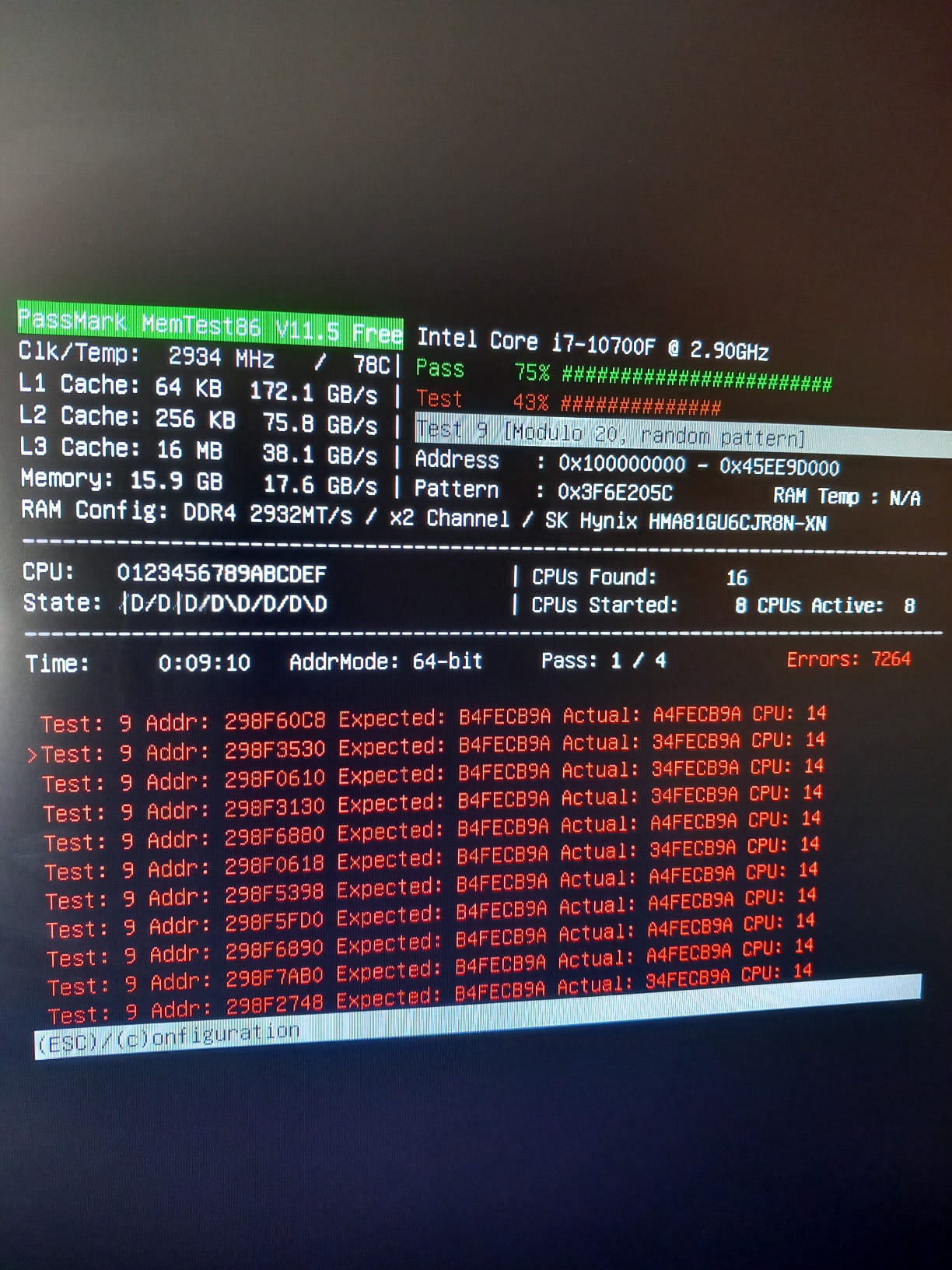
-
-
Modérateur@flo88
J'ai redirigé dans le forum Carte mère / RAM
Je ne saurais que conseiller comme RAM.
Sinon que le CPU I7 10700F aime la DDR4-2933
ou légèrement plus qui peut ête cadencée à cette vitesse
Je ne suis pas expert en RAM -
Contributeur Ambassadeur@fabul
Il a 2 barrettes de 8 go hynix en 2933mhz justement.
Le truc c'est que les prix flambent depuis quelques semaines sur les mémoires...
Celle là irait https://www.cdiscount.com/informatique/memoire-ram/mmoire-ram-pc-kingston-hyper/f-10716-aaape37451.html#mpos=2|mp
C'est un barrette seul mais en double ou sur d'autre fréquence c'est hors de prix à mon goût.
J'ai cherché vite.
Ou alors il faut voir en occasion.
-
-
Je viens de faire la partition 2
-
Tu n'es peut-être pas expert en RAM mais par contre je sais que tu es vraiment un expert tout court et même un gros expert tout court tu m'as vraiment enlever une épine du pied je te remercie vraiment du fond du cœur merci merci
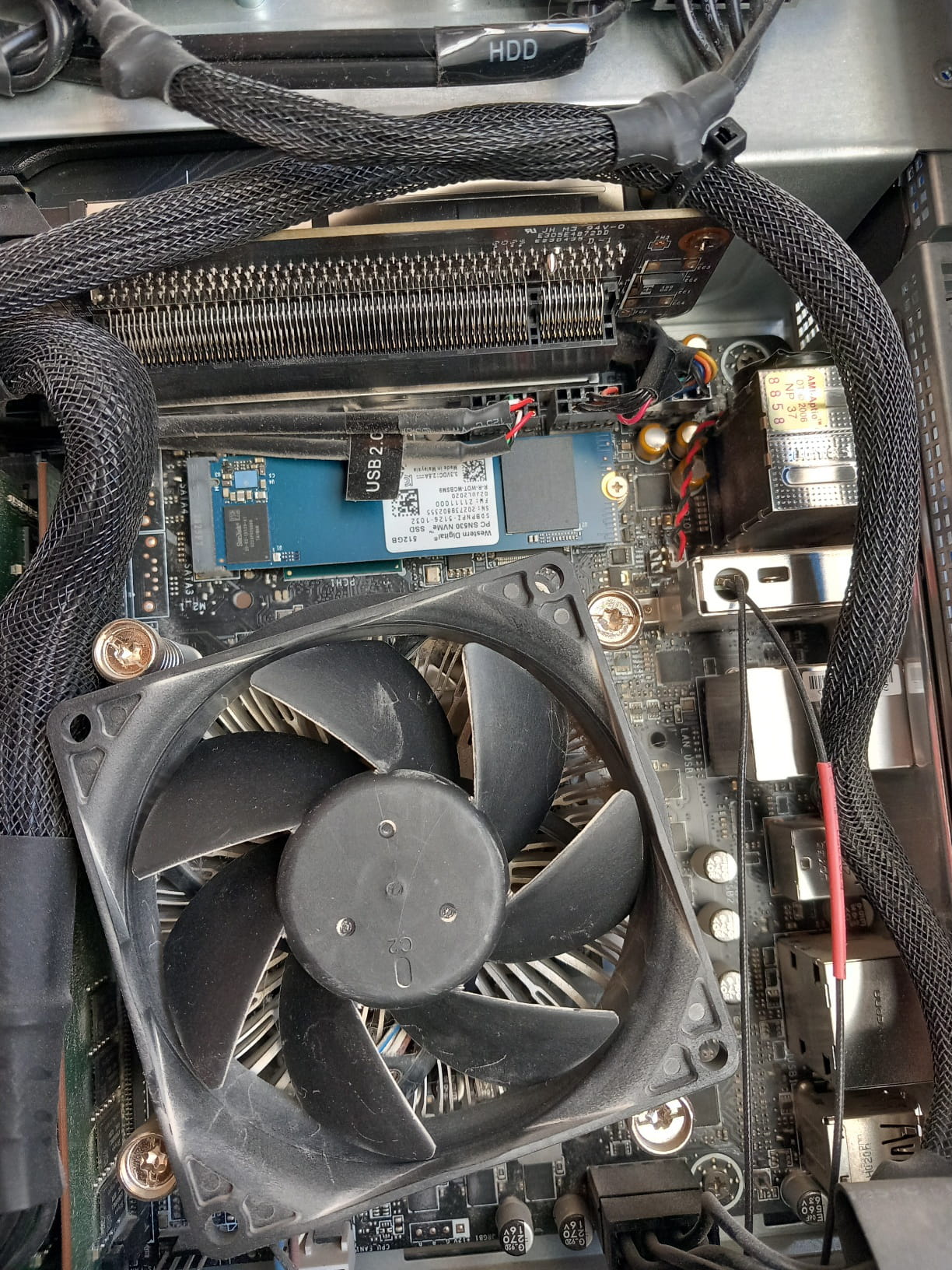
Par contre habituellement je la trouvais sur les gros PC on va dire c'était assez facile mais là comme avec le MSI trident c'est un peu tout réduit je sais pas trop où elle est j'ose pas trop gratter
-
Contributeur Ambassadeur
-
-
Contributeur Ambassadeur
Le moins cher que j'ai trouvé aujourd'hui, les prix changent vite et les promos disparaissent aussi vite qu'elles apparaissent.
Je pense même à une erreur pour ce kit, qui devrait etre au moins du double, on le trouve à plus de 200€ sur certain site...
-
Merci tu es extra, j'ai eu le temps de voir ton précédent post où ct cdiscount
J'avoue que c'était abusé :-( par contre 1 barrette vaut aussi cher que 2 barrettes quasiment
Voilà c'est bon j'ai pu retiré les barrettes, merci pour l'emplacement. :-)
Dis moi stp, suis je obligé de remettre 2x8 ou puis je mettre 1 seul de 16 ou alors 1 seule de 8 ?
Je te dis ça car je change de PC tous les 4/5 ans à peu près, et celui avant le Trident était aussi un i7 et il est au grenier (je les garde tous comme un imbécile) là c'est le premeier que je vends) et si je prenais la barrette de mon ancien pc stp ?
Et que je prenne de mon ancien pc ou que j'achete, j'ai rien à faire ? pas de MAJ ? ou dans le bios ? autre ?
Et pour finir que faut il qu'il soit inscrit obligatoirement ? je vois sur la barrette est isncris 1RX8 PC4-3200AA-UA2-11
-
Contributeur Ambassadeur@ludoAR
un i7 et il est au grenier (je les garde tous comme un imbécile) là c'est le premeier que je vends) et si je prenais la barrette de mon ancien pc stp ?
Il faut regarder ce que c'est comme ram, si c'est de la DDR4 oui tu peux les prendre, peux importe la fréquence du moment que c'est bien de la DDR4 (c'est marqué sur les barettes).
Attention, avant de les toucher, décharges-toi de l'électricité statique (en touchant le plot de terre d'une prise ou la un radiateur partie non peinte en cuivre)
Et que je prenne de mon ancien pc ou que j'achete, j'ai rien à faire ? pas de MAJ ? ou dans le bios ? autre ?
Non rien à faire, tu les installes et ça marche.
Et pour finir que faut il qu'il soit inscrit obligatoirement ? je vois sur la barrette est isncris 1RX8 PC4-3200AA-UA2-11
Si tu as ça sur les barrettes de l'ancien pc, tu peu les prendre sans soucis.
PC4-3200 (PC4 = DDR4 et 3200 c'est la frequence, c'est ok)
-
@flo88
merci <3
alors sur mon ancien pc i7, j'avais une unique barrette de 8go ddr4 en 2400
j'ai bien touché la barre terre d'une prise
donc je l'insère et je n'ai pas l'image sur mon moniteur, pourtant tout marchait bien avec l'unique cable hdmi qui était déjà en place
je me dis bon ben tan pis je vais prendre un display port car mon moniteur a les 2, ben pas d'image non plus :-(
y'a pas une place spécifique pour la barrette vu qu'il y a 2 emplacements ?
-
Contributeur Ambassadeur@ludoAR
Si, de préférence dans l'emplacement le plus éloigné du processeur.
-
@flo88
merci bcp FLo, voilà ca marche enfin :-)
si tu veux les barrettes étaient mal enclenchées (j'entendais pas le craquement)
du coup j'ai refait un test des ram et au bout de 1h39 il tourne toujours mais aucune ligne rouge
dis moi juste une question car mes barrettes ram de 8go de mon ancien pc sont en 2400 en fréquence, c pour mon info perso comme tu maitrises bien, quelle est la différence entre du 2400 et 3200 stp ?
-