
Windows 11 does not recognize the SD card reader.
Solvedkaneagle Posted messages 86263 Registration date Status Modérateur Last intervention -
Hello, after installing Windows 11 without a Microsoft account on a PC that should normally be unable to run it, I realize that the card reader is not recognized. Restarting the PC didn't help. Thank you for your response and have a nice day. whatt02
13 réponses
Hello,
The old card reader driver is likely not compatible.
Check for any alerts in the device manager or if there is a driver available from the PC manufacturer.
Hello and thank you for the response; the device manager doesn't express anything in terms of queries; the USB bus controllers have the best drivers according to Windows; this SD card reader does not exist in the disk manager. And I haven't found a driver corresponding to the Aspire F15 laptop on the Acer site (or driver if I'm not mistaken). I will continue to search... Have a good day. Whatt02

Hello,
Windows key + X
Device Manager
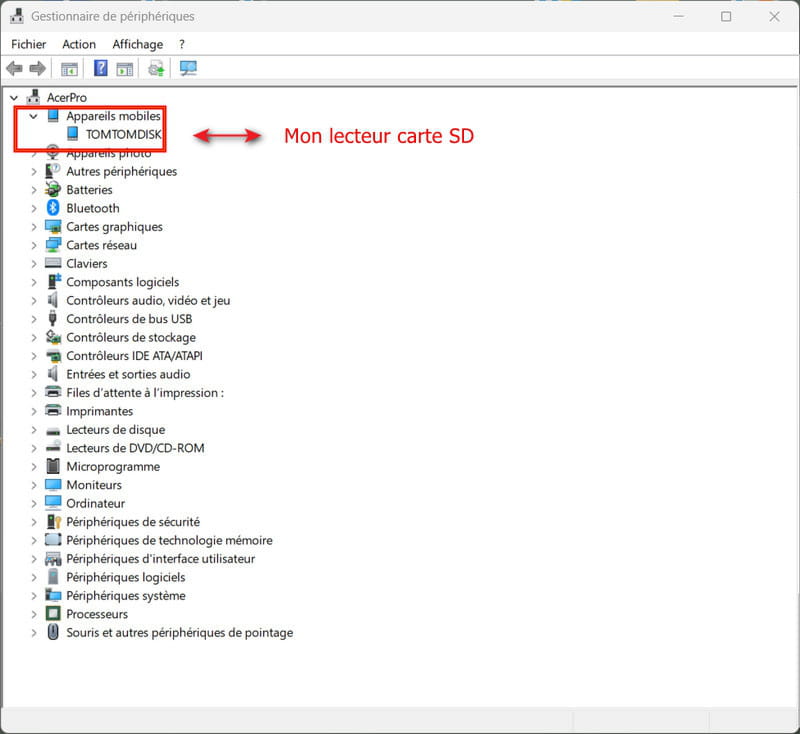
Do you have a section --> Storage devices or Disk drives?
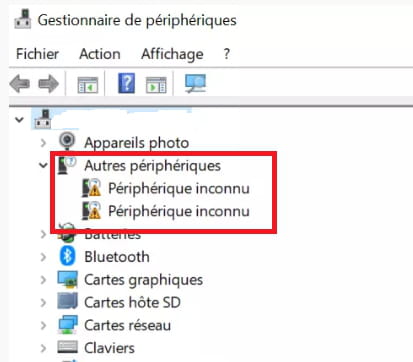
Also check if there is a section --> Other devices?
If so, what is the problematic device?
Example image:
---------------------------------------------------------------------------------------------------------------
No, the model is incomplete, Aspire F15 .......?
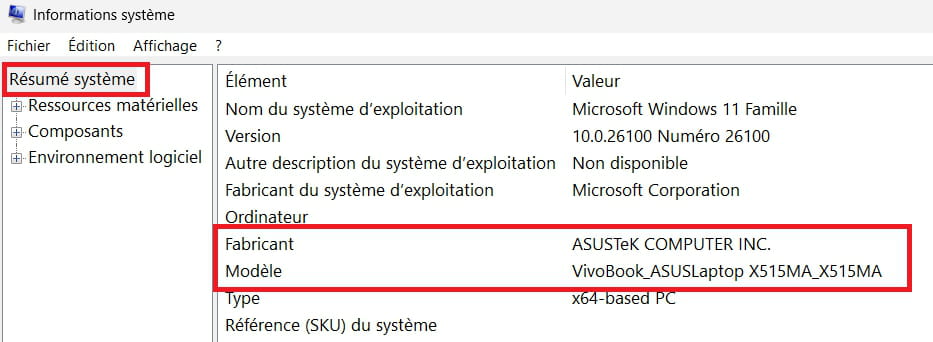
Windows + R
Type --> msinfo32.exe and OK
Look under Manufacturer and Model
Example image:
Hello, my apologies, I didn't see the yellow signals from the device manager. There are other devices with 5 subfolders - PCI data acquisition and signal processing controller - SM bus controller - PCI memory controller - simplified communications PCI controller and - PCI device. The drivers are not installed and Windows cannot find them.
The complete specifications of the PC are:
Computer DESKTOP-58DPNK1
Manufacturer Acer
Model Aspire F5-573G
Type x64-based PC
System SKU Aspire F5-573G_115C_1.27
Processor Intel(R) Core(TM) i7-7500U CPU @ 2.70GHz, 2901 MHz, 2 core(s), 4 logical processor(s)
BIOS Version/Date Insyde Corp. V1.27, 26/05/2017
I would have liked to copy a screenshot of the device manager, but it never worked. Thanks again. Have a good evening. Whatt02

Hi
I have the same one, an Aspire F15 F5 573G with the same version of BIOS and W11 25H2
This W11 comes from an upgrade from W10
The SD card reader works without me having done anything special
You have this version of W11 and have you done one or more Windows Updates?
I have no alerts in the device manager
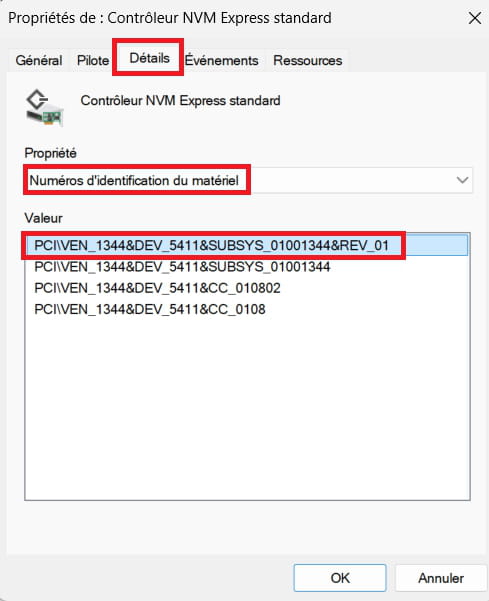
Post the no. Device IDs of the 5 peripherals:
Right-click on a device
Properties
Details tab
In Property, select --> Device IDs
Example image:
Good evening, below are the data
PCI data acquisition and signal processing controller:
PCI\VEN_8086&DEV_9D31&SUBSYS_115C1025&REV_21
PCI\VEN_8086&DEV_9D31&SUBSYS_115C1025
PCI\VEN_8086&DEV_9D31&CC_118000
PCI\VEN_8086&DEV_9D31&CC_1180
SM bus controller
PCI\VEN_8086&DEV_9D23&SUBSYS_115C1025&REV_21
PCI\VEN_8086&DEV_9D23&SUBSYS_115C1025
PCI\VEN_8086&DEV_9D23&CC_0C0500
PCI\VEN_8086&DEV_9D23&CC_0C05
PCI memory controller
PCI\VEN_8086&DEV_9D21&SUBSYS_115C1025&REV_21
PCI\VEN_8086&DEV_9D21&SUBSYS_115C1025
PCI\VEN_8086&DEV_9D21&CC_058000
PCI\VEN_8086&DEV_9D21&CC_0580
Simplified PCI communication controller
PCI\VEN_8086&DEV_9D3A&SUBSYS_115C1025&REV_21
PCI\VEN_8086&DEV_9D3A&SUBSYS_115C1025
PCI\VEN_8086&DEV_9D3A&CC_078000
PCI\VEN_8086&DEV_9D3A&CC_0780
PCI device
PCI\VEN_10EC&DEV_5287&SUBSYS_108F1025&REV_01
PCI\VEN_10EC&DEV_5287&SUBSYS_108F1025
PCI\VEN_10EC&DEV_5287&CC_FF0000
PCI\VEN_10EC&DEV_5287&CC_FF00
Have a good evening.
Whatt02
Download and install --> 7Zip 64 bits
For PCI data acquisition .......:
Download this driver --> Chipset
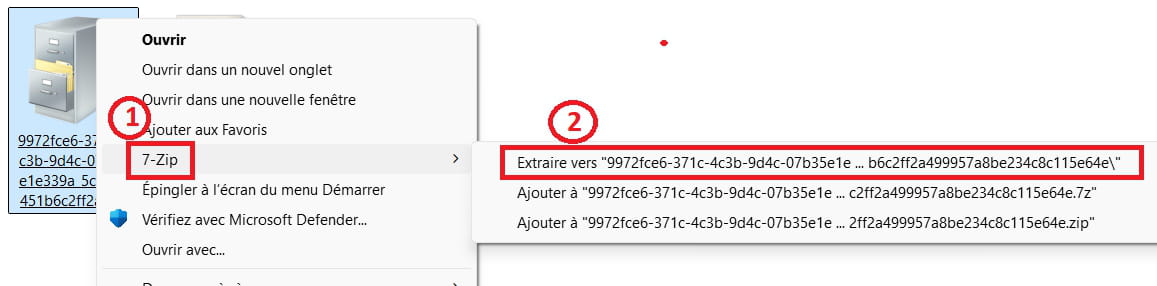
Right-click on the driver --> 9972fce6-.....cab
Select --> 7Zip
Choose --> extract to "9972fce6-.......\"
Go to Device Manager
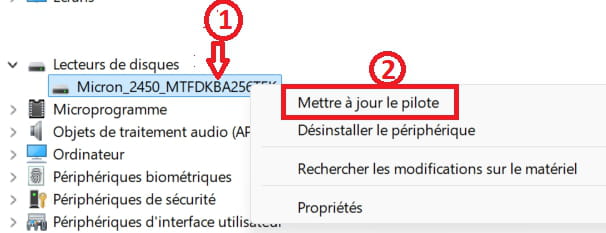
Right-click on the device --> PCI data acquisition .......
Update driver
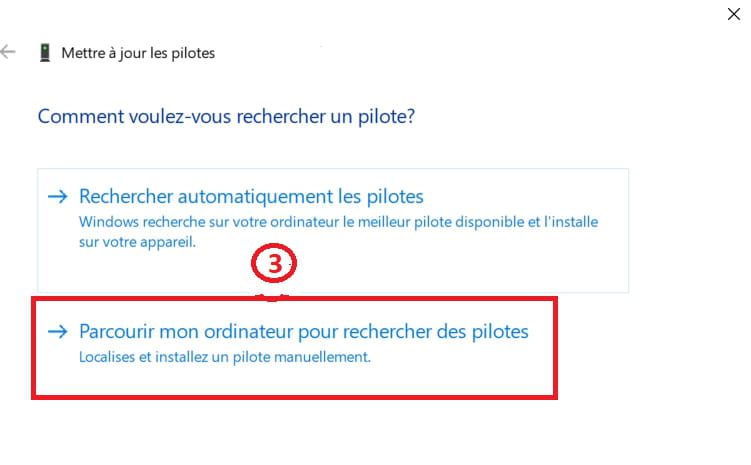
–>> Browse my computer for driver software <<–
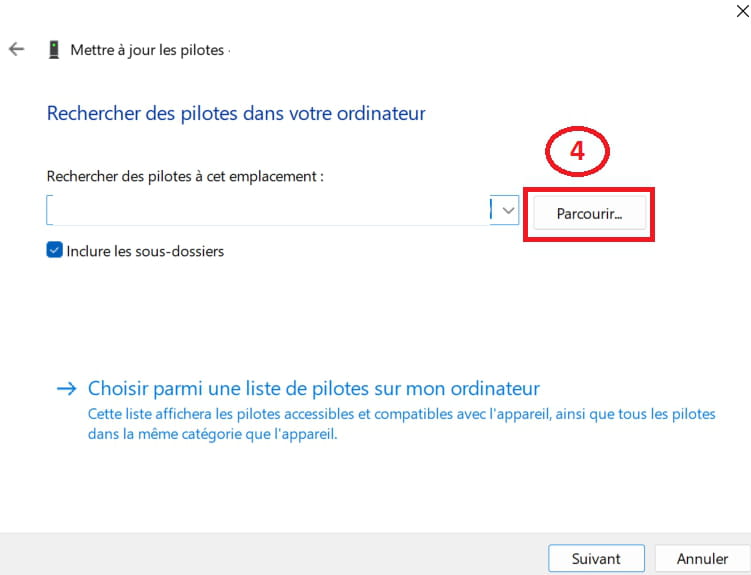
–>> Browse <<–
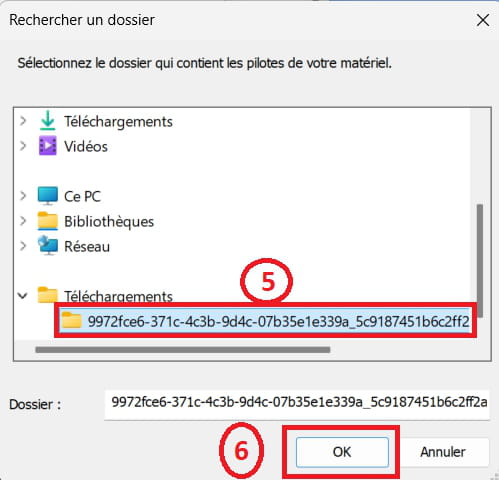
Select the folder of the unzipped driver --> 9972fce6-.......
OK, next
---------------------------------------------------------------------------------------------------------
For the SM Bus Controller:
Download this driver --> Synaptics SMBus Driver
Right-click on the driver --> sp144934.exe
Select --> 7Zip
Choose --> extract to "sp144934\"
Go to Device Manager
Right-click on the device --> SM Bus Controller
Update driver
–>> Browse my computer for driver software <<–
–>> Browse <<–
Go to the folder of the unzipped driver --> sp144934
Select the folder --> dchu_DRV
OK, next
---------------------------------------------------------------------------------------------------------
For the PCI Memory Controller, use the same driver as for PCI data acquisition, that is the chipset:
Go to Device Manager
Right-click on the device --> PCI Memory Controller
Update driver
–>> Browse my computer for driver software <<–
–>> Browse <<–
Select the folder of the unzipped driver --> 9972fce6-.......
OK, next
------------------------------------------------------------------------------------------------------
For the Simplified Communications PCI Controller:
Download this driver --> HECI
Right-click on the driver --> d542becb-.....cab
Select --> 7Zip
Choose --> extract to "d542becb-.......\"
Go to Device Manager
Right-click on the device --> Simplified Communications PCI Controller
Update driver
–>> Browse my computer for driver software <<–
–>> Browse <<–
Select the folder of the unzipped driver --> d542becb-.......
OK, next
---------------------------------------------------------------------------------------------------------
For the PCI Device:
Download this driver --> Realtek
Right-click on the driver --> drvbin64.....cab
Select --> 7Zip
Choose --> extract to "drvbin64.......\"
Go to Device Manager
Right-click on the device --> PCI Device
Update driver
–>> Browse my computer for driver software <<–
–>> Browse <<–
Select the folder of the unzipped driver --> drvbin64.......
OK, next
Restart the PC
Hello and thank you for the response, which is too complex for my very limited abilities in this area; I haven't gotten far in the process because I never found the "chipset" driver. Thanks anyway for all this late-night research. Have a good day. Whatt02
I didn't get far in the process because I never found the "chipset" driver. All the links in blue are for the drivers I created for you to download.
--> Chipset
--> Synaptics SMBus Driver
--> HECI
--> Realtek
First, download --> 7Zip 64 bits
Install it
Afterwards, carefully follow the procedure for the manual installation of the drivers.
Complicated and it doesn't work. When I downloaded the chipset, I right-clicked on it and I don’t have the 7zip option. I'm stuck with the choices offered by windows. No worries, I will do without this reader... Have a good day and thanks again. Whatt02
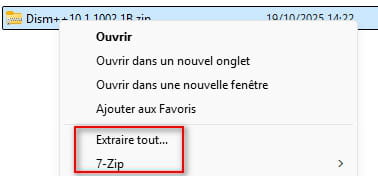
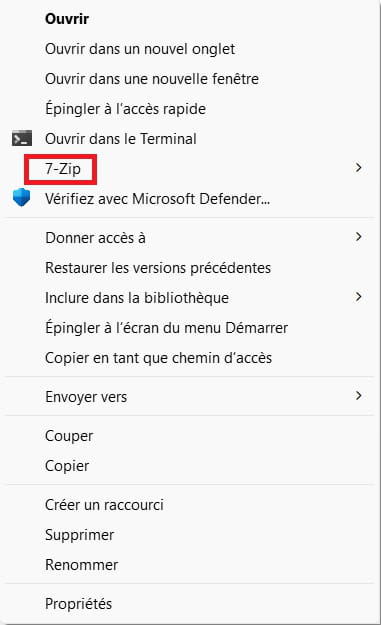
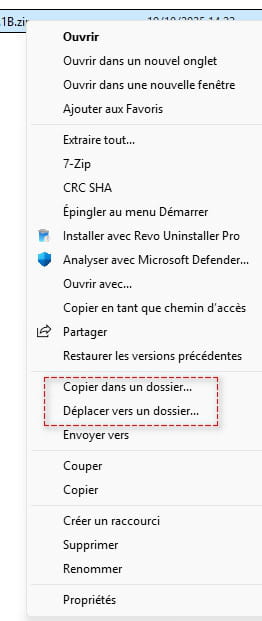
I right-click on it and I don't have the option for 7zip Have you installed 7Zip properly?
If not, download and install it --> 7Zip
It gives this:
----------------------------------------------------------------------------------------------------------
Afterwards, here are some example images for a manual installation of the chipset:
1- Right-click on the device
2- Update the driver
------------------------------------------------------------------------------------------------------------
3- Browse my computer for drivers
--------------------------------------------------------------------------------------------------------------
4- Browse
---------------------------------------------------------------------------------------------------------------
5- Click on the folder of the unzipped driver --> 9972fce6-.......
6- OK and next.
---------------------------------------------------------------------------------------------------------------
Take your time, nothing is urgent here.
We are here to help.
Good evening and thank you for the serious help you provided me. In fact, I had to go to the 7Zip at the bottom of the menu by clicking on other options. What followed, namely the installation of the new drivers, was rather simple even though it didn’t always follow the protocol you had defined. Thanks again to you and to those who thought about this blockage. Now, I hope it will be sustainable. Have a good evening. Whatt02