
Safely Remove External Device
Solvedbrucine Posted messages 24910 Registration date Status Member Last intervention -
Hello,
I am on Windows 11. A logo located in the hidden icons allowed me to safely Remove an external device (for me, it's an external hard drive). This logo has disappeared. I can't properly eject the aforementioned drive. It doesn't work with a right-click like it does for USB drives, the option doesn'tExist?
What can we do to get this logo back?
Best regards
8 answers
-
Good evening,
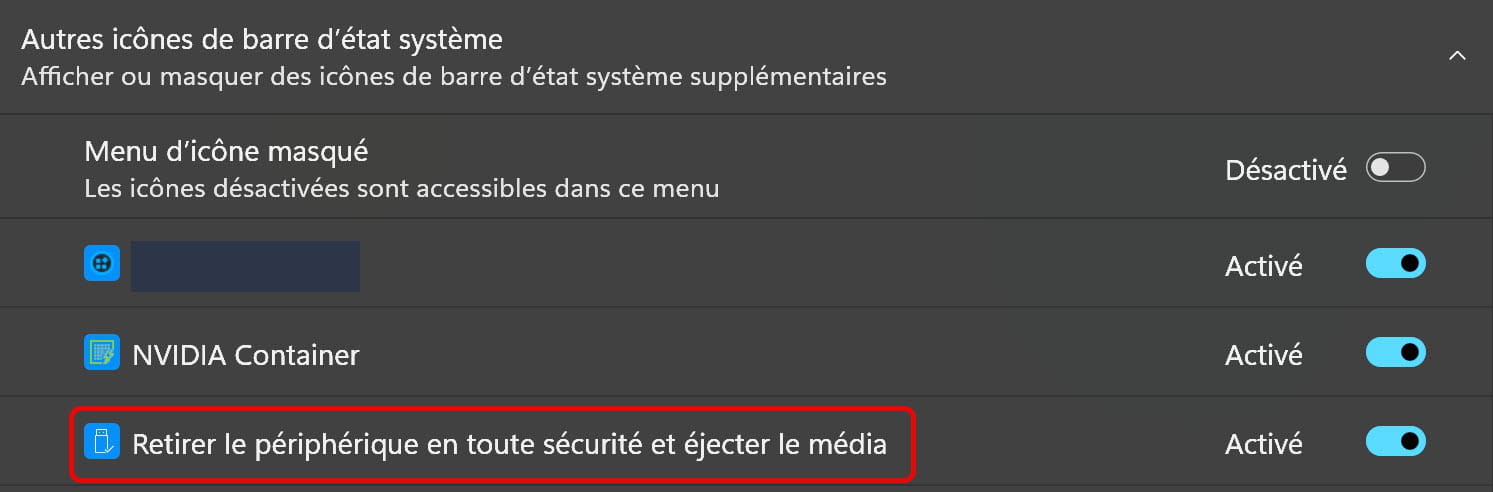
Search in Settings > Personalization > Taskbar in Windows 11...
-
Good evening,
I did what you asked me. The "safely remove hardware and eject media" option is indeed activated! But the logo still doesn't appear!
-
But I did exactly that. It doesn't change anything about the problem.
-
Good evening,
Okay, I found it: I don't like the Windows 11 taskbar that automatically sits at the bottom. I was used to having it at the top of the screen with Windows 10.
While looking on the forums, I discovered that there was software (ExplorerPatcher) that allowed me to revert to the Windows 10 taskbar, so I've been using it for a while now. That's where the problem comes from.
Thank you for your help - Regards
-
Hello, Good evening,
I've been using Explorer Patcher for a long time, never had this problem.
On the desktop, create a New > Shortcut
Target: C:\Windows\explorer.exe shell:::{05d7b0f4-2121-4eff-bf6b-ed3f69b894d9}
Then click on it and see if it helps you with the option to always show all icons.
Creating and running a .reg file with these lines to clean the notification area icon cache may helpWindows Registry Editor Version 5.00
[HKEY_CURRENT_USER\Software\Classes\Local Settings\Software\Microsoft\Windows\CurrentVersion\TrayNotSIB]
"PastIconsStream"=-
"IconStreams"=-Then restart Windows
Create and run a .bat file with these lines to clean the explorer cache may also help.
taskkill /im explorer.exe /f
cd /d %userprofile%\appdata\local
attrib -h -r -s iconcache.db
del iconcache.db /q
cd /d %LocalAppData%\Microsoft\Windows\Explorer
del *.* /q
start %windir%\explorer.exe
With some motherboards, the S.M.A.R.T. Monitoring option > Enable can make this icon appear, even when there are no USB devices connected, which is less desirable.-
Hello,
I deliberately set the Windows 10 style to customize the toolbars in the taskbar, that's the only reason I'm using Explorer Patcher.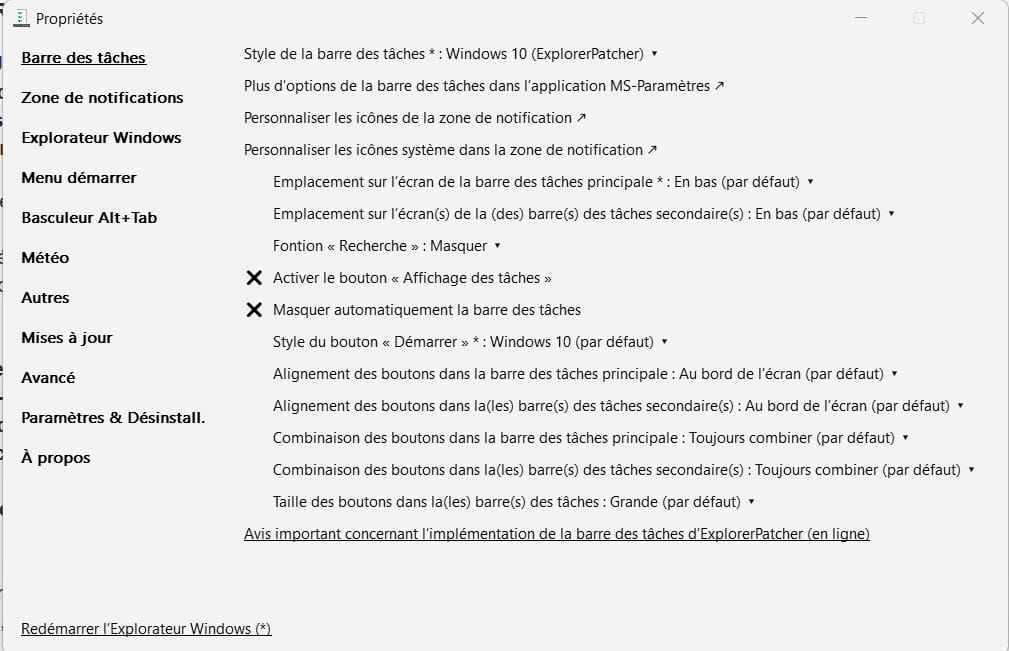
During the setup, the icon may have been accidentally unchecked in the Customize icons in the notification area.

Hello,
response for fabul: for the 'explorer' shortcut option it's done but it doesn't work. As for the other two options, since I'm not very tech-savvy, I'd rather not use them.
response for brucine: I had already done that manipulation. It doesn't give anything more.
In any case, the option "Remove device.... eject media" is indeed activated.
It works with a USB stick but not with an external hard drive?
Thank you both for your help - Best regards
-
Hello,
As a secondary point, I raised the issue a few days ago about a subject that has nothing to do with it: the controller of a number of external drives makes them not recognized as removable devices but as fixed drives and therefore non-ejectable.
There are a number of old utilities that force the opposite, but I haven't used them on Windows 10 or 11, and I'm not sure if they still work there or even if they can tackle the bit responsible for this behavior.
Since we’re dealing with registry tweaks, there is one that makes all devices be considered removable, but this might not be desirable.
It happens, and it has happened to me, that one has to physically disconnect a USB drive (of course after having left it unused for a while) because there is no other solution, come what may. -
Open Regedit and go to (Copy in the address bar and press Enter)
HKEY_CURRENT_USER\Software\Classes\Local Settings\Software\Microsoft\Windows\CurrentVersion\TrayNotSIB
And in the right pane, delete the two values
"IconStreams"
"PastIconsStream"
Then restart Windows.
It will do the same thing as the .reg file.
Hello,
On my computer, I always have the icon to eject the external HD in the taskbar.
But if I go to the File Explorer, I don't have the Eject option when I right-click on the external drive. However, this option is available for a USB stick. The external drive is therefore not considered as a device.
When we go to the Device Manager and right-click on the external drive, we can go to Properties then to Policies. We see this:
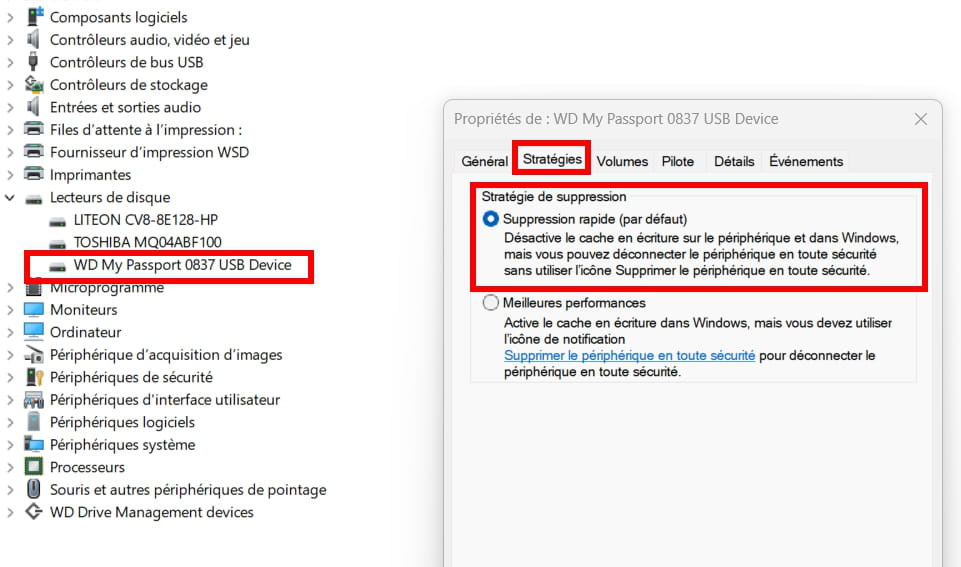
It therefore seems that by default, we can disconnect the hard drive without needing to eject it.
When we finish writing to the disk, we should be able to remove it without dismounting it.
What is well conceived is clearly stated,
And the words to say it come easily.
(Boileau)-
Hello,
I'm too lazy to connect a USB stick, I currently have an external USB drive and an SD card.
Both also show up in the device manager as mobile devices.
They are indeed recognized as devices, but as I said, the external drive is not removable.
The simplest way to convince yourself, for those who still have 24H2, is to go through wmic.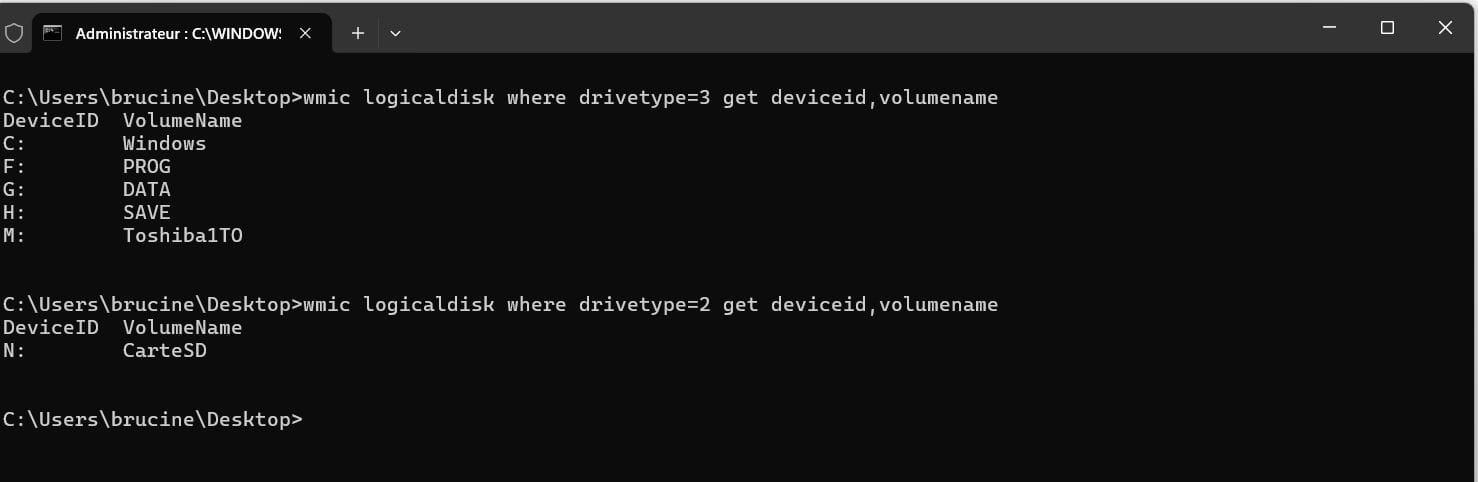
Hello,
I completely agree with what brucine says (in desperation I act like him),
As for Pierr10: it's the same for me: quick deletion (by default) is checked and according to what is stated in the label, you can safely disconnect the device without using the icon.
I followed the instruction recommended by Fabul: the icon cache must have been cleared, but it doesn't change anything.
In conclusion: it works for USB drives but not for an external hard drive; for those using Explorer Patcher, if you choose the W10 style it doesn't work no matter what you do. However, with the W11 style it works, but the taskbar is at the bottom, which I don't want; might as well go back to the original W11 taskbar!
Thank you all
-
Hello,
The snake bites its own tail; if we want to recover the features removed since Windows 11 22H2 in Explorer Patcher (for me, creating customized toolbars in the taskbar, for you moving it), we need to set it to Windows 10 style.
There used to be a registry tweak that worked without going through Explorer Patcher, now reported as non-functional, but we can still try it, or use third-party utilities like Taskbar 11 or Winaero Tweaker.
These utilities only hide the misery of the modifications under a graphical interface; the latter has passed the buck by referring to Explorer Patcher, while the former only gives us the choice at the top, I don't know.
https://lecrabeinfo.net/tutoriels/windows-11-deplacer-la-barre-des-taches-en-haut-de-lecran/
Other sources suggest, I haven't tested:
https://www.startallback.com/
-


