
Internal hard drive missing or failing?
jonas59 Posted messages 18 Registration date Status Member Last intervention -
Hello,
It's been 3-4 months since I last managed to access my 1 Terabyte internal hard drive "D". No issues accessing my "C" drive, but that's not where I stored my data.
At startup, my PC initiates the repair for this drive, I suppose, although not always, but in any case, there's no D drive at the end....
So I'm not quite sure if it's just dead or inaccessible for some reason... My PC is a few years old now, it's an Acer Aspire 3 laptop.
Since I've been busy with other things, I've kind of set this aside. I transferred my photos just before it failed roughly, and the rest of my documents at the beginning of the year. It's a bit of a hassle to try to recover my documents since the beginning of the year here and there, and to store on an external HDD, so I was wondering, is my drive really dead or not?
I've looked here and there on forums, but I haven't found anything conclusive? Or maybe I didn't search well.
Should I go to a repair shop or can this be solved in another way?
I thank in advance the kind soul(s) who will take a look at my problem...
16 answers
-
Hello.
Test your hard drive/SSD with CrystalDiskInfo use the following color codes to interpret the results:
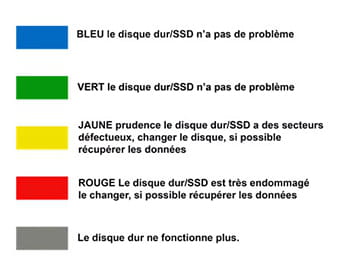
Clipping from Bazfile ;-)
-
Hello MysteryBean
Thank you for your response
I have a blue result at 74% for my drive C, the drive D does not appear...
To provide the most complete information, before my drive D disappeared, I started losing some files, some photos... (I just read another post that talks about this). So I saved my photos on an external drive.
When I plug in my external drive, it is blue and "good" (and it is named "D").
Good evening
-
RE_
74% is certainly an SSD, but the % is a bit low.
For the external drive, have you tried several ports on your PC?
Have you tried with another cable?
-
Hello
My external drive is working perfectly (condition "good" blue color), the problem is the internal drive I had that is no longer detected.
I have a C SSD drive of 118 Go and I had a D drive of 1 terabyte where I stored my data, which has disappeared.
-
If you have Win10 (you didn't specify), right-click on the Windows logo and then "Disk Management" does it appear?
-
Yes, I have Windows 10
No, it doesn't appear, I have the C drive 118GB, a 100MB partition, and a 1GB partition
-
Since it's a laptop, there aren't many solutions.
You should try opening the PC, removing the HDD, and putting it back in, as it may have come loose due to a shock.
Then, you can choose to buy an external case, put the HDD in it, and connect it via USB to see if it works. example
-
Hello
I opened my laptop.
I only found one actual disk, according to my knowledge... I assumed it was the 1 terabyte hard drive. But the screws around it are really too tight; I need to try again with a screwdriver to unscrew them.
On the other hand, I made sure everything was positioned correctly and I removed a bit of dust.
I turned the PC back on and ran a test with CrystalDiskInfo, the disk now appears, it doesn't have a letter, and I have a yellow "caution" box.
And now it shows up in disk management: disk 0, 931GB RAW, healthy, but it appears "hashed"
But I can't access it in my folders
-
RE_
Unfortunately, it seems dead, not sure you can recover any data.
If it is striped, should it be marked as "unallocated" like a new disk?
You can try to format it as "New simple volume" by right-clicking on it and then trying to recover data with one of these => Software <=
-
Hello
In fact, no, it is not greyed out, it's just that it was selected.
I have disk 0 of 931 GB and disk 1 of 119 GB, both are "online" and "healthy" and "basic data partition". The only difference is that disk 0 is in RAW, while the other is in NTFS.
However, in the top lines, disk 0 has no name and shows 100% free space, while disk C is named (Acer (C:)) and has 4% free space.
I tried to assign the letter D, but I got an error message saying that the disk is damaged and unreadable.
-
RE_
So, try to see if the recovery software (my link above in blue) detects the hard drive, and if so, try to recover the data.
If it doesn't detect it, try to assign a letter using DISKPART
-
Hello
With Ease Use Data Recovery for example, it works, the disk is detected (in yellow with a no entry sign), it starts searching for files, and at one point it tells me that the disk is disconnected.
Concurrently, the disk is detected (without a letter assigned) in Disk Management, and at one point it disappears, as if I had disconnected it.
I tried a couple of days ago, and today the same result.
DiskPart does not find my drive. But once I tried and it found it. I assigned it the letter D, but then my whole computer started lagging...
-
RE_
Unfortunately, as mentioned earlier, it is broken and I don't think you can do much to recover your data.
-
Hello
Thanks for the help anyway
I think the best thing is for me to get the documents I'm missing from the internet and my email, and store everything on external drives.
Is it worth it for me to buy an enclosure to read the internal drive? If I manage to take it apart...
-
Hi,
Is it worth it for me to buy a case to read the internal drive? If I manage to disassemble it...
I don't think so. If you have access problems on the PC, it won't get better with an external case.
-
