PC that doesn't run normally

luckydu43 Posted messages 4501 Registration date Status Member Last intervention -
Hello everyone
I have a PC with good specifications, but for the past few months, it's not working properly.
I've tried to solve my problem in different ways
updating drivers
updating Windows and others, nothing works
I wanted to format it
and I ended up with three boot sessions
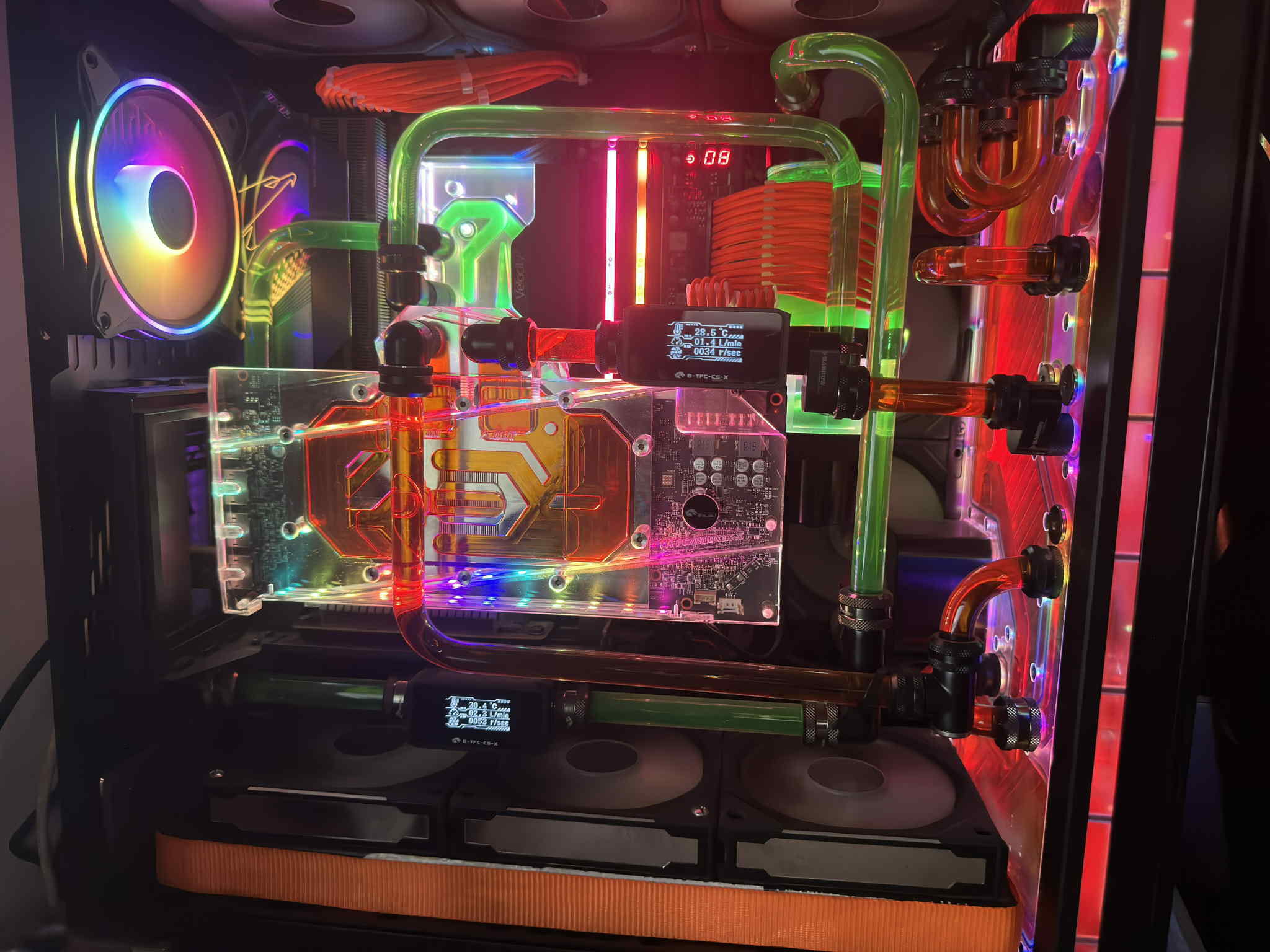
The PC is partially water-cooled
GPU and CPU
my PC
https://www.driverscloud.com/fr/configuration/szx8e8pr7xr-1/resume
I notice that the PC doesn't perform well in Call of Duty Warzone
before, it ran at 200 fps and now it runs at 105 during action with lots of lags
The graphics card is cooled with a Bykski Waterblock VGA MSI AMD Radeon RX 7900 water block on one circuit EK Water Blocks Quantum Reflection PC-O11D XL D5
The processor is on a VELOCITY 2 water block on another circuit reservoir on Bykski D5 pump
PC with rigid tubes
10 fans
I am attaching 2 photos of the PC
5 answers
-
Hello
This kind of request is too broad to be answered in 30 seconds. You'll spend days on your own following the guide below, but it will pay off!
More than the RX 7900, we need to see if the rest holds up. That said, let's skip this step since "before, it ran at 200 fps"
- First: viral analysis; use several free softwares ONE AFTER THE OTHER to ensure there is no infection. Avira then Avast for example.
- installation with online virus definitions updates.
- offline scan in safe mode
- the software should be uninstalled using Geek Unistaller (link) for example before installing the next one.
- Then do an integrity check (link)
- then a chkdsk c: /f /r /v b (to be launched in a terminal, will work on reboot)
- Finally, take a look at the installed apps with your uninstaller (Geek mentioned above) then in the "Startup" menu of the task manager and clean up if needed.
For what follows, I assume that the PC is clean but that, just in games, it lags.
- Update the drivers with DriverBooster (link), removing EVERYTHING during installation. Also to be uninstalled after use. It does its job of updating very well but it's a lousy software.
- the graphics driver should be updated at this occasion
- Use MSI Afterburner. This software provides a graphical view of all the PC's data and works with all brands and graphics chipsets.
- You’ll see temperatures, frequencies, everything to check if something is off in games.
- At the same time, open your task manager to check if the CPU and/or RAM is not maxed out.
Good luck and keep me updated
The MAMAA don’t have oil but they have data!
Can you feel my Big Data?
Sacrifice some freedoms for more security and you lose them ALL.
ALL YOUR DATABASE ARE BELONG TO US - First: viral analysis; use several free softwares ONE AFTER THE OTHER to ensure there is no infection. Avira then Avast for example.
-
Good evening
First problem: password does not work in safe mode
I managed to get the window to enter the password, but I'm told it is incorrect.
-
For the safe mode password, first note the account that requires authentication. In the example, it will be "Administrator".
Return to normal startup on your regular account, let's say "Shiva".
Open an elevated command prompt, type
whoami
it will output;
Shiva
Type
net user
You will get the list of users like this:
-------------------------------------------------------------------------------
DefaultAccount Administrator ShivaThen type
net user Administrator yourdesiredadministratorpassword
Press enter
Restart in safe mode and try this new password ;-)
-
-
Good evening,
I saw in your configuration that you have integrated graphics in the CPU > AMD Radeon(TM) Graphics.
Check when you play; make sure you are actually using the RX 7900 XT and not the integrated graphics AMD Radeon(TM) Graphics, you never know.
-
I doubt that the APU integrated into the processor provides 100+ fps under the same graphical settings that "limit" a RX 7900 to 200 fps.
To verify this, @Shiva80 StatusMember, just launch Warzone with the task manager in the background and check, in the Performance section, if it's the right GPU of the two that is taking 80~100% usage.
I also doubt that the APU gives 100+ fps but that's just to be sure. What's strange is how he was able to play at 200 fps and suddenly he's only getting more than 100 fps.
Unless there’s been an update, a bug in the game that has reduced the game's performance, that has been seen in some games where players complain that games are poorly optimized after an update.
He should test other games to see if he has the same performance issue on others as well or if he only has this problem on certain games.
-
-
Hello
as for the password, it's always the same thing
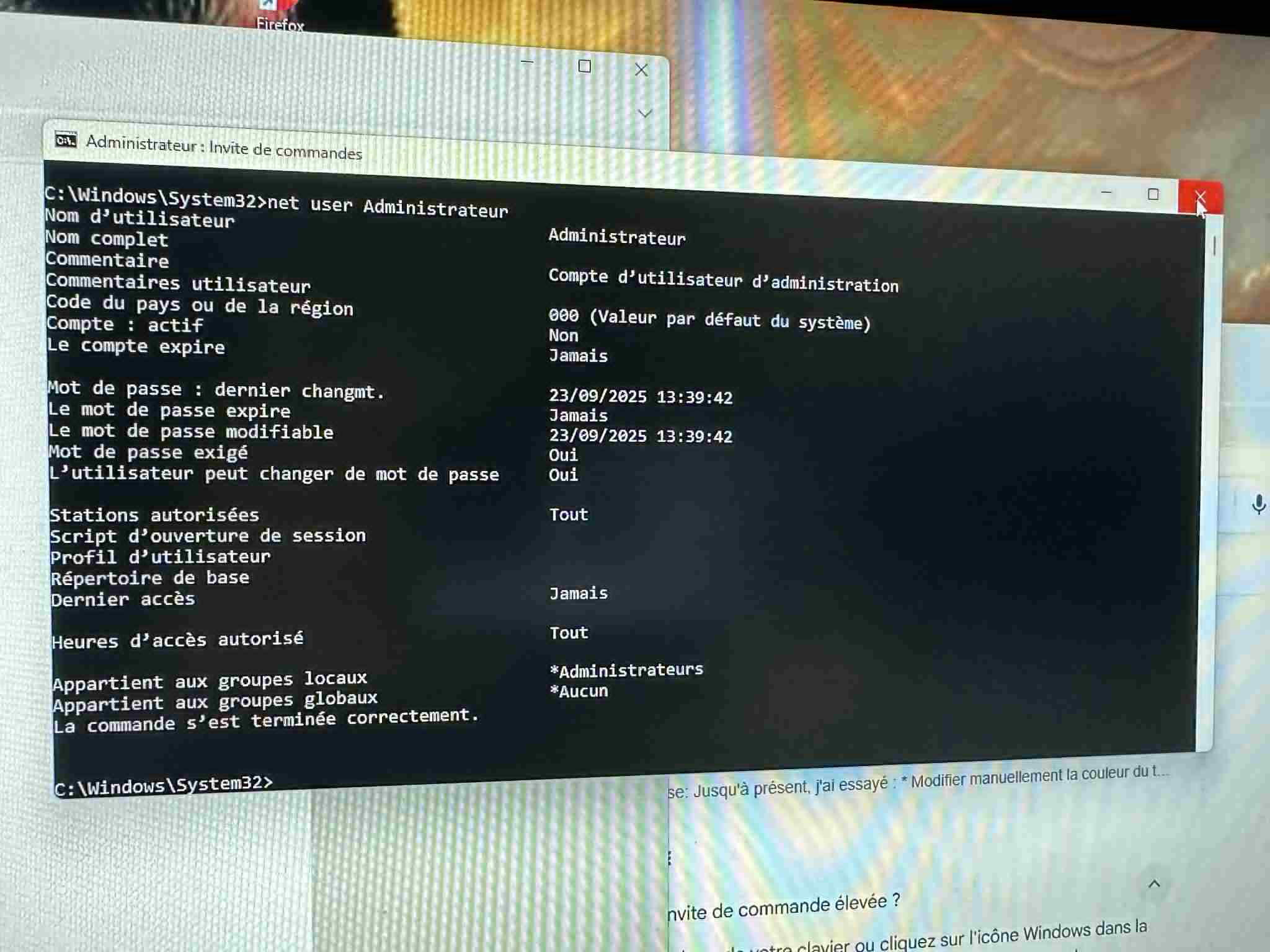

for Kiilla
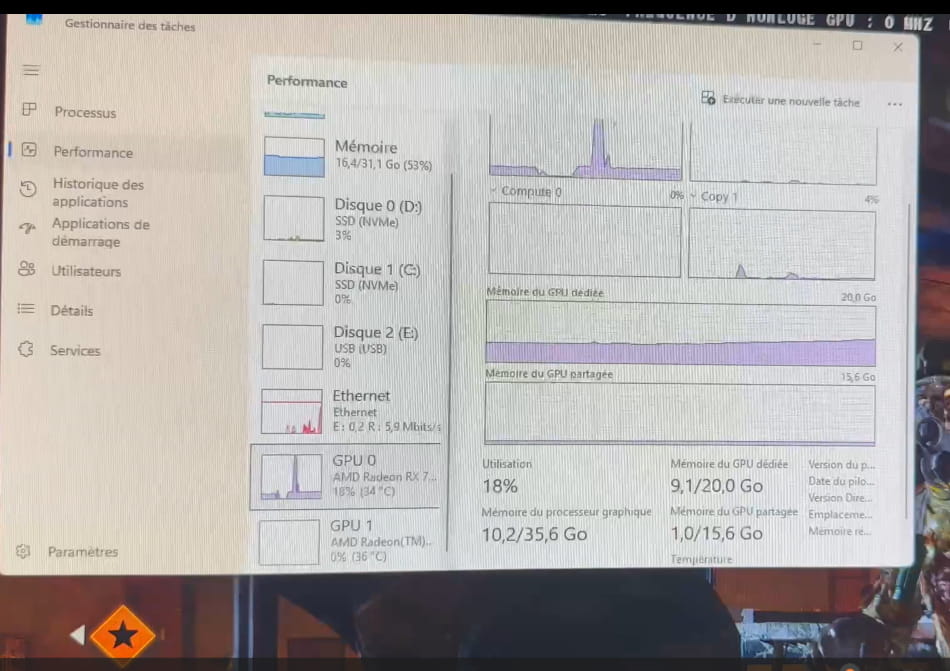
The game was launched for 30 seconds.
I saw that on my side in the Summary drivers
32 GB of total memory of DDR5 type at 12 GHz (3x4 GHz)
Corsair 16 GB stick
Maximum frequency: 2400 MHzBandwidth: DDR5-4800Maximum XMP frequency: 0 MHzXMP bandwidth: DDR5-0
Corsair 16 GB stick
Maximum frequency: 2400 MHzBandwidth: DDR5-4800Maximum XMP frequency: 0 MHzXMP bandwidth: DDR5-0
Maximum frequency: 2400 MHz does not match my RAM
-
"Maximum frequency: 2400 MHz this does not correspond to my RAM"
Yes, see here (link).
Type the command
net user Administrator yourdesiredadministratordpasswordOr
net user Administrator * Enter yourdesiredadministratordpassword Enter yourdesiredadministratordpassword Enter The command completed successfully
both are the same but it's to be done on the account requested at the time of safe mode.
Otherwise, too bad, disconnect the computer from the network and run the scan. It's just to see if there is an infection; there's a good chance there isn't, so no need to press too hard on this point.
-
-
re
sorry but it doesn’t work
I do
net user AdministratorEnter(there I tried this text)
adminpasswordyouwanttoset)Entercommand not recognized
Avira found nothing