
Printer issue
Solved
Macdec -
Hello everyone, (Francis, Ritchi, Aliboron)
It's been a long time since I've come to ask a question, so here it is:
My printer, despite being quite recent although the model... Canon TS 6350a is already old, and although the copier works, I can no longer print from my MacMini M2 (2024) running Sequoia, except occasionally, and I can't figure out why! I'm fed up and, since Apple no longer recognizes Canon, I'm considering replacing this young antique.
My question is: which multifunction printer do you think is good/very good, with a USB connection or other WiFi, easy to set up for my very old neurons?
Thank you all, long-time friends of the Web.
When it’s urgent, it’s already too late (Talleyrand)
When all else fails, read the manual or come to CCM ;)
11 answers
-
Hello everyone.
The mysteries of computing are unfathomable.
This morning I see an update notice for Sequoia and Tahoe, having not received much information about the latter, I decide to proceed with the update for Sequoia.
Update completed, I see, in my Dock, the Image Capture icon and I think I would do yet another scan test.
I turn on my printer, launch Image Capture and there, miracle, I see my printer and the scanning function operational, I place a document on the glass of the printer and start the scanner and bingo, everything works! I do another test from Canon IJ Scan and the same, everything works!
I still can't believe it! Is it the Sequoia update that fixed everything? A mystery. I’m not touching anything else!
I had written to Canon support, who registered my request giving me a response time of "within 15 days" as they are very busy.
So problem solved. Thank you to all the contributors, to whom I made waste precious time for some.
Have a nice afternoon.
Best regards.
André
When it's urgent, it's already too late (Talleyrand)
When everything has failed, read the manual or come to CCM ;) -
Hi Dédé,
It’s really nice to hear from you ;-)
About your printer... I think it must be from 2019...
Since mine, an older model, Canon 8150 from 2017, (which can connect via USB but I only use it via WIFI), works perfectly both from a Mac M1 running Sequoia and from an old iMac 2011 running High Sierra, I don’t see any reason why your printer wouldn’t work with a recent Mac...
It’s worth noting that for quite some time now, Macs don’t need drivers for printers anymore, and it’s even preferable not to install them...
So try resetting the printing system; take a look at this method:
https://support.apple.com/fr-fr/guide/mac-help/mh14001/mac
In short, I don’t see any reason to change printers, and it’s probably just a simple software issue...
Let’s wait to see what Ritchi, Aliboron, and the others have to say ;-)
*_Francis_*
Have a good day, good evening, good night ;)
iMac mid-2011 - MacBook Air M1 - iMac 2010 - iMac G5 -
Not really an original opinion on the matter as far as I'm concerned, having never owned a multifunction printer (I "make do" with a "single-function" laser printer). ;-)
However, I think a relatively recent model should work. On the Canon website, they state that it should be used via AirPrint: "This product is compatible with the selected operating system using AirPrint only. No driver is required." This must not have changed since Ventura (the latest version they mention), see this page.
Above all, I'm taking the opportunity to say a little hello and greet everyone!!!
Hello to you all!
Bernard -
Hello loyal followers, thank you Francis and Bernard for your responses and I’m very happy to know you are doing well.
So, strangely enough, this morning, as I had a document waiting to print, I launched the printing and, oh the weirdness of technology, the printer opened normally and printed my document!!
I tried to scan a document, impossible!
So I’m going to perform the printer system reset procedure.
I’ll keep you updated.
Have a good day.
When it's urgent, it's already too late (Talleyrand)
When everything has failed, read the manual or come to CCM;)-
After resetting, the printer works but the scanner still doesn't.
Regarding the wireless connection (WiFi), all my attempts have been in vain; I may be too far from my router and the signal is too weak. It's not easy.
For the scanner, there was a "universal" utility, wasn't there?
I will try to go back to Canon for an online reinstall; I did it once and everything worked well afterwards.
See you!
Hello everyone ;)
For my old Canon multifunction printer, I simply scan with the "Image Transfer" app. No need for third-party applications. This works both from High Sierra on my old Macs and from my MacBook Air running Sequoia..
So it should work for you too.
Note that I haven't installed anything from Canon...
Catch you later ;)
-
-
Hello Francis,
It would have been too good, but here we are, it's not.
When I first opened TI, it didn't see any image source. Restarting the mini and then it sees my TS 6300 series, it looks for the scanner but never finds it, hence this message: Failed to open a connection to the device (-21345)
I deduce that the scanner function is down. What do you think? I believe I'm going to have to invest! Too bad, I just renewed my stock of cartridges :-(
Am I going to please Apple by getting a HP?
When it's urgent, it's already too late (Talleyrand)
When everything has failed, read the manual or come to CCM ;) -
Don't you have this type of image with access to the scanner in the upper right corner?
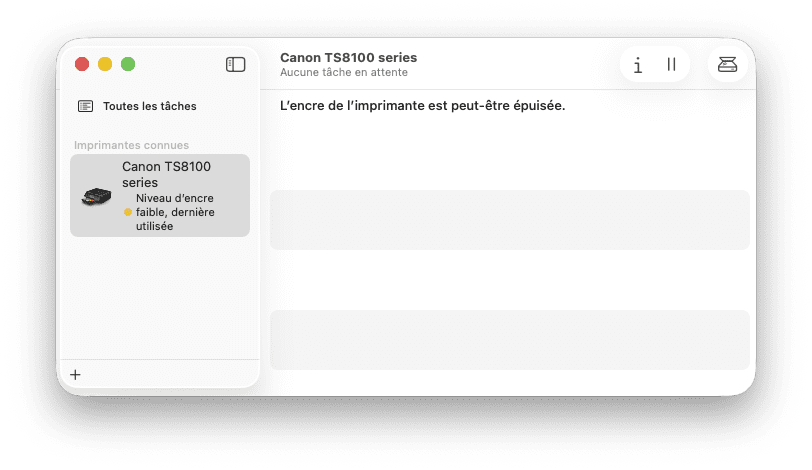
Then, after clicking on this icon:
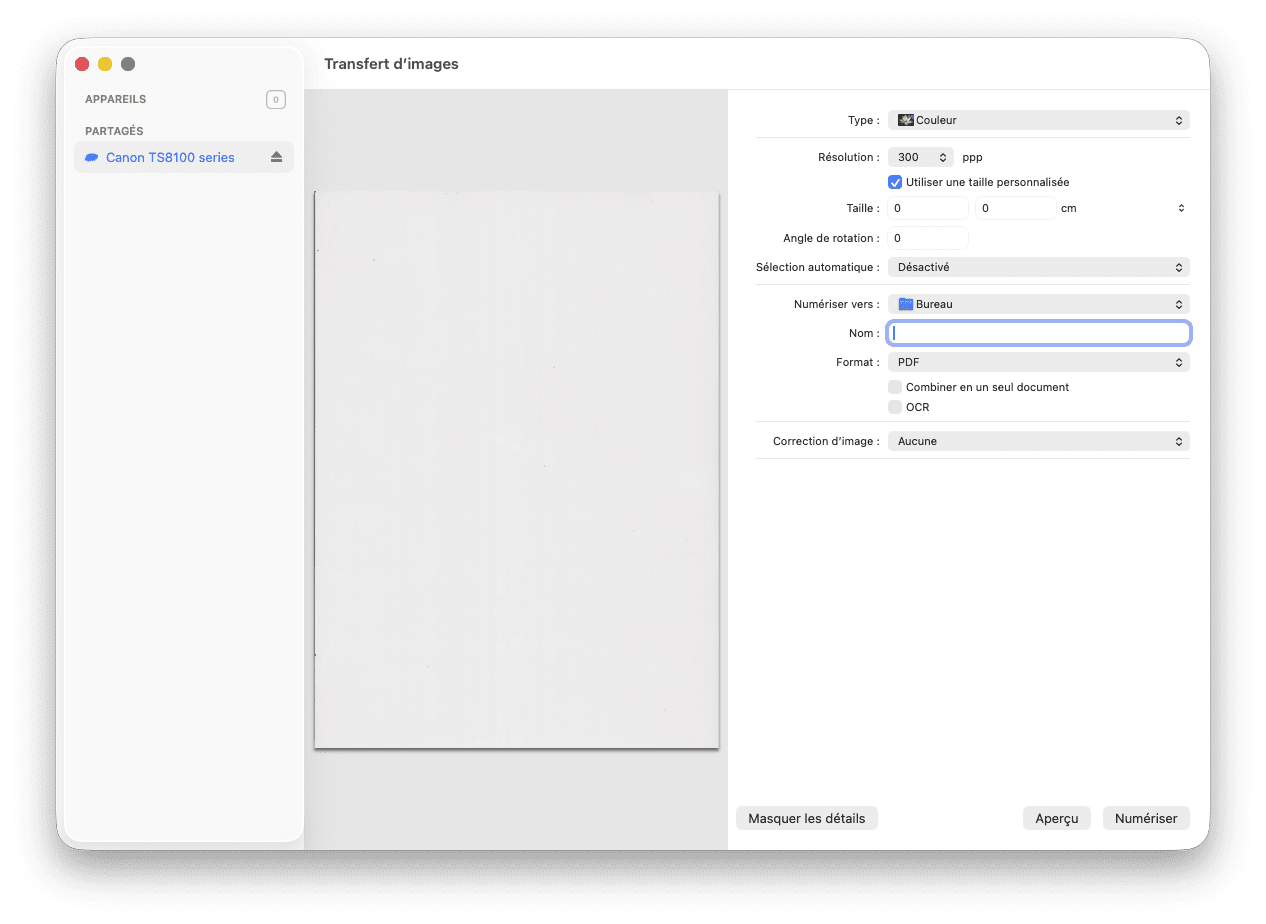
Nothing of the sort?
*_Francis_*
Have a good day, good evening, good night ;)
iMac mid-2011 - MacBook Air M1 - iMac 2010 - iMac G5 -
No, nothing, just this:
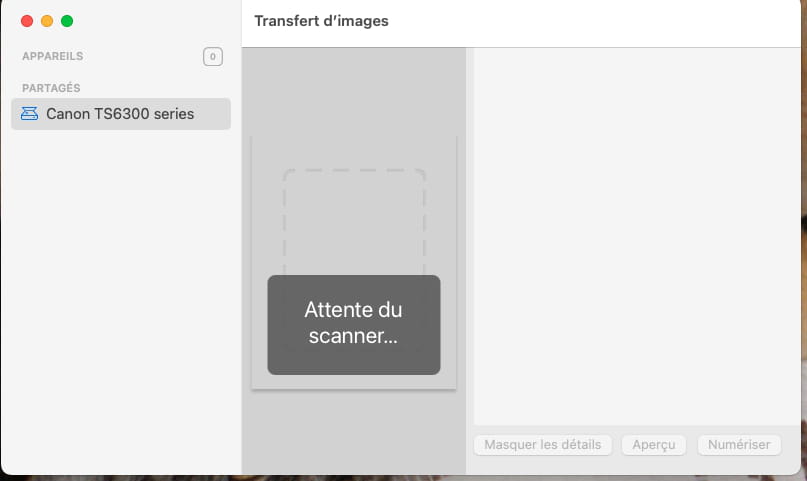
When it's urgent, it's already too late (Talleyrand)
When everything has failed, read the manual or come to CCM;)-
But don’t stress about it, Francis, I seldom use the scanner and I have the option, if needed, to use the iPad and "Notes" which allows for scanning, or even the smartphone.
The only needs would be to send documents to my health insurance, but even then, no problem, I’ll just ask the provider (radiologist, dentist, etc.) to send the file via email.
The main thing is that I can print, and it seems to be working fine. I haven’t tried it with a photo; I’ll see on another occasion.
Have a good evening and see you soon :-)
-
-
Hello Francis,
At the time of taking the screenshot, it was indeed active, I retested it.
The only little printer icon is to the left of the printer's name.
I do have an installation CD but... for Windows. For Mac, the installation is/was done online, as far as I remember!
However, my printer is under warranty because I replaced the old one, the same model, which was clogged with ink waste, last year, in September, so a year ago, and I have the warranty receipt, so I will go to FNAC to see what they say!
@+
When it’s urgent, it’s already too late (Talleyrand)
When everything has failed, read the manual or come to CCM ;) -
What surprises me is that you're installing things from the Canon website.
On a very recent Mac (and even on mine, a 2020 M1 model), there’s nothing left to install from the Canon website. My "old" Canon TS8151 printer is recognized for printing and scanning. I haven't installed anything like drivers or other applications from the Canon website for that.
My Canon printer isn't even connected via cable. Everything goes through Airport, both for printing and scanning....
So, with your very recent Mac and a printer newer than mine, you shouldn't have any problems.
*_Francis_*
Have a good day, good evening, good night ;)
iMac mid-2011 - MacBook Air M1 - iMac 2010 - iMac G5 -
Hello friends,
I did some research online regarding this error message.
I found this potential solution HERE:"I have got my HP scanner working! Obtain your HP printer's IP address from the network settings page in the printer and type this into your web browser. This opens the HP Embedded Web Server for your printer. Open the Scan tab. Load your document and press the Start Scan button. Your scanner should now scan. To save the scanned image, press the image preview button in the dark grey line near the bottom of the image. This will open Mac Preview and allow you to save the document to your Mac. Hope this works for you."
in French:
"Mon scanner HP fonctionne ! Récupérez l'adresse IP de votre imprimante HP dans les paramètres réseau et saisissez-la dans votre navigateur web. Le serveur web intégré HP de votre imprimante s'ouvre. Ouvrez l'onglet Numériser. Chargez votre document et appuyez sur le bouton Démarrer la numérisation. Votre scanner devrait maintenant numériser. Pour enregistrer l'image numérisée, appuyez sur le bouton d'aperçu de l'image dans la ligne gris foncé en bas de l'image. L'aperçu Mac s'ouvre et vous permet d'enregistrer le document sur votre Mac. J'espère que cela fonctionne."Note that the webpage I mentioned also provides other solutions, such as disabling IPv6 or ...
Solutions to try.
Have a great weekend everyone
Ritchi-
Hello Richard,
Thank you for this idea, but it doesn't work with my Canon TS 6350a.
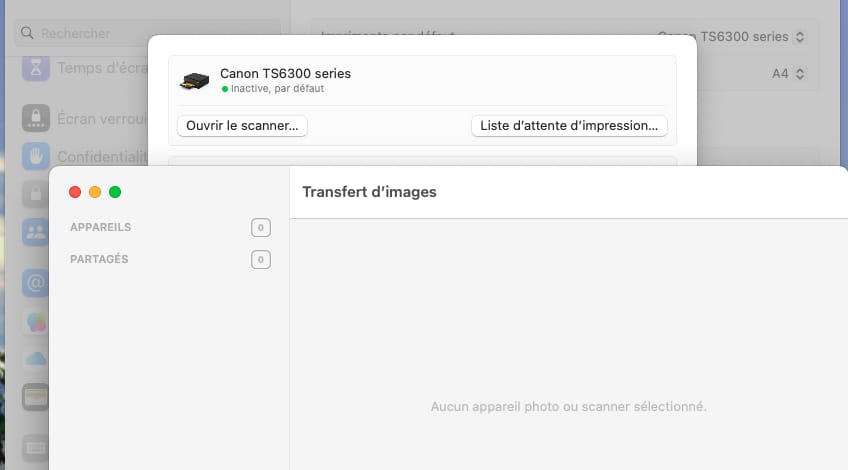
Following another piece of advice, after numerous attempts and getting the same error message, when I open the scanner from "System Settings/Printers and Scanners," it launches "Image Transfer" which cannot find a scanner!
I therefore deduce that my scanner is absent/defective.
Have a great weekend
Best regards
André
Hello
Could a neighbor or a close friend of yours come over with their laptop Mac/PC and their own USB cable to try the experience with your scanner and confirm or deny the problem?
If not, I also found this testimony HERE:
"I received feedback from Canon who indicated the steps to follow because it was indeed a network issue by disabling the IPV6 setting on the printer to prevent the Mac from hesitating to choose which addressing protocol to use for sending data to the printer."Canon indicates HERE how to do this.
Have you tested this IPV6 deactivation?
Ritchi
Good evening Richard,
Thank you for your research. I couldn't find the printer's network settings. :-(
I'm not in a hurry, as I only use the scanner very occasionally.
See my reply to Bernard below.
Good evening everyone.
Hello
Here's how I would do it:
I would turn off my printer.
On the Mac, I would open System Preferences via the Apple menu and type ipv6 in the search box:
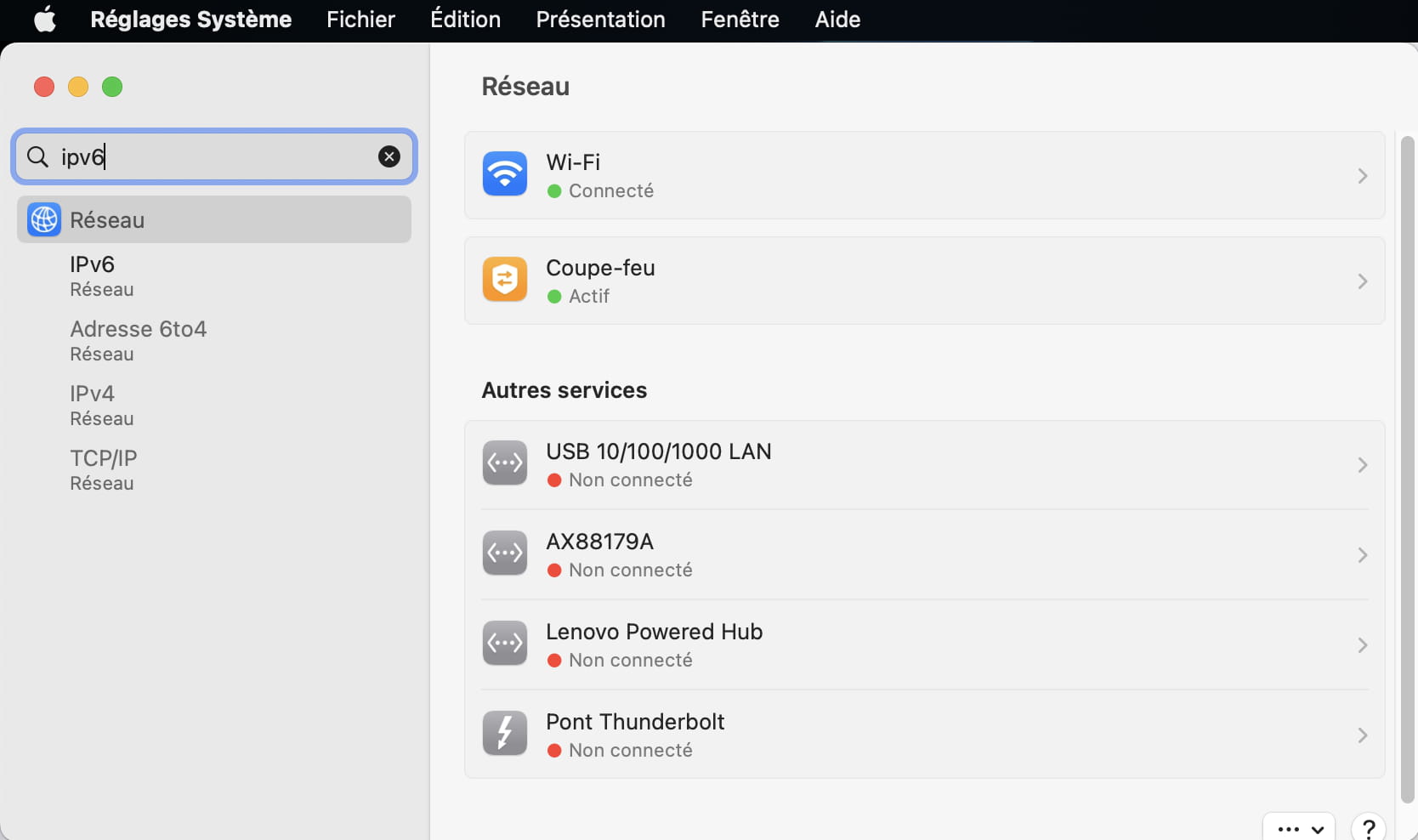
Then in the left column, under "Network" I would select "IPV6": a window should appear and I would then choose in the "Configure IPv6" field the option "Link-local only" after remembering the selected option:
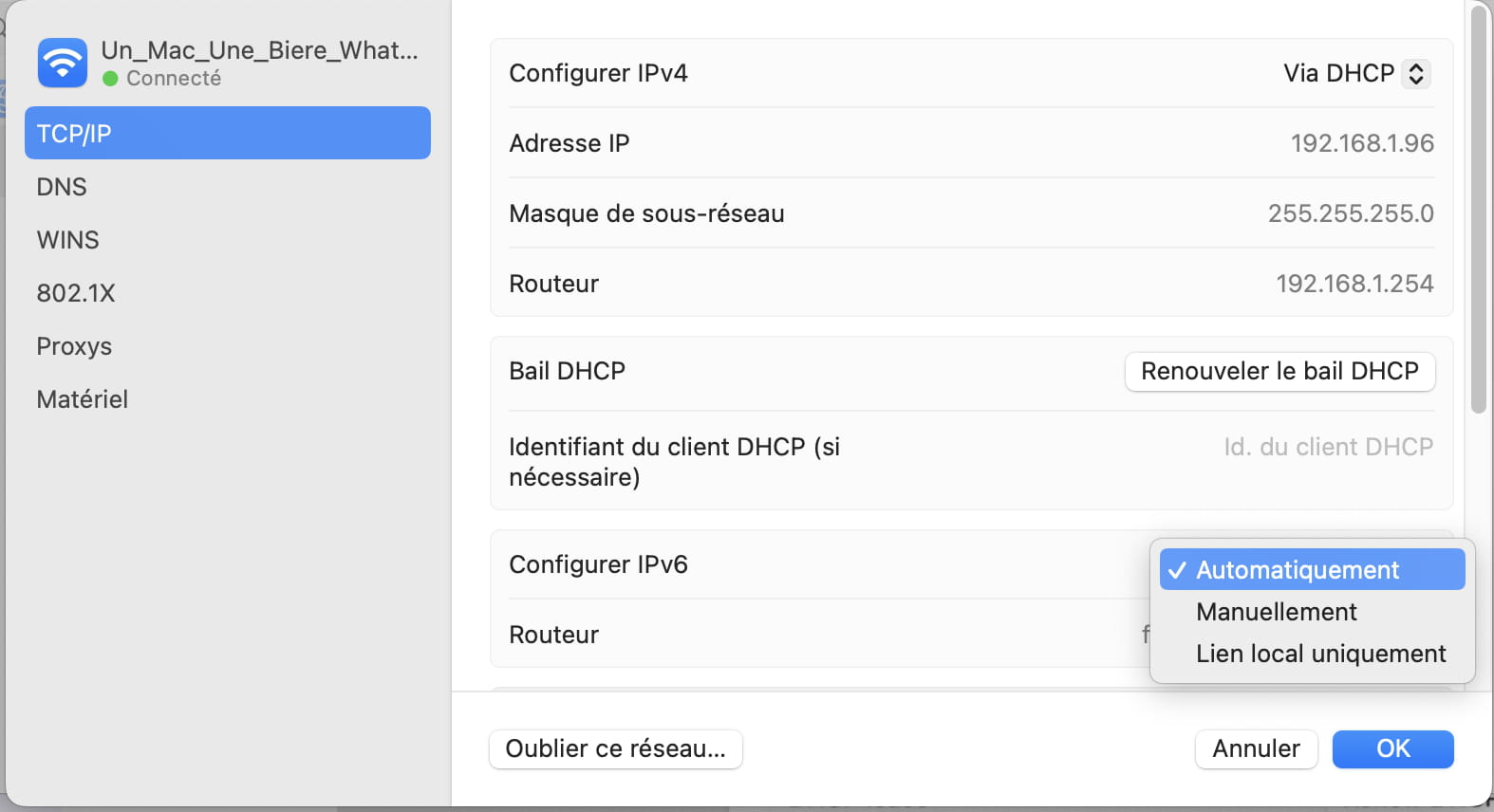
I would turn my printer/scanner back on and then try to launch the scanner again using the Apple tool "Image Capture".
If it works, then cool.
If it's not better, then I would redo the process to restore the saved option to avoid encountering other issues.
Ritchi
Hello Richard,
Thanks for the advice, unfortunately, like all the other attempts I've tried, this one does not perform any better.
When I connect to Wi-Fi, the mini can see the printer but the printer cannot see the mini.
Through USB, the printer is detected and recognized on the hub it's connected to, but all my attempts to use the scanner are in vain, with the error message. Image transfer does not see it.
I will see what I get answered at Fnac, if there is a specialist! That's not guaranteed, but since I'm under warranty... time will tell :-)
"Regarding the wireless connection (WiFi), all my attempts have been in vain; I may be too far from my router and the signal too weak."
Why not try a WiFi extender? Since the connection favored by Canon is AirPrint, that would probably be the best solution (and it can be useful for other things as well to have an extension of the WiFi)...
In any case, you can start by doing some tests by moving your printer. ;-)
Hello at your place!
Bernard-
Good evening Bernard,
Thank you.
I thought about doing it but I don't know which one is the best and if it pairs automatically. I had a pair of Netgear but it was a whole hassle to configure them.
Coming out of the box, I have two networks, one at 2.4 and one at 5 MHz.
I'll look into all of this during the week, since my printer is under warranty, I'll first go to the supplier (Fnac/Darty).
-


