
How to initialize the Epson L3251 printer
claude100n
Posted messages
349
Registration date
Status
Member
Last intervention
-
baladur13 Posted messages 47410 Registration date Status Moderator Last intervention -
baladur13 Posted messages 47410 Registration date Status Moderator Last intervention -
Hello
Well I have a problem with an Epson L3251 printer that the two LEDs (Ink and Paper) blink simultaneously.
And I don’t know what to do...
So please, if anyone among you has an idea to solve the problem, I thank you in advance.
2 answers
-
Hello claude100n
The indicator lights flashing simultaneously on the Epson L3251 generally indicate an issue with an empty or improperly installed ink cartridge.
-
Hello,
Excerpt from on page 21
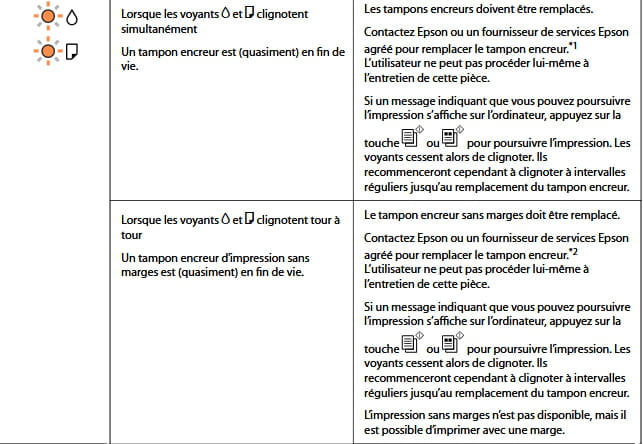
We must therefore infer that there is a problem with the ink pad at the end of its life
Replacement method:
and/or

