Windows 10 Home Search
Solved
Nathaly38190 Posted messages 59 Status Member -
Hello,
I'm looking for a Windows 10 Home ISO...
Currently, I have the Pro N version, and despite installing the Media Feature Pack for Windows 10/11 N, the basic media player in Windows doesn't work!
I went to "Add features," but I found neither the Media Feature Pack nor the player itself...
I downloaded several ISOs of supposedly Windows 10 Home, and in the end, just before starting the installation, I'm slapped with: Windows 10 Education N!
I even downloaded an ISO that supposedly had various versions, but at no point could I choose; I still ended up with Windows 10 Education N.
I also tried various media players, but none suited my taste!
I even downloaded the Windows ISO Downloader tool, but when I click on W10, I only get a blank page, while for W7 and other versions, I get the details...
Thanks to anyone who can help me find the right version, because in the end, Pro doesn't bring me anything special!
7 answers
-
-
Hello,
Have you tried using the VLC player?
https://images.videolan.org/vlc/index.fr.html
No need for an ISO file to clean up Windows!
Also known as Refresh, this option reinstalls Windows while keeping your personal files intact. It removes applications and settings but retains your documents, photos, and other personal data.
(https://www.microsoft.com/fr-fr/download/details.aspx?id=48231).
-
Hello,
This is not an error, WMP is intentionally absent from the N versions and is installed through the options indicated in the control panel, programs, optional features or the Media Feature Pack, but there are as many versions as there are major versions and updates, so one must be sure to find the right one, and I don't know if this includes the Pro N versions.
Repairing or resetting is therefore useless.
-
-
Hello,
Yes, yes, it was indeed my intention to format, but when I created the USB drive, I wasn't given the option to delete everything...
I was faced with: Install Windows Education N + Keep my files/apps.
After that, I admit I launched the setup from Windows while it was on, & not from the USB drive.
I will therefore boot from the USB drive, accept to delete everything & I should have the option to choose the version.
Thank you for enlightening me!
-
Hello,
We're not talking about a few cents for an online license, but it's not certain that it will keep it depending on the version to install.
Of course, you will need to format and reinstall from the USB drive, and backup your personal data beforehand on an external drive or a second partition created for that purpose if there is space.These N licenses are obscure; they are intended for education or businesses and are generally subject to volume licensing.
I don't believe there are individual licenses other than "gray" ones, which could then be volume licenses misused for activation.
Whether the PC actually belongs to one of these organizations or a volume license has been used, we risk the same drawback: that the network administrator or license manager has implemented a strategy to prohibit installation.
-
-
Hello,
Thank you to those who helped me, but for now I'm not making any progress...
I can't boot from the USB drive!
I tried creating a bootable SD card with Rufus, same deal...
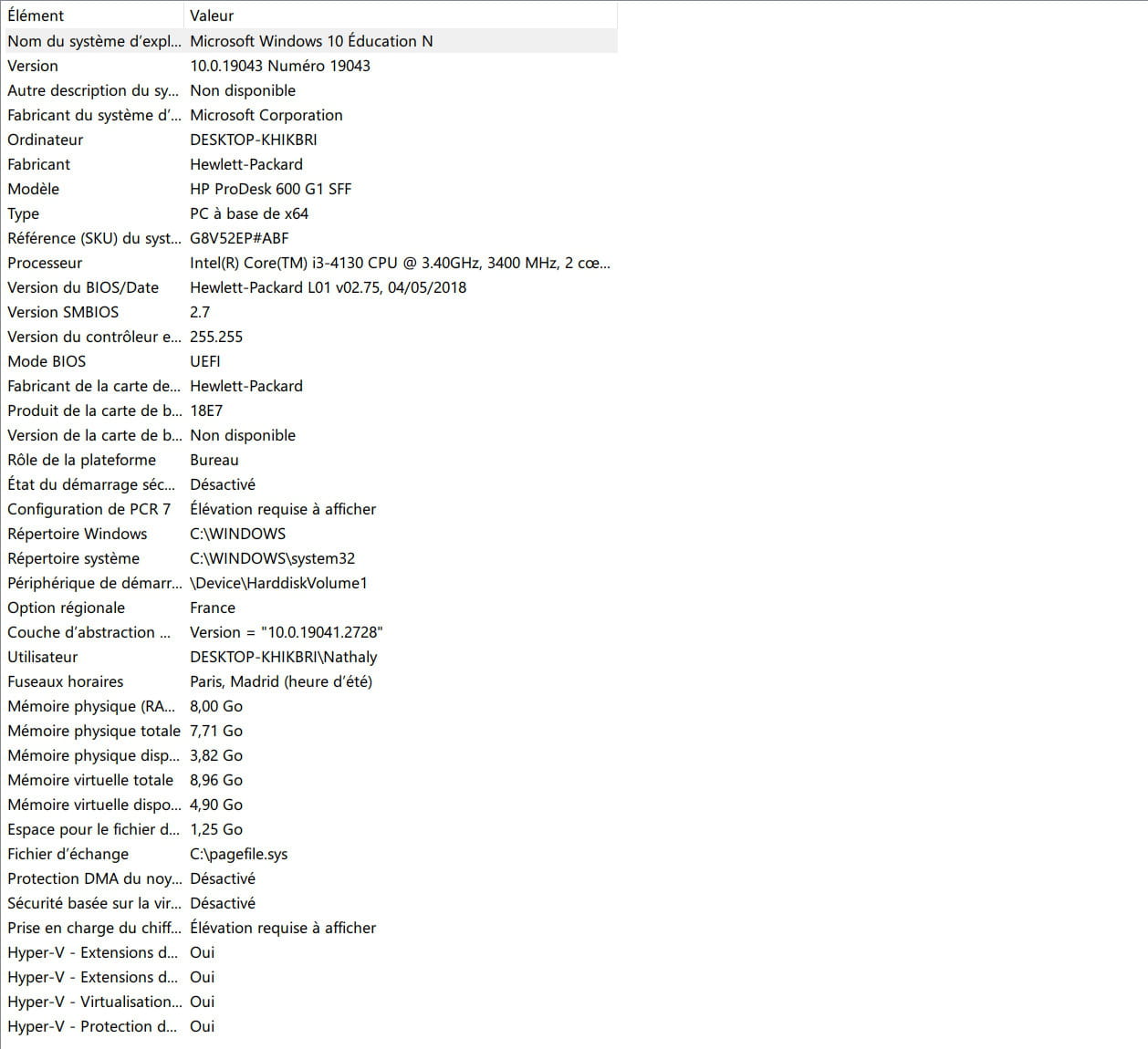
I have a HP desktop PC with the following specifications, and I admit I don't know what corresponds to the USB drive and even less to the SD card.
Despite my attempts, and although I click on "Save & Exit," what I set as the first boot option is not taken into account.
-
Hello,
I feel compelled to insist, your current Windows is working, so as for reinstalling (we don’t reinstall Windows just because a simple drive isn’t working…), have you tried the VLC player? We haven't found anything better than this one; it's top-notch.
All you need to do is refresh Windows to get it back in shape (the average time for this operation is about 45 minutes…) after that, it’s up to you to spend several days with not really conclusive results if I cross-reference your last statement!
https://forums.commentcamarche.net/forum/affich-38224228-recherche-windows-10-famille#p38224243
-
-
Hello,
Thank you Brucine for setting things straight!
At this time, we can say that the matter is closed because this morning, I achieved what I wanted...
I couldn't boot from my USB drive / SD card because I was stubbornly tapping F10 at startup & I couldn't set the USB or SD card as the first boot device.
But after searching a bit more on the Net, I found another alternative, tapping "escape" & there, the boot order is much clearer, & well taken into account.
I don't intend to contradict you, however, I did successfully start the installation from the SD card, & I did see the different versions...
So I successfully installed Windows 10 Home, and yes, I'm glad to have the Windows reader, even though the others are surely very good, I didn't want software packed with options that I would never use.
This simple reader plays my CDs, my videos, & I don't ask for more.
Thank you to those who showed interest in my request!
-
MPMP10,
I don't think I'm being unpleasant; I believe that anyone asking for help expects a straightforward response to their request for assistance, and not to have the subject change...
You claim that I want to format only because I don't have the Windows reader; I didn't think I needed to detail the reasons for formatting.
But why not! I test a lot of software before I can determine which one truly suits me... Uninstalling these programs always leaves traces here and there, and anyone would tell you that it's good for a PC to be formatted from time to time, just to start fresh.
Anyway, I'm not here to fight, and I'm not forcing you to help me...
I'm persistent, and if I can't find help here, I will find it elsewhere, but I really find it a shame that a simple request for help can spiral out of control like this!
Have a good day!
-
Hello,
Excuse me, I thought I was free to choose the version of Windows according to my needs...
As I mentioned earlier, my current version doesn't provide what I'm expecting, the best thing is to respond to my request, which is to help me boot from my USB drive or SD card... And not to dwell on your own beliefs!
-
I thought I was free to chooseThere is no reason to be unpleasant about it, and in no way did I try to force you to do so in my previous statement; I mentioned "after, feel free to..." I simply gave you an opinion and nothing more!
-
Hello,
Let's try to set the record straight: even if I may be repeating myself, updating or repairing Windows will bring the system back to the current state... therefore Windows 10 N Pro, by definition, does not include WMP.
The author is free to choose whether or not to use another media player, to insist on WMP, to change versions, and to format because they feel like cleaning up or because that is their decision.
In this last scenario, there are two ways to create a bootable USB drive (a SD card is excluded): Media Creation Tool and Rufus.
The first one is simpler, but I can't remember if we can download the appropriate version online or if the site only imposes the one existing on the computer; it doesn't hurt to try.
In the second case, and contrary to what the link says, an 8 GB drive is sufficient (but if you don’t have one, it has become a rare item); the trick is to create the drive in the correct mode (here UEFI/GPT).
HP computers will allow you to boot from this drive in two ways.
Either as indicated in the link, by tapping F10 to enter the BIOS and moving the USB drive to the top of the list; you confirm and reboot (you can't go wrong, the name displayed for the drive, unless you've given it a name, will be the hardware name, for example "Sandisk 16 GB").
The alternative is to do nothing at all and this time tap F9 on startup; you'll get the Boot Manager which lists everything capable of booting, you scroll down to the name of the drive if needed and hit enter.
-