
PCIE_PWR1: What is it for?
Solvedlm66 Posted messages 402 Status Member -
Hello,
I'm going to buy this graphics card >>>MSI NVIDIA GeForce RTX 5060 <<<
Should I connect PCIE_PWR1? What is it for?

23 answers
- 1
- 2
-
flo88 Posted messages 28497 Registration date Status Contributor Last intervention Ambassadeur 5 172
Take one of the two cables at the bottom (PCIe 6+2 pins) for the graphics card.
However, on the PSU side, it connects to the one labeled PCIe and not CPU like the one you’ve outlined; they are not the same, be careful. It's not obvious at first glance, I agree, but the notches are different and if we force it, it's guaranteed to short circuit.
-
Hello
Your 2 new power supplies are priced the same as the latest standards and are probably not going to make a difference in consumption: that's what the configuration will require and that's it.
It could also last a very long time, the one you choose, powering the most powerful of your graphic cards and you already have several. You choose the power supply you want.
You have at least 3 slots for possibly a graphics card, 4 slots for possibly NVMe disks, and connections for plenty of HDDs if you want, so you can plug in a lot of cables.
Your motherboard, see the manual, should account for a maximum number of power wires, including for PCIe, options for plenty of installed or future options that may not have been tested yet.
-The more power wires you connect, the more needs you cover, and you can reduce the load on each wire.
-The sold items may have modified specifications without notice by the manufacturers. On a motherboard, for usage, you'll need to connect it; sometimes it won't start if it's not connected.
-We can no longer respond separately to each question; there are at least 2 big configurations at the same time at your place, from different dates, and we might end up with different answers. The questions are all anonymous on the forum (at least 6), each asking a general question without giving the entire configuration, while we often choose with all the details of the machine.
-AIO failures after 2-3 years are common, the liquid decomposes or algae clog a system not meant to be disassembled, we throw it away, but it's expensive; that's the main reason not to recommend them if we can avoid it.
-
flo88 Posted messages 28497 Registration date Status Contributor Last intervention Ambassadeur 5 172
Hello
The plan is that of a motherboard, you need to check its documentation to know when to connect what. Probably in the presence of multiple graphics cards like SLI or Crossfire.
You should place your 5060 in the PCI_E1 and connect it directly to the power supply.
-
You place the 5060 in the PCI_E1 and connect it directly to the power supply.Yes, I put it in that PCI_E1 slot and connect it to the modular power supply where there are 8 holes, as shown in white?

Then can I randomly take one of these 3 cables and plug it into the graphics card? Or is there a specific one among these 3 cables to connect?

Thank you.
-
Hello,
In principle, this is powered only by a single PCIe 8 (6+2) pin directly from the power supply to the PCIe 8 pin of the GPU. In principle, you do not go through the motherboard to power it.
-
It's surprising: should I connect only one PCIe 8-pin to this connector or also a PCIe 8-pin directly to the GPU?
-
Hello to both of you,
I chose the CORSAIR RM850e (2025) power supply


I need to connect to the MSI Z890 Gaming Plus WiFi motherboard,
the 2 cables EPS/ATX 12V (8pin 4+4) from the CORSAIR RM850e (2025) power supply to the 2 connectors CPU-PWR1 and 2
I also need to connect the PCIe (8-pin 6x2) cable from the power supply to the MSI NVIDIA GeForce RTX 5060 8G graphics card
So, these 3 cables are connected to the power supply on the connectors below:

===============================Now===========================
I need to connect to the MSI Z890 Gaming Plus WiFi motherboard,
the 12V - 2x6 to dual (8pin 6+2) cable from the CORSAIR RM850e (2025) power supply to the PCIE-PWR1 connector

So, this 12V - 2x6 to dual (8pin 6+2) cable is connected to the power supply on the connector below:

There you go, I hope I summarized everything correctly, thank you for confirming whether or not this is how I should proceed?
Have a great day.
-
Small reflections:
the 2 cables EPS/ATX 12V (8pin 4+4) from the CORSAIR RM850e power supply (2025) to the 2 connectors CPU-PWR1 and 2
No need to connect both CPU-PWR, one is enough.
______________________________________________________________________________
.
===============================Now===========================
I need to connect to the MSI Z890 Gaming Plus WiFi motherboard,
the 12V - 2x6 to dual (8pin 6+2) cable from the CORSAIR RM850e power supply (2025) to the PCIE-PWR1 connectorSo, this 12V - 2x6 to dual (8pin 6+2) cable is connected to the power supply at the connector below:
This 12V 2x6 plug is normally reserved for certain graphics cards that require a specific 12-pin connector.
So for the PCIE_PWR1, it's better to use the PCIe cable (8 pins 6+2)
-
-
In the User Guide Motherboard "Z890 GAMING PLUS WIFI" on page 11, it is indicated to connect the 2 EPS/ATX 12V (8pin 4+4) cables.

In the User Guide Motherboard "Z890 GAMING PLUS WIFI" on page 44, it states to connect all of them.
Important
Make sure that all power cables are properly connected to an appropriate ATX power supply to ensure stable operation of the motherboard.======================================================================
This 12v 2x6 socket is normally reserved for certain graphics cards that require a specific 12 pin connector.I agree, but I am forced to use it because I only have
3 CPU/PCIe connectors on this power supply.2 EPS/ATX 12V (8pin 4+4) from the CORSAIR RM850e (2025) power supply to the 2 connectors CPU-PWR1 and 2.
And the 3rd PCIe (8-pin 6x2) from the power supply to the MSI NVIDIA GeForce RTX 5060 8G graphics card.
And therefore, I am missing 1 CPU/PCIe connector on this power supply.
What should I do? Change the power supply and buy another one with 4 CPU/PCIe connectors?
-
No, no need to change the power supply!
You can connect the 2 EPS/ATX 12V cables (8pin 4+4), of course, it doesn't interfere at all; the second one is only for heavy overclocking (your motherboard is dedicated to that...) so one will be sufficient for normal use.
I mentioned this to free up a CPU/PCIe connection from the power supply specifically for the graphics card.
Because if one day you change your graphics card for one that requires a 12VHPWR PCIe with 12 pins, you will be stuck.
P.S: For the PCIE_PWR1, I'm not convinced of its usefulness even though it is indeed specified to connect it, so better to plug it in, but it remains quite specific to MSI because with Gigabyte (I only work with them), there is no such connector on the models I know.
After some research because it was annoying me........
This PCIE_PWR1 connector is not essential, it is only present on MSI and a few Asus (to say that the power PCBs from these manufacturers are poorly defined, I'm taking the leap: Yes) It's apparently there to reinforce the power available on the pciexpress bus (in reality, to limit voltage drops on the bus for very high configurations, which aligns with the PCB issue I'm raising)
What is the additional 8-pin connector on X870 and Z890 motherboards for? | CORSAIR
-
-
So last question.
In the end: is there a risk of burning the Motherboard by making the connection below?
Because from what I've read:
ALL CORSAIR 12V-2x6 / 12VHPWR cables do exactly the same thing, that is to say, provide up to 600W to the graphics card.Maybe the PCIE-PWR1 connector on my motherboard cannot receive 600W
Native 12V-2x6 vs 8-pin to 12V-2x6 - what is the difference?
======================================================================
I need to connect to the MSI Z890 Gaming Plus WiFi motherboard,
the 12V - 2x6 to dual (8pin 6+2) cable from the CORSAIR RM850e (2025) on the PCIE-PWR1 connectorSo, this cable 12V - 2x6 to dual (8pin 6+2) is connected to the power supply on the connector below:
-
I need to connect the 12V - 2x6 to dual (8pin 6+2) cable from the CORSAIR RM850e (2025) power supply to the PCIE-PWR1 connector on the MSI Z890 Gaming Plus WiFi motherboard.
Yes, you can do that. There is no risk for the motherboard as those are the correct plugs.
However, the connector to be plugged into the graphics card is mandatory; otherwise, the graphics card will not start (I'm referring to the one called PCIe (8-pin 6x2)). The "PCIE-PWR1" on the motherboard does not substitute for the graphics card's own power connection.
-
-
This is the first time I've seen a motherboard with a built-in GPU power connector. According to what I read in the link that flo88 provided, this connector allows for an additional power supply of 420W + the 75W supplied by the PCIe 16X port directly, totaling 495W, whereas the 12V - 2x6 to dual (8pin 6+2) provides up to 600W. So, given your GPU's power requirements, you can just use this connector without using the 8-pin PCIe from the power supply to the GPU. There is no risk of your GPU being damaged.
-
Hi,
Thank you both for your contribution, but the reason I'm being so insistent is that it's been at least 15 years since I last built a PC.
So I'm very afraid of making a mistake, it would be a shame given the price of the components.So to summarize what you're saying, it gives 2 solutions.
1st solution:From the power supply 12V-2x6 ---> to the Motherboard PCIE_PWR1
From the power supply CPU/PCIe ---------------> to the Graphics Card RTX 5060
2nd solution:One single 12V-2x6 cable to power both the graphics card and the PCIE_PWR1 connector

From the power supply 12V-2x6 ---> to the Motherboard PCIE_PWR1
----> to the Graphics Card RTX 5060
So, the big question. If I go with the 1st solution, will there be no mistakes?
-
"One 12V-2x6 cable to power both the graphics card and the PCIE_PWR1 connector"
In fact, the PCIE_PWR1 connector has been implemented on this motherboard to power the GPU through the motherboard instead of running the power supply cable directly to the GPU. There shouldn't be any issues. It's like you being worried that your setup, which should only need a power supply of 550 to 650W, would have problems because you have an 850W power supply.
Your GPU is powered by a single 8-pin PCIe connector.
-
In fact, the PCIE_PWR1 connector has been implemented on this motherboard to power the graphics card through the motherboard instead of running the power cable directly to the graphics card.
So no. This connector is not there just for that, but mainly to stabilize the bus with very large graphics cards; it does not replace the connection of the graphics card, it is an additional connection. If the (or the) dedicated connectors of the graphics card are not plugged in, the graphics card will not start, that's a fact.
-
-
OK! You mean he has to, necessarily, plug in this connector + the PCIe 8 pins for a GPU that only consumes 145W?
-
The connector or connectors for the graphics card, yes. The one on the Corsair motherboard seems to indicate that it is not necessary. I quote:
Nothing indicates that these connectors are necessary for normal use, including for high-end gaming systems. Additional power connectors may interest overclockers, for whom stability under very high loads will be more important, but for everyone else, it is an element that can contribute to stability, but is not essential.
-
-
So he can just connect the GPU directly to the power supply as I recommended in post #5, especially since not all motherboards controlled by a Z890 are equipped with a PCIE_PWR1 connector. So it's not essential to connect it.
-
Hello epango and flo88,
I have therefore finalized and chosen the CORSAIR RM850e power supply (2025)
As for the connection PCIE_PWR1, it is advisable, if possible, to connect it as you mentioned.
What worries me is the 12V - 2x6 to dual (8pin 6+2) cable that needs to connect to PCIE_PWR1, because likewise the Y connector of this cable is not compatible. In short, I'll see, it's also the PCIe (8-pin 6x2) cable that is compatible with the PCIE_PWR1 connector or vice versa.
-
"As for the PCIE_PWR1 connection, it is recommended, if possible, to connect it as you mentioned."
I don't think that's advisable. It's like some high-end motherboards that have a P8 connector plus a P4 for CPU power. The single P8 is sufficient; adding a P4 can only be useful for certain people who are doing extreme overclocking. You're complicating your life for no reason. For a small graphics card like yours, which consumes only 145W and weighs just under 500g, a single PCIe 8-pin (6+2) connection is enough; there’s no need for a reinforced PCIe port support. Maybe later, if you replace your current RTX5060 with an RTX5090, for example..
-
-
Hello,
However, is it imperative to have a Graphics Card Support.
Thank you.
-
-
Hello
Graphics card support.
Only 493 grams and a length of 2 fans, it's not the heaviest ones approaching 2 kg.
Compare it with a 4060 with 3 fans 280mm long which exceeds twice the length of the slot in the photo: that one yes, it becomes a good idea, there's a heatsink + 1 fan + backplate that stick out into the void over this entire length, everything is heavier and it only puts pressure on the slot on the right.
https://www.ldlc.com/fiche/PB00558486.html
You have 1050g on this model with 2 fans from the 4000 series, it's already double yours.
https://fr.msi.com/Graphics-Card/GeForce-RTX-4060-GAMING-X-NV-EDITION-8G/Specification
> and I stick several cork wine bottle stoppers cut or filed to the exact mm, it costs nothing, you can paint them.
-
-
flo88 Posted messages 28497 Registration date Status Contributor Last intervention Ambassadeur 5 172
It's not necessarily useful in the sense that high-end motherboards like this one have reinforced PCIe ports to prevent the tearing that was common in the past.
But it's a matter of taste; it can't hurt.
-
Hello,
Well, thanks to you, I was able to assemble my PC without any problems. Thank you all for your valuable advice.
However, I'm showing you a photo, but it seems to me that there is an issue.
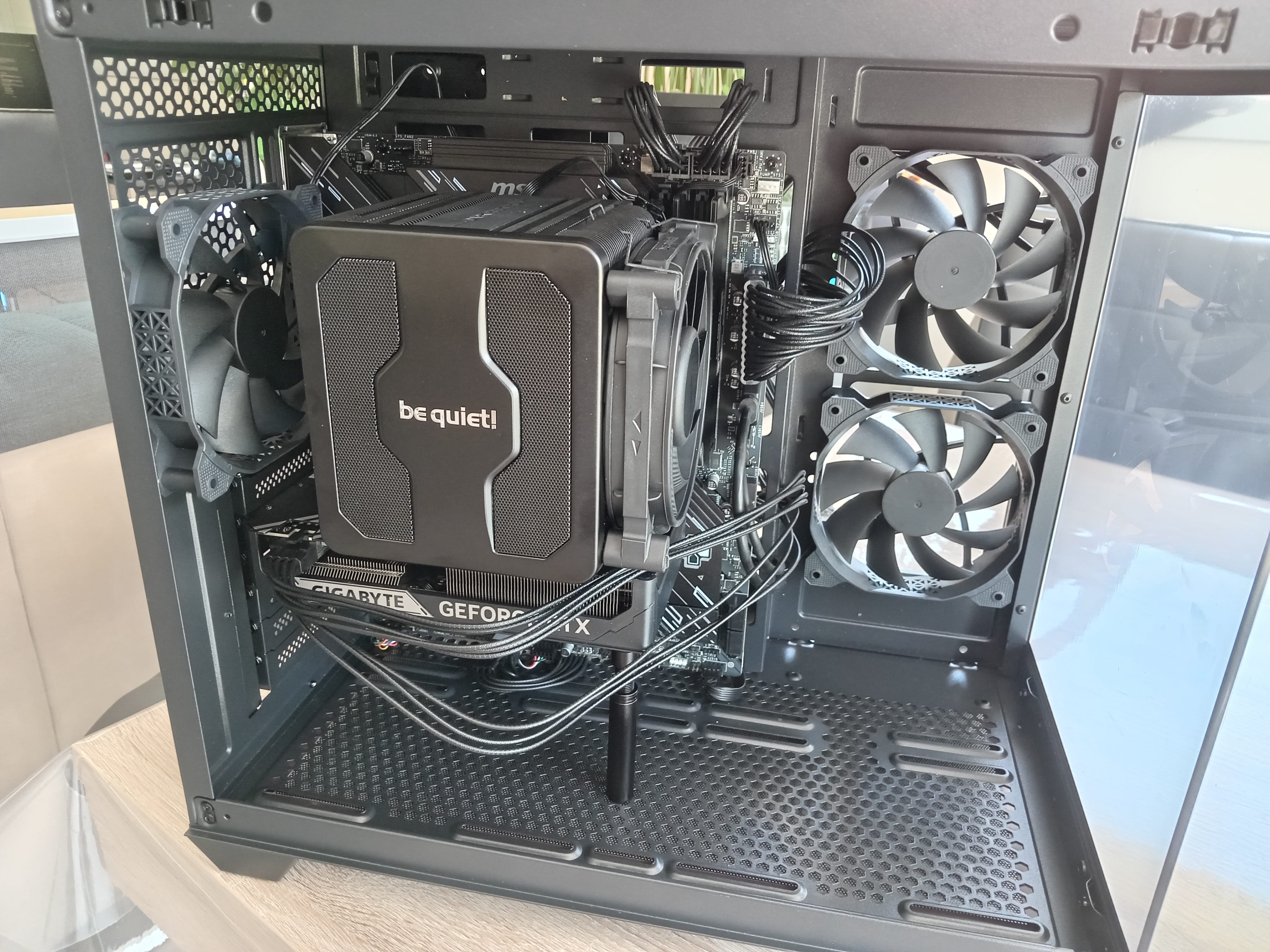
The 2 fans on the front panel are exhausting air outwards.
Shouldn't it be the other way around? The fans at the front of the case are supposed to bring in fresh air into the PC, right? -
Hello
Normally, you just have to make the fan turn around and it blows in the other direction, that's all.
Yes, if the CPU fans push air to the left (or back), the air needs to come in from the right.
-
Thank you,
That's crazy! You buy a PC case and it gets delivered with the fans installed upside down… That’s not normal.
Or maybe it’s done on purpose because they are mounted sideways instead of at the front?



- 1
- 2