
Wireless Headphones Sony RF-895-RK
baladur13 Posted messages 47331 Registration date Status Moderator Last intervention -
Hello,
Here's the thing, I'm having an issue with my Sony RF-895-RK headphones. I bought them new a few months ago, and everything was great at first. I left them on their stand plugged in and haven't used them for a few months; today, the base won't turn on either when charging or in use, so there's no sound. Is it possible that the battery needs to be replaced? What seems strange to me is that I hardly used them. Can a battery wear out just by being plugged into the mains?
Thank you in advance for your help.
11 answers
-
Hello,
Whether it's the battery or another component, a manufacturing defect is always possible even when it's new, so return it to customer service to claim the warranty.
The wear on a battery is constant, whether it's plugged in or not. Leaving a vehicle stationary for several months will cause the battery to degrade much faster in this context.
For the rest, we can't be sure from a distance via a forum to know exactly which component is actually defective.
-
Hello,
Your device has two indicators:
- one on the base - red when charging - off when fully charged - green when there is a sound signal.
- one on the headset - on when the headset switch is on - off when stopped
The batteries are in the headset, and therefore, if they are worn out or dead, the headset indicator will remain off when turned on. Is that the case? If so, replace the batteries.
As for the base, check that it is properly connected to a working electrical outlet and that the volume level of the device supplying the sound is sufficiently high.
Very difficult to catch a black cat in a dark room.
Especially when it isn't there...-
Thank you for your response.
On the headset itself, when I switch it to "on" it lights up green, but on the base, there is no light at all, neither red nor green, it doesn't seem to detect anything anymore.
The dock has remained plugged into a working power supply, but I haven't used the headset for a few months, I think. It is properly seated on it. Everything was working fine, it hasn't suffered any shocks, I don't understand.
The stand is connected to the headphone jack of the TV, a Philips, but I no longer have the model. I've tried looking through all the sound settings on the TV, but nothing works, and it is indeed set to "headphones."
The stand itself is plugged into a power strip. It has never changed from this configuration and it worked perfectly at the beginning. It's worth mentioning that there hasn't been a power outage.
I just tried changing the stand's socket, but it's still the same. No response from it.
-
The model of the Philips television can be found on a nameplate at the back of the television. Having the model will allow me to consult the manual and guide you further if necessary.
Make sure the jack plug is fully inserted into the television's socket and also into the headset's base.
Normally, when the jack plug is inserted into the television side, it cuts off the sound on the latter, except in special cases where the television menu allows you to turn on its speakers as well.
Very difficult to catch a black cat in a dark room.
Especially when it's not there...-
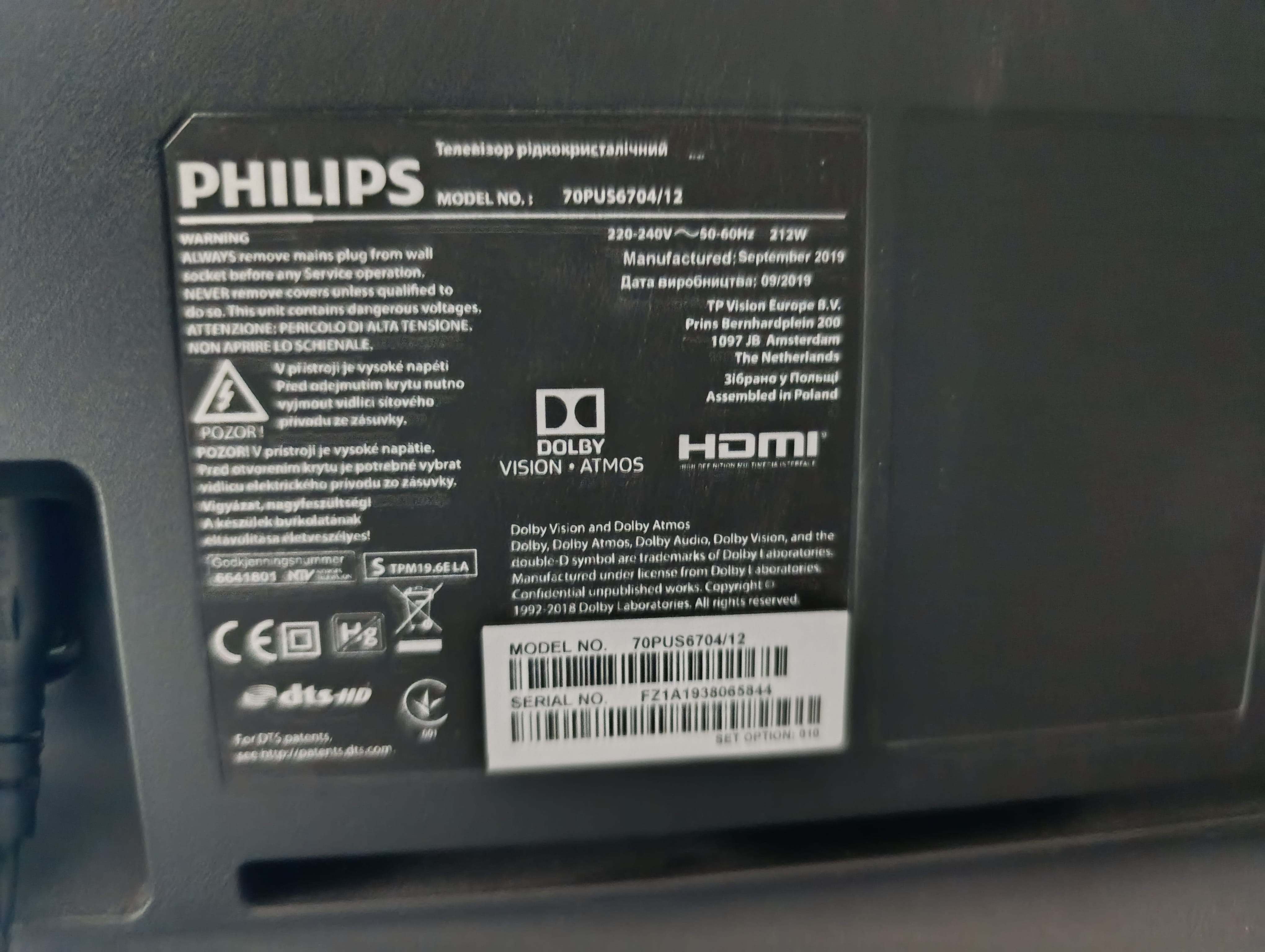
Here is the photo with the TV model information.
The cables are all well connected. I don't understand why the base is not responding anymore while the headset is turning on.
OK Philips 70PUS6704/12
Your headphones are properly connected with a 3.5mm jack to the headphone output of the television (the socket on the side of it)?
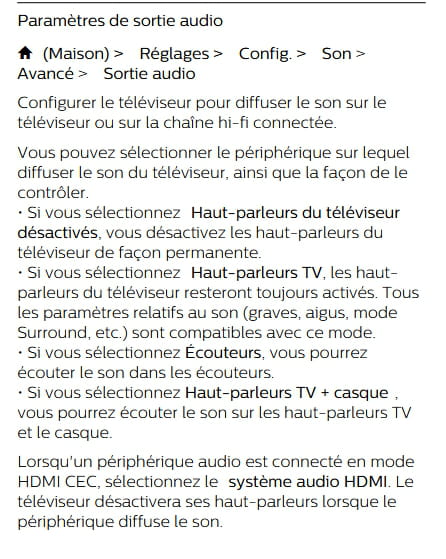
The manual on page 14 describes a separate headphone volume adjustment but does not specify where this adjustment can be made!?
You mentioned in message #5 that you set the audio output to headphones, but did you adjust the output volume? Normally, the television speakers should be inactive, is that the case?
Try setting the audio output to TV speakers + headphones as described in the manual on page 40 (excerpt below) and adjust the volume in such a way that you can hear correctly with the speakers for the headphones to see if you can find the adjustment.
Are there any other audio devices connected to your television?
It's very difficult to catch a black cat in a dark room.
Especially when it's not there...Yes, the headset is properly connected via the jack plug to the TV's headphone socket.
Once that was done, I tried all the settings on the TV; in headphone mode, the sound stops on the TV and is supposed to continue in the headset. I tried turning the volume on the TV and the headset to the maximum to see if it would detect anything, but nothing at all. The issue seems to be coming from the dock, which is completely unresponsive, no lights at all. I'm starting to think that the dock has given up, but I wonder how that could be since it has been used very little?
And to answer you, apart from the jack plug, there are only two HDMI cables also connected to the TV.
Have you tried changing the channel (Channel selector on the base) three possible positions?
Have you tried connecting your headset to a mobile phone?
You say this headset is recent; if it's still under warranty, as MPMP10 mentioned, the customer service solution should definitely not be overlooked.
It is very difficult to catch a black cat in a dark room.
Especially when it isn't there...-
Oh yes, I also tried to change the channel but the base won't hear anything, I've checked the pins, made sure the headset fits well but nothing works. Earlier, I tried to plug the jack into a phone but there was no reaction.
I bought it new in a box on Vinted but unfortunately there's no receipt so no warranty... I don't think it’s the battery that needs changing since the light turns on the headset, right? So it would mean the whole headset needs replacing... Incredible considering it's brand new.
If the base has been connected for months, it’s not really brand new anymore.
Since the batteries are charged, it’s normal that the red light doesn’t come on. You should turn on the headset without placing it on its base for the entire night so that the batteries discharge and see if tomorrow, when you put the headset back in standby and on its base, the charging light (red) comes back on; otherwise, the power supply block is probably faulty.
There are two possibilities:
- power supply block of the base faulty (reference AC-MS1202c) https://www.amazon.fr/s?k=ac-ms1202
- jack cable faulty.
Yes, but even if it's charged, then why not indicate a green LED once the headset is removed from the dock? But I'll do that and I'll see tomorrow, yes... thank you for trying to help me :)
The battery drained this afternoon; I left it on since yesterday, and when I put it back on the dock, it still doesn't respond. However, the battery seems to be charging because a few moments later, when I turn it back on, it turns green on the headset. I thought maybe the LED on the dock is not working, but then why is no sound detected in the headset?
-
I seriously doubt the faulty indicator. For the batteries, once the headphones are off, they may regain a bit of energy because they are no longer in use, and then the indicator could light up again.
I'm increasingly doubtful about the health of your power supply unit. It would be good to check that there is indeed a 12 volts output from the power supply and also that there is approximately 3 volts on the socket connections (where the headset rests). But for that, you need a voltage tester (multimeter).
In my opinion, it's either the power supply or the base itself because when I place the headset, turned on, on the base, it stays on. However, once it's charging, I think it should turn off and the base should take over. I'm trying to leave the headset on the base to see if it discharges there. I'm really tempted to buy a new power supply, but if that's not the issue, I'll end up buying a headset and wasting money on a power supply...
I don't think so, unfortunately not. I have everything unplugged at the moment. I will inquire tomorrow; otherwise, maybe I'll take the risk of getting a new power supply because I don't see why the socket would have failed, it hasn't moved and has hardly ever been used.
Good evening. Just a quick message to give you some news if you see this message. It was indeed the power supply. Once changed, it started to work perfectly again. Now, what I'm wondering is how the power supply could have failed? There were no power outages, so should I leave the headset permanently plugged in or not? The problem is that if I unplug it and then plug it back in before using it, it will start to charge and might not be ready for a long session. Currently, I've left it plugged in and there's no issue, but I'm questioning it. Thank you in advance.
-

