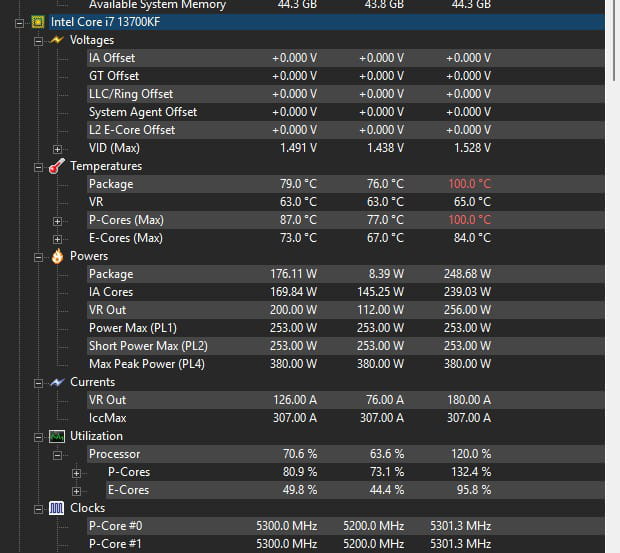
Processor at 100 degrees

maximemllr Posted messages 20 Status Member -  
.eric Posted messages 1386 Registration date   Status Member Last intervention   -

Hello everyone, I have an I7-13700KF processor, and when I play certain games (e.g., Helldivers 2), my processor temperatures exceed 100 degrees, even though I set the game to medium. I also changed the retention bracket for my processor to the Thermalright LGA1700 Bending Corrector Frame.
Here are my other components in case it helps:
Motherboard: ASUS PRIME Z790 A WIFI
Memory: 64 (16x4) GB DDR5 CORSAIR 6000MHZ
Graphics Card: RX 7900 XTX
AIO: LIAN LI 360 GALAHAD
PSU: 1000 W CORSAIR

ALSO, another issue is that sometimes the red DRAM light turns on my motherboard.

5 answers

  1. Winux
     

    Hello,

    The AIO must have an issue; if you didn't assemble the PC, you need to contact customer service.

    0
    1. .eric Posted messages 1386 Registration date   Status Member Last intervention   87
       

      Hello

      Yes, it's known to heat up, so it’s not easy in a case.

      This is the official Intel figure; at 10 nm, it's a heater; the consumed power.

      Maximum Turbo Power
      253 W

      0
    2. maximemllr Posted messages 20 Status Member
       

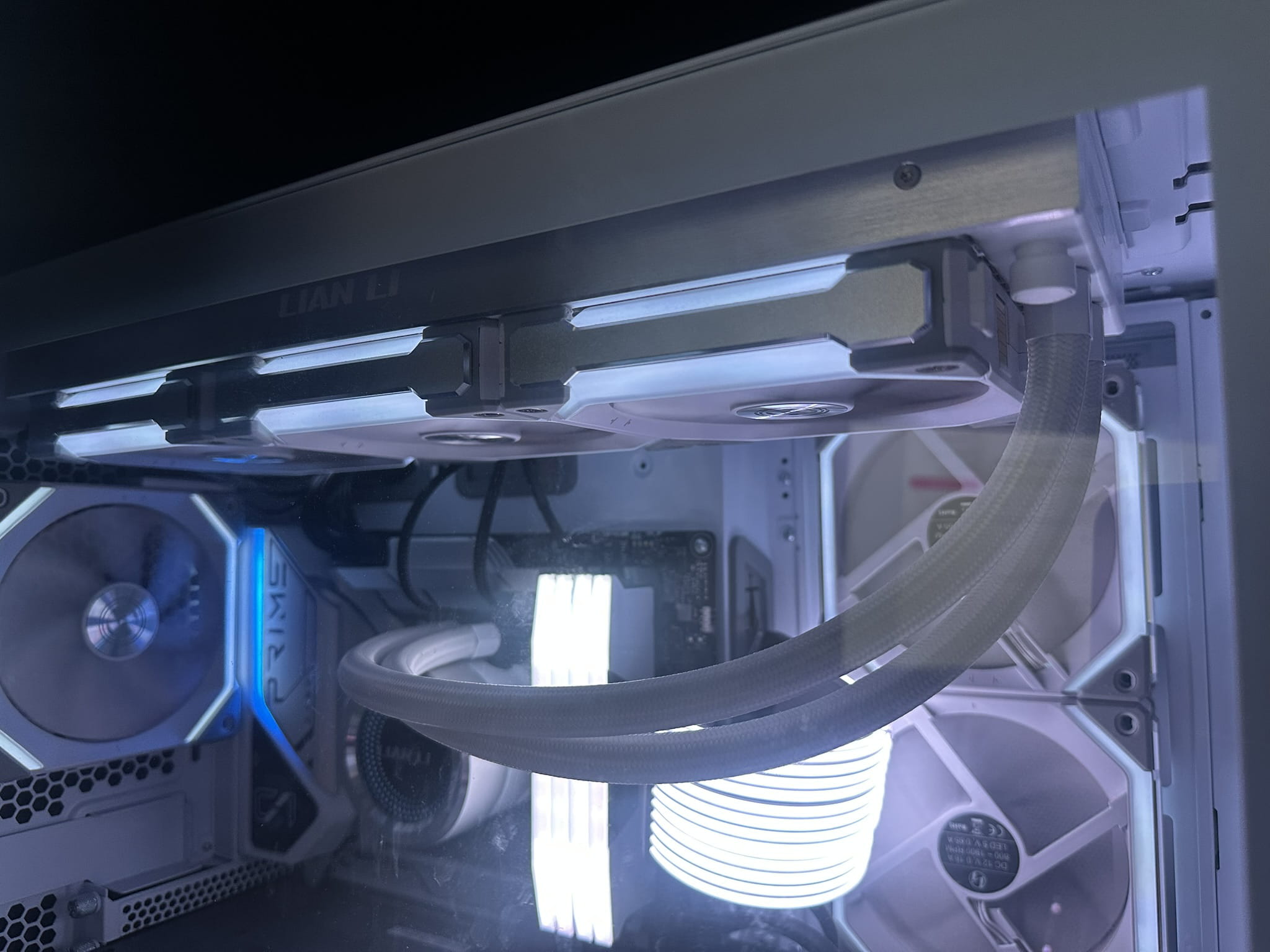
      It's me who put together the PC, how can I see if the AIO has a problem? I'm sending you a photo of the installation at the AIO level.
      0
      1. Winux > maximemllr Posted messages 20 Status Member
         

        Did you remove the plastic wrap from the block before putting it with paste on the CPU?

        0
      2. maximemllr Posted messages 20 Status Member > Winux
         

        yes, I removed it

        0
  2. flo88 Posted messages 28484 Registration date   Status Contributor Last intervention   Ambassadeur 5 168
     

    There should be more temperature monitoring, install HWMONITOR and provide screenshots.

    In any case, at 100 degrees the water cooling clearly isn't working properly, it needs to be disassembled, first check the thermal paste contact.

    0
    1. maximemllr Posted messages 20 Status Member
       

      I took a screenshot of the hwmonitor, I'll show it to you tomorrow, and I changed the thermal paste 5 days ago.

      0
    2. maximemllr Posted messages 20 Status Member
       
      0
    3. flo88 Posted messages 28484 Registration date   Status Contributor Last intervention   5 168 > maximemllr Posted messages 20 Status Member
       

      The CPU doesn't go below 76 degrees, with peaks at 100.

      You need to stop using your PC or you'll fry the CPU.

      Take apart your water cooling and replace it; a good airflow will be much more reliable and efficient.

      0
    4. maximemllr Posted messages 20 Status Member > flo88 Posted messages 28484 Registration date   Status Contributor Last intervention  
       

      When you say "a good airflow," do you mean a cooler instead of an AIO?

      0
    5. flo88 Posted messages 28484 Registration date   Status Contributor Last intervention   5 168 > maximemllr Posted messages 20 Status Member
       

      Yes

      1
  3. john99 Posted messages 1119 Status Member 153
     

    Hello, what case do you have?

    0
    1. maximemllr Posted messages 20 Status Member
       

      Dynamic evo 011 LIAN li

      0
  4. flo88 Posted messages 28484 Registration date   Status Contributor Last intervention   Ambassadeur 5 168
     

    The case is specified for a heatsink height of 170mm, which is normal for a standard ATX, the heatsink is exactly 168mm to fit these types of cases, it's surprising... or maybe it's the CPU support bracket you added.

    0
    1. maximemllr Posted messages 20 Status Member
       

      Actually, the problem is with the RAM, since I have to raise the fan of the heatsink, that's when it doesn't fit (I should have taken a photo...)

      0
  5. julia_gameuse_FR Posted messages 3 Status Member
     

    Oh yeah, 100 degrees... lol it's getting too hot here.
    No, you've got a little bug, thermal paste, a fan that's not spinning.

    Use a simple heatsink to test...

    0
    1. .eric Posted messages 1386 Registration date   Status Member Last intervention   87
       

      Hello julia_gameuse_FR

      No, it's not a "simple" cooler for testing, this one is for overclocking.

      280W TDP suited for liquid metal on the processor, and yes the height goes from 168 to 206mm with the fan raised to the 5th notch for RAM with large heatsinks.

      The processor that heats up has a TDP of 263W

      0