
Updates and Security
Solvedbollo1 Posted messages 933 Registration date Status Membre Last intervention -
Hello everyone,
For some time now, in the Windows Update section, I've been getting this message: "You are not up to date" "Your device does not have important quality and security updates" ...
I have tried to "update," but there has been no result...
Is there anything to be done?
Thank you in advance for your help
Best regards.
8 réponses
Hello,
Perhaps by manually forcing the installation of 23H2 as you were suggested here without following up on it?
https://forums.commentcamarche.net/forum/affich-38084876-securite-windows#p38085250
Hello brucine,
Indeed, some time ago, I had a security issue regarding the security logo in the taskbar. I tried to follow what Fabul suggested but with no result, so I restored to a previous date and the security logo is valid again... And it remains valid currently.
This seems to be something else, it seems to me, regarding Windows. I'm willing to manually force the installation of 23H2, but I don't know how to do it.
Can you provide me with the steps to follow if the process is relatively simple?
Already, if I weren't repeating myself, it would be better, it's Windows 11 that is 23H2 until September-October, Windows 10 has definitively stopped at 22H2.
If for some reason Windows Update doesn't work, the various manual installation methods, prefer 3.2 or 3.3.
https://lecrabeinfo.net/telecharger-et-installer-windows-10-22h2.html
Success often debugs Windows Update in the process, if not, repair afterwards.
https://lecrabeinfo.net/reparer-windows-update-echec-mises-a-jour-et-erreurs.html
Thank you brucine for the indicated site.
I just skimmed through it quickly, I will read it again, but it seems complicated for me, not understanding some information...
As far as I'm concerned, will downloading version 22H2 directly be enough?
I currently have version 21H2.

Hello,
Try with Windows Update MiniTool
https://lecrabeinfo.net/windows-update-minitool-gerer-les-mises-a-jour-de-windows.html
Uncheck 'driver updates' if possible
Otherwise
https://www.malekal.com/reparer-windows-update/#Les_erreurs_Windows_Update
Hello spiralio, thank you for your reply, but honestly the sites you mentioned are too complicated for me... I wouldn't be able to manage on my own...
I'm looking for a simple solution (if it exists) to update my computer from the current 21H2 update to 22H2 if possible.
If not, I will give up...
https://www.malekal.com/windows-update-minitool/
Malekal's presentation seems a bit more accessible to me ??

Hello @bollo1 StatutMembre.
If you are on Windows 10:
Perform a repair of Windows 10 without data loss (everything is kept), this will update Windows 10, despite what is indicated on the screens it is indeed a repair not a Windows installation.
Go to this page and click on Download the tool now.
Open the tool and follow the instructions below:

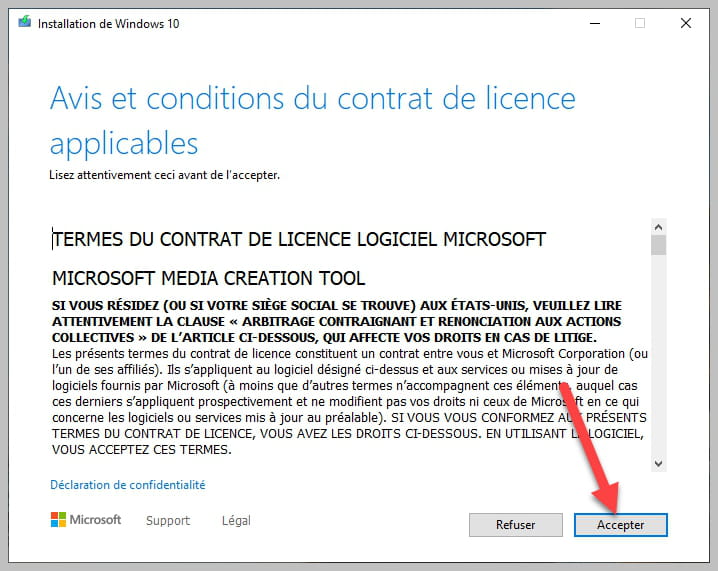


Be sure to check as shown in the photo.
bazfile
Moderator/Security Contributor.
a hello, a response, a thank you are always appreciated.
Hello everyone and THANK YOU for your help, this time the computer was updated after more than 3 hours and that's why I couldn't respond to your messages yesterday.
I'm looking into what has changed, not much actually. The font size and especially the fact that, before I was using 2 screens and now, the second screen no longer works.
Regarding notifications, a message indicates under "project": "Your PC can't use another screen, try reinstalling the driver or using another video card."
I'll see if I can manage on my own...
Thanks again to brucine and bazfile for your help and the instructions I successfully followed.
Definitely see you soon and best regards.