My desktop is not displaying anything (post-Windows 10 update)
Solved
DesakArnii
Posted messages
4
Status
Member
-
Malekal_morte- Posted messages 178136 Registration date Status Moderator, Security Contributor Last intervention -
Malekal_morte- Posted messages 178136 Registration date Status Moderator, Security Contributor Last intervention -
Hello everyone,
Here's my problem: after a massive update of Windows 10, I had to restart my computer (desktop PC, tower, a bit old components but operational). Everything seems to go well, I can access my welcome screen and type in my password.
However, once I'm logged in, instead of my desktop, I find a black screen but with the icon of my mouse and a small window of a software that runs automatically at startup. I tried to launch the task manager but it doesn't show up. I attempted to start safe mode or even to reset my PC or to uninstall the last update: nothing worked, the computer asks for a password that I don't know (none of the ones I tried worked).
After many hours of a black screen, a good sign appeared: my desktop wallpaper showed up and with it the taskbar (empty of course, otherwise it wouldn't be fun). Any attempt to open via the Windows logo failed and a "Windows Explorer not responding" window was open.
It seems clear to me that this is a problem related to Windows 10 and not to my PC.
So I call upon the power of the Internet to see if anyone has encountered this problem and/or knows how to resolve it or if there are any solutions.
Thank you in advance for your responses, I will try to provide any necessary details if I have forgotten anything.
Here's my problem: after a massive update of Windows 10, I had to restart my computer (desktop PC, tower, a bit old components but operational). Everything seems to go well, I can access my welcome screen and type in my password.
However, once I'm logged in, instead of my desktop, I find a black screen but with the icon of my mouse and a small window of a software that runs automatically at startup. I tried to launch the task manager but it doesn't show up. I attempted to start safe mode or even to reset my PC or to uninstall the last update: nothing worked, the computer asks for a password that I don't know (none of the ones I tried worked).
After many hours of a black screen, a good sign appeared: my desktop wallpaper showed up and with it the taskbar (empty of course, otherwise it wouldn't be fun). Any attempt to open via the Windows logo failed and a "Windows Explorer not responding" window was open.
It seems clear to me that this is a problem related to Windows 10 and not to my PC.
So I call upon the power of the Internet to see if anyone has encountered this problem and/or knows how to resolve it or if there are any solutions.
Thank you in advance for your responses, I will try to provide any necessary details if I have forgotten anything.
5 answers
-
Hello,
You can downgrade, which means going back to the previous version.- Windows 10 settings.
- Update and security
- recovery on the left
- and on the right you have the option to downgrade.
This is possible for 10 days after the update, after this period, it will no longer be possible.
More info: How to downgrade and return to the previous version of Windows 10
--
Please press any key to continue the disinfection... -
It's off to a bad start.
To try to recover the documents: Windows 10: missing files and documents – how to find them.
And if not: repair Windows 10 without data loss.
As a last resort, you will need to use Photorec
The goal is to format the partition to NTFS.
Be careful, depending on the damage, this may not be possible.
TestDisk can help recover data.- Run it and go to the filters to recover the necessary file types (only images, Word/Excel docs, etc.). Make sure to do this, otherwise it will recover many files unnecessarily.
- Select the disk and start the recovery.
More help: Photorec Tutorial: Recover deleted and lost files
And if it's still not better, you'll need to reset it.
-
Well, I took a bit of time to try and consult your links, and they all start with basic instructions like: look for a folder, download a file, or something else...
However, the problem is that I have absolutely NO control over the computer: my mouse is present, but even the basic action of a right-click does not work.
I obviously do not have the ability to access the Internet in any form, and as I said before, even drastic actions (resetting, downgrading, and others in the advanced troubleshooting options) require the password of an administrator account that has never been activated.
Thank you for your help so far, I will make a post if there is any update.
-
Reset Windows 10
and if that doesn't work:
Reinstall Windows 10 without formatting:
The principle is to create a Windows 10 installation USB drive and boot the computer from it to reinstall Windows without formatting in order to keep the data.
Since the computer is crashed, this needs to be created from another working computer.
To create the USB drive:
You need a USB drive with at least 8 GB.- Create a USB drive with Media Creation Tool: Download and create a Windows 10 USB drive with Media Creation Tool
- Boot from it by modifying the boot sequence and indicating the USB drive or DVD: How to boot the computer from USB drive
If the USB drive doesn't work, try to make another one with Rufus: how to download Rufus.
Download the ISO file, for example with Adguard: Download Windows ISO
Launch Rufus and then indicate the path of the ISO file
In partition type, choose GPT.
For more details, refer to this tutorial for specifics: how to create a Windows installation USB drive
The Windows 10 installer should then start:
Follow this tutorial that explains how to install Windows 10: how to install Windows 10.
All steps are provided from A to Z with tips at the end to secure Windows 10.- Let yourself be guided to install Windows 10.
- Choose custom (not upgrade)
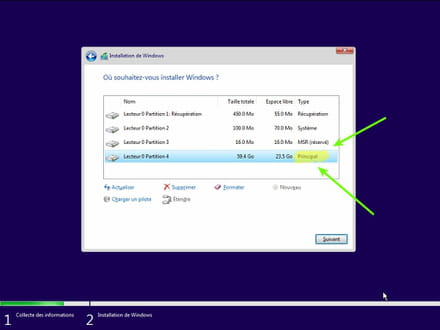
- During the partition phase, select the main partition and click next.
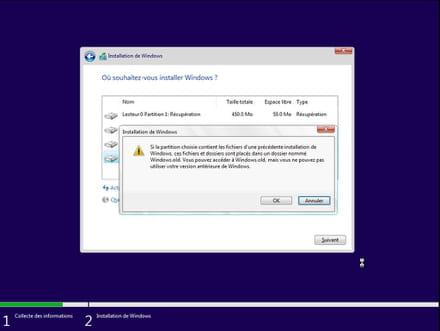
- The installer will tell you that Windows is already present and offer to move it.
- Follow the Windows installation procedure using the tutorial above.
Just don't format.
Your user data will be copied to the Windows.old folder.
Once Windows is installed, I recommend following these tips to properly configure and use Windows: Tips after reinstalling Windows.
--
Please press any key to continue the disinfection... -
I made the decision to format my disk (I didn't have any important folders on it for now)
The installation from the USB key worked well and my PC is functioning again
Thanks for your help once again
(I don't know how to mark this article as Resolved) -
ok great,
In the future, to avoid data loss, I invite you to back up your documents.
These links explain how to do it:- Backing up your data on Windows 10
- Backing up your data for free
--
Please press any key to continue the disinfection...