
Trojan:Win32/Vigorf.A & Trojan:Script/Wacatac.H!ml
Solvedbazfile Posted messages 58498 Registration date Status Moderator Last intervention -
Hello,
I have just reinstalled Windows 10. Since I hadn't saved the files, I'm reinstalling everything little by little; I admit it's taking me a ridiculous amount of time because I'm a basic user.
In the process, while checking the security, Microsoft Defender found the two mentioned trojans but did not remove them.
I searched online but only found offers for paid or free antivirus downloads, and since I don't know their real effectiveness against these two viruses, I prefer to consult you.
Could you help me get rid of them and guide me on how to do it?
Thank you very much in advance. Best regards.
14 answers
-
Hello.
Download FRST.
Once downloaded save it to the desktop then right-click on FRST and choose Run as administrator you will see this:

Wait for the message the tool is ready to operate to appear then click on Scan
Be careful, wait for the messages saying that the scan is complete to appear.

At the end of the scan you will have two text files on the desktop FRST and Addition.

Then send the FRST and ADDITION reports to https://www.cjoint.com/ then provide the two links generated by https://www.cjoint.com/ in your response.
bazfile
Moderator/Security Contributor.
a hello, a response, a thank you are always appreciated. -
I uploaded it to a server, download FRST via this link.
bazfile
Moderator/Security Contributor.
hello, a reply, a thank you are always appreciated. -
Hello Bazfile,
Thank you for listening to me on a Sunday.
How do we bypass this?
Because I tried to launch it from the free v/page but that didn't work either, Edge is still blocking it.
I also tried to download it from elsewhere including a CCM page but no miracle. Then I tried to launch it from the desktop, the system displays the dialog box below. What should I do?
-
Have you read my message number 3 carefully? Just a reminder:
I uploaded it to a server, download FRST via this link.
bazfile
Moderator/Security Contributor.
A greeting, a response, a thank you are always appreciated. -
Hello,
I don't know if zipping it would work better.
You need to unzip (extract) the executable to the desktop before using it.
Zipped on Cjoint (upload for 21 days)
https://www.cjoint.com/c/NDvo5fDAE5U
From the 64-bit version here
https://www.bleepingcomputer.com/download/farbar-recovery-scan-tool/-
The first file he downloaded has the extension .crdownload, which means it is a partially downloaded file; in plain terms, the download is incomplete, which is why it has these opening suggestions see message 6.
I assume he did not take into account the file I uploaded because, like many, perhaps he does not read all the messages.
In any case, I believe the wacatac infection (a generic detection that is mostly false) has been removed by Windows Defender, as Windows Defender does effectively remove infections, but people continue to see them because they are in Windows Defender's history; it is actually a past detection, you just have to look at the date to realize it. People confuse detection with detection history; there are many similar posts in the forum.
The FRST report would allow us to know for sure and form an accurate opinion.
-
-
@Astronomix35 StatusMember .
Since you just reinstalled Windows 10 on Friday night, there's no infection on your PC.
The warnings from Windows Defender concerned the software OfficeLangPack2013_Brazilian_x64 that you downloaded, it is located in:
D:\Downloads\OfficeLangPack2013_Brazilian_x64.exe .
I think it's a false positive.
The alerts also concerned the Edge cache.
If you want to analyze the file found by Windows Defender, clear the Edge cache and remove the many orphaned/obsolete processes, follow these steps:
Procedure to follow in the order indicated:
1- Open FRST as an administrator by right-clicking on FRST and choosing run as administrator
2 - Copy the entire script that is in the box below:Start:: CreateRestorePoint: CloseProcesses: File: D:\Downloads\OfficeLangPack2013_Brazilian_x64.exe HKLM\...\Run: [] => [X] HKLM-x32\...\Run: [] => [X] HKU\S-1-5-21-2138684309-1682331496-1631371275-1001\...\Run: [] => [X] Task: {25D09679-ABB4-4A30-80C8-B8041B98A160} - \Intel\Intel Telemetry 2 -> No file Task: {317107BF-13F6-48B4-AA5A-BA0B03A02F4B} - \Microsoft\Windows\ErrorDetails\EnableErrorDetailsUpdate -> No file Task: {39CD21EB-35CB-4512-AA79-269F27FC6E2F} - \DropboxUpdateTaskMachineUA -> No file Task: {40C16C89-5B22-4B8C-9C81-473B802B8152} - \DropboxUpdateTaskMachineCore -> No file Task: {4684A723-77DC-46F4-9460-C702FB7F0491} - \ATK Package 36D18D69AFC3 -> No file Task: {46FCE6C3-B5EE-4EFC-970E-62DD4766CD46} - \ATK Package A22126881260 -> No file Task: {48A98229-5C8E-4DDD-8139-CF35F7262A95} - \Microsoft\Windows\Plug and Play\Plug and Play Cleanup -> No file Task: {523F5687-D9CD-4734-8E2F-81D937655347} - \Microsoft\Windows\UpdateOrchestrator\USO_UxBroker_Display -> No file Task: {5365D1B5-E050-4D5E-B386-8A29115A0649} - \WpsUpdateTask_Administrator -> No file Task: {5499FBAB-5FAB-45C6-AF5B-EFAF4EBCF68C} - \Microsoft\Windows\UpdateOrchestrator\Policy Install -> No file Task: {5587F1DC-15D0-4331-A673-6EF75E5CD9C0} - \Microsoft\Windows\AppID\SmartScreenSpecific -> No file Task: {62789515-8E87-427E-B2E6-74622444682D} - \ASUS USB Charger Plus -> No file Task: {6430CC72-EBF8-4F8C-AF87-2CCE1878ED23} - \ASUS\ASUS Product Register Service -> No file Task: {6847379D-08CC-4757-B19E-6E8CEC5DB74F} - \IntelWiDi-Upgrade-91ba0caa-28a7-4f47-8d08-f71b4b10fbec -> No file Task: {6C7E462D-5ADA-412E-B391-D60DA0F23B65} - \Microsoft\Windows\UpdateOrchestrator\USO_UxBroker_ReadyToReboot -> No file Task: {71E53243-3A2D-47EE-9DAB-6D71B2366657} - \Microsoft\Windows\ErrorDetails\ErrorDetailsUpdate -> No file Task: {751032FB-518B-42B1-84EC-DAFF4695A73D} - \WpsNotifyTask_Administrator -> No file Task: {76E2892C-4A10-47AA-8E71-BB21C89B845D} - \ASUS Splendid ACMON -> No file Task: {81095EBF-E6B2-4850-A7D3-D3B1C1B8E2B9} - \DropboxOEM -> No file Task: {A2AB61D5-D872-47C1-967A-EAD1E3C91A7B} - \ASUS\ASUS GIFTBOX -> No file Task: {B8F1709B-849F-4A0F-BFB9-8D1FFAF48AC3} - \Microsoft\Windows\UpdateOrchestrator\Maintenance Install -> No file Task: {C349BB67-3672-4975-AE02-517BAD9318EE} - \Microsoft\Windows\WindowsUpdate\sih -> No file Task: {E26414DB-F74C-405A-BAA2-3FAC384AE565} - \ASUS Smart Gesture Launcher -> No file Task: {ED370D9D-F6CA-4E76-99AD-34BF5A26A475} - \IntelWiDi-Upgrade-91ba0caa-28a7-4f47-8d08-f71b4b10fbec-Logon -> No file Task: {FA625267-66E0-464A-AE95-8754007E78AD} - \Microsoft\Windows\UpdateOrchestrator\Reboot -> No file Task: {32A05256-5820-4EC1-90F3-A1DCCA35B200} - System32\Tasks\IUM-F1E24CA0-B63E-4F13-A9E3-4ADE3BFF3473 => C:\Program Files (x86)\Intel\Intel(R) Update Manager\bin\iumsvc.exe --automatic (No file) S4 mccspsvc; "C:\Program Files\Common Files\McAfee\CSP\1.6.1008.0\McCSPServiceHost.exe" [X] ContextMenuHandlers5: [igfxcui] -> {3AB1675A-CCFF-11D2-8B20-00A0C93CB1F4} => -> No file FirewallRules: [{FC185D01-6CA3-4008-8A94-6D6181A045C6}] => (Allow) C:\Program Files\Intel Corporation\Intel WiDi\Next\WirelessDisplay.exe => No file EmptyTemp: End::3- Once the script is copied, click on Fix, FRST will automatically take the script that is in the clipboard.

Let the fix complete, once it's done you will be asked to restart your PC, do so as soon as prompted, see below.
Then once your computer has restarted:
4- You will have a file Fixlog on your desktop, then send this fixlog report to https://www.cjoint.com/ then provide the link generated by https://www.cjoint.com/ in your response.5- CHECK AND TELL ME IF YOUR PROBLEM IS STILL PRESENT
bazfile
Moderator/Security Contributor.
A hello, a response, a thank you are always appreciated. -
Good evening Bazfile,
Here is the link that Cjoint gave me
https://www.cjoint.com/c/NDvuV5tn6sU
I also ran a quick scan of Windows 10's virus and threat protection and the report says no threats found.
I believe that thanks to your invaluable help, I have finally cleaned this notebook.
Allow me one last question, should I delete the file that caused all this chaos
D:\Téléchargements\OfficeLangPack2013_Brazilian_x64.exe .THANK YOU THANK YOU THANK YOU
-
The fixlog is OK.
According to the FRST report, the file OfficeLangPack2013_Brazilian_x64.exe is no longer present on the PC, it was removed by Windows Defender.
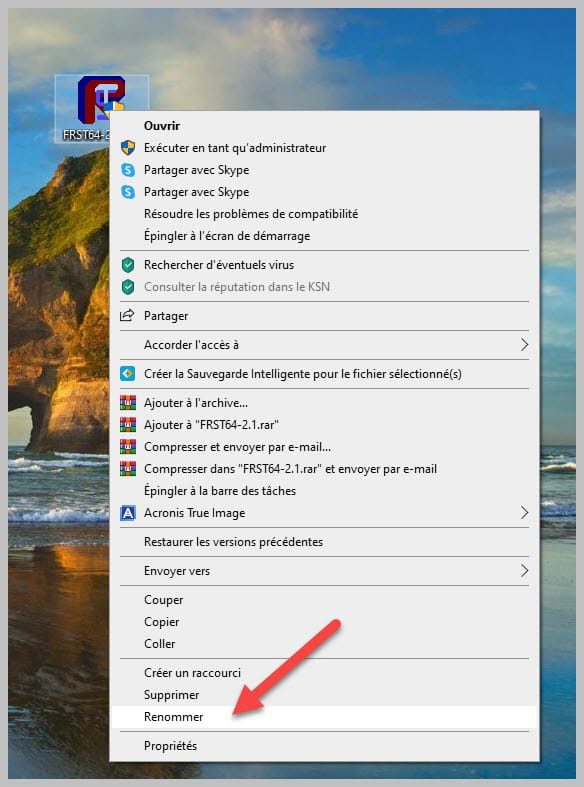
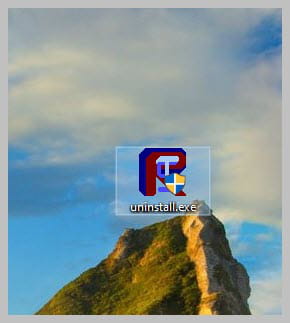
Uninstall FRST, rename the FRST file you downloaded to uninstall, then once the file is renamed, open it; the uninstallation will occur automatically via a restart of the PC.
bazfile
Moderator/Security Contributor.
A hello, a reply, a thank you are always appreciated. -
Good evening Bazfile,
Thank you for your reply.
I tried to follow your link to download FRST, but when I went to look for it on the desktop, I couldn't find it. Then I tried from a download link found further down the BLEEPING page that your link directed me to, it sort of worked, which gives FIGURE 1. Obviously, when I right-clicked, the menu didn't offer me the option to run as admin. FIG 2
Did I do something wrong in my manipulations?

-
Thank you, I think I've found the flaw.
Edge refuses to download it because it considers it dangerous.
I should use another browser, maybe Firefox or Brave, but for that, I need to download it first.
Am I at risk of spreading the virus in the new browser? -
Hello Bazfile,
Following your post 7,
Have you read my message number 3? As a reminder:
I uploaded it to a server, download FRST via this link.
I confirm I used the link that takes me to a Free page, then I clicked on the download bar. For added security, I just repeated the operation and again I got a download message. The screenshot below shows various error messages including the latest...

Of course, a new icon appears on the desktop with almost the same characteristics

This leads me to wonder; do I have the necessary drivers to carry out this operation, because until now I have only reset Win 10 and added Office Home 2016, which is my office tool purchased in an authorized store and registered with Microsoft.
-
Here I am again.
I downloaded Firefox and I was finally able to bypass the blockage.
I obtained the two aforementioned txt files.
I just sent the first one (FRST) to Cjoint and it gave me the following link
https://www.cjoint.com/c/NDvrJHz5auDand here is the second Addition file
https://www.cjoint.com/c/NDvrOrj2bgDI hope I did everything according to your instructions
-
Hello Bazfile,
I followed your instructions regarding the uninstallation process, everything seems to have gone well. THANK YOU AGAIN.
I believe I can continue installing all the other applications that were removed during the reinstallation.
By the way, there was a list of these applications that was provided by Windows, but with the various restarts I can no longer find it, do you know where I can retrieve it? It would make my job easier. If that's not possible, I will install the most useful ones because ultimately on my laptop I only use office applications, browsers, WhatsApp, an old FastStone for photos, etc. but I don’t play games.
Also regarding this, don’t you think that applications such as Xbox Live, WPS Office Asus, WildTangent Games, web storage, Gaming Assistant, Evernote or Dropbox should be removed?-
I advise you to ask this question in the Windows 10 forum as it is not related to the security forum.
Install the applications you need, and uninstall the others you don't use; the main thing is to keep only the applications that are necessary.
-
-


