
Trojan:JS/Mountsi.B!ml and Windows Script Host issue
SolvedHello,
today while activating some functionality of Windows Defender, an alert appeared Trojan:JS/Mountsi.B!ml
the affected item is " amsi: C:\Users\dell\AppData\Roaming\stream.x64.x-all.dat I tried deleting the trojan but it came back every time I restarted Windows, I installed several antivirus programs but it remained undetectable except for Windows Defender, which detected it,
I don't know if it's because of Avast, but after installing it, an error appeared after restarting my computer, Windows Script Host unable to find the file "C:/users/dell/AppData/Roaming/stream.x64.x-all.dat"
FSRT : https://www.cjoint.com/c/LKyxTY01UwS
Addition : https://www.cjoint.com/c/LKyxUmBCVPS
Windows / Chrome 107.0.0.0
8 answers
-
Moderator
Hello
Procedure to follow in the indicated order:
1- Open FRST as an administrator by right-clicking on FRST and selecting run as administrator
2 - Copy the entire script that is in the box below:Start:: CreateRestorePoint: CloseProcesses: Startup: C:\Users\dell\AppData\Roaming\Microsoft\Windows\Start Menu\Programs\Startup\Send to OneNote.lnk [2021-11-29] ShortcutTarget: Send to OneNote.lnk -> C:\Program Files\Microsoft Office\root\Office16\ONENOTEM.EXE (No file) Startup: C:\Users\dell\AppData\Roaming\Microsoft\Windows\Start Menu\Programs\Startup\stream.x64.x-all.dat.lnk [2022-11-24] ShortcutAndArgument: stream.x64.x-all.dat.lnk -> C:\Windows\system32\wscript.exe => /E:vbscript "C:\Users\dell\AppData\Roaming\stream.x64.x-all.dat.vbs" S3 eppvad_simple; \SystemRoot\system32\drivers\EMP_UDAU.sys [X] C:\Users\dell\AppData\Roaming\stream.x64.x-all.dat.vbs EmptyTemp: End::3- Once the script is copied, click on Fix, FRST will automatically use the script from the clipboard.

Let the fix complete, once it is done you will be asked to restart your PC, do it as soon as you are prompted, see below.
Then once your computer has restarted:
4- You will have a Fixlog file on your desktop, then send this fixlog report to PJJOINT and provide the link generated by PJJOINT in your response.5- CHECK AND TELL ME IF YOUR PROBLEM IS STILL PRESENT
6- Once the disinfection is complete, change your online passwords as they may have been stolen.
bazfile
Moderator/Security Contributor.
A hello, a response, a thank you are always appreciated. -
Thank you immensely for your help, I hope you will be rewarded in proportion to the assistance you provide to people and their mental health.
-
Hello, today when restarting my computer to do what you asked me, I did not receive the trojan alert,
anyway for now after putting the code in FRST in administrator mode and after restarting the computer, the Windows Script Host error is gone. Thank you again!
Here is the fixlog https://pjjoint.malekal.com/files.php?id=20221125_r6g10h15x10f9-
Moderator
The fixlog is OK.
If everything is also OK on your side, you can uninstall FRST, rename the FRST file you downloaded to uninstall, then once the file is renamed, open it, the uninstallation will happen automatically via a PC restart, see the screenshots below.For your information.
Your version of Windows 10 is not up to date, to check this go to Windows Update, the update to version 22H2 should be offered to you if it's not the case go to this page click on Update now, this will start the download of the Microsoft tool, just open it and it will allow you to update Windows 10 to the latest version and will tell you if it is compatible with your PC, be careful this update takes some time.
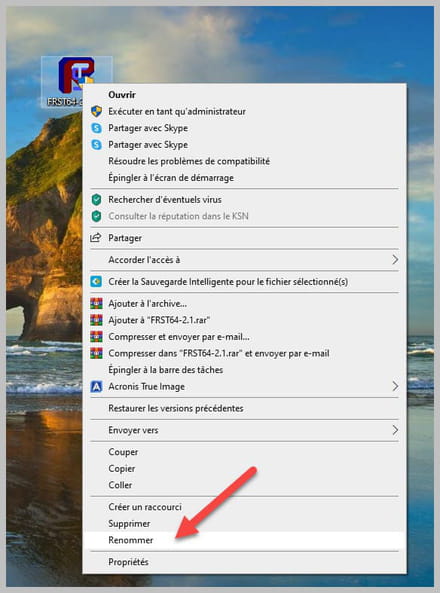
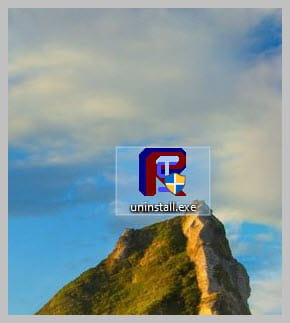
-
-
While updating just now, when I restarted my computer, the Windows Defender alert reappeared.

-
I just don't understand sometimes I restart the PC, Windows Defender doesn't detect anything, and other times the alert appears once in three after a reboot.
Attachment:
FRST: https://pjjoint.malekal.com/files.php?id=FRST_20221125_e5y8d7k7e11Addition: https://pjjoint.malekal.com/files.php?id=20221125_u15l14m11v12o14

-
Moderator
There is nothing left, your PC is clean; it comes from the Windows Defender history, the detection remained there since it was not Windows Defender that removed the infection.
Delete the Windows Defender history and you'll see that there will be nothing left.
For your information, your PC is apparently compatible with Windows 11 since your i5-1145G7 processor is compatible; the upgrade is free and is offered in Windows Update.
Do this test https://www.commentcamarche.net/telecharger/utilitaires/23801-whynotwin11/ .
-
-
Okay, I will delete it. Is Windows 11 more stable and optimized than Windows 10?
-
I will get to work on it, I hope the disk encryption problem on Windows 11 will disappear, thank you very much again!

-
Well, I don't understand then, for the encryption it is activated, my BitLocker is activated but it says it is temporarily suspended. I restart my computer but it doesn't resume. Do you think it's because OneDrive is not connected?
-
Moderator
I don't know, you need to ask your question in the Windows forum, this is a forum dedicated to infections.
-
