
My PC is not using all the RAM.
bendrop Posted messages 12665 Registration date Status Contributor Last intervention -
Hello,
On my PC, I currently have 3 RAM sticks of 8GB each, totaling 24GB, but my PC only uses 7.92GB, while it detects the 24GB. I have already used "MSconfig"; when I set "maximum memory," it shows 24576, but when I restart my PC and go back, it shows 0, and in the settings, it still displays 7.92GB usable.
In the BIOS, I do not have the option to use "memory remap" or anything like that since it is not offered. I have an MSI B450 Tomahawk.
Thank you.
Sincerely,
4 answers
-
Hello,
Find out what RAM is used for.
And you will understand why it is not used at 100%
-
Do you use all the water available from your faucets?
Do you use all the electricity available from your outlets?
Well, in a PC, the system and the software running on it only use what they need.
However, I can create a software for you that will consume all your RAM and even make calls to the hard drive.
To do this, it's enough to perform rapid calculations on many very large numbers.
You can find such programs on the internet.
-
-
Hi
The following page shows in the task manager a PC that has 32 GB of RAM, and the PC uses it all well, look where it says "Memory______ 32 GB" above the graph; it's not easy to understand the way Windows presents the numbers but there's nothing we can do about that.
When you have your 24 GB at that spot, it's good you can let Windows 10 or 11 manage your memory. You can see the numbers fluctuate all the time for some, while others never change. The definitions are on the page.
The old tutorials for usable memory no longer work on the latest Windows versions.
https://websetnet.net/fr/understand-windows-task-manager-memory-tab/
Just these little phrases: You don't understand how Windows works.
"my PC only uses 7.92 GB==There are always 7.92 GB usable."
-
Hello,
It's a common issue; we can't predict the performance of any RAM addition just by chance; it depends on how the motherboard chipset and the processor's memory controller respond.
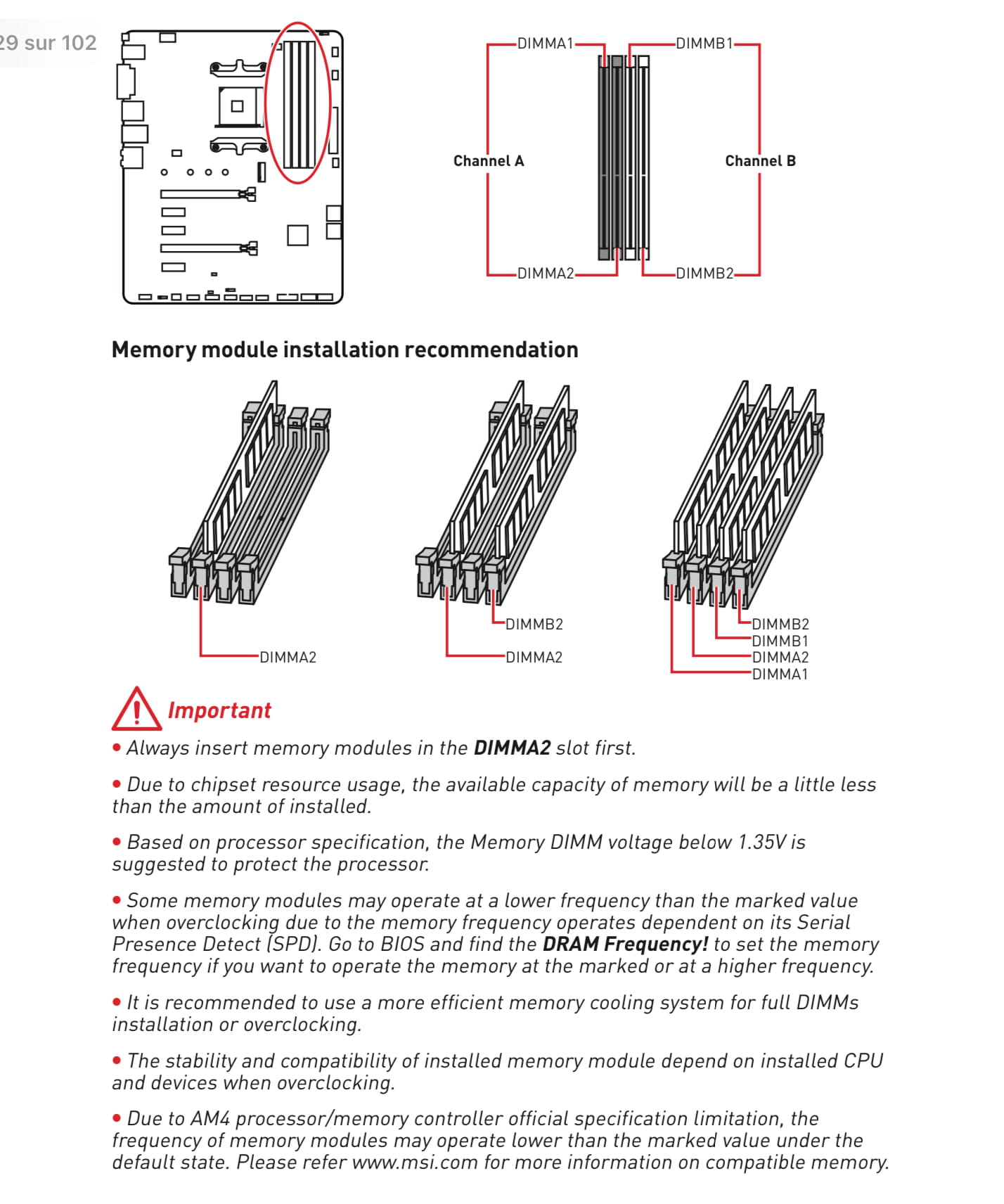
Generally, on this type of AM4 motherboard, it can be either 1, 2, or four RAM sticks in certain slots only, and all of this must be checked for compatibility.
-
Good evening,
You do not specify the characteristics of your 3 RAM sticks that do not comply with the manufacturer’s installation recommendations. You cannot have 3. You also do not specify your CPU.
Best regards.

