
Reduced Internet Speed
Solvedbazfile Posted messages 58529 Registration date Status Moderator Last intervention -
Good evening,
I am seeking your help to try to resolve my problem as I have tried everything without success..
Here is my issue:
On my desktop PC (and only this one), I have a very reduced internet speed; when I run a speed test, I reach 100Mbit/s for downloads and 0.08Mbit/s for uploads on average.
When I run the same speed test on another computer (this one being a laptop), I get results around 900Mbit/s for downloads and 500Mbit/s for uploads.
I should clarify that I am conducting these tests with the same RJ45 cables, which I unplug from one PC to plug into the other, and using the same Ethernet ports on the fiber box.
I have tried changing the DNS settings and doing an ipconfig /release followed by ipconfig /renew.
I checked the properties of the network adapters, but I didn't see anything unusual.
Upon investigation, I noticed that the LED lights on the Ethernet port were both yellow (one steady and one blinking), so I bought a USB-Ethernet adapter (which lights up green when connected) but that did not resolve the issue.
In summary, I have internet working on my desktop PC, but only at a fraction of the available speed.
For your information:
- I have an MSI B450 Tomahawk motherboard
- I am with Free, with a Freebox Pop fiber subscription
- I have CAT7 RJ45 cables
Thank you in advance, hoping that we can resolve this issue :/
7 answers
-
Hello.
If you have the CfosSpeed software installed on your PC, uninstall it, restart your PC, and check if it’s better.
Follow the same procedure if you have the Netlimiter software.
bazfile
Moderator/Security Contributor.
A hello, a reply, a thank you are always appreciated. -
Hello,
first of all, is it a direct connection to the box or not (via powerline adapters for example)?
next, what is the exact model of the Ethernet card in the device manager?
also, what is the connection speed of this card?
And there you go ....
But goodness, those line spacings are so annoying!! -
Hello,
@bazfile: I uninstalled CfosSpeed and restarted, same result on the speed test.
And I didn't have the Netlimiter software installed :/
@brupala: it's a connection via the apartment's internal network, the box is connected to a wall socket that is linked to another wall socket in another room, it’s on this last socket where my PC is plugged in.
I also tested with Gigabit PLCs, the result was the same.
The ethernet card is: Realtek PCIe GbE Family Controller.
It is configured to "Auto-negotiation", I also tried "1.0 Gbps Full Duplex" but it didn't change anything.
I hope I have answered your questions,
Thank you
-
-
-
-
I'm doing my tests here:

Here are the results:

And here are the results on my other PC (same cable, same test):

Download FRST once downloaded save it on the desktop then right-click on FRST and choose Run as administrator you will see this:

Wait for the message the tool is ready to operate to appear then click on Analyze
Warning, wait for the messages indicating that the scan is complete to appear.

At the end of the scan, you will have two text files on the desktop FRST and Addition.

Then send the FRST and ADDITION reports to https://www.cjoint.com/ then provide the two links generated by https://www.cjoint.com/ in your reply.
bazfile
Moderator/Contributor security.
a hello, a reply, a thank you are always appreciated.-
Here are the links:
FRST: https://www.cjoint.com/c/MJflFBrAIqg
Addition: https://www.cjoint.com/c/MJflFXRZHRg
cFosSpeed is still active on your PC and is still in the installed programs.
Uninstall cFosSpeed using Revo Uninstaller in advanced scan mode.
Revo Uninstaller Tutorial to Read Carefully.
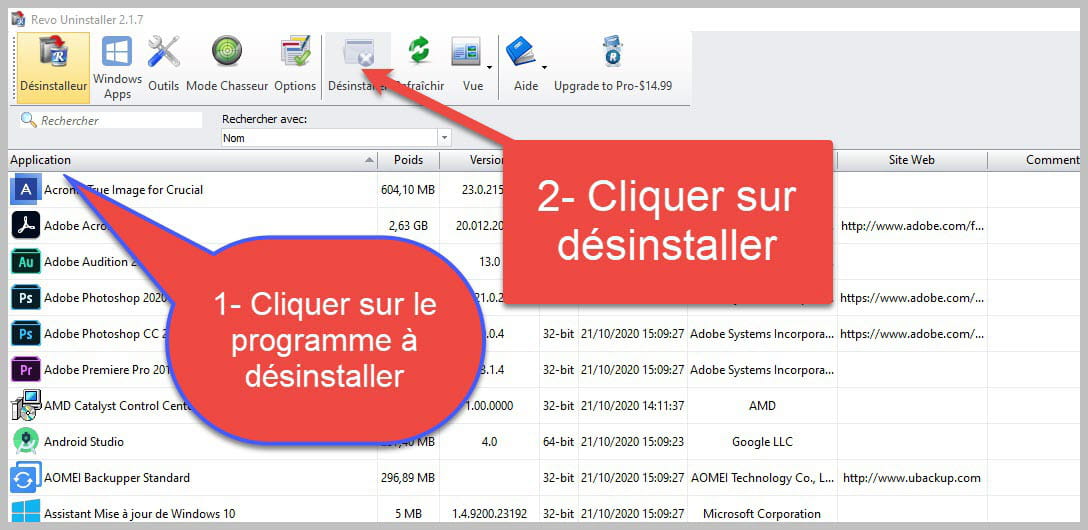

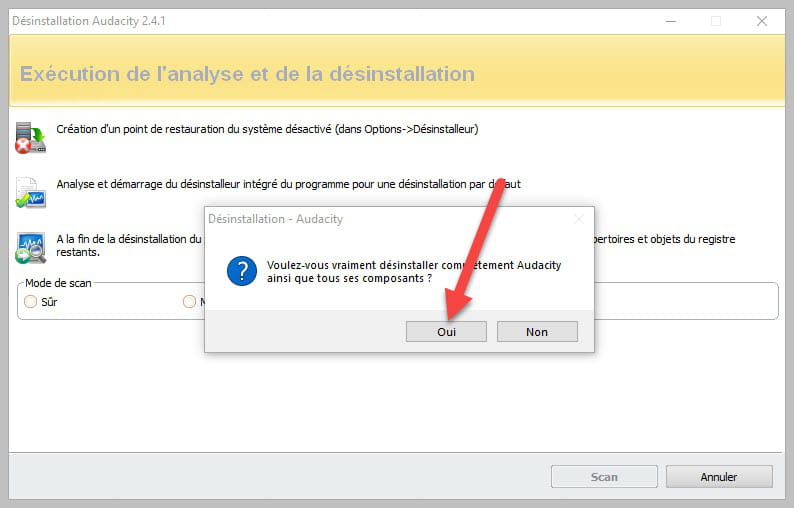
Accept the uninstallation of the program you wish to uninstall, and if there is an error message saying that uninstallation is impossible, close the error message and continue the procedure.

Check "Advanced scan" then click on "Scan".

Click on "Select all" then on "Delete"; if a second list appears, do the same, and once everything is deleted, click on "Done," restart your PC, and check if your problem persists.
This will not be over; you have a parasite search engine in Firefox that we will address later.
-
This fix has indeed resolved the problem! Thank you very much! :)

However, cFosSpeed is still present on my PC, I even uninstalled it twice to be sure, but it always comes back. Is this a problem considering that my internet speed has become "normal"?
Here are the new links:
FRST: https://www.cjoint.com/c/MJfmwHQjoFg
Addition: https://www.cjoint.com/c/MJfmwS5Drfg
It's an MSI program that reinstalls it. In my opinion, the culprit is MSI Dragon Center, which is part of the installed packages and launches on PC startup:
DragonCenter -> C:\Program Files\WindowsApps\9426MICRO-STARINTERNATION.DragonCenter_2.0.133.0_x64__kzh8wxbdkxb8p [2023-09-23] (MICRO-STAR INTERNATIONAL CO., LTD) [Startup Task]If you encounter this type of connection problem again:
- Either you uninstall Dragon Center.
- Or you disable it from Windows startup. To do this, go to the Task Manager, then in the Startup tab, select Dragon Center and disable it so it won't launch at PC startup.
Then you can uninstall cFosSpeed again, using RevoUninstaller.
For your information, you have a parasitic search engine in Firefox, as well as orphaned processes and a lot of obsolete entries in the Windows firewall. If you'd like to remove all this and reset the Windows firewall, follow the steps below. It's not mandatory; it's up to you.
Procedure to be done in the order indicated:
1- Open FRST as an administrator. To do this, right-click on FRST and choose Run as administrator
2 - Copy the entire script that is in the following box:Start:: CreateRestorePoint: CloseProcesses: GroupPolicy: Restriction ? Policies: C:\ProgramData\NTUSER.pol: Restriction HKLM\...\Run: [DigidesignMMERefresh] => C:\Program Files\Avid\Pro Tools First\MMERefresh.exe (No file) Task: {19A152F8-43DD-4F4B-9D99-80ACF138DA80} - System32\Tasks\GamingOSDAutoStartUp => C:\Program Files\GamingOSD\GamingOSD.exe -autostart (No file) Task: {0B449F65-812D-4E5B-AA75-41A6060A5639} - System32\Tasks\MonitorMicroKey => C:\Program Files\GamingOSD\MonitorMicroKeyDetector.exe (No file) Task: {D2279999-9DD0-448C-98E1-CA45227129FE} - System32\Tasks\MonitorMysticLight => C:\Program Files\GamingOSD\MysticLight\MysticLightController.exe (No file) Task: {BE576145-B97D-48B6-9B31-90A6DFC99BCA} - System32\Tasks\MonitorWeatherDetector => C:\Program Files\GamingOSD\WeatherDetector.exe (No file) S2 DigiRefresh; C:\Program Files\Avid\Pro Tools First\MMERefresh.exe -s [X] S3 digiSPTIService64; "C:\Program Files\Avid\Pro Tools First\digisptiservice64.exe" [X] S1 nordlwf; \SystemRoot\system32\DRIVERS\nordlwf.sys [X] Edge Extension: (No name) -> AutoFormFill_5ED10D46BD7E47DEB1F3685D2C0FCE08 => C:\Windows\SystemApps\Microsoft.MicrosoftEdge_8wekyb3d8bbwe\Assets\HostExtensions\AutoFormFill [not found] Edge Extension: (No name) -> BookReader_B171F20233094AC88D05A8EF7B9763E8 => C:\Windows\SystemApps\Microsoft.MicrosoftEdge_8wekyb3d8bbwe\Assets\BookViewer [not found] Edge Extension: (No name) -> LearningTools_7706F933-971C-41D1-9899-8A026EB5D824 => C:\Windows\SystemApps\Microsoft.MicrosoftEdge_8wekyb3d8bbwe\Assets\HostExtensions\LearningTools [not found] Edge Extension: (No name) -> PinJSAPI_EC01B57063BE468FAB6DB7EBFC3BF368 => C:\Windows\SystemApps\Microsoft.MicrosoftEdge_8wekyb3d8bbwe\Assets\HostExtensions\PinJSAPI [not found] FF NewTab: Mozilla\Firefox\Profiles\19ce3ear.default -> hxxps://defaultsearch.co/homepage?hp=1&pId=BT171001&iDate=2020-04-20 02:44:17&bName=&bitmask=0600 FF NewTab: Mozilla\Firefox\Profiles\nt3vyi78.default-release -> hxxps://defaultsearch.co/homepage?hp=1&pId=BT171001&iDate=2020-04-20 02:44:17&bName=&bitmask=0600 cmd: netsh advfirewall reset End::3- Once the script is copied, click on Fix; FRST will automatically take the script from the clipboard.

Let the correction take place. Once it’s done, you will be asked to restart your PC; do it as soon as prompted, see below.
Then, once your computer has restarted:
4- You will have a Fixlog file on your desktop. Then, send this fixlog report to https://www.cjoint.com and provide the generated link from https://www.cjoint.com in your response.
bazfile
Moderator/Security Contributor.
A greeting, a response, a thank you are always appreciated.-
MSI Dragon Center was indeed disabled on startup, but just to be sure, I uninstalled it via the Windows uninstaller (it wasn't available on Revo Uninstaller) but cForsSpeed is still there...
___________
Here is the Fixlog file: https://www.cjoint.com/c/MJfozotV73g
I ran a scan again after removing Dragon Center for your information:
FRST: https://www.cjoint.com/c/MJfoAq8lUKg
Addition: https://www.cjoint.com/c/MJfoAAQV85g
The fixlog is OK.
cForsSpeed is still there...
The main thing is to know whether cFosSpeed continues to limit your bandwidth even if it is present.
Do this new FRST correction, it will remove cFosSpeed.
Start:: CreateRestorePoint: CloseProcesses: R2 cFosSpeedS; C:\Program Files\cFosSpeed\spd.exe [602376 2021-07-29] (cFos Software GmbH -> cFos Software GmbH) C:\Program Files\cFosSpeed C:\ProgramData\cFos C:\WINDOWS\system32\Drivers\cfosspeed6.sys C:\WINDOWS\cFosSpeed_Setup_Log.txt C:\WINDOWS\cFosSpeed_Setup_OldLog.txt End::Be careful, the correction will not remove the entry in the installed programs normally; if cFosSpeed is properly uninstalled, you will know it when you uninstall it via the installed programs—you should receive a message indicating this and asking if you want to remove the entry.
bazfile
Moderator/Security Contributor.
A hello, an answer, a thank you are always appreciated.
Latest Discussions -
Install flashlight on samsung a36
on 15 Aug -
Windows reinstall on formatted hard drive
on 15 Aug -
Macro delete criteria without removing xl filters arrows
on 15 Aug -
Connected windows mobile
on 15 Aug -
Problem with font in word
on 15 Aug -
Mouse that isn’t working properly
on 15 Aug -
The volume level on my acer is insufficient.
on 15 Aug -
New hard drive problem
on 15 Aug -
Texture issues in enshrouded
on 15 Aug -
Speaker wiring
on 15 Aug
Other languages
-



