
Missing drivers on my Mac
_Ritchi_ Posted messages 21130 Registration date Status Contributor Last intervention -
Hello, I just finished installing Windows 10 on my 13" mid-2009 MacBook Pro, and it seems to be working except for some drivers. I've already searched on Apple's website, but there isn't any version of Boot Camp that matches my computer with Windows 10. I'm missing 3 drivers that I've already tried to install, but they just crash my hard drive since they are designed for Windows 7 and 8:
- Bluetooth host controller
- Built-in iSight
- Coprocessor
Maybe they aren't important? Could someone guide me towards a solution?
Thanks in advance
1 answer
-
Hello
Your MacBook Pro 13" mid2009 is limited to macOS El Capitan 10.11.6, and it is true that Apple does not offer a BootCamp solution to install Windows 10 on its site.
However, it seems that it is possible to do it with a workaround in the Boot Camp Assistant application as explained HERE and below is the interesting part:
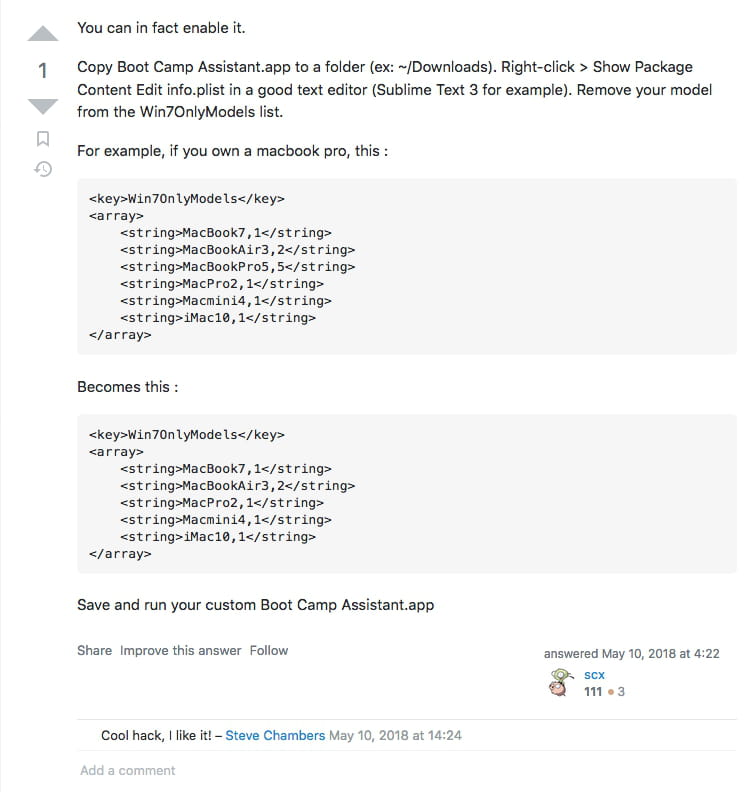
In summary:
You just need to do the following:
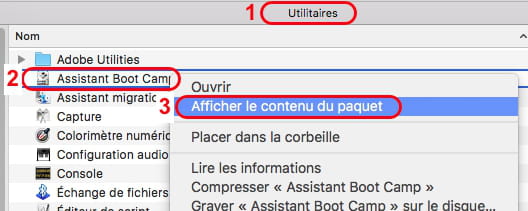
- open the folder "Applications -> Utilities"
- right-click on "Boot Camp Assistant"
- choose the menu "Show Package Contents"
- open the Contents folder
- edit the "info.plist" file with your preferred editor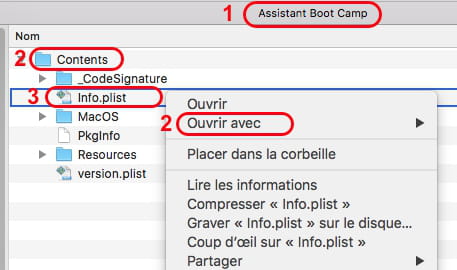
- in the info.plist file, search for the line "<key>Win7OnlyModels</key>" (which is towards the end of the file):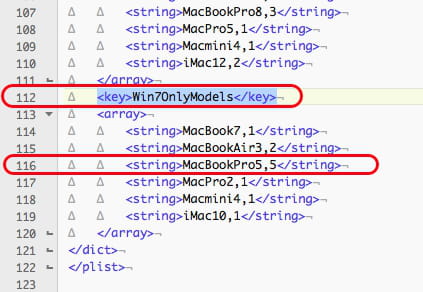
- delete your Mac's model from the "Win7OnlyModels" section (in your case, it's the line <string>MacBookPro5,5</string> )
- save the file
- install Windows 10 as explained by Apple on its site 'Boot Camp Assistant'
Give it a try
Ritchi
