
Error 0x800f0831
Solvedsavlulu13 Posted messages 188 Registration date Status Member Last intervention -
Hello,
For a few days now I’ve been unable to install the latest Windows update KB5022282.
"Problems occurred while installing updates, but we will retry later. If the problem persists and you want to search the Internet for information or contact support for assistance, this may help you: (0x800f0831)"
I’ve tried everything, manually, Windows Update troubleshooter, and nothing.
Moreover, it feels very slow on my PC, though it isn’t exactly new.
I’m considering doing a reset because of the slowness, but first I’d like to see if there isn’t another solution for both that and the update. Because resetting takes so long.
My PC is an Asus but I don’t remember how to find its model/reference
Intel(R) Core(TM) i3-4130T CPU @ 2.90GHz 2.90 GHz
Thanks in advance
7 answers
-
Hello.
Test your hard drive with CrystalDiskInfo use the following color codes to interpret the results:
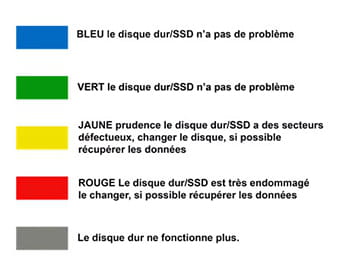
If the disk is OK perform a Windows 10 repair without data loss (everything is kept), despite what appears on the screens this is a repair, not a Windows installation.
Download this Microsoft tool open the tool and proceed as indicated below:
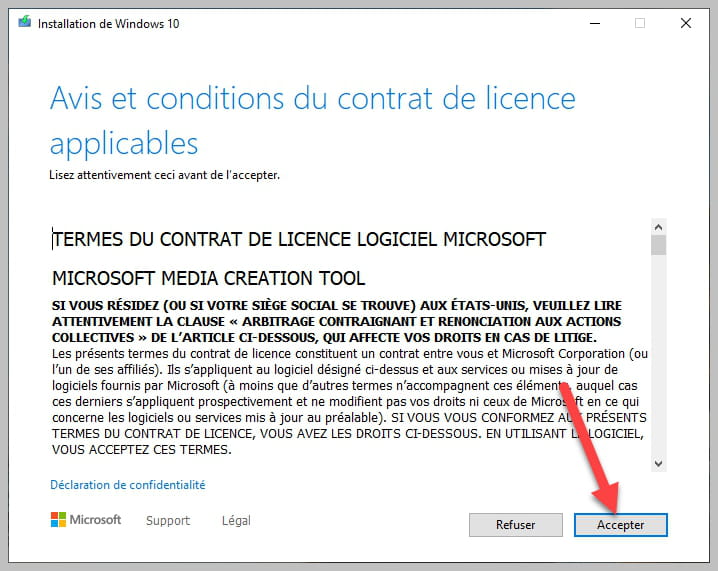


Be sure to keep the checkbox checked as shown in the photo.
bazfile
Moderator/Security Contributor.
a hello, an answer, a thank you are always appreciated. -
Good evening, it seems there is a problem.
https://www.zupimages.net/viewer.php?id=23%2F03%2Fj71l.jpg
Should I still perform the Windows 10 repair?
-
Am I going to lose my Windows license? I’m going to have to get it repaired because I don’t know how to change a hard drive.
Thanks for the help
-
Replacing a hard drive is simpler than that: a few screws to unscrew and that's it, done in a few minutes. As for the license, you don't lose it; Windows will reactivate automatically, and if that isn't the case, see this page: this page. Regarding Windows installation, it's very simple—see this page; no need to go to a repair shop.
-
I’m not ready to do it, far too afraid of making a mistake, and above all I wouldn’t know which one to choose
-
Do you have a laptop or a desktop computer?
Ultra simple, il suffit de retirer le panneau, généralement sur le côté droit de la tour, d’en retirer le disque dur et d’installer un nouveau disque dur, par exemple https://www.amazon.fr/Seagate-St1000dmz10-Barracuda-Disque-Interne-Argent/dp/B07D99KFPK
ou
Tu peux aussi installer un SSD beaucoup plus rapide qu’un disque dur classique, par exemple https://www.amazon.fr/Crucial-CT1000MX500SSD1-Interne-MX500-Pouces/dp/B078211KBB
-
-
Does the SSD suit me, is it suitable for configuring my PC?
-
Yes, there are plenty of tutorials on the net and videos on YouTube that explain how to do it https://www.google.com/search?q=changer+disque+dur+tour+pc
-
-
Thanks, I’ll order it as soon as possible and will come back if I have a problem :)
