
Remove Powershell virus.
Solved/Closed
Hello everyone,
My system is currently infected with the Powershell virus that I cannot remove permanently.
I am running Windows 11 with Nod32 Internet Security as my antivirus, but every time I turn off/restart my computer, at some point, Powershell opens up and even though Nod32 tells me it is removing it, it keeps coming back and I don't know what to do.
Can you help me?
Thank you in advance.
Best regards,
Rudy
42 answers
-
Moderator
Hello.
Download FRST once downloaded save it on the desktop then right-click on FRST and choose Run as administrator you will see this:

Click on Scan

Note, wait for the messages saying that the scan is complete to appear.

At the end of the scan you will have two text files on the desktop FRST and Addition.


Then send the FRST and ADDITION reports to PJJOINT see THIS TUTORIAL then provide the two links generated by PJJOINT in your response.
bazfile
Moderator/Security Contributor.
a greeting, a response, a thank you are always appreciated. -
Moderator
The fixlog is OK, your PCs are clean.
For FRST, you can start by studying this https://forum.security-x.fr/tutoriels-317/tutoriel-frst
You can uninstall FRST, see my message 6.
bazfile
Moderator/Security Contributor.
a hello, a response, a thank you is always appreciated.-
-
Moderator@Rudy_Paris
OK.
-
-
:
FRST : https://pjjoint.malekal.com/files.php?id=FRST_20230113_q12p15m5s10m6
Addition : https://pjjoint.malekal.com/files.php?id=20230113_i12w11e13q10w15
Thank you for your help!
-
Hello , I've already sent you the links to the two txt files.
Thank you anyway for your kindness and responsiveness!
I also think I have the virus on two other computers of mine...
Best,
Rudy -
Moderator
Once the disinfection is complete, change all your online passwords as they may have been stolen (email, social networks, banking site logins, etc., etc....).
If you are using pirated software (Microsoft Office and/or Windows), I advise you to stop that, especially since it poses a lot of risks for nothing; see this page and this page.
Procedure to follow in the order indicated:
1- Open FRST as an administrator by right-clicking on FRST and choosing run as administrator
2 - Copy the entire script that is in the following box:Start:: CreateRestorePoint: CloseProcesses: BHO: Bitdefender Wallet -> {1DAC0C53-7D23-4AB3-856A-B04D98CD982A} -> C:\Program Files\Bitdefender\Bitdefender Security\pmbxie.dll => No file BHO-x32: Bitdefender Wallet -> {1DAC0C53-7D23-4AB3-856A-B04D98CD982A} -> C:\Program Files\Bitdefender\Bitdefender Security\Antispam32\pmbxie.dll => No file Toolbar: HKLM - Bitdefender Wallet - {1DAC0C53-7D23-4AB3-856A-B04D98CD982A} - C:\Program Files\Bitdefender\Bitdefender Security\pmbxie.dll No file Toolbar: HKLM-x32 - Bitdefender Wallet - {1DAC0C53-7D23-4AB3-856A-B04D98CD982A} - C:\Program Files\Bitdefender\Bitdefender Security\Antispam32\pmbxie.dll No file FirewallRules: [{303638A2-AA4E-4319-9A33-62457D60F0BF}] => (Allow) C:\Users\Rudy TORDJEMAN\AppData\Roaming\Zoom\bin\airhost.exe => No file FirewallRules: [{0295BC9A-88F3-434D-9D8B-C8E0A6F1DF45}] => (Allow) C:\Users\Rudy TORDJEMAN\AppData\Roaming\Zoom\bin\airhost.exe => No file HKLM\Software\...\Authentication\Credential Providers: [{C885AA15-1764-4293-B82A-0586ADD46B35}] -> IFEO\osppsvc.exe: [VerifierDlls] SppExtComObjHook.dll IFEO\SppExtComObj.exe: [VerifierDlls] SppExtComObjHook.dll HKLM\...\Run: [] => [X] HKLM\...\Run: [CL-25-F33D36F4-AAA6-4945-B37B-E911D136FF89] => "C:\Program Files\Common Files\Bitdefender\SetupInformation\CL-25-F33D36F4-AAA6-4945-B37B-E911D136FF89\setuplauncher.exe" /run:Installer.exe /args:"/setup-folder:"CL-25-F33D36F4-AAA6-4945-B37B-E911D13 (the data item has 7 extra characters). (No file) Task: {02415FDA-83EE-4317-962F-1FE35A5D9485} - \Winrar -> No file Task: {6020405E-79E6-42CA-BE70-40EB40AE90D2} - System32\Tasks\EdgeCrashHandler => C:\Program Files (x86)\Microsoft\Edge\Application\mshandler.exe (No file) Task: {CC9E531F-81AA-4232-BAC5-2575045F85DC} - \Crash Handler -> No file Task: {CCDFC0B8-01A3-4E74-A820-4F13F51D269E} - System32\Tasks\Microsoft\Windows\Mobile Broadband Accounts\MNO Metadata Parser => C:\WINDOWS\System32\MbaeParserTask.exe (No file) Task: {D8D1B8F8-9501-4696-AFA7-3128519EA50A} - \Microsoft\Windows\Management\Provisioning\aBMYcDh\436ABF07-1656-4260-9E57-357415EA4FE8 -> No file Task: {E0F10DCF-44AD-40E8-9370-FB5DA59F93FB} - System32\Tasks\Microsoft\Windows\UpdateOrchestrator\USO_UxBroker => C:\WINDOWS\system32\MusNotification.exe (No file) S1 WinSetupMon; system32\DRIVERS\WinSetupMon.sys [X] HKLM\SOFTWARE\Microsoft\Windows Defender: [DisableAntiSpyware] Restriction HKLM\SOFTWARE\Microsoft\Windows Defender: [DisableAntiVirus] Restriction Task: {368A2802-07E5-4B1B-B44D-E95121EF8C37} - System32\Tasks\Microsoft\Windows\Management\n1LDhtQmd => powershell.exe -WindowStyle Hidden -ExecutionPolicy Bypass -File "C:\WINDOWS\System32\52DD.tmp\52DE.tmp.ps1" Task: {D4F3BFA3-9B90-4BDF-A499-8B9AB31E3D79} - System32\Tasks\Microsoft\Windows\DeviceDirectoryClient\RegisterDevicePeriodic24mztCvhYcb => powershell.exe -WindowStyle Hidden -ExecutionPolicy Bypass -File "C:\WINDOWS\System32\7822.tmp\7823.tmp.ps1" Task: {EBBC415C-920F-4439-9230-E5450DC8712F} - System32\Tasks\Microsoft\Windows\Application Experience\StartupAppTasknbRcaSW => powershell.exe -WindowStyle Hidden -ExecutionPolicy Bypass -File "C:\WINDOWS\System32\E060280D-9105-477C-9FB1-62C15838E78A.ps1" C:\WINDOWS\System32\52DD.tmp\52DE.tmp.ps1 C:\WINDOWS\System32\E060280D-9105-477C-9FB1-62C15838E78A.ps1 C:\WINDOWS\System32\7822.tmp\7823.tmp.ps1 EmptyTemp: End::3- Once the script is copied, click on Fix, FRST will automatically take the script that is in the clipboard.

Allow the fix to process; once it is finished, you will be asked to restart your PC, do so as soon as prompted, see below.
Then once your computer has restarted:
4- You will have a Fixlog file on your desktop; then send this fixlog report to PJJOINT and provide the link generated by PJJOINT in your response.5- CHECK AND LET ME KNOW IF YOUR PROBLEM IS STILL PRESENT
bazfile
Moderator/Security Contributor.
A hello, a response, a thank you are always appreciated. -
Thank you sincerely.
Here is the link to the fixlog: https://pjjoint.malekal.com/files.php?id=20230113_h125t6d12p11
Best regards,
Rudy
-
Moderator
The fixlog is OK.
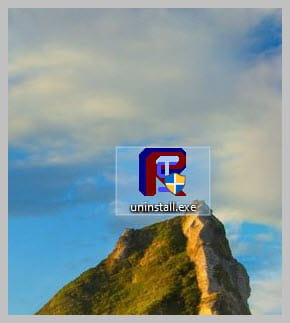
If everything is also OK on your side, you can uninstall FRST, rename the FRST file you downloaded to uninstall, and once the file is renamed, open it; the uninstallation will occur automatically via a restart of the PC.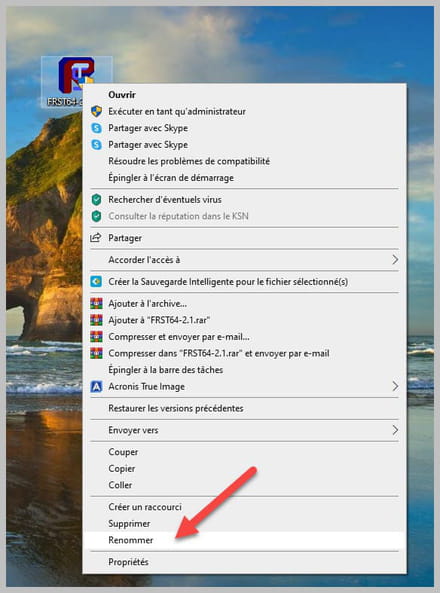
bazfile
Moderator/Security Contributor.
A hello, a response, a thank you are always appreciated. -
Thank you so much for your kindness, you are right, I had installed an unofficial version of Office and I didn't know that Cdiscount offered Windows / Office licenses at such low prices.
Therefore, I will follow your advice and stop that immediately, the risk is not worth it.
Would you also be willing to help me remove the virus from my other two computers?
I really appreciate it in advance.
Warm regards, -
You’re the best, I really don’t know how to thank you!
I’m at work now, the other two PCs are at home. I’ll be there by 6 PM.
I’ll take care of that kindly when I arrive, and I invite you to take your time to respond if you have other projects/ priorities.
Once again, thanks for everything, Baz!
Rudy
-
Dear ,
Following up on our exchanges this morning and your invaluable help for which I again extend my sincerest thanks, you will find below the links to the .Txt files following the analysis of my second machine.
Take your time, no rush:
FRST: https://pjjoint.malekal.com/files.php?id=FRST_20230113_n514m6u14e12
Addition: https://pjjoint.malekal.com/files.php?id=20230113_t12k14g8n12s8
Thanks again.
Rudy -
,
As requested, I have completed the full analysis, here is the link to the new file:
FRST: https://pjjoint.malekal.com/files.php?id=20230113_x13s12z14t7i12
Best regards,
Rudy
-
Forgive me, I wasn't paying attention... The fatigue!
Here's the ADDITION link: https://pjjoint.malekal.com/files.php?id=20230113_x13s12z14t7i12
I look forward to hearing from you,
Rudy
-
Forgive me once again!
Here it is: https://pjjoint.malekal.com/files.php?id=FRST_20230113_w9q10p14s10c15
-
Great, that's good news! No Powershell, that's cool. Yes, I’d like to keep Office to be completely honest with you. However, if that causes an issue for your script, I can make a move towards you to make your job easier, as I still have a diagnosis to ask you about my last machine. But for this case, if I can keep Office, that would be fantastic.
Best regards,
Rudy
-
Moderator
Here is the correction script, you do the same as last time. I don't remember the procedure, you can find it in my message 4.
Start:: CreateRestorePoint: CloseProcesses: Edge Extension: (No name) -> AutoFormFill_5ED10D46BD7E47DEB1F3685D2C0FCE08 => C:\Windows\SystemApps\Microsoft.MicrosoftEdge_8wekyb3d8bbwe\Assets\HostExtensions\AutoFormFill [not found] Edge Extension: (No name) -> BookReader_B171F20233094AC88D05A8EF7B9763E8 => C:\Windows\SystemApps\Microsoft.MicrosoftEdge_8wekyb3d8bbwe\Assets\BookViewer [not found] Edge Extension: (No name) -> LearningTools_7706F933-971C-41D1-9899-8A026EB5D824 => C:\Windows\SystemApps\Microsoft.MicrosoftEdge_8wekyb3d8bbwe\Assets\HostExtensions\LearningTools [not found] Edge Extension: (No name) -> PinJSAPI_EC01B57063BE468FAB6DB7EBFC3BF368 => C:\Windows\SystemApps\Microsoft.MicrosoftEdge_8wekyb3d8bbwe\Assets\HostExtensions\PinJSAPI [not found] HKLM\SOFTWARE\Microsoft\Windows Defender: [DisableAntiSpyware] Restriction HKLM\SOFTWARE\Microsoft\Windows Defender: [DisableAntiVirus] Restriction HKLM\SOFTWARE\Policies\Microsoft\Windows\WindowsUpdate: Restriction HKLM\...\Run: [] => [X] HKU\S-1-5-21-46554163-4094859263-1037165548-1001\...\Run: [Adobe Acrobat Synchronizer] => "C:\Program Files (x86)\Adobe\Acrobat DC\Acrobat\AdobeCollabSync.exe" (No file) HKU\S-1-5-21-46554163-4094859263-1037165548-1001\...\Run: [vidnotifier.exe] => C:\Program Files (x86)\Common Files\DVDVideoSoft\lib\vidnotifier\vidnotifier.exe (No file) ShortcutTarget: $McRebootA5E6DEAA56$.lnk -> (No file) Task: {532E3D71-2350-4465-932B-0E00CD7CA95F} - System32\Tasks\Microsoft\Office\OfficeBackgroundTaskHandlerRegistration => C:\Program Files (x86)\Microsoft Office\root\VFS\ProgramFilesX86\Microsoft Office\Office16\officebackgroundtaskhandler.exe (No file) Task: {BBC49A52-1C14-4BF2-881B-05CBDD972812} - System32\Tasks\Microsoft\Windows\rempl\shell-usoscan => C:\Program Files\rempl\remsh.exe /RunUsoScanOnly (No file) Task: {FDB849A3-0141-4C07-B645-71331AA6F8ED} - System32\Tasks\Microsoft\Office\OfficeBackgroundTaskHandlerLogon => C:\Program Files (x86)\Microsoft Office\root\VFS\ProgramFilesX86\Microsoft Office\Office16\officebackgroundtaskhandler.exe (No file) CustomCLSID: HKU\S-1-5-21-46554163-4094859263-1037165548-1001_Classes\CLSID\{520AA812-396B-40DE-8ED1-0EDC70630DBE}\localserver32 -> C:\Users\hackw\AppData\Local\Programs\3CXDesktopApp\app\3CXDesktopApp.exe => No file ContextMenuHandlers1: [7-Zip] -> {23170F69-40C1-278A-1000-000100020000} => -> No file ContextMenuHandlers1: [ANotepad++64] -> {B298D29A-A6ED-11DE-BA8C-A68E55D89593} => -> No file ContextMenuHandlers1: [BriefcaseMenu] -> {85BBD920-42A0-1069-A2E4-08002B30309D} => -> No file ContextMenuHandlers3: [{4A7C4306-57E0-4C0C-83A9-78C1528F618C}] -> {4A7C4306-57E0-4C0C-83A9-78C1528F618C} => -> No file ContextMenuHandlers4: [7-Zip] -> {23170F69-40C1-278A-1000-000100020000} => -> No file ContextMenuHandlers4: [Offline Files] -> {474C98EE-CF3D-41f5-80E3-4AAB0AB04301} => -> No file ContextMenuHandlers5: [igfxcui] -> {3AB1675A-CCFF-11D2-8B20-00A0C93CB1F4} => -> No file ContextMenuHandlers6: [BriefcaseMenu] -> {85BBD920-42A0-1069-A2E4-08002B30309D} => -> No file ContextMenuHandlers6: [Offline Files] -> {474C98EE-CF3D-41f5-80E3-4AAB0AB04301} => -> No file SearchScopes: HKU\S-1-5-21-46554163-4094859263-1037165548-1001 -> DefaultScope {0633EE93-D776-472f-A0FF-E1416B8B2E3A} URL = SearchScopes: HKU\S-1-5-21-46554163-4094859263-1037165548-1001 -> {0633EE93-D776-472f-A0FF-E1416B8B2E3A} URL = FirewallRules: [{0D262F22-A7BE-478E-BD0E-E3C0DDBE3EE8}] => (Allow) C:\Users\hackw\AppData\Roaming\Zoom\bin\airhost.exe => No file FirewallRules: [{829F3D3E-8853-4655-B5A4-0EAEC4863257}] => (Allow) C:\Program Files\Microsoft Office\Office16\UcMapi.exe => No file FirewallRules: [{E2373E94-7913-49C2-88EA-E3132662F138}] => (Allow) C:\Program Files\Microsoft Office\Office16\UcMapi.exe => No file FirewallRules: [{0491DC63-840A-4641-8826-886DB8CD069E}] => (Allow) C:\Program Files\Microsoft Office\Office16\lync.exe => No file FirewallRules: [{CFA95005-D0B1-4E10-9196-FFB6E4001354}] => (Allow) C:\Program Files\Microsoft Office\Office16\lync.exe => No file FirewallRules: [TCP Query User{A611EC03-D0E0-41DE-B4BF-C7B2A1E6A6B2}C:\users\hackw\appdata\local\programs\3cxdesktopapp\app\3cxdesktopapp.exe] => (Allow) C:\users\hackw\appdata\local\programs\3cxdesktopapp\app\3cxdesktopapp.exe => No file FirewallRules: [UDP Query User{4FC74924-C5EC-40E6-B64E-E26C00FE4281}C:\users\hackw\appdata\local\programs\3cxdesktopapp\app\3cxdesktopapp.exe] => (Allow) C:\users\hackw\appdata\local\programs\3cxdesktopapp\app\3cxdesktopapp.exe => No file FirewallRules: [TCP Query User{E16AE63B-2D94-481A-9178-854A1B893C39}C:\users\hackw\appdata\local\programs\3cxdesktopapp\app\3cxdesktopapp.exe] => (Block) C:\users\hackw\appdata\local\programs\3cxdesktopapp\app\3cxdesktopapp.exe => No file FirewallRules: [UDP Query User{B3A02E80-3ECA-4256-A401-3DF7A39D6D18}C:\users\hackw\appdata\local\programs\3cxdesktopapp\app\3cxdesktopapp.exe] => (Block) C:\users\hackw\appdata\local\programs\3cxdesktopapp\app\3cxdesktopapp.exe => No file EmptyTemp: End::
-
-
Baz,
Thank you, it seems to be going well.
Below is the Fixlog:
https://pjjoint.malekal.com/files.php?id=20230113_d11h15v11z14g14
and to finish (my third machine)
Sum: https://pjjoint.malekal.com/files.php?id=20230113_d15x7z8x9s13
FRST: https://pjjoint.malekal.com/files.php?id=FRST_20230113_m1312i11z13l8
Thanks a thousand times again, you really are great.
If you offer any training, even paid, I’m interested.
Rudy
-
Moderator
If you offer training, even if paid, I'm interested.
I did it voluntarily but I stopped because I was too busy, if you're motivated there are free courses available online:
https://helper-formation.fr/ open training
https://forum.security-x.fr/inscription-et-informations/information-sur-la-formation/ closed training, you have to wait for spots to open up.
For your information.
Your version of Windows 10 is not up to date on PC n°2 (1 year behind) and PC n°3 (2 years behind) only PC n°1 was up to date, to check it go to Windows Update the update to version 22H2 should be offered to you, if not, go to this page click on Update now, this will start downloading the Microsoft tool, just open it and it will allow you to update Windows 10 to the latest version and tell you if it is compatible with your PC, be careful this update takes some time.
For your third PC, it is not infected despite the unofficial Adobe Acrobat and Microsoft Office software.Below is the script that will remove the obsolete items from PC n°3.
Start:: CreateRestorePoint: CloseProcesses: HKLM\...\Run: [] => [X] HKU\S-1-5-21-172983263-84869316-3819629878-1001\...\Run: [Web Companion] => C:\Program Files (x86)\Lavasoft\Web Companion\Application\WebCompanion.exe --minimize (File not found) Task: {2CC27808-8667-4D75-BE16-E9246DDEA5D6} - System32\Tasks\Update Checker => C:\Program Files (x86)\ASUS\ASUS Live Update\UpdateChecker.exe (File not found) S3 MpKslcf158a97; \??\C:\ProgramData\Microsoft\Windows Defender\Definition Updates\{030DAB8C-695D-4197-872C-9DF7E46C7789}\MpKslDrv.sys [X] FirewallRules: [TCP Query User{621830B6-0149-4178-86B3-5800BB0280A0}C:\users\users\appdata\roaming\utorrent\updates\utorrent.exe] => (Block) C:\users\users\appdata\roaming\utorrent\updates\utorrent.exe => File not found FirewallRules: [UDP Query User{AFE7448D-87EB-47F1-9A35-219D1CB9BB02}C:\users\users\appdata\roaming\utorrent\updates\utorrent.exe] => (Block) C:\users\users\appdata\roaming\utorrent\updates\utorrent.exe => File not found EmptyTemp: End:: -
@bazfile
Dear Baz,
It is truly to your credit, and if it was also done voluntarily and with a good heart, that's even better! Honestly, I would have loved to go through you, but I have no doubt I can ask for your help in the future if necessary. I will check the links you sent me; it's true that, overall, I would really like to learn how to handle scripts like you seem to do well to solve various issues.
To follow up, I'm attaching the latest file so you can reassure me (Fixlog):
https://pjjoint.malekal.com/files.php?id=20230113_c7b613g9i13
Indeed, regarding the Windows updates, I did download the update tool, and everything seems to be going well.
Thanks again!
-
-
Hi Baz,
I hope you're doing well since yesterday.
Unfortunately, I was able to update Windows on one of the two computers.
Indeed, one of them informed me that I could not keep my files, folders, software, etc. in order to proceed with the installation, so I gave up.
What I wanted to ask you is the following: based on the scripts you've inputted to help others in my situation, is it a case-by-case input to remove the virus, or is what you enter for what could be my script, the neighbor's, the neighbor's wife, etc. to remove the virus the same thing?
Thank you and have a great day.
-
Moderator
No, it's on a case-by-case basis, it's a custom disinfection, it requires a good understanding of Windows, because if you make a mistake, you can crash the PC since FRST deletes everything it's instructed to delete. Some apprentice wizards tried to give it a shot without the necessary knowledge and they ran into problems; this isn't something you learn in two days. Many computer repair technicians don't know how to do this, which doesn't stop them from charging a hundred euros for a so-called disinfection that often boils down to using disinfection software or, if the software doesn't work or works poorly, reinstalling Windows. You noticed the effectiveness of Eset, which wasn't able to remove the infection from your first PC. In that regard, I really don't see the point in paying for antivirus on Windows 10 or Windows 11; in these two versions of Windows, an antivirus is already integrated, and it's effective and sufficient in most cases. It activates automatically as soon as no other antivirus is installed on the PC.
For PCs resistant to updates, for your information, you can try repairing Windows 10 without data loss (everything is retained). Despite what is indicated on the screens, it is indeed a repair not a Windows installation.
Download this Microsoft tool, open the tool and do as indicated below:
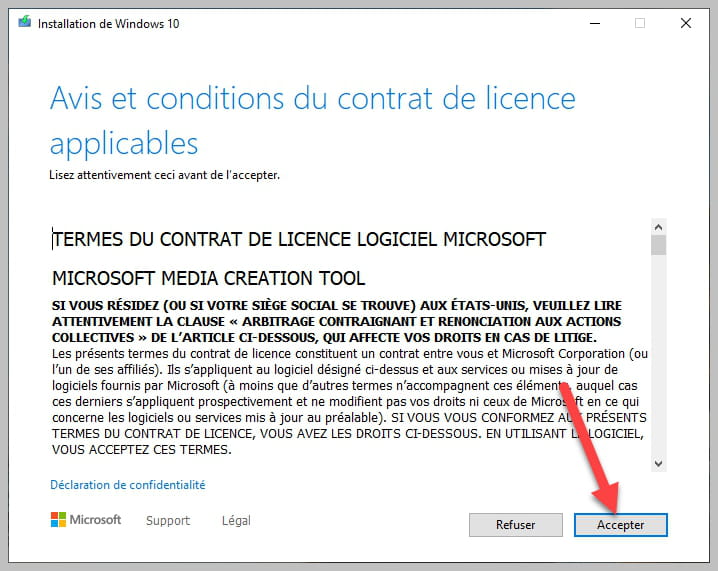


Be sure to check as shown in the photo.
-
@bazfile
Hello Baz,
Despite your recommendation, it still doesn’t work, it’s either I lose all the data or nothing at all.
Too bad for this position, I’m going to stay like this, don’t worry about it.
Thanks again.
One last thing, can I have you analyze my gaming PC?
Thank you and have a good day.
-
Moderator@Rudy_Paris
Yes.
-
@bazfile
Hello Baz,
I hope you're doing well.
Here is my gaming PC (thank you again)
Addition: https://pjjoint.malekal.com/files.php?id=20230115_b6q10k9o9q13
FRST: https://pjjoint.malekal.com/files.php?id=FRST_20230115_g13z14t1213y13
For this case, and what I can tell you in advance, is that I "forced" the activation of Windows a bit, and indeed, I have a few games downloaded (from another computer).
Have a good Sunday, and thanks again. -
Moderator@Rudy_Paris
Correction Script FRST.
Start:: CreateRestorePoint: CloseProcesses: HKLM\SOFTWARE\Policies\Microsoft\Windows\WindowsUpdate: Restriction GroupPolicy: Restriction ? Policies: C:\ProgramData\NTUSER.pol: Restriction HKLM\SOFTWARE\Policies\Google: Restriction HKLM\...\Winlogon: [Userinit] C:\WINDOWS\system32\userinit.exe,C:\Windows\SysWOW64\userinit.exe, Task: {1A4B5DAB-2232-4182-AD92-7D585EBAAF84} - \Microsoft\Windows\Setup\EOSNotify -> No file Task: {40FC7E6C-A746-4C27-AB6A-5D5BCB65244F} - System32\Tasks\Microsoft\Windows\UpdateOrchestrator\Reboot_AC => C:\WINDOWS\system32\MusNotification.exe /RunOnAC RebootDialog (No file) Task: {521E4534-A0E7-463B-AA9A-DC82BB59D543} - \CCleanerSkipUAC -> No file Task: {94B0F574-264A-4340-A5FF-1B27DBBBD455} - System32\Tasks\Microsoft\Windows\UpdateOrchestrator\Reboot_Battery => C:\WINDOWS\system32\MusNotification.exe /RunOnBattery RebootDialog (No file) Task: {F81339C3-6BB3-4A2D-B2F0-23685AEB4B1F} - \Microsoft\Windows\Setup\EOSNotify2 -> No file ContextMenuHandlers1: [UAContextMenu] -> {A9B8E64D-3F7E-4D32-8FC9-E391DEE67D75} => -> No file ContextMenuHandlers5: [UAContextMenu] -> {A9B8E64D-3F7E-4D32-8FC9-E391DEE67D75} => -> No file ContextMenuHandlers6: [UAContextMenu] -> {A9B8E64D-3F7E-4D32-8FC9-E391DEE67D75} => -> No file HKLM\Software\Microsoft\Internet Explorer\Main,Start Page = hxxps://fr.search.yahoo.com/yhs/web?hspart=iry&hsimp=yhs-fullyhosted_003&type=wbf_ir_17_24¶m1=1¶m2=f%3D1%26b%3DIE%26cc%3Dfr%26pa%3Dwincy%26cd%3D2XzuyEtN2Y1L1Qzu0Dzz0C0Bzz0AtCyEzzyB0C0F0AtByDzztN0D0Tzu0StCzyzytCtN1L2XzutAtFtBzytFtAtFzzyCtN1L1Czu1TtN1L1G1B1V1N2Y1L1Qzu2SyC0ByEtDtB0CzzyEtGtCyDzzyDtGzzyEyCyCtGyCyEtB0FtGzytBtCtDtCyE0CyCzy0EyDyD2QtN1M1F1B2Z1V1N2Y1L1Qzu2SzztAtC0ByBzyzz0DtGzytCtAzytGyEyDyEyBtGzy0AtDyBtG0FzzyDtBtCyCtB0Bzz0AyByB2QtN0A0LzuyEtN1B2Z1V1T1S1NzutCtAtDzytC%26cr%3D140929364%26a%3Dwbf_ir_17_24%26os_ver%3D6.3%26os%3DWindows%2B8.1%2BPro HKU\S-1-5-21-2056269571-3993759547-864851565-1001\Software\Microsoft\Internet Explorer\Main,Start Page = hxxps://fr.search.yahoo.com/yhs/web?hspart=iry&hsimp=yhs-fullyhosted_003&type=wbf_ir_17_24¶m1=1¶m2=f%3D1%26b%3DIE%26cc%3Dfr%26pa%3Dwincy%26cd%3D2XzuyEtN2Y1L1Qzu0Dzz0C0Bzz0AtCyEzzyB0C0F0AtByDzztN0D0Tzu0StCzyzytCtN1L2XzutAtFtBzytFtAtFzzyCtN1L1Czu1TtN1L1G1B1V1N2Y1L1Qzu2SyC0ByEtDtB0CzzyEtGtCyDzzyDtGzzyEyCyCtGyCyEtB0FtGzytBtCtDtCyE0CyCzy0EyDyD2QtN1M1F1B2Z1V1N2Y1L1Qzu2SzztAtC0ByBzyzz0DtGzytCtAzytGyEyDyEyBtGzy0AtDyBtG0FzzyDtBtCyCtB0Bzz0AyByB2QtN0A0LzuyEtN1B2Z1V1T1S1NzutCtAtDzytC%26cr%3D140929364%26a%3Dwbf_ir_17_24%26os_ver%3D6.3%26os%3DWindows%2B8.1%2BPro SearchScopes: HKLM -> DefaultScope {0633EE93-D776-472f-A0FF-E1416B8B2E3A} URL = hxxps://fr.search.yahoo.com/yhs/search?hspart=iry&hsimp=yhs-fullyhosted_003&type=wbf_ir_17_24¶m1=1¶m2=f%3D4%26b%3DIE%26cc%3Dfr%26pa%3Dwincy%26cd%3D2XzuyEtN2Y1L1Qzu0Dzz0C0Bzz0AtCyEzzyB0C0F0AtByDzztN0D0Tzu0StCzyzytCtN1L2XzutAtFtBzytFtAtFzzyCtN1L1Czu1TtN1L1G1B1V1N2Y1L1Qzu2SyC0ByEtDtB0CzzyEtGtCyDzzyDtGzzyEyCyCtGyCyEtB0FtGzytBtCtDtCyE0CyCzy0EyDyD2QtN1M1F1B2Z1V1N2Y1L1Qzu2SzztAtC0ByBzyzz0DtGzytCtAzytGyEyDyEyBtGzy0AtDyBtG0FzzyDtBtCyCtB0Bzz0AyByB2QtN0A0LzuyEtN1B2Z1V1T1S1NzutCtAtDzytC%26cr%3D140929364%26a%3Dwbf_ir_17_24%26os_ver%3D6.3%26os%3DWindows%2B8.1%2BPro&p={searchTerms} SearchScopes: HKLM -> {0633EE93-D776-472f-A0FF-E1416B8B2E3A} URL = hxxps://fr.search.yahoo.com/yhs/search?hspart=iry&hsimp=yhs-fullyhosted_003&type=wbf_ir_17_24¶m1=1¶m2=f%3D4%26b%3DIE%26cc%3Dfr%26pa%3Dwincy%26cd%3D2XzuyEtN2Y1L1Qzu0Dzz0C0Bzz0AtCyEzzyB0C0F0AtByDzztN0D0Tzu0StCzyzytCtN1L2XzutAtFtBzytFtAtFzzyCtN1L1Czu1TtN1L1G1B1V1N2Y1L1Qzu2SyC0ByEtDtB0CzzyEtGtCyDzzyDtGzzyEyCyCtGyCyEtB0FtGzytBtCtDtCyE0CyCzy0EyDyD2QtN1M1F1B2Z1V1N2Y1L1Qzu2SzztAtC0ByBzyzz0DtGzytCtAzytGyEyDyEyBtGzy0AtDyBtG0FzzyDtBtCyCtB0Bzz0AyByB2QtN0A0LzuyEtN1B2Z1V1T1S1NzutCtAtDzytC%26cr%3D140929364%26a%3Dwbf_ir_17_24%26os_ver%3D6.3%26os%3DWindows%2B8.1%2BPro&p={searchTerms} SearchScopes: HKLM-x32 -> DefaultScope {0633EE93-D776-472f-A0FF-E1416B8B2E3A} URL = hxxps://fr.search.yahoo.com/yhs/search?hspart=iry&hsimp=yhs-fullyhosted_003&type=wbf_ir_17_24¶m1=1¶m2=f%3D4%26b%3DIE%26cc%3Dfr%26pa%3Dwincy%26cd%3D2XzuyEtN2Y1L1Qzu0Dzz0C0Bzz0AtCyEzzyB0C0F0AtByDzztN0D0Tzu0StCzyzytCtN1L2XzutAtFtBzytFtAtFzzyCtN1L1Czu1TtN1L1G1B1V1N2Y1L1Qzu2SyC0ByEtDtB0CzzyEtGtCyDzzyDtGzzyEyCyCtGyCyEtB0FtGzytBtCtDtCyE0CyCzy0EyDyD2QtN1M1F1B2Z1V1N2Y1L1Qzu2SzztAtC0ByBzyzz0DtGzytCtAzytGyEyDyEyBtGzy0AtDyBtG0FzzyDtBtCyCtB0Bzz0AyByB2QtN0A0LzuyEtN1B2Z1V1T1S1NzutCtAtDzytC%26cr%3D140929364%26a%3Dwbf_ir_17_24%26os_ver%3D6.3%26os%3DWindows%2B8.1%2BPro&p={searchTerms} SearchScopes: HKLM-x32 -> {0633EE93-D776-472f-A0FF-E1416B8B2E3A} URL = hxxps://fr.search.yahoo.com/yhs/search?hspart=iry&hsimp=yhs-fullyhosted_003&type=wbf_ir_17_24¶m1=1¶m2=f%3D4%26b%3DIE%26cc%3Dfr%26pa%3Dwincy%26cd%3D2XzuyEtN2Y1L1Qzu0Dzz0C0Bzz0AtCyEzzyB0C0F0AtByDzztN0D0Tzu0StCzyzytCtN1L2XzutAtFtBzytFtAtFzzyCtN1L1Czu1TtN1L1G1B1V1N2Y1L1Qzu2SyC0ByEtDtB0CzzyEtGtCyDzzyDtGzzyEyCyCtGyCyEtB0FtGzytBtCtDtCyE0CyCzy0EyDyD2QtN1M1F1B2Z1V1N2Y1L1Qzu2SzztAtC0ByBzyzz0DtGzytCtAzytGyEyDyEyBtGzy0AtDyBtG0FzzyDtBtCyCtB0Bzz0AyByB2QtN0A0LzuyEtN1B2Z1V1T1S1NzutCtAtDzytC%26cr%3D140929364%26a%3Dwbf_ir_17_24%26os_ver%3D6.3%26os%3DWindows%2B8.1%2BPro&p={searchTerms} SearchScopes: HKU\S-1-5-21-2056269571-3993759547-864851565-1001 -> DefaultScope {0633EE93-D776-472f-A0FF-E1416B8B2E3A} URL = hxxps://fr.search.yahoo.com/yhs/search?hspart=iry&hsimp=yhs-fullyhosted_003&type=wbf_ir_17_24¶m1=1¶m2=f%3D4%26b%3DIE%26cc%3Dfr%26pa%3Dwincy%26cd%3D2XzuyEtN2Y1L1Qzu0Dzz0C0Bzz0AtCyEzzyB0C0F0AtByDzztN0D0Tzu0StCzyzytCtN1L2XzutAtFtBzytFtAtFzzyCtN1L1Czu1TtN1L1G1B1V1N2Y1L1Qzu2SyC0ByEtDtB0CzzyEtGtCyDzzyDtGzzyEyCyCtGyCyEtB0FtGzytBtCtDtCyE0CyCzy0EyDyD2QtN1M1F1B2Z1V1N2Y1L1Qzu2SzztAtC0ByBzyzz0DtGzytCtAzytGyEyDyEyBtGzy0AtDyBtG0FzzyDtBtCyCtB0Bzz0AyByB2QtN0A0LzuyEtN1B2Z1V1T1S1NzutCtAtDzytC%26cr%3D140929364%26a%3Dwbf_ir_17_24%26os_ver%3D6.3%26os%3DWindows%2B8.1%2BPro&p={searchTerms} SearchScopes: HKU\S-1-5-21-2056269571-3993759547-864851565-1001 -> {0633EE93-D776-472f-A0FF-E1416B8B2E3A} URL = hxxps://fr.search.yahoo.com/yhs/search?hspart=iry&hsimp=yhs-fullyhosted_003&type=wbf_ir_17_24¶m1=1¶m2=f%3D4%26b%3DIE%26cc%3Dfr%26pa%3Dwincy%26cd%3D2XzuyEtN2Y1L1Qzu0Dzz0C0Bzz0AtCyEzzyB0C0F0AtByDzztN0D0Tzu0StCzyzytCtN1L2XzutAtFtBzytFtAtFzzyCtN1L1Czu1TtN1L1G1B1V1N2Y1L1Qzu2SyC0ByEtDtB0CzzyEtGtCyDzzyDtGzzyEyCyCtGyCyEtB0FtGzytBtCtDtCyE0CyCzy0EyDyD2QtN1M1F1B2Z1V1N2Y1L1Qzu2SzztAtC0ByBzyzz0DtGzytCtAzytGyEyDyEyBtGzy0AtDyBtG0FzzyDtBtCyCtB0Bzz0AyByB2QtN0A0LzuyEtN1B2Z1V1T1S1NzutCtAtDzytC%26cr%3D140929364%26a%3Dwbf_ir_17_24%26os_ver%3D6.3%26os%3DWindows%2B8.1%2BPro&p={searchTerms} CHR Notifications: Default -> hxxps://tgb7.newsupdatesky.info; hxxps://www.flvto.biz cmd: netsh advfirewall reset EmptyTemp: End::
-
-
Hello Baz,
I hope you are doing well. You had provided me with your invaluable help back in January and I thank you for it again.
I noticed that one of my 4 machines you interacted with remains infected by a virus following the installation of an unofficial version of Adobe Acrobat, long before I met you to get your help regarding PowerShell.
The issue is that I am unable to uninstall this version of Adobe Acrobat, receiving a message: "Windows Installer" The feature you are trying to use is on a network resource that is unavailable."
This likely leaves access open for the hacker to take control of my machine, as Nod32 indicates to me.
Is it possible once again to ask for your help in forcefully uninstalling this unofficial version of Adobe and permanently removing the virus that allows the hacker to carry on with their business in great comfort?
Thank you once again for your help. -
Moderator
Hello.
Download FRST, once downloaded save it to the desktop then right-click on FRST and choose Run as administrator you will see this:

Wait for the message the tool is ready to work to appear, then click on Analyze
Warning, wait for the messages saying that the analysis is complete to appear.

At the end of the analysis, you will have two text files on the desktop FRST and Addition.

Then send the FRST and ADDITION reports to https://security-x.fr/up/ then provide the two links generated by https://security-x.fr/up/ in your reply.
bazfile
Moderator/Contributor security.
a hello, a reply, a thank you are always appreciated. -
-
Moderator
There is always Microsoft Office which is unofficial.
I warned you in my message 25 that Adobe was not official, so it's no surprise that you received this message during its uninstallation, the hosts file has been modified to block connections to various Adobe sites.
To restore the hosts file, follow the procedure in the order indicated:
1- Open FRST as an administrator by right-clicking on FRST and selecting run as administrator
2 - Copy the entire script from the box below:Start:: CreateRestorePoint: CloseProcesses: ContextMenuHandlers5: [igfxcui] -> {3AB1675A-CCFF-11D2-8B20-00A0C93CB1F4} => -> No file HKLM\SOFTWARE\Microsoft\Windows Defender: [DisableAntiSpyware] Restriction HKLM\SOFTWARE\Microsoft\Windows Defender: [DisableAntiVirus] Restriction HKLM\SOFTWARE\Policies\Microsoft\Windows\WindowsUpdate: Restriction ShortcutTarget: $McRebootA5E6DEAA56$.lnk -> (No file) Hosts: EmptyTemp: End::3- Once the script is copied, click on Fix, FRST will automatically take the script from the clipboard.

Let the fix complete, once it's finished you will be prompted to restart your PC, do it as soon as you are asked, see below.
Then once your computer is restarted:
4- You will have a Fixlog file on your desktop, then send this fixlog report to https://security-x.fr/up/ and provide the link generated by https://security-x.fr/up/ in your reply.5- Uninstall Adobe Acrobat with Revo Uninstaller in advanced scan mode.
Revo Uninstaller tutorial to read carefully.
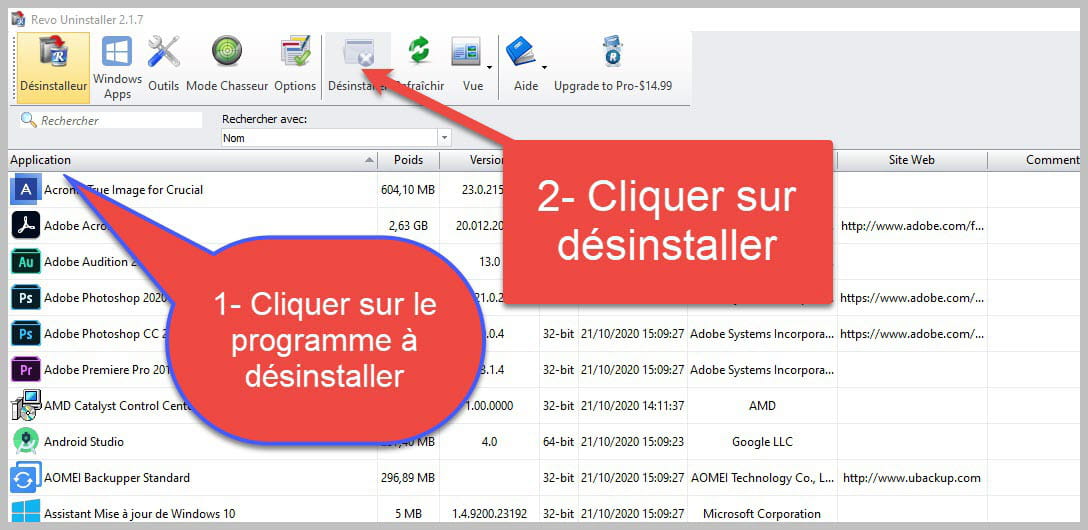

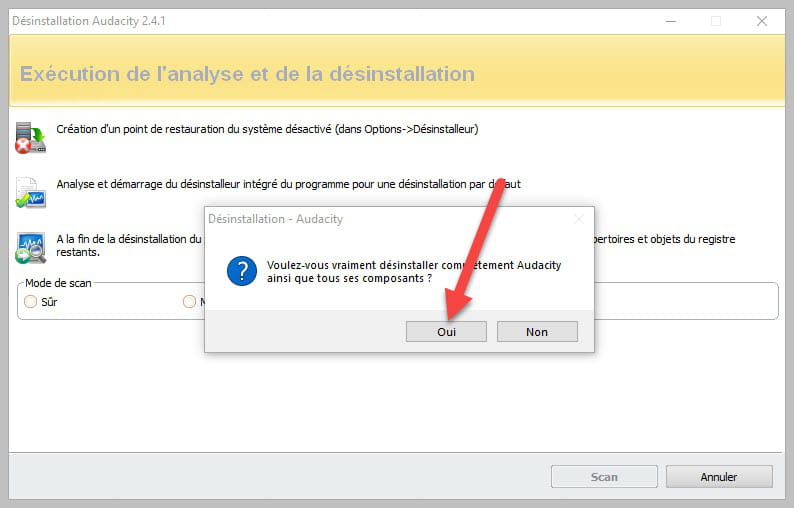
Accept the uninstallation of the program you wish to uninstall and if there is an error message saying that the uninstallation is impossible, close the error message and continue the procedure.

Check "Advanced scan" then click on "Scan".

Click on "Select all" then on "Delete," if a second list appears, do the same, and once everything is deleted, click on "Done" a restart may be requested.
bazfile
Moderator/Security contributor.
A hello, a response, a thank you are always appreciated.


- 1
- 2
- 3