
Remove DualSafe Password Manager pop-up.
Solvedbazfile Posted messages 58514 Registration date Status Moderator Last intervention -
Hello,
I have an advertisement that appeared today on my desktop and I would like to know if it is possible to uninstall the program that displays them? I searched online but couldn't find an answer.
Here is the ad in question:
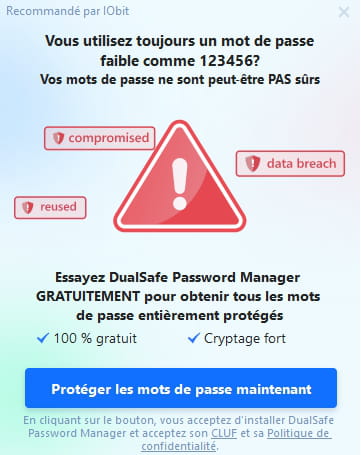
Thank you very much
Best regards
5 answers
-
Hello.
Download FRST once downloaded save it to your desktop then right-click on FRST and choose Run as administrator you will see this:

Click on Scan

Attention, wait for the messages saying that the scan is complete to appear.

At the end of the scan you will have two text files on the desktop FRST and Addition.


Then send the FRST and ADDITION reports to PJJOINT see THIS TUTORIAL then provide the two links generated by PJJOINT in your response.
bazfile
Moderator/Security Contributor.
a hello, a response, a thank you are always appreciated. -
Thank you very much for this response,
Here are the two links:
https://pjjoint.malekal.com/files.php?id=FRST_20221125_c5z8v12m9x9
https://pjjoint.malekal.com/files.php?id=20221125_e14g5u15t14o10
Best regards -
Procedure to follow in the indicated order:
1- Open FRST as administrator by right-clicking on FRST and choosing run as administrator
2 - Copy the entire script found in the box below:Start:: CreateRestorePoint: CloseProcesses: Task: {212CAFAFA2-D54E-4C13-A5C6-640767C16D07} - System32\Tasks\BLACK FRIDAY Task (One-Time) => C:\Program Files (x86)\IObit\Driver Booster\8.2.0\bf.exe [7287360 2022-11-21] (IObit CO., LTD -> IObit) End::3- Once the script is copied, click on Correct, FRST will automatically take the script that is in the clipboard.

Allow the correction to take place, once it is finished you will be asked to restart your PC, do so as soon as you are prompted, see below.
Once your computer has restarted:
4- You will have a Fixlog file on your desktop, then send this fixlog report to PJJOINT and provide the generated link from PJJOINT in your response.5- CHECK AND TELL ME IF YOUR PROBLEM IS STILL PRESENT
bazfile
Moderator/Security Contributor.
A hello, a response, a thank you is always appreciated. -
Here is the Fixlog file:
https://pjjoint.malekal.com/files.php?id=20221125_w9c5k9z1510
Since the ads appear randomly on my desktop, I cannot / do not know how to check directly.
Thank you for your responses,
Best regards
Sasha -
Hello,
I haven't received any new ads so far, so I suppose the issue is resolved!
Thank you for your help!Best regards
