Soundbar not working

Titpat76 Posted messages 11 Status Member -  
Titpat76 Posted messages 11 Status Member -

Hello

I just bought a Hisense 55U7HQ TV that has an optical output, my soundbar does too, but when I turn it on, it doesn't work. Do you have a solution please? Thank you

6 answers

  1. Panth33ra Posted messages 23158 Registration date   Status Member Last intervention   Ambassadeur 2 358
     

    Hello,

    Can you specify the brand and model of your soundbar? ... Does it come with a remote control?


    0
  2. Titpat76
     

    Hello

    Samsung soundbar model HW-J450 equipped with a remote control

    Thank you

    0
    1. Panth33ra Posted messages 23158 Registration date   Status Member Last intervention   2 358
       

      Check the page How to connect my soundbar to my TV? Everything is explained there. If none of this works, then your soundbar is faulty. Therefore, a return for repair is necessary.

      0
  3. Titpat76 Posted messages 11 Status Member
     

    Thank you for the response, but it works with a USB key, it doesn't detect the TV.

    0
    1. Panth33ra Posted messages 23158 Registration date   Status Member Last intervention   2 358
       

      ...and yet, it should work. My TV is connected to my Panasonic mini-chain with its optical cable. You just need to use the remote control to indicate what to play (TV, radio, USB stick, or audio CD). Not very complicated.

      Read my message #3 again. If it doesn't work... back to customer service.

      0
  4. baladur13 Posted messages 47348 Registration date   Status Moderator Last intervention   14 398
     

    Hello,

    You need to activate the optical output of the Hisense television via the TV menu.
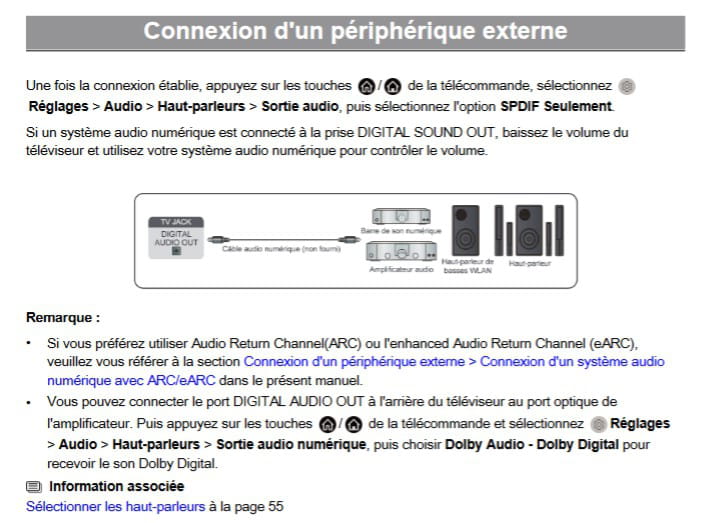
    © Extract from the manual on page 45

    Also see on page 55 the audio output format to set to PCM.
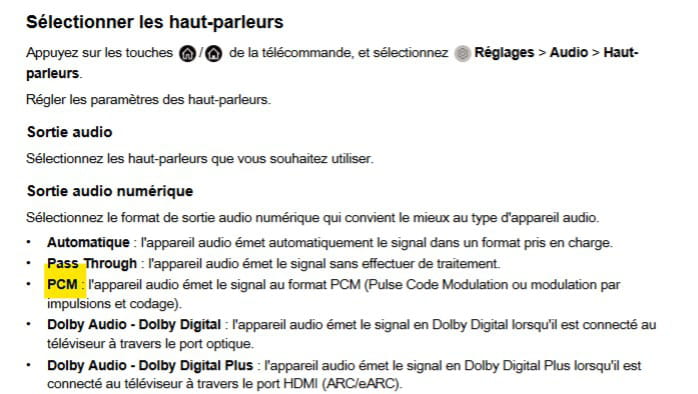
    The manual https://hisense.fr/download/ean/6942147477267/6942147477267_manuelsys.pdf


    It’s very hard to catch a black cat in a dark room.
    Especially when it’s not there...

    0
  5. Titpat76 Posted messages 11 Status Member
     

    Thank you for everything. I've already done the search manipulation for the TV and it remains silent. It's not too serious yet; I'll use the headphones, which work, while waiting to figure out why it's not working.

    Thank you and have a nice evening.

    0
    1. baladur13 Posted messages 47348 Registration date   Status Moderator Last intervention   14 398
       

      the sought-after manip TV

      Uh! The manipulations to be done are to be carried out in the television menu....

      0
  6. Titpat76 Posted messages 11 Status Member
     

    Thank you

    0

