Connexant SmartAudio HD speaker malfunction
Solved
Aymeric_4456
Posted messages
10
Status
Member
-
Aymeric_4456 Posted messages 10 Status Member -
Aymeric_4456 Posted messages 10 Status Member -
Hello everyone,
I have an ASUS ROG GL552VW that just went through a reset and maintenance by a technician.
The computer was slow and the sound wasn't working.
It is now super fast, but the sound still doesn't work...
Apparently, the problem comes from the Connexant SmartAudio HD driver which seems to prevent the speakers from working.
As soon as we uninstall the driver in the device manager, the sound works. But when we restart, the driver automatically reinstalls itself and the sound stops working again.
According to the technician, this issue is common with this type of device and there may not be a solution.
I'm throwing a message in a bottle, does anyone know a solution for this problem?
Thank you in advance for your responses and for your help.
I have an ASUS ROG GL552VW that just went through a reset and maintenance by a technician.
The computer was slow and the sound wasn't working.
It is now super fast, but the sound still doesn't work...
Apparently, the problem comes from the Connexant SmartAudio HD driver which seems to prevent the speakers from working.
As soon as we uninstall the driver in the device manager, the sound works. But when we restart, the driver automatically reinstalls itself and the sound stops working again.
According to the technician, this issue is common with this type of device and there may not be a solution.
I'm throwing a message in a bottle, does anyone know a solution for this problem?
Thank you in advance for your responses and for your help.
8 answers
-
Hello,
Windows + R
Type --> devmgmt.msc and OK.
Do you have a section --> other devices?
If yes, what are the problematic devices?
What do you have under sound, video and game controllers?
Give the hardware ID of the audio device
Check this out --> Find the identification number of a device
Post the number in your next message.
----------------------------------------------------------------------------------
Is Windows up to date?
Press Windows + R
Type --> winver and OK
What is the version?
Example image:
-
Hello Kaneagle, and thank you for your reply.
No section --> other devices
Below are the details of the devices I have.
For me, it's "Conexant SmartAudio HD" that is problematic
I have the identification numbers for "Conexant SmartAudio HD":
-->HDAUDIO\FUNC_01&VEN_14F1&DEV_510F&SUBSYS_10431C5D&REV_1001
-->HDAUDIO\FUNC_01&VEN_14F1&DEV_510F&SUBSYS_10431C5D
I have this in version:

-
-
I assume you are on Windows 10. If you have the Speakers icon in the notification area, right-click on it, then click on Sound and then click on Playback. In the window that opens, look for Speakers among the displayed devices. If you find it, check if Speakers is checked. If not, right-click on it, then click on Set as Default Device. If a device other than Speakers is already checked, you will need to uncheck it first before doing what was mentioned earlier. To do this, right-click on it and then click on Disable.
Good luck.
Here is the audio driver that you could also try to install:
https://www.asus.com/fr/SupportOnly/GL552VW/HelpDesk_Download/
-
What is the current version and date of the driver?
Example image:
--
Human beings are at their best when things are at their worst. -
Download and install --> 7Zip 64-bit
Right-click on the driver --> Audio_Conexant_Z_V8.66.95.70Sub3_21875.exe
Select --> 7Zip
Choose --> extract to "Audio_Conexant_Z_V8.66.95.70Sub3_21875\"
Device Manager
Go to sound, video, and game controllers
Right-click on --> Conexant SmartAudio HD
Uninstall
Check --> delete the device
Uninstall
Windows + R
Type --> control panel and OK
Programs and Features
Uninstall --> Conexant SmartAudio HD
Restart the PC.
Go to Device Manager
Right-click on the device
Update driver
Browse my computer for drivers
Choose from a list of drivers...
Have disk
Browse
Go to the unzipped driver folder --> Audio_Conexant_Z_V8.66.95.70Sub3_21875
Folder --> W8-64
Select the file --> X40Plmwa.inf and OK.
Restart.
--
Human beings are at their best when things are at their worst-
I did what you advised me, but it doesn't work.
Some remarks that may have an impact:
==> After the
"Windows + R
Type --> control panel and OK" ==> I have nothing to uninstall, there is no more "Conexant SmartAudio HD" in the list
==> When selecting the driver from the unzipped driver folder, I cannot select the file "X40Plmwa.inf", I can only select the folder "W8-64" in its entirety
==> Just before reinstalling the device, I always have a brief moment where I can choose between two outputs for sound by clicking on the icon at the bottom right (see photo) and the sound works. After installing the driver, I only have the option "Speakers (Conexant SmartAudio HD) and it doesn't work anymore...

-
-
just before reinstalling the device
Device Manager
What do you have in audio, video, and game controllers?
--
Human beings are at their best when things are at their worst -
Give the device identification number of the high definition audio device
Look at this --> Find the identification number of a device
Post the number in your next message.
--
Humans are at their best when things are at their worst. -
Not the corresponding one but indeed --> Equipment identification numbers
Is it the same as already posted?
--> HDAUDIO\FUNC_01&VEN_14F1&DEV_510F&SUBSYS_10431C5D
-
Try the manual installation again:
Go to Device Manager
Right-click on the device
Update driver
Browse my computer for drivers
-->> Choose from a list of drivers... <<--
-->> Have Disk <<--
Browse
Go to the unzipped driver folder --> Audio_Conexant_Z_V8.66.95.70Sub3_21875
Folder --> W8-64
Select the file --> X40Plmwa.inf and OK.
Restart.
--
Human beings are at their best when things are at their worst.-
I tried again, but it didn't work. However, I think I found the solution:
==> Device Manager
==> Update the "Conexant SmartAudio HD" device for me
==> Click on "Browse my computer for drivers"
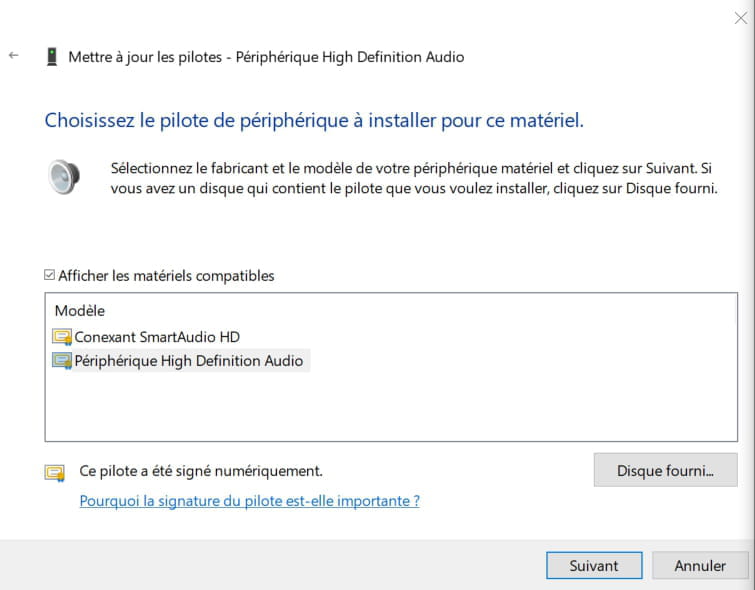
==> Click on "Let me pick from a list of available drivers on my computer"
==> you come across the following picture:
==> For my computer, I just had to choose the "High Definition Audio Device" ("Conexant SmartAudio HD" not working)
==> Click next (complete the installation)
==> Restart the computer and it works for me =)
Thanks everyone for your help! ;)
-