
Random FF crash
Solved
melandru
Posted messages
14
Registration date
Status
Member
Last intervention
-
kaneagle Posted messages 86287 Registration date Status Moderator Last intervention -
kaneagle Posted messages 86287 Registration date Status Moderator Last intervention -
Hello,
Random crashes overnight with the message "Hmm, we can’t find this site"
I used the FF repair utility
Uninstalled/reinstalled FF
To no avail. I switched to Chrome.
New PC since yesterday, on Windows 11, same thing (turns out it wasn't because of my old machine)
I changed the DNS address with the new one and it's worse, no internet on the new machine, and no way to use Chrome as backup.
If someone could help me, that would be great.
Thanks
Configuration: Android / Firefox 100.0
Random crashes overnight with the message "Hmm, we can’t find this site"
I used the FF repair utility
Uninstalled/reinstalled FF
To no avail. I switched to Chrome.
New PC since yesterday, on Windows 11, same thing (turns out it wasn't because of my old machine)
I changed the DNS address with the new one and it's worse, no internet on the new machine, and no way to use Chrome as backup.
If someone could help me, that would be great.
Thanks
Configuration: Android / Firefox 100.0
3 answers
-
Hello,
I changed the DNS address to a different one and now it's worse, no internet
Press Windows + R
Type --> ncpa.cpl and OK.
Right-click on the Ethernet connection
Properties
Select --> Internet Protocol Version 4 (TCP/IPv4)
Click on --> Properties
Check that both boxes are checked:
--> Obtain an IP address automatically
--> Obtain DNS server addresses automatically
Do the same with Internet Protocol Version 6 (TCP/IPv6)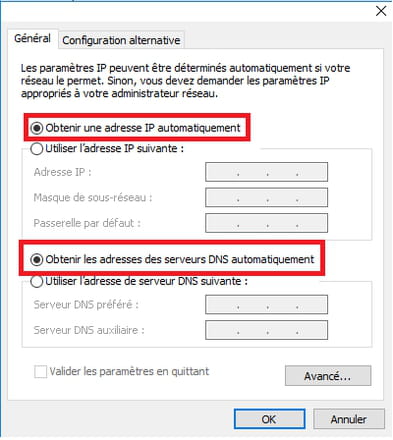
Do the same with the wireless connection
-----------------------------------------------------------------------------------------------
If the problem persists:
Shut down the PC
Unplug the modem (box) and router from the wall socket
Wait a few minutes
Plug the modem and router back into the wall socket
Wait for all the LEDs to be lit
Start the PC.
-----------------------------------------------------------------------------------------
If it doesn't work, try these 8 commands:
Press Windows + X
Select --> Windows PowerShell (admin) or Command Prompt (admin) and confirm.
Type these 8 commands and hit enter after each:
ipconfig /flushdns
netsh winsock reset
netsh winhttp reset proxy
netsh winhttp reset tracing
netsh winsock reset catalog
netsh int ip reset all
netsh int ipv4 reset catalog
netsh int ipv6 reset catalog
Restart the PC.
--
Human beings are at their best when things are at their worst. -
Thank you, it's very nice of you to take the time and provide me with a complete answer.
For now, it's working.
I have saved the eight commands you gave me, just in case.
Thanks again. -
You're welcome.
Have a good evening.
--
Human beings are at their best when things are at their worst.
