
How to check motherboard drivers?
Solved
DKdence
Posted messages
221
Status
Member
-
billmaxime Posted messages 50526 Registration date Status Contributor Last intervention -
billmaxime Posted messages 50526 Registration date Status Contributor Last intervention -
Hello hello,
After reinstalling Windows 11 using a USB drive, I had to update the motherboard drivers, but I'm not sure if everything is installed correctly.
How can I check the motherboard drivers?
I installed my drivers here https://www.gigabyte.com/Motherboard/B360-HD3-rev-10/support
I have updated :
- Audio
- Chipset
- Lan
- Sata RAID/AHCI
- VGA > I couldn't install this one.
Thank you.
After reinstalling Windows 11 using a USB drive, I had to update the motherboard drivers, but I'm not sure if everything is installed correctly.
How can I check the motherboard drivers?
I installed my drivers here https://www.gigabyte.com/Motherboard/B360-HD3-rev-10/support
I have updated :
- Audio
- Chipset
- Lan
- Sata RAID/AHCI
- VGA > I couldn't install this one.
Thank you.
23 answers
- 1
- 2
Next
-
I also have this warning that appeared after the reinstallation of Windows,

-
re
As we can see, it does not match the version you gave me; in the photo above, it says "driver version 17.11.0.1000."
I don't think it's important (10 days difference)
your SSD has already logged a few hours

also look at what is listed for your HDD (good at what percentage?)
aside from what you provide for the drivers, have you updated the BIOS as Bazfile advised you?
do you still have the alert message --> iaStorac Error?
@+
--
the radiation level is higher at the employment agency than at Chernobyl-
also check what is reported for your HDD (good to what %)
Everything seems to be working correctly,
besides what you provide for drivers, did you update the BIOS that Bazfile mentioned?
Is it a BIOS update with flashing?
do you still have the alert message --> Error iaStorac?
Yes..
Ps: sorry for the other post D=
-
-
A brief summary of my situation,
On March 15, I performed what is called a clean reinstall of Windows 11, after which I started experiencing freezing/crashing issues whether on the web or in file explorer, but not in a game; although I don't play much, I haven't experienced any freezing during those times.
I have two errors that appeared in the event viewer that were not present before the reinstall.
Event 2, Volmgr
Event 129, Iastorac
I have noticed no performance drops or increases in temperature nor CPU going to full stock.
Summary finished.
-------------------------------------------------------------------------------------------------------------------------------------------------------------------------------
I have a few questions: when reinstalling using a USB key, are the BIOS settings altered?
In the photo below, can I switch to "Intel RST with Optane system acceleration"?
Is there something wrong with these two photos? (apart from the quality... I apologize for your eyes) O_O

Thank you to those who took the time to read me. -
Hello, ((Problem solved))
I finally found the answer to my computer issue; it's a hardware problem. (the hard drive)
I no longer have these two errors since I unplugged the HDD; I was receiving them at every computer startup.
Event 2, Volmgr
Event 129, Iastorac
and I no longer have any CPU interruptions (my previous issue before reinstalling Windows). I also had a clicking sound in the tower that was heard at regular intervals, but it's no longer there.
As a small anecdote: these CPU interruptions appeared in August 2021; in February I downloaded HWmonitor, which allows me to monitor temperatures, speed, etc. There were no interruptions when I let this software run, but as soon as I closed it, the interruptions reappeared, forcing me to launch Hwmonitor at every computer startup. Why did Hwmonitor prevent these interruptions from occurring? It's a mystery that remains to be unraveled.
--------------------------------------------------------------------------------------------------------------------------------------------------------------------------
I want to thank all the people who tried to help me. Thank you all! -
re
I should have specified the clicking sound that could be heard in the tower.
Yes, but it's not a big deal, because you found out where the issue came from :)
A big thank you for the feedback and the explanations
Good continuation
@+
--
The radiation level is higher at the employment office than at Chernobyl. -
hello
- VGA > I wasn't able to install this one.
did you get an error message? anything else?
check if you have any alerts in the device manager (? or /!\) yellow
are you noticing any malfunctioning of the pc?
@+
--
the radiation level is higher at the unemployment office than in Chernobyl-
Hello Billmaxime, thank you for getting back to me.
"you have alerts in Device Manager"
No alerts, here’s what happens when I try to install it,

After reinstalling Windows 11 with a USB drive, I started experiencing freezes along with this warning in the Event Viewer,
Storahci Error
I was told to install the "SATA AHCI" driver, and after doing so, I still see the warning but this time,
iaStorac Error
I want to emphasize that before reinstalling Windows 11, I was already using it without these errors + freezes.
My PC:
Purchased in: 2018
operating systems: Windows 11 Home
Motherboard: GYGABYTE B360 HD3
Processor: i3-8100 3.60GHz
Graphics Card: NVIDIA GeForce GTX 1060 6GB
RAM: 16 GB
1 SSD 110 GB (57 GB free)
1 HDD 931 GB (759 GB free)
-
-
re
I was told to install the "SATA AHCI" driver, once done, I still get the warning but this time,
Error iaStorac
did you install this driver from your motherboard? --> Intel Rapid Storage Technology
[17.11.0.1000.1]
13.57 MB
2021/10/20
check this page for the error --> Error iaStorac --> click here
PS: I'm busy and I won't be able to respond to you as quickly as usual
@+
--
the radiation level is higher at the employment office than at Chernobyl-
Re billmaxime,
No problem!
I installed this driver,
As we can see, it does not match the version you provided, in the photo above, it states "driver version 17.11.0.1000"
I did download these two updates
For the one called "Intel Rapid Storage Technology," I got a setup and simply ran it,
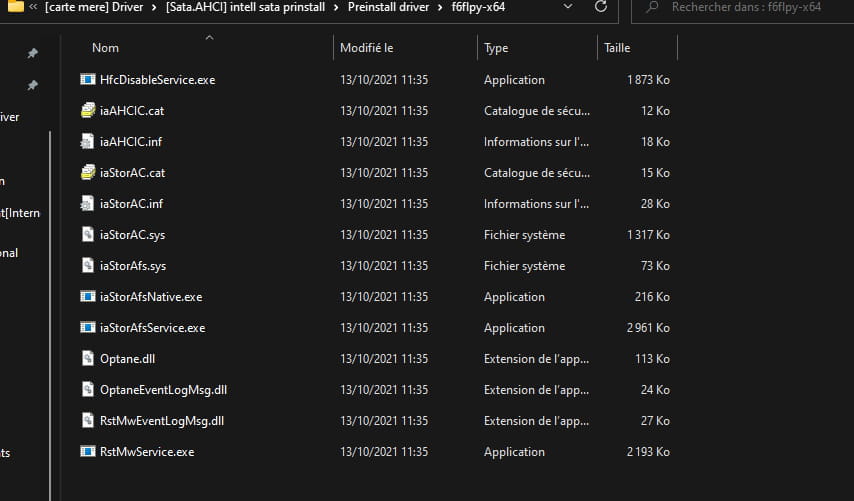
Then for the "SATA preinstall driver" from Intel, I had several ".exe" files, I went through the device manager for the installation by selecting "browse" to search the folder,
- - - - - - - - -- - - - - - - - - - - - - - - - - -- - - - - - - - - - - - - - - - - -- - - - - - - - - - - - - - - - - -- - - - - - - - -- - - - - - -
I also have a screenshot showing the status of my SSD, taken from CrystalDiskInfo, it looks like everything is fine,
-
-
Hello,
Windows key + X
Device Manager
Give the hardware ID of the VGA
Check this --> Find the hardware ID of a device
Post the ID in your next message.
--
Human beings are at their best when things are at their worst. -
- VGA > I couldn't manage to install this one.
What do you have in graphics cards?
--
Humans are at their best when things are at their worst.-
It was before I realized what VGA was, but even now I'm not sure of its usefulness, so I prefer to ask. :3
I have this in my graphics card,
-----------------------------------------------------------------------------------------------------------------------------------------------------------------------------
I have a question that has nothing to do with what you're asking me, if you allow me, is everything correct on this screen?
I heard that you need to check .Net Framework 3.5.
-
-
Everything is correct for the graphics card.
Go to IDE controllers .....
Give the hardware identification number of the Intel (R) 300 ....
Check this --> Find the identification number of a device
Post the number in your next message.
-
re
I found the same one as on the manufacturer's website for your motherboard --> click here
Driver index > I > Intel > RST-Win10_Win11-17.11.0.1000.zip
the one from your motherboard's site --> mb_driver_intel_bootdisk_irst_17.11.0.1000.1(1).zip
the one from Driverscloud's site --> mb_driver_intel_bootdisk_irst_17.11.0.1000.1.zip
the dates of the .inf file to be installed are the same: (iaAHCIC.inf) --> 10/13/2021
PS: hi Kaneagle
@+
--
the radiation level is higher at the employment center than at Chernobyl -
Re billmaxime,
Sorry, I didn't understand your last message, should I download something?
-----------------------------------------------------------------------------------------------------------------------------------------------
In the screen below, I have a driver that dates back to 1968, is that normal?
Device Identification Numbers
PCI\VEN_8086&DEV_A308&SUBSYS_50011458&REV_10
PCI\VEN_8086&DEV_A308&SUBSYS_50011458
PCI\VEN_8086&DEV_A308&CC_060100
PCI\VEN_8086&DEV_A308&CC_0601
and many other drivers dating from 2006, you too? -
re
in my previous message, with the identifier you provided --> PCI\VEN_8086&DEV_A352&SUBSYS_B0051458&REV_10
I found the same driver on Driverscloud as on the manufacturer's website for your motherboard --> Intel > RST-Win10_Win11-17.11.0.1000.zip
in your last message --> In the screen below, I have a driver from 1968 is that normal?
I would say yes, given what I find regarding the identifier


PS: are you having issues with the PC, or just one alert with --> Error iaStorac?
@+
--
the radiation level is higher at the employment office than at Chernobyl-
Do you have issues with the PC, or just one alert with --> Error iaStorac?
I still have the iaStorac alert and some small freezes from time to time, what's more frustrating is that the computer is still fast.
Isn't there something that would allow us to see what happened during/before these freezes? I was able to note the times of the crashes.
-
-
re
I don’t really see what needs to be done for now, wait for Kaneagle to come back on the topic
@+
--
the radiation level is higher at the job center than at Chernobyl -
billmaxime -->
I don't really see what needs to be done for now
Same for me
Perform a repair of Windows 11
Take a look at this --> Repair Windows 11 without data loss
--
Human beings are at their best when things are at their worst-
Re Kaneagle,
Perform a repair of Windows 11
Yes, I will try this procedure in the evening, so I will need to download an ISO but this time without using a USB key.
When I built my computer in 2018, I bought it with a Windows 10 digital license, wouldn't it be better for me to install Windows 10 and then upgrade to Windows 11? Or does it not make any difference? Sorry, I'm desperate.
-
-
re
look in Windows Update --> Optional updates --> Drivers
let me know if there are any updates
@+
--
the radiation level is higher at the employment center than at Chernobyl -
Hi
No, nothing on this side. :<
that's a shame :(
I bought it with a digital license for Windows 10, wouldn't it be better for me to install Windows 10 and then upgrade to Windows 11?
to go back to W10 from W11, you have 10 days after the "migration" from W10 to W11 --> click here
or does it not change anything?
did the PC work correctly under W10, or did you have the same issues as under W11?
PS: if you install W10, I don't know if your Windows license/activation key will still be valid...
you can find license keys on various websites
@+
--
the radiation level is higher at the employment center than at Chernobyl-
The PC was working fine under W10, or did you have the same issues as under W11?
I had a problem with both Windows 10 and 11, but that's another story, which is why I wanted to reinstall Windows cleanly. However, instead of solving my issue, I encountered another one. As a result, today I have two problems with my computer. Okay, I'm nitpicking a bit since I've (kind of) resolved the first one.You can find license keys on various sites.
Are they free? My license is linked to my Microsoft account.
-
-
re
I had a problem on Windows 10 and 11, but that's another story
what problems did you have on W10 with your PC?
depending on the issues you had on W10, it may not even be worth reinstalling it...
Are they free? My license is linked to my Microsoft account.
no, but they're not expensive
example: (look for a Pro version)
click here
click here
@+
--
the radiation level is higher at the employment office than at Chernobyl-
What problems have you had with your PC running W10?
I've already made a topic about it, I'll try to summarize,
It's a problem that lasted 7 months and is now halfway resolved. Let me explain!
I had interruptions lasting 4 seconds, during which I couldn't do anything; the cursor and keyboard were frozen, even the sound from a video turned into a TUtttt. A noise could be heard from the tower, as if something was starting up, then gradually faded away. (I think it's the fans)
These interruptions are caused by the CPU going into full stock mode,
Why halfway resolved? It's partly thanks to a software I downloaded randomly, called "HWmonitor", which allows you to check the temperatures, speeds, etc. of the various components. I noticed and experimented that when I have this software running on the PC, I have zero interruptions, but they come back as soon as I close the software.
The first idea that came to me is that the PC uses something related to HWmonitor, and that it needs it or at least that it keeps it running without the "bug", but what???
Now for the past 2 months, my situation forces me to run HWmonitor every time I start my PC; I do not experience any interruptions as long as it is active.
Note 1: It started under Windows 10, when I migrated to W11, they were still present.
Note 2: In safe mode, I have interruptions.
And that's why I wanted (I was advised) to do a clean reinstallation of Windows 11. You know the rest..
Ps: vdm
--------------------------------------------------------------------------------------------------------------------------------------------------------------------------No, but they are not expensive.
Wait, I don't get it. I paid more than 100 euros for my Windows 10 license, and now Cdiscount is selling them for 0.50 euros??
-
-
I already made a topic about this, I'll try to summarize
It seems I saw/read the topic
Wait, I don’t get it. I paid over 100 euros to get my Windows 10 license and now they're selling them at Cdiscount for 0.50 euros??
Where did you buy your W10 license?
Is it a "box" version?
@+
--
The radiation level is higher at employment agencies than at Chernobyl. -
re
There is a sticker on my case with numbers, that's the Windows key.
1 Windows license consists of 5 sets of 5 characters
xxxxx-xxxxx-xxxxx-xxxxx-xxxxx
@+
--
the radiation level is higher at the unemployment office than at Chernobyl-
1 Windows license consists of 5 sets of 5 digits and letters
I have 25 letters/digits on the sticker.
Is there a difference between the key and the license?
If I understand correctly, the key costing 0.50 euros is only for activating the license, and so, the day I change my motherboard, I will need to buy a key from Cdiscount.
-









- 1
- 2
Next