Unable to install Windows 10 on a hard drive
Solved
Bomjag
-
billmaxime Posted messages 50534 Registration date Status Contributor Last intervention -
billmaxime Posted messages 50534 Registration date Status Contributor Last intervention -
Hello,
I have an Acer Nitro 5 AN-515-51-54WC (Laptop) and it dates back to mid-2018.
Trying to fix issues on this computer during my visit to my family, I attempted to install Windows updates and drivers (impossible), format the HDD "C:/" (impossible), create a Windows USB drive (impossible), and finally reset the PC (impossible).
My last resort was to reset the BIOS settings (What an idiot) and since then I need to reinstall Windows 10 on the PC to hope to turn it on but during the installation on my C: in unallocated space, the error "Cannot install Windows 10, the hard drive may fail" appears.
The problem is that it was working fine a few days ago.
Has anyone had a similar problem, and is it fixable or do I need to replace the hard drive with a newer model?
Best regards, Romain.
I have an Acer Nitro 5 AN-515-51-54WC (Laptop) and it dates back to mid-2018.
Trying to fix issues on this computer during my visit to my family, I attempted to install Windows updates and drivers (impossible), format the HDD "C:/" (impossible), create a Windows USB drive (impossible), and finally reset the PC (impossible).
My last resort was to reset the BIOS settings (What an idiot) and since then I need to reinstall Windows 10 on the PC to hope to turn it on but during the installation on my C: in unallocated space, the error "Cannot install Windows 10, the hard drive may fail" appears.
The problem is that it was working fine a few days ago.
Has anyone had a similar problem, and is it fixable or do I need to replace the hard drive with a newer model?
Best regards, Romain.
Related links:
- Reinstall Windows 10 after hard drive replacement
- installation de Windows 10 impossible sur les partitions
- Unable to install Windows 10, hard drive about to fail.
- Install Windows 10 on a new hard drive in my PC without a network card.
- Is it possible to install Windows 10 on a Pentium 4 2.8GHz?
- Windows installed on 2 hard drives
10 answers
-
Hello
During the installation on my C: in unallocated space, the error "Unable to install Windows 10, the hard drive may fail" occurs.
The problem is that it was working well a few days ago.
Did you recreate 1 or 2 partitions on your HDD when it is "unallocated"?
Generally, we do this:
1 partition for the OS (operating system)
1 partition for the DATA (the data)
See you later
--
The radiation levels are higher at the unemployment office than at Chernobyl. -
hi
I just checked the manufacturer's website for your PC --> Nitro 5 AN515-51
the operating system is W10 Home
for storage, you have the following:
1 HDD of 1TB
1 SSD of 128 GB
you need to install W10 on the SSD
sources
see you
--
the radiation level is higher at the job center than at Chernobyl -
re
okay for the external HDD that is Bootable
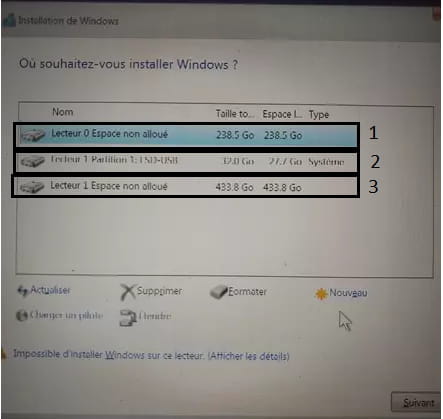
to create the partition on the SSD, when you are on this page

you click on the “unallocated” partition, then on “new”
you confirm with OK to create the partition
if you have any questions...
@+
--
the radiation level is higher at the employment agency than at Chernobyl -
re
can you post a photo of the page?
@+
--
the radiation level is higher at the job center than at Chernobyl -
re
sorry, but I can't see anything in your screenshot
tell me what you see (the partitions), and if they are formatted and unallocated
@+
--
the radiation level is higher at the employment center than at Chernobyl -
re
SSD where new is available but not formatted
External HDD partition with Windows installation program and format not available
And external HDD partition empty and unallocated and format not available
You should not touch the external HDD
Look at my screenshot and tell me what the HDDs/partitions are
PS: I can't see your 128GB SSD...

@+
--
The radiation level is higher at the employment center than at Chernobyl. -
re
so you have to install W10 on the 256GB SSD
the HDD No. 2 is the one where you have W10 for installation
the HDD No. 3 is the one you formatted and can no longer see for installation
the PC has been "tinkered with," as you no longer have the original disks (the 128GB SDD and the 1TB HDD)
@+
--
the radiation level is higher at the employment center than at Chernobyl. -
So just change the SSD and install W10
See you
--
the radiation level is higher at the unemployment office than at Chernobyl -
re
no problem for the help :)
remember to mark your topic as resolved --> click here
thank you
@+
--
the radiation level is higher at the job center than at Chernobyl -
re
Regarding the list of disks available during the Windows 10 installation process, I only have the SSD in unallocated space.
you must create 1 new partition on the SSD to install W10
I reformatted the HDD and it no longer appeared on my list of disks when the PC was working.
the HDD will be used to store your data, not the operating system
that being said, I don't know why it is no longer visible
in addition to the external hard drive with the program but unable to install because "it might fail".
generally, we use a USB stick of 8GB to put the W10 we want to install
I don't know why you put W10 on the external HDD, which should not be bootable
@+
--
the radiation level is higher at the employment office than at Chernobyl-
Re,
The external hard drive is bootable since the Windows installer runs correctly up to the choice of the disk on which to install Windows.
I understand that I need to create a new partition on the SSD; however, I don't know how to do this from the Windows recovery environment.
Do you have a solution to create the new partition? Perhaps from the command prompt?
-