
Unable to activate Windows 10
Solved/Closed
XylaTV
Posted messages
20
Status
Member
-
XylaTV Posted messages 20 Status Member -
XylaTV Posted messages 20 Status Member -
Hello, I'm having a problem with activating Windows 10, I'm receiving this message:

The Microsoft account is not linked to any organization :/
Thank you for your help.

The Microsoft account is not linked to any organization :/
Thank you for your help.
11 answers
-
I went to the website touslesdrivers.com, but an error message appeared when I launched the utility
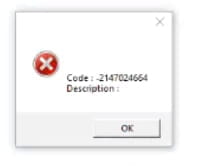
I used Malwarebytes to check the files on the PC (I found over 200 issues and I deleted everything), then I tried the key again and this appeared: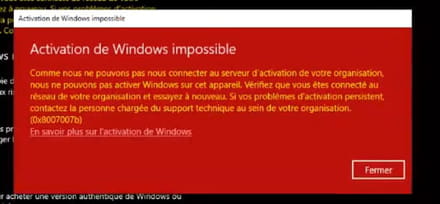
-
Hello
I think you don't have internet access (or not yet)
so first check your connection information or if you have a device alert on the network card, maybe just a driver that needs to be updated -
re
not all drivers are working; Malwarebytes is functioning normally, it is installed but doesn’t need internet (except for updates)
so we are back to a possible issue with the network card
you did not mention checking this point!
are you currently connected to the internet or not
if yes, is it wired? (RJ45) or Wi-Fi? if Wi-Fi, have you tried wired, and vice versa
is this a company PC? or a PC that is part of a private network? or none of that? -
re
right-click on the blue Windows icon at the bottom left, then Device Manager, then look or expand "Network Adapter" to see if you have any issues with the controller or driver. -
Hello,
There is probably a volume KMS license activation procedure inherited from the university (which fails if this server is no longer reachable, not configured, the license is no longer valid...)-
- You can remove the KMS license, for example, via the command line, but Windows will no longer have any license; you will need to purchase one:
https://www.malekal.com/slmgr-commande-activer-supprimer-visualiser-licences-windows/
-
-
re
1) Do you have any triangle or other alert?
If there is nothing, then everything is fine, so we don't touch anything!
2) If you are connected to the internet: it doesn't matter whether it's wired or via wifi
the issue may come from too low a bandwidth, which means the server takes too long to respond and ends up timed out
solution: turn off all other devices using the wifi: TV, other PCs, phones, and so on
try the online activation again
if it still doesn't work, you'll need to do it by phone
To activate Windows 10 by phone:
Select Start > Settings > Update & Security > Activation.
Under the Activate Windows now section, select Activate by phone.
Choose your location (or the closest location) from the dropdown list, then select Next.
Call one of the available listed phone numbers. An automated system will guide you through the activation process. If you cannot complete the operation correctly, you will be connected to Microsoft support in your region and country.
If you do not have the Phone Activation option:
Press the Windows Key + R, type slui 4 in the Run box, then select OK.
Choose your location (or the closest location) from the dropdown list, then select Next.
Call one of the available listed phone numbers. An automated system will guide you through the activation process. If you cannot complete the operation correctly, you will be connected to Microsoft support in your region and country. -
Hi,
I had an activation issue
I changed the motherboard, formatted the HDD, installed Windows on the same drive
At first, it told me Windows is activated with a digital license...
After a restart, it says the hardware configuration has changed, activate Windows...
I tried with my key, never succeeded
I had to reinstall Windows a second time...
So reinstall Windows. -
Hello
I used Malwarebyte to check the files on the PC (I found over 200 issues and deleted everything), then I tried the key again and this appeared:
Automatic tools don't see everything, and 200 "issues" is a lot, but we should see what it found.
A FRST scan wouldn't hurt to check the PC
Can you post the Malwarebytes report that contains these detections?
=> After restarting, open MBAM again.
=> Click on the Report tab
=> Select the corresponding file --> Click on View report
=> Click on Export --> Text file (TXT)
=> The Save dialog box opens
=> Give it a name and save it to the Desktop
=> Host the report on https://up.security-x.fr/ and post the link obtained in your next response.
--
Security contributor.-
- RE_
Nothing too serious, and a lot of lines for the same thing.
Before having to reinstall Windows, create a topic here: https://forums.commentcamarche.net/forum/virus-securite-7
We will conduct a more in-depth analysis.
-
-
I found on a site that I could do this
**Removed by moderation.**
Then I received this message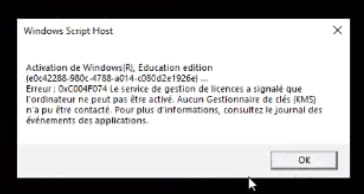
What am I supposed to understand from this? -
If you don't have a credit card to pay online, you can link your bank card to PayPal and pay on eBay
https://www.ebay.com/sch/i.html?_from=R40&_trksid=p2380057.m570.l1313&_nkw=windows+10+pro+key&_sacat=0
Sellers may not all be trustworthy.
But once activated, you can check with the command slmgr -dli
Have proof to get your money back in case of fraud. -
Finally found it!
**Removed by moderation.**
Windows Education is now activated :) Thanks to everyone for your help ^^



