
Connect a mouse to my tablet
cyril111
Posted messages
199
Registration date
Status
Member
Last intervention
-
cyril111 Posted messages 199 Registration date Status Member Last intervention -
cyril111 Posted messages 199 Registration date Status Member Last intervention -
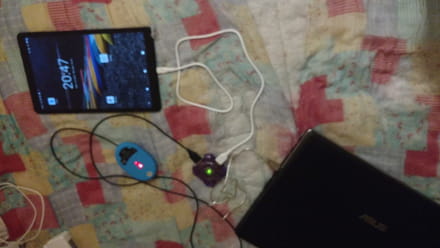
Hello, I connected my tablet (alldocube i30, android 10) to a hub and added my mouse, and you can see that it is well powered, but I don't see anything on my tablet. Did I make a mistake?

3 answers
-
jeannets Posted messages 28402 Registration date Status Contributor Last intervention Ambassadeur 6 603
Hello,
The principle works, I assure you; but it depends on the hardware used, there's an element of luck.
1° You need to make sure that your USB cable is indeed a "Data" cable and not just a charging cable.
2° Your setup may need to be connected before starting the tablet, it seems to me..???
3° It depends a lot on the Hub, as some don't work at all.
4° For just a mouse, you could use a USB-C to USB-A adapter without a hub, like this one for example. https://www.boulanger.com/ref/8008142
Is it really a USB-C that you have on this tablet..??
5° With this Android, it's possible that you have a setting in the USB configuration... to check, but I just tried a mouse with a USB adapter on my Smartphone and it works directly (it's an Android 9) and there’s nothing special in the connected USBs.
Personally, I tried a Powered Hub with 7 ports, connecting a tablet, mouse, keyboard, CD reader, and hard drive... and it works but you need a power supply of 2.5 Amperes.-
Hello,
It's a bit unclear, but it seems to me that the hub is connected to the laptop. So the tablet and the mouse are also connected to the computer.- It may be that your cable is not the right one... but the installation only has one cable...
There are cables that look exactly like another but are actually very different.
1° cables with only two conductors... They only act as battery chargers
2° cables with four conductors... They can charge the battery and transfer data, which the others cannot do. Only these cables can transmit information from your mouse to your tablet...
That said, I recommended a USB-C to USB-A reducer/adapter that seems very simple and connects the mouse directly to the tablet, but, well, whether it's that or the OTG cable, the result is the same...
-
-
Good evening,
Keep it simple:
A standard mouse with a USB connector + an OTG cable.
We connect everything and it works without any problems.
What is well conceived is clearly expressed,
And the words to say it come easily.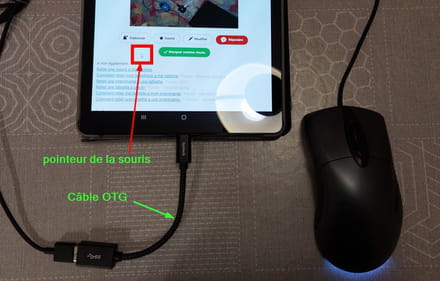
(Boileau)-
- Clearly, the mouse has a USB Type A connector.
Therefore, an intermediate OTG cable is needed.
You can find it easily:
Here is a cable for USB Type C ports.
There is the same one for micro USB.
It can also be used to connect a USB key.
-
-
jeannets Posted messages 28402 Registration date Status Contributor Last intervention Ambassadeur 6 603
Yes, that's what I explained..
In the photo, the mouse cable brushes against the computer, but it doesn't seem to be connected to it...???
And reading the text doesn't help either...
And as I said, it works very well... it's perfect for retrieving data when the touchscreen is broken; but not the display screen. etc.. etc.-
In the photo, I see the hub's output (male USB) connected to the laptop. The mouse and the tablet are connected to the inputs (female USB) of the hub.
I will test it tomorrow out of curiosity, I've always believed that the inputs couldn't cross over and had to converge towards the hub's output. If it works, I'll learn something new, thanks to you :).
-


