My printer is not printing the correct colors
Jeicko
-
glg29 Posted messages 29751 Registration date Status Contributor Last intervention -
glg29 Posted messages 29751 Registration date Status Contributor Last intervention -
Hello everyone,
I have an Epson XP-455 printer.
For the first few months, I didn't have any particular issues.
Recently, I've been unable to print the correct colors.
For example: When I try to print yellow, the printer prints pink.
I work with a MacBook Pro and use the Adobe suite, specifically Illustrator, and I set my colors to CMYK for printing.
Having a limited budget, I opted for this printer, and now I find myself going to print at Office Depot..
I hope you can help me. Thank you.
I have an Epson XP-455 printer.
For the first few months, I didn't have any particular issues.
Recently, I've been unable to print the correct colors.
For example: When I try to print yellow, the printer prints pink.
I work with a MacBook Pro and use the Adobe suite, specifically Illustrator, and I set my colors to CMYK for printing.
Having a limited budget, I opted for this printer, and now I find myself going to print at Office Depot..
I hope you can help me. Thank you.
7 answers
-
Hello,
Does your Epson XP-455 printer use original Epson ink cartridges?
--
ASUS ROG G752 VSK | QuadCore Intel i7 7700HQ | 32 GB-DDR4 | 2 SSD M.2 500 GB | 2 HDD Seagate 2TB | GeForce GTX 1070M 8 GB | 17.3" display (120 Hz) | DirectX 12 | Windows 10 (x64) -
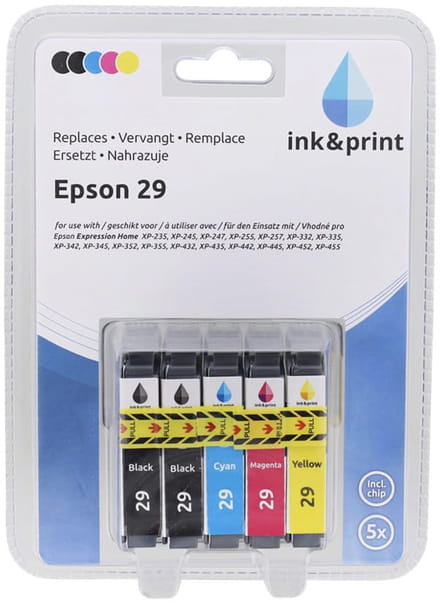
No, I don't use the Epson brand; I use the same reference adapted to my printer.
I imagine it's not ideal, but it has always worked until now.
Here's what I use:
-
-
Hello,
I'm reaching out to you because I bought an original black Epson cartridge to try before purchasing all the colors.
The problem is the same; I tried to print a document in black and it came out blue.
Any other ideas? -
Hello,
Are the cartridges in their respective places in the print head?
Is a test page printing correctly with all the inks?
Best regards.
--
He who does not please upon arriving will always do so upon leaving.
O Breizh my country, I cherish my country! -
Thank you for responding,
I just checked what you asked me.
- Yes, the cartridges are in their respective places in the print head.
- No, the test page is not printing correctly. Right now, we're dealing with blue shades; a few weeks ago, it was pink.-
Good evening,
Epson and other brands have poor support for generic cartridges, so if there are shades of one color or another during a test, it would suggest that the print head might be the cause. This is just a hypothesis, of course, but the symptoms seem to point to this part of the printer as being responsible for the issues.
Best regards.
-
-