How to set up FIBER/RJ45 with FREE
Nad9475
Posted messages
10
Status
Membre
-
Pierrecastor Posted messages 10830 Registration date Status Modérateur Last intervention -
Hello,
I need your help.
Eight years ago, I had work done in my apartment. The contractor offered to set up an RJ45 installation for fiber... Except there was no fiber
I am finally eligible for fiber through Free
But I don’t know how to set up my network.
I don't understand how to power the RJ45 sockets
I haven't subscribed yet because I don't know where to have the PTO installed
Could you help me?
I need your help.
Eight years ago, I had work done in my apartment. The contractor offered to set up an RJ45 installation for fiber... Except there was no fiber
I am finally eligible for fiber through Free
But I don’t know how to set up my network.
I don't understand how to power the RJ45 sockets
I haven't subscribed yet because I don't know where to have the PTO installed
Could you help me?
11 réponses
In principle, fiber boxes only have one Ethernet port for output, which is supposed to power the box; under these conditions, and if the RJ45 outputs are in the walls, the box should therefore be placed near the ONT fiber box and a switch should be installed downstream since it's rare for a box to have more than 4 RJ45 outputs.
Nothing also prevents, even with fiber, from setting up part of the network using Powerline adapters.
Hello and welcome as a new member. I'm joining the discussion to propose ideas. You haven't chosen the provider who will install the fiber yet. You have the right to have the fiber box installed in the room of your choice; the fiber cable will pass through the original tube of your telephone installation. It is preferable for the modem (box) with its Wi-Fi antenna to be in a central location in your house for a good connection.
The fiber box will be connected via RJ45 to the modem, which has at least 4 outputs. You can choose to add an Ethernet splitter to connect to your original RJ45 installation.
I remind you that you can also connect devices like printers, TVs, tablets, and PCs via Wi-Fi, as long as the devices are not too far from the modem.
If you choose a splitter, don't go for the cheapest option; choose a model that disconnects non-active devices.
https://www.materiel.net/produit/201504160056.html
Note:
The provider will only connect the wire and the box remains yours. Make sure to ask your provider who supplies the fiber box, as the installers are intermediaries sent by Free and do not supply the box.
If you have any other questions, either Brucine or I will read them.
"Donkeys change their minds, fools do not."
Remember to mark your message as "resolved" if that's the case.
The fiber box will be connected via RJ45 to the modem, which has at least 4 outputs. You can choose to add an Ethernet splitter to connect to your original RJ45 installation.
I remind you that you can also connect devices like printers, TVs, tablets, and PCs via Wi-Fi, as long as the devices are not too far from the modem.
If you choose a splitter, don't go for the cheapest option; choose a model that disconnects non-active devices.
https://www.materiel.net/produit/201504160056.html
Note:
The provider will only connect the wire and the box remains yours. Make sure to ask your provider who supplies the fiber box, as the installers are intermediaries sent by Free and do not supply the box.
If you have any other questions, either Brucine or I will read them.
"Donkeys change their minds, fools do not."
Remember to mark your message as "resolved" if that's the case.
Hello,
the only correct answer is in this drawing, quite abundant on this forum:
we can do other things, but we regret it sooner or later.
You should find a communication cabinet with your electrical panel if your installation has been done correctly as you say.
It should be noted that the chosen ISP only installs the fiber, the PTO at the end, possibly an ONT, but less and less, as the fiber increasingly comes directly into the box, and finally the box.
It is better to directly connect the Ethernet wall sockets or others directly to the box, and add a switch if there are not enough ports.
As for Wi-Fi, those from the box are often too weak, it is often better to add an access point on a wall socket where needed, or even a mesh Wi-Fi network if the house is large.
For Bucine,
ONT boxes are increasingly becoming obsolete and fibers are more and more directly in the boxes.
Powerline adapters are really a drag on a fiber connection, they should be avoided unless one does not yet have a proper wired installation.
For glandu,
we don’t talk about modems on a fiber connection :-)
And the link you show is a switch, not a splitter.
And there are 8-port unmanaged models like this that are much cheaper, especially since we are not sure there’s a need for them.
the only correct answer is in this drawing, quite abundant on this forum:
we can do other things, but we regret it sooner or later.
You should find a communication cabinet with your electrical panel if your installation has been done correctly as you say.
It should be noted that the chosen ISP only installs the fiber, the PTO at the end, possibly an ONT, but less and less, as the fiber increasingly comes directly into the box, and finally the box.
It is better to directly connect the Ethernet wall sockets or others directly to the box, and add a switch if there are not enough ports.
As for Wi-Fi, those from the box are often too weak, it is often better to add an access point on a wall socket where needed, or even a mesh Wi-Fi network if the house is large.
For Bucine,
ONT boxes are increasingly becoming obsolete and fibers are more and more directly in the boxes.
Powerline adapters are really a drag on a fiber connection, they should be avoided unless one does not yet have a proper wired installation.
For glandu,
we don’t talk about modems on a fiber connection :-)
And the link you show is a switch, not a splitter.
And there are 8-port unmanaged models like this that are much cheaper, especially since we are not sure there’s a need for them.
Hello Brupala, thank you for contributing to the question and I'm happy to "poke" you a bit. You know a lot of things, I only have my experience to oppose to you. Last month, Orange installed a fiber box for me because they don't want to change the box (or modem) that I had, so I still have an RJ45 connection.
As for calling it a box/modem, I do it intentionally for those who confuse it with the TV decoder (live box) and TV boxes, Xbox, G-box, etc.
I'm talking about an ADSL modem router, so with Wi-Fi.
As for a splitter or switch, or in English, a switch or Ethernet power strip, give me the difference! I think the electrician hired by Nad will make the right choice.
As for calling it a box/modem, I do it intentionally for those who confuse it with the TV decoder (live box) and TV boxes, Xbox, G-box, etc.
I'm talking about an ADSL modem router, so with Wi-Fi.
As for a splitter or switch, or in English, a switch or Ethernet power strip, give me the difference! I think the electrician hired by Nad will make the right choice.
A patch panel is just used to organize wiring, there's no electronics inside.
The patch panel can be categorized under distributors.
Switches handle electronic functions (and only one technology); an Ethernet switch can only process (read and distribute) Ethernet frames, an ATM switch only reads ATM cells, and an optical switch (more of a combiner as it is static, not dynamic) only recognizes the light wavelengths it is designed to distribute.
The patch panel can be categorized under distributors.
Switches handle electronic functions (and only one technology); an Ethernet switch can only process (read and distribute) Ethernet frames, an ATM switch only reads ATM cells, and an optical switch (more of a combiner as it is static, not dynamic) only recognizes the light wavelengths it is designed to distribute.
Yes, well, I have an ONT box, brand new and that I didn't choose...
As for the powerline adapters, it is of course contradictory to use them on a fiber connection: the ones I have only serve to connect the TV since the box is in another room and there are no RJ45 outlets in the walls, it avoids having to run cables all over the place and it's good enough for the TV function as long as the powerline adapters in question have a sufficient speed.
That said, I only took the fiber because my ISP "sold" it to me cheaper than my previous ADSL subscription, and it doesn't bring much to the discussion except when it comes to uploading or downloading large files.
As for the powerline adapters, it is of course contradictory to use them on a fiber connection: the ones I have only serve to connect the TV since the box is in another room and there are no RJ45 outlets in the walls, it avoids having to run cables all over the place and it's good enough for the TV function as long as the powerline adapters in question have a sufficient speed.
That said, I only took the fiber because my ISP "sold" it to me cheaper than my previous ADSL subscription, and it doesn't bring much to the discussion except when it comes to uploading or downloading large files.
unless it involves uploading or downloading large files.
yes, but that’s the main benefit of fiber, especially the upload speed.
After that,
it’s true that powerline adapters are sufficient for watching TV today, as long as they’re not too noisy.
And finally,
the longer it goes, the more expensive ADSL subscriptions will be compared to fiber; it’s the only way to push those who are okay with it to switch before the copper network is dismantled in the coming years.
yes, but that’s the main benefit of fiber, especially the upload speed.
After that,
it’s true that powerline adapters are sufficient for watching TV today, as long as they’re not too noisy.
And finally,
the longer it goes, the more expensive ADSL subscriptions will be compared to fiber; it’s the only way to push those who are okay with it to switch before the copper network is dismantled in the coming years.
Hello,
Thank you for your responses.
For the ISP, I only have Free, which offers a Fiber plan in my building, and I no longer want to wait because I can't even get Wi-Fi in my "big apartment" of 60 m²
So if I understand correctly, the technician will install the small box, and I will connect the server directly to it.
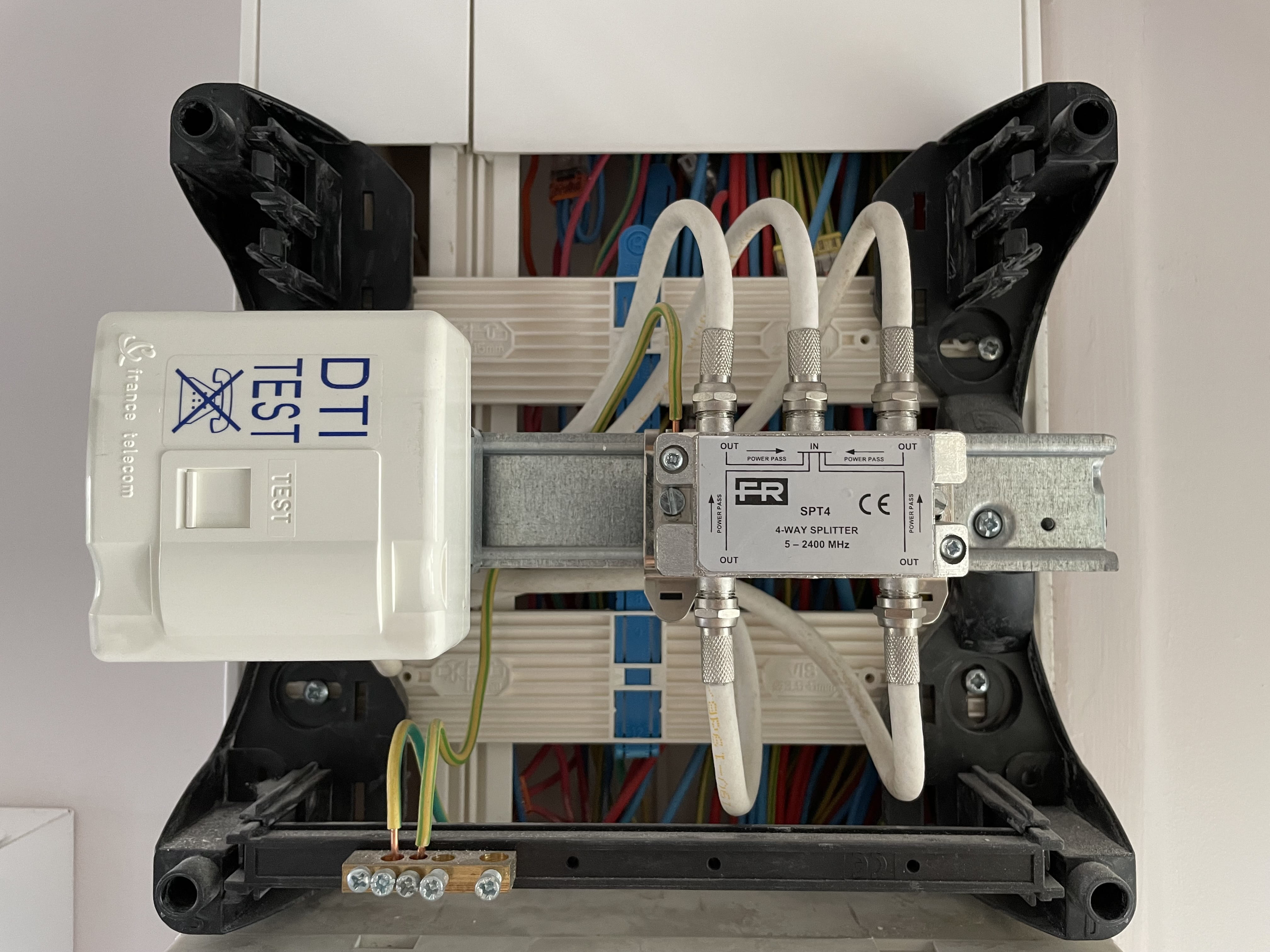
So far, so good. What I don't understand is that in my meter, I only have a DTI socket and not a patch panel.
I'm attaching a photo so you can see.
Maybe I need to connect the socket directly to the DTI to power all the sockets in the apartment.
Thank you for your help.
Thank you for your responses.
For the ISP, I only have Free, which offers a Fiber plan in my building, and I no longer want to wait because I can't even get Wi-Fi in my "big apartment" of 60 m²
So if I understand correctly, the technician will install the small box, and I will connect the server directly to it.
So far, so good. What I don't understand is that in my meter, I only have a DTI socket and not a patch panel.
I'm attaching a photo so you can see.
Maybe I need to connect the socket directly to the DTI to power all the sockets in the apartment.
Thank you for your help.
Thank you,
oh OK,
you have only one socket connected in this DTI.
I don't know what your electrician sold you, but that's an installation just for a phone that he did for you.
How many wall sockets do you have in total and how many of them does your box work on?
For the moment,
it's better to have your fiber installed where you'll be using your box.
It's a shame for a recent electrical installation, they didn't even follow the standards of the time.
oh OK,
you have only one socket connected in this DTI.
I don't know what your electrician sold you, but that's an installation just for a phone that he did for you.
How many wall sockets do you have in total and how many of them does your box work on?
For the moment,
it's better to have your fiber installed where you'll be using your box.
It's a shame for a recent electrical installation, they didn't even follow the standards of the time.
I am with Numéricable and I am using the TV antenna.
In the living room, I have two sockets
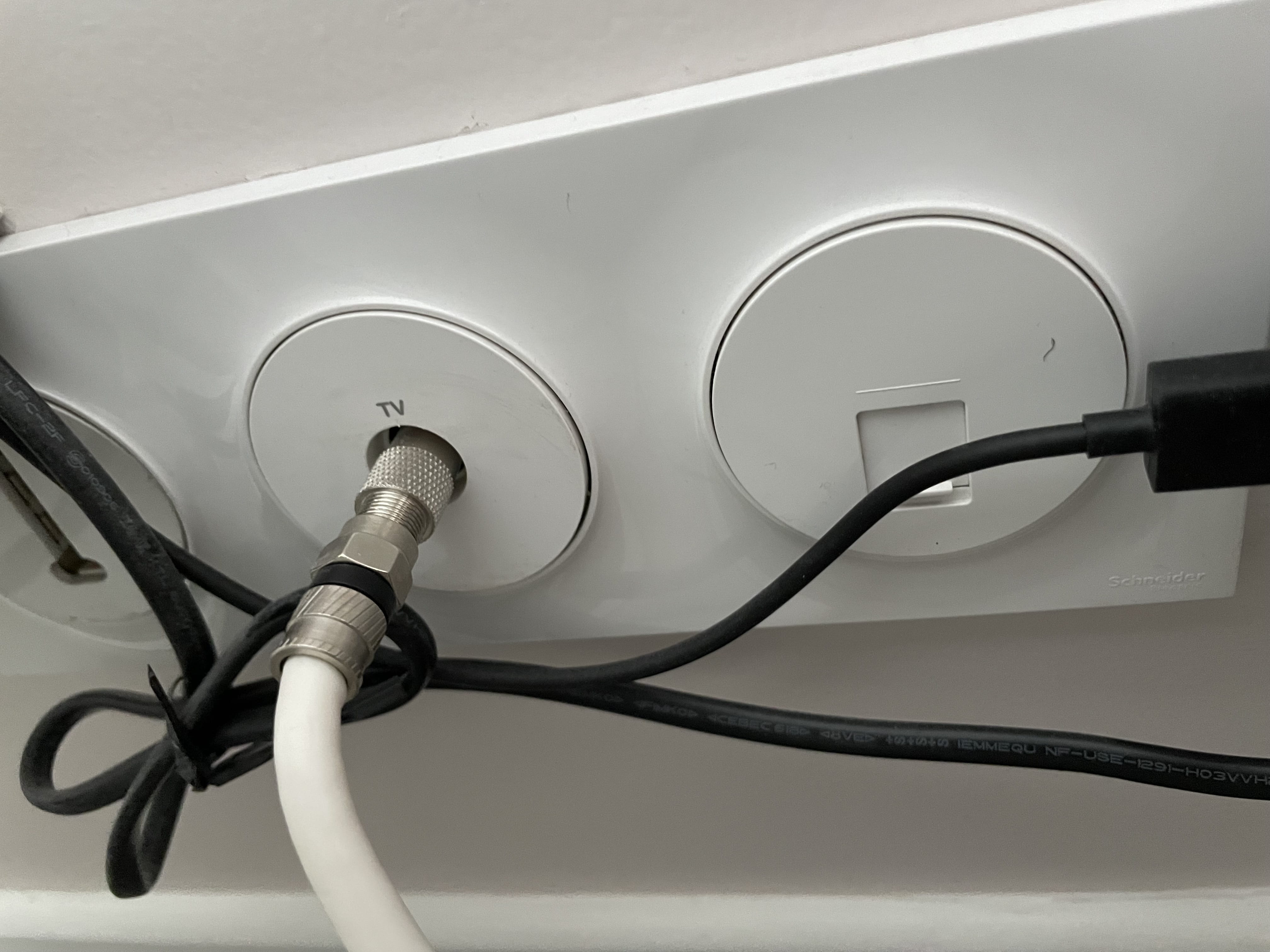
RJ45, one near the TV (Trio Telephone, antenna, and RJ45) and one under my desk.
I also have two other RJ45 sockets in the bedrooms.
Normally, the contractor told me at the time of installation that I should connect the server at the panel and that it would power the RJ45 sockets throughout the house...
In the living room, I have two sockets

RJ45, one near the TV (Trio Telephone, antenna, and RJ45) and one under my desk. I also have two other RJ45 sockets in the bedrooms.
Normally, the contractor told me at the time of installation that I should connect the server at the panel and that it would power the RJ45 sockets throughout the house...
OK,
so right now, nothing to do with the wall-mounted RJ45 and the DTI, it goes through the TV splitter next to it.
The problem is,
the contractor hasn’t done their job:
we don’t see 4 twisted pair cables at the communication cabinet and even less the sockets that are supposed to be at the end, we only see one connected solely for the phone in the DTI.
It's a bit short, bordering on fraud there.
Also,
it's not a server but a router (the box).
Currently,
we cannot implement this diagram as I initially indicated to you at <5>
so right now, nothing to do with the wall-mounted RJ45 and the DTI, it goes through the TV splitter next to it.
The problem is,
the contractor hasn’t done their job:
we don’t see 4 twisted pair cables at the communication cabinet and even less the sockets that are supposed to be at the end, we only see one connected solely for the phone in the DTI.
It's a bit short, bordering on fraud there.
Also,
it's not a server but a router (the box).
Currently,
we cannot implement this diagram as I initially indicated to you at <5>
It would indeed be interesting to ask the electrician if he installed the RJ45 sockets just for decoration or if they are connected to cables, and if so, where they lead (but from experience, many have the behavior described by brupala; they only power the phone, period).
Regarding Numericable, there should currently be not only a TV output but also a cable arrival box (or satellite dish if it’s via satellite).
If not, then there’s only the option to either put the electrician in his place or return to a classic setup as I had mentioned.
Regarding Numericable, there should currently be not only a TV output but also a cable arrival box (or satellite dish if it’s via satellite).
If not, then there’s only the option to either put the electrician in his place or return to a classic setup as I had mentioned.
If I understand correctly, I'm missing the patch panel that allows me to power each RJ45 socket.
If I put the server above my circuit breaker in the entrance, I can’t use Wi-Fi or powerline adapters to connect my box in the living room?
Because it really bothers me to have a cable running through my entire apartment (there’s no way to do it differently since I have enclosures that don't open and a false ceiling).
If I put the server above my circuit breaker in the entrance, I can’t use Wi-Fi or powerline adapters to connect my box in the living room?
Because it really bothers me to have a cable running through my entire apartment (there’s no way to do it differently since I have enclosures that don't open and a false ceiling).
The right approach under these conditions (nothing possible on the panel except to pull cables) is the one I described:
the technician is struggling, as is the case with me, to pass the optical cable through the existing phone sockets to the spot where you put your box (more ONT box) if there is one.
For everything that is not close to the box, use powerline adapters or WiFi.
I almost forgot: the property management, the municipality, or the end of the cow entrust the fiber installation to a certain operator: however, you remain free to choose another one (SFR, Bouygues...).
the technician is struggling, as is the case with me, to pass the optical cable through the existing phone sockets to the spot where you put your box (more ONT box) if there is one.
For everything that is not close to the box, use powerline adapters or WiFi.
I almost forgot: the property management, the municipality, or the end of the cow entrust the fiber installation to a certain operator: however, you remain free to choose another one (SFR, Bouygues...).
Hello,
the DTI shouldn't even be connected to an RJ45 socket since we can see a T socket to the left of the TV socket in the living room.
So the ends of the cables for the 4 RJ45 sockets are missing. Unless the installer, in a moment of absurd inspiration, connected the 2 RJ45 sockets in the living room to the 2 RJ45 sockets in the bedrooms.
The box in the communication box, yes, that’s possible (if there are electrical sockets), which Freebox are you getting? The Freebox TV box can be connected via PLC.
the DTI shouldn't even be connected to an RJ45 socket since we can see a T socket to the left of the TV socket in the living room.
So the ends of the cables for the 4 RJ45 sockets are missing. Unless the installer, in a moment of absurd inspiration, connected the 2 RJ45 sockets in the living room to the 2 RJ45 sockets in the bedrooms.
The box in the communication box, yes, that’s possible (if there are electrical sockets), which Freebox are you getting? The Freebox TV box can be connected via PLC.
I think I stumbled upon an artist who liked "useless sockets" decoration
The Freebox Revolution, I saw that there was in the box a server, a box, and powerline adapters.
a server box that indeed provides Wi-Fi, Ethernet, and phone, plus a lot of other stuff (NAS, VPN...) a TV box (player) some powerline adapters, the freeplugs, but you don't have to use them, if the two units are close, it's better to use a direct Ethernet cable between the two.
The freeplugs only serve as power supply, without connecting them to an Ethernet port.
Hello friends, I'm reading your speculations with delight; don't panic any more, our Nad needs to see a specialist. The wall sockets are fine somewhere, and with a good meter, we can find a solution.
I have a 100m apartment, and the Wi-Fi works well everywhere, and there are Wi-Fi extenders if needed.
yes,
but Wi-Fi is already a downgrade from fiber speed, even if it works.
We're not trying to panic, but rather to reassure by presenting all possible options. As for the state of the wiring, we are also looking into it, and maybe all it takes is a small spark because I don't think our client is very into Metrix.
but Wi-Fi is already a downgrade from fiber speed, even if it works.
We're not trying to panic, but rather to reassure by presenting all possible options. As for the state of the wiring, we are also looking into it, and maybe all it takes is a small spark because I don't think our client is very into Metrix.
The electrician, yes it's better they know how to use it, but they also have other tools
Enjoy the nice weather :-)
Hello, I contacted the contractor and sent him the photos so he can respond to me. Even though his employee no longer works for his company, he should be able to give me an explanation. I will give you the details because it might be useful for others.
In any case, thank you for taking the time to help me
Have a great end of the day
In any case, thank you for taking the time to help me
Have a great end of the day
Hello, I am closing this discussion to give you the conclusion of the story.
After receiving the response from another electrician because the contractor is unreachable, I now know that my installation is useless; I only have the sockets on the walls, no wires pulled into the panel. So I will have to run the cable along my hallway and into my living room. Thank you for your help.

The RJ45 outlets are embedded in the walls.
I must admit I'm having a hard time understanding (I'm a woman with no knowledge of fiber)...
When I was doing the installation, it seemed to me that I wouldn't have to run cables in my apartment during the fiber installation.
If I have the fiber box installed in the panel at the entrance and place the server there, how do I connect it to the box in the living room without running a cable? And how do I power the RJ45 outlets?
I'm sorry if my questions seem silly, but I'm having trouble understanding.
The technician got the optical cable to where I wanted (in my office) without anything visible: the passage is made through the existing telephone/ADSL conduits in the walls.
The optical cable arrives in a small box with a fiber-RJ45 output to the ONT box, then an RJ45 output from the ONT box to the router.
In order for the network to be powered, the optical signal must be converted into an electrical signal transmitted to the router, and not directly from the ONT to the device.
In your case, we either continue to power the local network as before and possibly wirelessly (Wi-Fi, powerline), or we want to use the RJ45 outputs from the walls.
But I assume these outputs come from the electrical or patch panel if there is one: in these conditions, it is in this panel that we should power the RJ45 downstream from the router.
Either the router and ONT are in the panel and we connect the wall RJ45s to the router via an ethernet switch if the 4 outputs from the router are not enough.
Or one of the cables in the wall is used to connect the living room's router and the ONT in the panel, and we continue to operate the router downstream as before.
Or we need to route the outputs from the router in the wall to the switch and then go back down via the RJ45s to the appropriate device, but generally we can't because there would need to be either as many RJ45 sockets as there are devices near the router, or at least one more from which we would route one of the outputs from the router to a switch in the panel.