Recurring PC boot issue after power disconnection
Solved
0905GAMER
Posted messages
130
Status
Member
-
gugu01 Posted messages 15669 Registration date Status Contributor Last intervention -
gugu01 Posted messages 15669 Registration date Status Contributor Last intervention -
Hello everyone,
I've been having an issue with my PC for a while now. After unplugging it to move it, for example, it doesn't turn on; the power button doesn't start it up, and this happens every time. I found a workaround for this issue: I unplug it from the wall, remove the BIOS battery, plug it back in, and then it turns on, but gives me an error message (which is normal since there's no battery). I have to put the BIOS battery back in when it's on, then reboot it from the BIOS, and it works again (not great...). I have no idea where this could be coming from; I think it's the motherboard (maybe a capacitor that's not doing its job anymore?).
If you have any ideas, I'm all ears.
I have another, more serious issue. Last week, I was playing Rocket League, using a controller (with a headset plugged into the controller), and suddenly the sound cut out for half a second, then came back, and then cut out completely, with the screen showing no signal even though the PC was still running normally. I rebooted 2-3 times and it was still the same, no signal. I unplugged the PC and did my battery trick, and after 2 attempts, it came back. I checked the CPU and GPU temperatures, which were normal, and I checked the status of my SSD and HDD (using CrystalDiskInfo) and everything was fine! This was the first time it happened; it scared me a bit, but I thought maybe it wouldn't be too serious. Today, I was playing Assetto Corsa, I exited the game and went back to the launcher, left for 5 minutes, came back, and boom, same thing: the PC was running but there was no signal on the screen, and now I can't find a signal again, even after my usual workaround that normally works...
I’d like your opinions; I don’t think it’s my graphics card because that would have cut the video signal but I would have still had sound. I really don’t think it’s the CPU, and regarding the SSD/HDD, I can't see how that could be the problem. Faulty RAM?
I’d like to mention that I’ve had this PC for at least 5 years and I've never had any issues before, no overclocking except for the R9 280X before I got the 970.
Thank you in advance!
I5 4570
Asus GTX 970
Asus B85 PRO GAMER
2 x 8 GB
SSD 120 (Windows)
2 x 1 TB HDD
I've been having an issue with my PC for a while now. After unplugging it to move it, for example, it doesn't turn on; the power button doesn't start it up, and this happens every time. I found a workaround for this issue: I unplug it from the wall, remove the BIOS battery, plug it back in, and then it turns on, but gives me an error message (which is normal since there's no battery). I have to put the BIOS battery back in when it's on, then reboot it from the BIOS, and it works again (not great...). I have no idea where this could be coming from; I think it's the motherboard (maybe a capacitor that's not doing its job anymore?).
If you have any ideas, I'm all ears.
I have another, more serious issue. Last week, I was playing Rocket League, using a controller (with a headset plugged into the controller), and suddenly the sound cut out for half a second, then came back, and then cut out completely, with the screen showing no signal even though the PC was still running normally. I rebooted 2-3 times and it was still the same, no signal. I unplugged the PC and did my battery trick, and after 2 attempts, it came back. I checked the CPU and GPU temperatures, which were normal, and I checked the status of my SSD and HDD (using CrystalDiskInfo) and everything was fine! This was the first time it happened; it scared me a bit, but I thought maybe it wouldn't be too serious. Today, I was playing Assetto Corsa, I exited the game and went back to the launcher, left for 5 minutes, came back, and boom, same thing: the PC was running but there was no signal on the screen, and now I can't find a signal again, even after my usual workaround that normally works...
I’d like your opinions; I don’t think it’s my graphics card because that would have cut the video signal but I would have still had sound. I really don’t think it’s the CPU, and regarding the SSD/HDD, I can't see how that could be the problem. Faulty RAM?
I’d like to mention that I’ve had this PC for at least 5 years and I've never had any issues before, no overclocking except for the R9 280X before I got the 970.
Thank you in advance!
I5 4570
Asus GTX 970
Asus B85 PRO GAMER
2 x 8 GB
SSD 120 (Windows)
2 x 1 TB HDD
16 answers
-
jeannets Posted messages 28440 Registration date Status Contributor Last intervention Ambassador 6 609
Hello,
I suppose it's the CMOS battery that is too weak... It should be measured; it should be around 3 volts or a little more... but at 2.8 volts, it's already too low...
If you can't measure it, just replace it directly; you can find them in supermarkets... -
jeannets Posted messages 28440 Registration date Status Contributor Last intervention Ambassador 6 609
OK,
So, it's your power supply that's tripping... either it's not powerful enough... or there's an internal short circuit... or there's an external short circuit... on the motherboard for example... or the graphics card... it could also be a USB stick...
You have to search for a short circuit... and find it....!
What is the brand and model of this PC or the motherboard?-
Thank you for your reply, I'm also hearing about a short circuit on a Facebook forum! The power supply is large compared to my setup
I5 4570
Asus GTX 970
Asus B85 PRO GAMER
2 x 8 GB
120 GB SSD (Windows)
2 x 1 TB HDD
Cooler Master G650M power supply
As for the short circuit, I will take the time to disassemble/reassemble the PC, it doesn't cost me anything. In terms of peripherals, I have an Xbox One controller, G29 steering wheel, Bluetooth key, keyboard and mouse dongle, but I had already tested it with no peripherals except for the USB dongle for the keyboard/mouse and it was the same for the startup issue.
-
-
jeannets Posted messages 28440 Registration date Status Contributor Last intervention Ambassador 6 609
Yes, you can even open your power supply... clean the inside and check if you see anything...??? that has overheated... blown capacitors... components touching the metal... solder joints that move...
And also with the same ideas on the motherboard...
Let's say you should first unplug everything connected to the PC to see if the issue persists... to determine if it comes from the PC itself or from what is connected to it...
I'm thinking about the monitor... the DVI HDMI VGA cable?? ... or the graphics card...-
Alright, I'll look into that, thanks for your help!!
As for the HDMI cable, I changed it not long ago and I really don't think it's coming from the graphics card because when I have the issue, I have no sound at all either, whereas the sound comes either from my Hi-Fi system connected via jack or from my headset connected to my controller via USB.
-
-
jeannets Posted messages 28440 Registration date Status Contributor Last intervention Ambassador 6 609
It is possible that due to the disconnection, the PC may not work at all anymore..??
So at that point, you should check the keyboard indicators... Are they on or off..??
Press the "Num Lock" and "Caps Lock" keys and check if the corresponding lights change state with each press of the key...??
Or on the contrary, if nothing happens.....??
Are the fans spinning..??
Have you not had any other electrical issues in your house for example..? Or a storm..??-
About the disjunction?
Well, the PC doesn't turn on at all so the keyboard LEDs will definitely be off, as well as the fans
No electrical issues at my place (all this for the startup issue after unplugging the PC)
Regarding the no signal issue on the screen, the PC is running normally, the fans are spinning, the peripherals are powered, no issues.
-
-
jeannets Posted messages 28440 Registration date Status Contributor Last intervention Ambassador 6 609
And does the Num Lock or Caps Lock indicator follow the movement of the key... only regarding your last line..??
At the beginning, I understood that the power was completely cut off..
Check afterwards if the BIOS date is correct..??
Your motherboard has three screen outputs: DVI, VGA, HDMI... you could plug your screen into one of those and remove your graphics card for a few days, just to reduce consumption and start eliminating options... Because we need to take action to find the issue..
A RAM stick can also freeze the PC... or even a hard drive...
The disconnection can be caused by a faulty component in the PC... or even a screw holding the motherboard that touches the chassis... A pin, a paperclip, that falls into the power supply unit or something else etc... (turn the PC upside down)...!-
I'll check that if I have the issue again, I'll keep you updated
I need to check the BIOS date, I've never really paid attention to it but yes, once in Windows when I removed and then replaced the battery, the time was incorrect
You're right!! I'm going to take the time to disassemble everything, clean it, and reassemble it
That's what I think as well regarding the RAM, I need to find the software to run advanced tests on it
Same goes for that, now that you mention it my case is quite dented... Corsair Carbide 200r with a window. I'm considering buying a new one, in any case I need to do it to sell it better in the future
Thanks, in any case, for gradually shedding light on things, I'll keep you updated on the progress
-
-
jeannets Posted messages 28440 Registration date Status Contributor Last intervention Ambassador 6 609
If I understand correctly, some time ago you moved this PC... and it's since then that your issues have appeared...??
So it would be something that you moved, unplugged/replugged, changed the place of... that would have caused a "I don't know what"
Or something has shifted by itself inside the case, with the movements and inclinations...
Unplug each connector, take a good look inside, and reconnect it firmly... you need to be wary of USB ports that have a broken wall in the socket...
If the devices have changed outlets, one with ground and the other without... or with power strips and extensions that interrupt the ground... there can be ground returns that cause these kinds of issues....
For example... a PC on an extension (no ground) is connected to ground through the USB cable of a printer... which is grounded at another outlet...
This is how one pole of the 220v wanders through the USBs to seek ground at the neighboring outlet... (not good at all)
You might also have spikes in current with the starting of a fridge or a radiator thermostat... which cause a momentary voltage drop... during this time, your PC's power supply lacks power... and trips, facing the wattage demand it cannot provide.. Here's a simple thing that could happen... knowing the environment. -
I've been having this problem for over a year at least; every time I move it and therefore unplug it, I have the issue.
It's complicated to know when the problem appeared and therefore to identify the change in hardware; in terms of components, there is just the GTX 970 and an added hard drive, but that's been at least 2 years and I can't say if I had the issue at that time.
My PC is plugged into a surge protector with a ground connected to my power line adapter with a ground, no double surge protectors or anything like that.
Regarding the electricity, my subscription hasn't changed for years, and I've never had any issues even with all the household appliances on, plus 2 PS4s and 2 PCs in addition to mine in the house, knowing that there is now 1 less PS4 and 1 less PC in the house and no new devices.
I have some knowledge, but you're helping me a lot, thank you!!!
The more I go on, the more I centralize the problem; for now, I suspect either:
RAM
Motherboard
Internal short circuit
For my random no signal issue, which is currently rare (let's say 2 times in a week and a half).
And for the issue with my PC not starting after unplugging:
RAM
Motherboard
Power supply
Short circuit
I need to take the time to disassemble everything, consider buying a new case, clean it, and reassemble. In parallel, I will do an advanced RAM test and open my power supply to check. -
jeannets Posted messages 28440 Registration date Status Contributor Last intervention Ambassador 6 609
I still feel like this issue mainly arises with games that demand quite a bit of processing power and graphics card... So, power.
That said, the plug you have to remove and then put back is to reset the "circuit breaker," so you have a short circuit (or a loss of power) in your PC and/or its accessories.
I would suspect that it's not a full short circuit but a slight one, either very brief (very, very brief) or with little current... and depending on the moment, the same thing causes the "No signal" and the complete disconnection... but in any case, it's a detection circuit in the power supply unit that triggers for that... a "Watchdog."
This power supply is almost at its limit with its 650W, if it really delivers that...?? especially with this graphics card and two large hard drives... And I saw it was modular... so with a questionable distribution of power across the connectors, it could very well happen that one branch is consuming too much while its neighbor is just fine.
I mean that a poor balance at this level can also encourage disconnection...
Here are a few points to also consider carefully. -
For gaming, I really don't think so.. As I told you, this has happened to me twice so far, once while playing Rocket League which uses about 50% CPU, GPU, and RAM, and once after playing Assetto Corsa which uses up to 100% GPU (around 70% most of the time), about 30% CPU, and 50-60% of my RAM, and I had quit the game at that moment and was on the launcher that really uses nothing. I play other games like Warzone which uses all the resources of my PC at 100% CPU, GPU, and RAM; if there really is a problem with the power supply, it would crash while I was playing.
I’m looking into getting a case, I don’t think I’ll order it this week but rather next week to make my choice; I’ll dismantle the entire PC, clean it, and reassemble it at that time. I'll take the opportunity to open the power supply and check everywhere to see if there's a piece of metal or anything else that could cause a short circuit.
“But in any case, there is a detection circuit in the power supply unit that triggers for that... a ‘Watch dog,’ so the fact that my PC goes into no signal (turns off while staying on) would be a safety feature of the power supply, right?
550 watts are recommended for a 970 configuration; I had chosen deliberately large, and I’ve seen equivalent configurations with less powerful power supplies on many forums. For the 650 watts real, I don’t know... But it is certified 80+ bronze, so it’s not a no-name unverified one.
It's true that we can question the distribution, but logically, whether it's modular or not, it doesn't change anything; each connector is designed to power a specified wattage, and I haven't had any issues so far.
I might be able to change the power supply cables; I don’t remember what I had available but I certainly have a SATA and PCI-E cable left, we’ll see as it costs me nothing if I have them. -
jeannets Posted messages 28440 Registration date Status Contributor Last intervention Ambassador 6 609
Yes, everything you say here... Holds up... for equipment in good working condition... But given what is happening, there is something that is not normal and that takes us off the line of this reasoning... There is a statement that is not true... Which one??
-- Of course your power supply is of sufficient power... but does it deliver 650 watts five years later... I've seen some that provided 75% of the advertised power, brand new, with good brands... I must say I only see those that have problems...! and not the others.
Yes, the Watch Dog is a safety circuit in power supplies and also in other monitoring.
Let's wait until you change your case and take the opportunity to clean up this setup... and maybe even redo the thermal paste... and we’ll see later... -
Yes, regarding the power supply, I don't have enough perspective, and I've never seen any issues with power loss, but it probably exists. There might be a way to test if it still has its power?
Okay, if you have more information, I'm interested. I'll keep you posted when I order the box and then when I've done the disassembly, etc.
Do you really think I should change the thermal paste? My processor hasn't changed at all in temperature; after all, for how little it costs, I could do it. I’ve never dealt with the graphics card; the temperature hasn’t changed either, so it shouldn't be complicated to change the thermal paste as well.
Thanks a lot for the time you’re taking to help me, by the way. -
jeannets Posted messages 28440 Registration date Status Contributor Last intervention Ambassador 6 609
To test a power supply... the principle is simple... you connect bulbs or a resistor to the output... until reaching 650 watts... and in principle, you put an ammeter in series in the line and a voltmeter on the output of the power supply... by multiplying volts by amps, you get the watts coming out of the power supply... That's the principle..
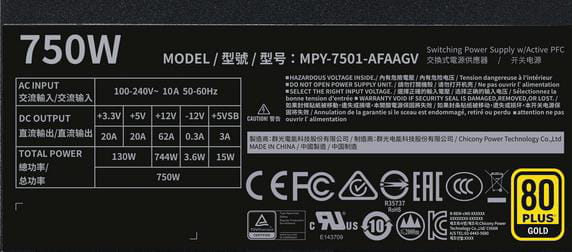
In practice, it's a bit more complicated... because a power supply outputs several voltages, 5 volts, 12 volts, and 3.3 volts... in principle, it's written on the side of the block; so you have to set up the circuit for each one... You can also use resistors like those from a toaster or dryer... be careful, it does heat up quite a bit... Here is the power table for 750w
We realize that the sum of the power does not match... It's an optimized average that assumes not everything is at full load at the same time.
-- 12 volts with 62 amps equals 744 watts; to dissipate this value, you need to connect a 0.2 ohm resistor... or 12 car headlight bulbs or 20 meters of 1.5² electric wire, it's hot..
For thermal paste, it doesn't seem necessary for the moment, and it can increase the risks..-
Oula, that seems complicated ^^
I have a multimeter, so I would need a second one to have an ammeter and a voltmeter, and for the rest of the equipment, that seems difficult... I should take the time to look into it, I admit it will be the last test I will do.
Yes, that's what I think, increasing the risks? In the sense that I might mess it up? I've applied quite a few.
-
-
jeannets Posted messages 28440 Registration date Status Contributor Last intervention Ambassador 6 609
Yes, it's more complicated than what you generally find around here... but well, I've given the explanation... Personally, I've tested quite a few... some time ago... I must say they are still below par... but with the recent and serious suppliers, they are getting closer to their claims... -
Good evening to both of you,
A lot has been said, not everything was followed.
Perhaps we should treat it as if there are two issues.
Take care of the unplugged, moved, reconnected, won't start.
And see the rest afterwards (if independent)
The BIOS battery, as indicated, change it.
5 years or more won't hurt
Because even a good voltage doesn't necessarily mean it's good (it's not for two or three euros ...)
Then set your BIOS time and date.
(Good battery, an unplugged PC keeps the correct date and time and settings)
Regarding the damaged case, make sure nothing touches the "sheet metal" (motherboard too close ...)
--
Auto message
Without regular feedback from you... you can always refer to article 22 ;-)
Mini Reminder to the volunteers who are helping you: Respond, Respect, Politeness,... -
Hello there,
Yes, we should focus on one issue at a time.
I'll take the opportunity to change the battery; I haven't had any issues with the time after unplugging it, only after removing the battery.
As for the case, I'll probably order it today or over the weekend. I'll take care of all the disassembly next week.-
Hello, I'm giving you a little update; I received the case yesterday, so I cleaned everything:
No issues visually with the power supply; I opened it and apart from a bit of dust, nothing alarming
I changed the BIOS battery, and the PC started up immediately after reassembling it in the new case. I got the BIOS message, but nothing unusual since I removed the old battery to put in the new one. I didn’t try to unplug the PC to restart it due to lack of time.
I'll give you a real update tonight or tomorrow after I unplug the PC and restart it, but since it started on the first try, I think the first issue is resolved; the problem must have been the faulty battery despite good voltage.
-
-
jeannets Posted messages 28440 Registration date Status Contributor Last intervention Ambassador 6 609
Yes, these battery stories happen... it depends on the type of voltmeter... or you need to put a resistor in parallel (22 ohms for example) to see if the measured voltage collapses or not... in your case, it should have collapsed...
This dead battery is a sufficient reason.
But well, that's good news for now because nothing is burnt out...
In any case, thank you for the feedback.