Connect a SATA HDD to M.2
Solved
Kiraxellix
Posted messages
153
Status
Member
-
Kiraxellix Posted messages 153 Status Member -
Kiraxellix Posted messages 153 Status Member -
Hello,
Currently, I have hard drives connected via SATA on my current PC.
I was considering buying a PC that has the following ports:
2 M.2 ports; 1 PCIe x16 slot; 1 PCIe x1 slot
Can I connect my two SATA HDDs to the M.2 ports of this new PC? Will it work?
Thanks in advance.
Currently, I have hard drives connected via SATA on my current PC.
I was considering buying a PC that has the following ports:
2 M.2 ports; 1 PCIe x16 slot; 1 PCIe x1 slot
Can I connect my two SATA HDDs to the M.2 ports of this new PC? Will it work?
Thanks in advance.
6 answers
-
Hello
On the new PC, there are SATA ports.
Generally, there are often 6.
There won't be any problem connecting your drives
--
There are 3 kinds of people: those who know how to count and those who don't.
There are two categories of people: those who divide everything into two categories and the others. -
Hello
no, these are not the same disks
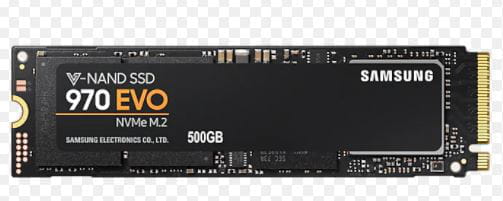
on the M.2 port, we connect an M.2 SSD like this one:

--
If my answer helped you, click the Thank You button. -
Thank you,
Is there an adapter to connect my two SATA HDDs to this new PC?
PCIe ports are for graphics cards, is that correct? -
Thank you for the response
This is the PC I'm interested in
https://store.hp.com/FranceStore/Merch/Product.aspx?id=1T0D2EA&opt=ABF&sel=DTP
But in the "Expansion Slots" section, they don't mention SATA ports... -
Why?
Is it because the "mini" PC is too small to hold them, is that it? -
Well, thank you very much for this clarification, I will mark the subject as resolved.
Best regards.