How to delete entries on Gigaset
Solved
Alice
-
baladur13 Posted messages 47345 Registration date Status Moderator Last intervention -
baladur13 Posted messages 47345 Registration date Status Moderator Last intervention -
Hello,
How to delete a contact from a full directory on a Gigaset AS 435H?
The menu does not provide the option, only indicates "memory full."
Thank you
Best regards
CM
How to delete a contact from a full directory on a Gigaset AS 435H?
The menu does not provide the option, only indicates "memory full."
Thank you
Best regards
CM
Related links:
- Disable alarm on Gigaset Duo. How to do it?
- remove the private option on Gigaset C 430 A
- how to delete a number on the Gigaset A415
- Gigaset duo A 605 H directory transfer between handsets
- How to delete new messages on ALCATEL XL 585 duo
- difference between GIGASET DUO AS690H and AS690A landline phones
3 answers
-
Good evening,
See page 8 of the notice (it’s not the same reference but it seems to correspond to your model)
http://gse.gigaset.com/fileadmin/legacy-assets/CustomerCare/Manuals/A4x/A415_A415A/A31008-M2505-N161-1-7719_13-06-2016_fr_FR.pdf
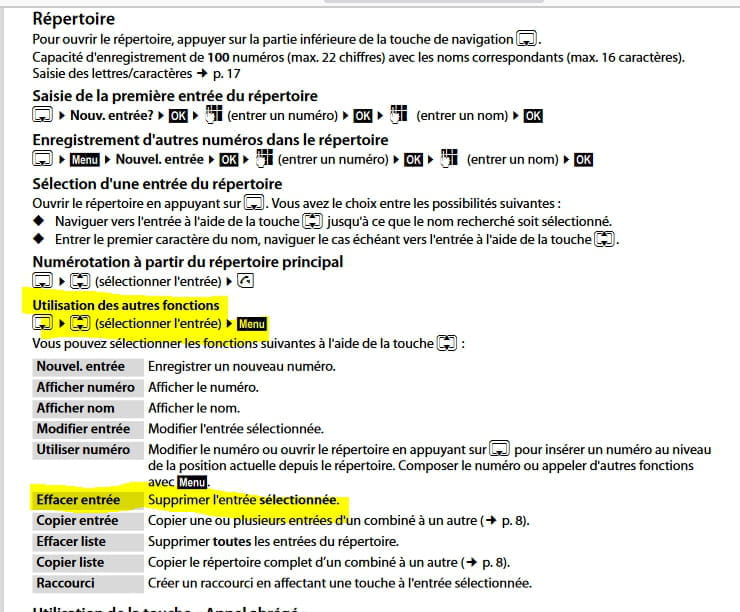
Press the down arrow on the square navigation key to access the directory, then press the up or down arrows until you find the sub-menu delete entry.
Hope that’s clear enough.
Best regards :) -
Hello,
Excerpt from the notice on page 8:
The notice: http://gse.gigaset.com/fileadmin/legacy-assets/CustomerCare/Manuals/A4x/A415_A415A/A31008-M2505-N161-1-7719_13-06-2016_fr_FR.pdf
--
Very difficult to catch a black cat in a dark room.
Especially when it's not there... -
Thank you both!
Problem solved (after having accidentally deleted everything before waiting for your very quick help!).
Indeed, in the "Menu," under "new entry," you had to navigate in the central square, up to find "modify" and down to find "delete entry."
What's unfortunate is that the memory fills up very quickly. It has nothing to do with a smartphone's capacity.