
Realtek HD Audio Manager Missing on Windows 10, how to reinstall it?
Solved
Profile blocked
-
Profile blocked -
Profile blocked -
Hello,
I am reaching out to you because my Realtek HD audio manager is no longer present on my computer.
This issue probably occurred after a Windows update.
Since this possible update, when I plug in my headphones, I can hardly hear anything; I have to turn the volume up to 100%.
So, I can very faintly hear voices.
The Realtek HD audio manager has completely disappeared.
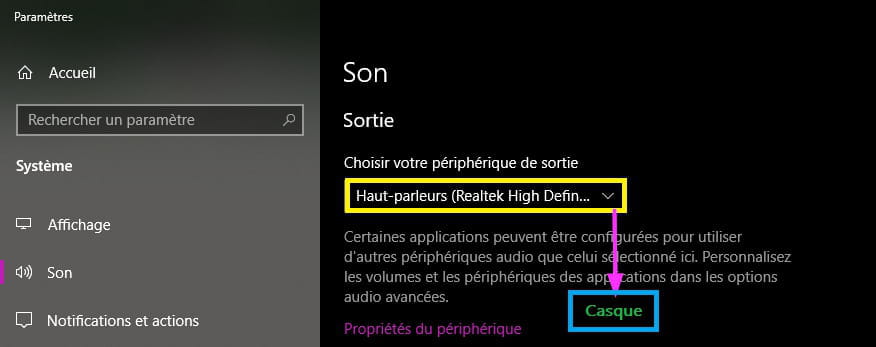
Thus, it is difficult to select the desired sound output
(either through the headphones or the speakers of my laptop).
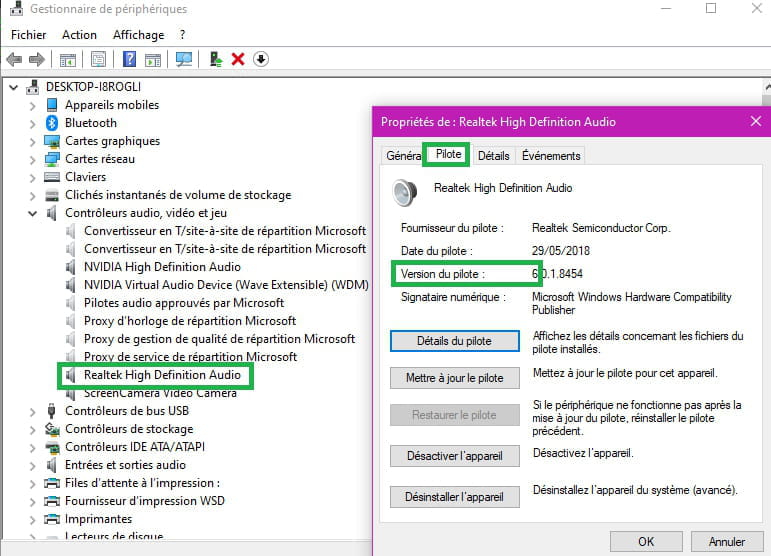
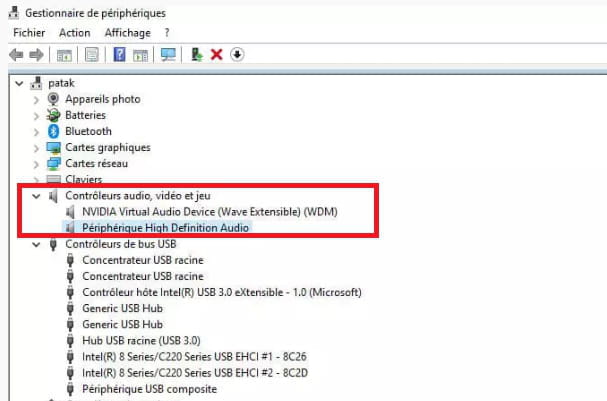
I deleted a device from the Device Manager (NVIDIA), in the Audio, Video and Game Controllers tab:
--NVIDIA Virtual Audio Device (Wave Extensible) (WDM)
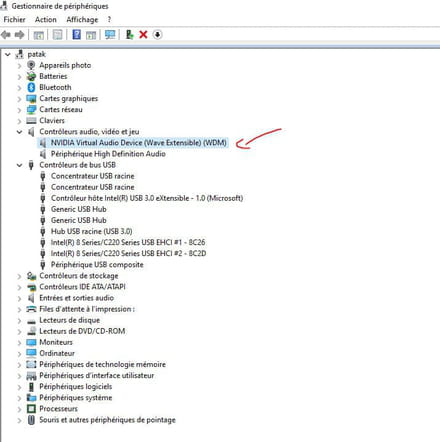
After this deletion, no changes occurred.
So I reinstalled the device (NVIDIA).
Still in the Audio, Video and Game Controllers tab:
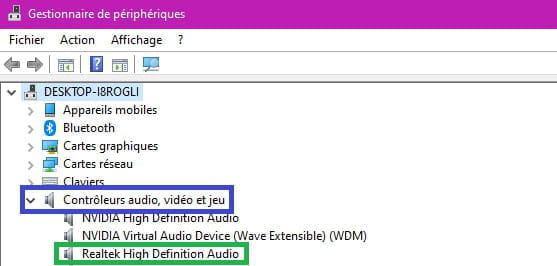
I uninstalled and then disabled the High Definition Audio Device.
It seems that Windows automatically reinstalled it after this uninstallation.

Then, I clicked on the sound icon at the bottom right of the taskbar and right-clicked.
Four options are presented:
--Open sound settings
--Open volume mixer
--Spatial sound (disabled)
--Troubleshoot sound problems
All options have been used.
Including troubleshoot sound problems and open sound settings.
The sound settings page:
--I clicked on manage audio devices
--Troubleshoot
--The advanced settings have been tested
The result is the same.
The sound control panel was also addressed.
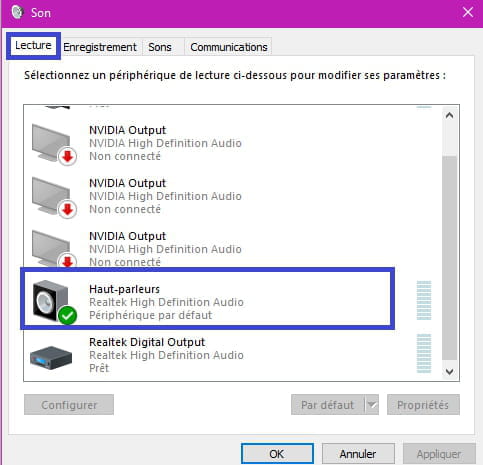
A small "Sound" window opens, displaying the devices:
--Speakers
--Headphones
The headphones (Sennheiser HD 380 Pro) are checked in green in the playback tab, while the speakers are grayed out.
A right-click has already been performed on both the headphones and the speakers.
The other three tabs show:
--Recording, where the microphone is checked in green.
--Sounds, I did nothing in this sound part.
--Communications, "Do nothing" is checked, which seems to be the best option, according to various tutorials on the subject.
To conclude, I used the ergonomic options:
To modify the device volume, but it's still the same.
I wanted to downgrade to Windows 10, but that didn't work.
I also wanted to uninstall an update, but I don't know which one is causing the issue.
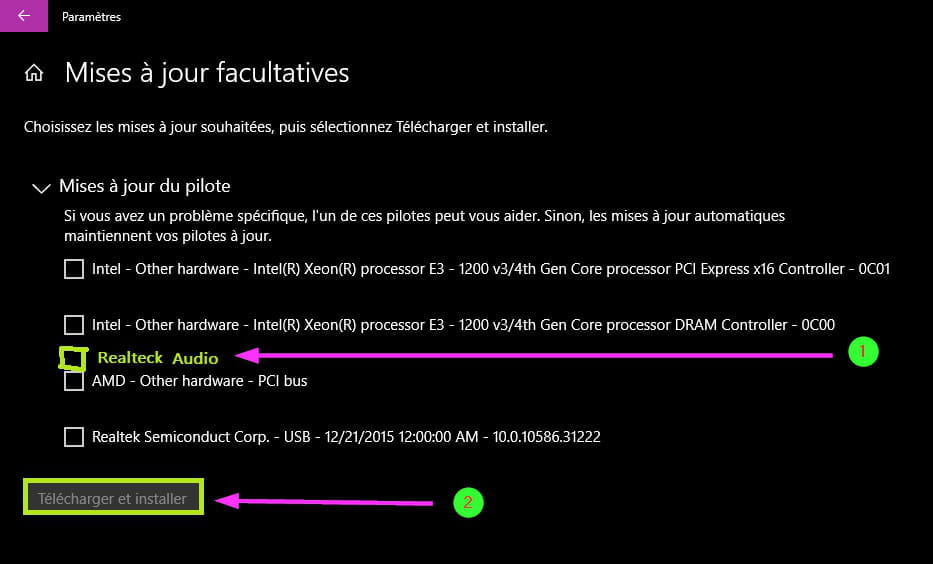
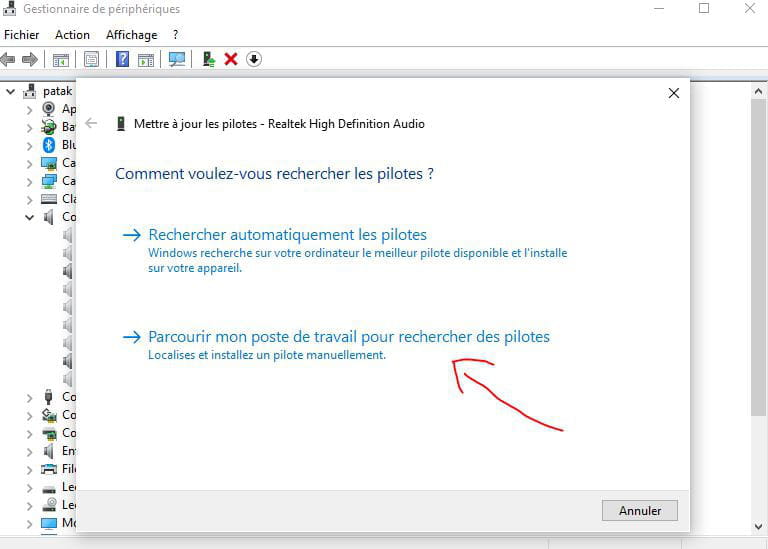
I downloaded the RealTek driver thinking it might debug the situation a bit, but still nothing.
The selected file corresponds to the one dedicated to Windows 10, version x64.
https://www.commentcamarche.net/telecharger/utilitaires/8149-pilote-realtek-high-definition-audio-pour-vista-7-8-10-64-bits/
I must have missed something!
I am open to any solutions you may have.
Thank you in advance for your understanding.
Kind regards.
Having downloaded AIDA64, I am sending you the report of the computer below:
--------[ AIDA64 Extreme ]----------------------------------------------------------------------------------------------
Version AIDA64 v6.30.5500
Benchmark Module 4.5.837.8-x64
Homepage https://www.aida64.com/
Report Type Report Wizard [ TRIAL VERSION ]
Computer ----------
Generator ----------
Operating System Microsoft Windows 10 Home 10.0.18362.1237 (Win10 RS6 [1903] May 2019 Update)
Date 2020-11-26
Time 14:47
--------[ Summary ]-----------------------------------------------------------------------------------------------------
Computer:
Computer Type PC ACPI with x64 processor (Mobile)
Operating System Microsoft Windows 10 Home
OS Service Pack [ TRIAL VERSION ]
Internet Explorer 11.1198.18362.0
Edge 87.0.664.47
DirectX DirectX 12.0
Computer Name ----------
User Name ----------
Logon Domain [ TRIAL VERSION ]
Date / Time 2020-11-26 / 14:48
Motherboard:
CPU Type Mobile QuadCore Intel Core i7-4720HQ, 3400 MHz (34 x 100)
Motherboard Name Asus N751JX Series Notebook
Motherboard Chipset Intel Lynx Point HM86, Intel Haswell
System Memory [ TRIAL VERSION ]
DIMM3: Samsung M471B1G73DB0-YK0 [ TRIAL VERSION ]
BIOS Type AMI (01/12/2015)
Display:
Video Adapter Intel(R) HD Graphics 4600 (1 GB)
Video Adapter Intel(R) HD Graphics 4600 (1 GB)
Video Adapter Intel(R) HD Graphics 4600 (1 GB)
3D Accelerator Intel HD Graphics 4600
Monitor AU Optronics B173HW02 V1 [17.3" LCD]
Multimedia:
Audio Adapter Realtek ALC668 @ Intel Lynx Point PCH - High Definition Audio Controller [C2]
Storage:
IDE Controller Intel(R) 8 Series Chipset Family SATA AHCI Controller
IDE Controller Realtek PCIE CardReader
Storage Controller Microsoft Storage Spaces Controller
Disk Drive HGST HTS721010A9E630 (1 TB, 7200 RPM, SATA-III)
Disk Drive SanDisk SD7SB3Q256G1002 (256 GB, SATA-III)
Optical Drive MATSHITA DVD-RAM UJ8G6
SMART Hard Disks Status OK
Partitions:
C: (NTFS) [ TRIAL VERSION ]
D: (NTFS) 127.9 GB (106.3 GB free)
E: (NTFS) 465.8 GB (66.1 GB free)
F: (NTFS) 465.8 GB (7.7 GB free)
Total Size [ TRIAL VERSION ]
Input:
Keyboard Keyboard Device Filter
Mouse ASUS Touchpad
Network:
Primary IP Address [ TRIAL VERSION ]
Primary MAC Address DC-85-DE-E4-87-63
Network Adapter Kaspersky Security Data Escort Adapter #2
Network Adapter Kaspersky Security Data Escort Adapter
Network Adapter Microsoft Wi-Fi Direct Virtual Adapter #3
Network Adapter Microsoft Wi-Fi Direct Virtual Adapter #4
Network Adapter Qualcomm Atheros AR946x Wireless Network Adapter (192. [ TRIAL VERSION ])
Network Adapter Realtek PCIe GbE Family Controller
Network Adapter TAP-Windows Adapter V9 (169. [ TRIAL VERSION ])
Peripherals:
Printer Canon MP210 series Printer
Printer Fax
Printer Foxit PhantomPDF Printer
Printer Microsoft Print to PDF
Printer Microsoft XPS Document Writer
Printer OneNote for Windows 10
Printer PDF for Accounting
Printer Send To OneNote 2013
USB2 Controller Intel Lynx Point PCH - USB 2.0 EHCI Host Controller 1 [C2]
USB2 Controller Intel Lynx Point PCH - USB 2.0 EHCI Host Controller 2 [C2]
USB3 Controller Intel Lynx Point PCH - USB 3.0 xHCI Host Controller [C2]
USB Device Generic USB Hub
USB Device Generic USB Hub
USB Device Composite USB Device
USB Device Qualcomm Atheros Bluetooth 4.0
USB Device USB2.0 HD UVC WebCam
Battery Microsoft AC Adapter
Battery Microsoft Surface ACPI-Compliant Control Method Battery
DMI:
DMI BIOS Vendor American Megatrends Inc.
DMI BIOS Version N751JX.202
DMI System Manufacturer ASUSTeK COMPUTER INC.
DMI System Product N751JX
DMI System Version 1.0
DMI System Serial Number [ TRIAL VERSION ]
DMI System UUID [ TRIAL VERSION ]
DMI Motherboard Manufacturer ASUSTeK COMPUTER INC.
DMI Motherboard Product N751JX
DMI Motherboard Version 1.0
DMI Motherboard Serial Number [ TRIAL VERSION ]
DMI Chassis Manufacturer ASUSTeK COMPUTER INC.
DMI Chassis Version 1.0
DMI Chassis Serial Number [ TRIAL VERSION ]
DMI Chassis Asset Tag [ TRIAL VERSION ]
DMI Chassis Type Notebook
--------[ DMI ]---------------------------------------------------------------------------------------------------------
[ BIOS ]
BIOS Properties:
Vendor American Megatrends Inc.
Version N751JX.202
Release Date 01/12/2015
Size 6 MB
System BIOS Version 4.6
Boot Devices Floppy Disk, Hard Disk, CD-ROM
Capabilities Flash BIOS, Shadow BIOS, Selectable Boot, EDD, BBS, Smart Battery
Supported Standards DMI, ACPI, UEFI
Expansion Capabilities PCI, USB
Virtual Machine No
BIOS Manufacturer:
Company Name American Megatrends Inc.
Product Information https://ami.com/en/products/bios-uefi-firmware/
BIOS Upgrades http://www.aida64.com/goto/?p=biosupdates
[ System ]
System Properties:
Manufacturer ASUSTeK COMPUTER INC.
Product N751JX
Version 1.0
Serial Number [ TRIAL VERSION ]
SKU# ASUS-NotebookSKU
Family N
Universal Unique ID [ TRIAL VERSION ]
Universal Unique ID (GUID) [ TRIAL VERSION ]
Wake-Up Type Power Switch
[ Motherboard ]
Motherboard Properties:
Manufacturer ASUSTeK COMPUTER INC.
Product N751JX
Version 1.0
Serial Number [ TRIAL VERSION ]
Asset Tag [ TRIAL VERSION ]
Asset Tag [ TRIAL VERSION ]
Asset Tag [ TRIAL VERSION ]
Motherboard Manufacturer:
Company Name ASUSTeK Computer Inc.
Product Information https://www.asus.com/Motherboards/
BIOS Download https://www.asus.com/support
Driver Update https://www.aida64.com/looking-driver-update
BIOS Upgrades http://www.aida64.com/goto/?p=biosupdates
[ Chassis ]
Chassis Properties:
Manufacturer ASUSTeK COMPUTER INC.
Version 1.0
Serial Number [ TRIAL VERSION ]
Asset Tag [ TRIAL VERSION ]
Chassis Type Notebook
Boot-Up State Safe
Power Supply State Safe
Thermal State Safe
Security Status None
[ Processors / Intel(R) Core(TM) i7-4720HQ CPU @ 2.60GHz ]
Processor Properties:
Manufacturer Intel
Version Intel(R) Core(TM) i7-4720HQ CPU @ 2.60GHz
Asset Tag Fill By OEM
Part Number Fill By OEM
External Clock 100 MHz
Maximum Clock 3800 MHz
Current Clock 2600 MHz
Type Central Processor
Voltage 1.2 V
Status Enabled
Upgrade Socket rPGA988B
Socket Designation SOCKET 0
HTT / CMP Units 2 / 4
Capabilities 64-bit
CPU Manufacturer:
Company Name Intel Corporation
Product Information https://ark.intel.com/content/www/us/en/ark/search.html?q=Intel+Core+i7-4720HQ
Driver Update https://www.aida64.com/looking-driver-update
[ Caches / CPU Internal L2 ]
Cache Properties:
Type Unified
I am reaching out to you because my Realtek HD audio manager is no longer present on my computer.
This issue probably occurred after a Windows update.
Since this possible update, when I plug in my headphones, I can hardly hear anything; I have to turn the volume up to 100%.
So, I can very faintly hear voices.
The Realtek HD audio manager has completely disappeared.
Thus, it is difficult to select the desired sound output
(either through the headphones or the speakers of my laptop).
I deleted a device from the Device Manager (NVIDIA), in the Audio, Video and Game Controllers tab:
--NVIDIA Virtual Audio Device (Wave Extensible) (WDM)

After this deletion, no changes occurred.
So I reinstalled the device (NVIDIA).
Still in the Audio, Video and Game Controllers tab:
I uninstalled and then disabled the High Definition Audio Device.
It seems that Windows automatically reinstalled it after this uninstallation.

Then, I clicked on the sound icon at the bottom right of the taskbar and right-clicked.
Four options are presented:
--Open sound settings
--Open volume mixer
--Spatial sound (disabled)
--Troubleshoot sound problems
All options have been used.
Including troubleshoot sound problems and open sound settings.
The sound settings page:
--I clicked on manage audio devices
--Troubleshoot
--The advanced settings have been tested
The result is the same.
The sound control panel was also addressed.
A small "Sound" window opens, displaying the devices:
--Speakers
--Headphones
The headphones (Sennheiser HD 380 Pro) are checked in green in the playback tab, while the speakers are grayed out.
A right-click has already been performed on both the headphones and the speakers.
The other three tabs show:
--Recording, where the microphone is checked in green.
--Sounds, I did nothing in this sound part.
--Communications, "Do nothing" is checked, which seems to be the best option, according to various tutorials on the subject.
To conclude, I used the ergonomic options:
To modify the device volume, but it's still the same.
I wanted to downgrade to Windows 10, but that didn't work.
I also wanted to uninstall an update, but I don't know which one is causing the issue.
I downloaded the RealTek driver thinking it might debug the situation a bit, but still nothing.
The selected file corresponds to the one dedicated to Windows 10, version x64.
https://www.commentcamarche.net/telecharger/utilitaires/8149-pilote-realtek-high-definition-audio-pour-vista-7-8-10-64-bits/
I must have missed something!
I am open to any solutions you may have.
Thank you in advance for your understanding.
Kind regards.
Having downloaded AIDA64, I am sending you the report of the computer below:
--------[ AIDA64 Extreme ]----------------------------------------------------------------------------------------------
Version AIDA64 v6.30.5500
Benchmark Module 4.5.837.8-x64
Homepage https://www.aida64.com/
Report Type Report Wizard [ TRIAL VERSION ]
Computer ----------
Generator ----------
Operating System Microsoft Windows 10 Home 10.0.18362.1237 (Win10 RS6 [1903] May 2019 Update)
Date 2020-11-26
Time 14:47
--------[ Summary ]-----------------------------------------------------------------------------------------------------
Computer:
Computer Type PC ACPI with x64 processor (Mobile)
Operating System Microsoft Windows 10 Home
OS Service Pack [ TRIAL VERSION ]
Internet Explorer 11.1198.18362.0
Edge 87.0.664.47
DirectX DirectX 12.0
Computer Name ----------
User Name ----------
Logon Domain [ TRIAL VERSION ]
Date / Time 2020-11-26 / 14:48
Motherboard:
CPU Type Mobile QuadCore Intel Core i7-4720HQ, 3400 MHz (34 x 100)
Motherboard Name Asus N751JX Series Notebook
Motherboard Chipset Intel Lynx Point HM86, Intel Haswell
System Memory [ TRIAL VERSION ]
DIMM3: Samsung M471B1G73DB0-YK0 [ TRIAL VERSION ]
BIOS Type AMI (01/12/2015)
Display:
Video Adapter Intel(R) HD Graphics 4600 (1 GB)
Video Adapter Intel(R) HD Graphics 4600 (1 GB)
Video Adapter Intel(R) HD Graphics 4600 (1 GB)
3D Accelerator Intel HD Graphics 4600
Monitor AU Optronics B173HW02 V1 [17.3" LCD]
Multimedia:
Audio Adapter Realtek ALC668 @ Intel Lynx Point PCH - High Definition Audio Controller [C2]
Storage:
IDE Controller Intel(R) 8 Series Chipset Family SATA AHCI Controller
IDE Controller Realtek PCIE CardReader
Storage Controller Microsoft Storage Spaces Controller
Disk Drive HGST HTS721010A9E630 (1 TB, 7200 RPM, SATA-III)
Disk Drive SanDisk SD7SB3Q256G1002 (256 GB, SATA-III)
Optical Drive MATSHITA DVD-RAM UJ8G6
SMART Hard Disks Status OK
Partitions:
C: (NTFS) [ TRIAL VERSION ]
D: (NTFS) 127.9 GB (106.3 GB free)
E: (NTFS) 465.8 GB (66.1 GB free)
F: (NTFS) 465.8 GB (7.7 GB free)
Total Size [ TRIAL VERSION ]
Input:
Keyboard Keyboard Device Filter
Mouse ASUS Touchpad
Network:
Primary IP Address [ TRIAL VERSION ]
Primary MAC Address DC-85-DE-E4-87-63
Network Adapter Kaspersky Security Data Escort Adapter #2
Network Adapter Kaspersky Security Data Escort Adapter
Network Adapter Microsoft Wi-Fi Direct Virtual Adapter #3
Network Adapter Microsoft Wi-Fi Direct Virtual Adapter #4
Network Adapter Qualcomm Atheros AR946x Wireless Network Adapter (192. [ TRIAL VERSION ])
Network Adapter Realtek PCIe GbE Family Controller
Network Adapter TAP-Windows Adapter V9 (169. [ TRIAL VERSION ])
Peripherals:
Printer Canon MP210 series Printer
Printer Fax
Printer Foxit PhantomPDF Printer
Printer Microsoft Print to PDF
Printer Microsoft XPS Document Writer
Printer OneNote for Windows 10
Printer PDF for Accounting
Printer Send To OneNote 2013
USB2 Controller Intel Lynx Point PCH - USB 2.0 EHCI Host Controller 1 [C2]
USB2 Controller Intel Lynx Point PCH - USB 2.0 EHCI Host Controller 2 [C2]
USB3 Controller Intel Lynx Point PCH - USB 3.0 xHCI Host Controller [C2]
USB Device Generic USB Hub
USB Device Generic USB Hub
USB Device Composite USB Device
USB Device Qualcomm Atheros Bluetooth 4.0
USB Device USB2.0 HD UVC WebCam
Battery Microsoft AC Adapter
Battery Microsoft Surface ACPI-Compliant Control Method Battery
DMI:
DMI BIOS Vendor American Megatrends Inc.
DMI BIOS Version N751JX.202
DMI System Manufacturer ASUSTeK COMPUTER INC.
DMI System Product N751JX
DMI System Version 1.0
DMI System Serial Number [ TRIAL VERSION ]
DMI System UUID [ TRIAL VERSION ]
DMI Motherboard Manufacturer ASUSTeK COMPUTER INC.
DMI Motherboard Product N751JX
DMI Motherboard Version 1.0
DMI Motherboard Serial Number [ TRIAL VERSION ]
DMI Chassis Manufacturer ASUSTeK COMPUTER INC.
DMI Chassis Version 1.0
DMI Chassis Serial Number [ TRIAL VERSION ]
DMI Chassis Asset Tag [ TRIAL VERSION ]
DMI Chassis Type Notebook
--------[ DMI ]---------------------------------------------------------------------------------------------------------
[ BIOS ]
BIOS Properties:
Vendor American Megatrends Inc.
Version N751JX.202
Release Date 01/12/2015
Size 6 MB
System BIOS Version 4.6
Boot Devices Floppy Disk, Hard Disk, CD-ROM
Capabilities Flash BIOS, Shadow BIOS, Selectable Boot, EDD, BBS, Smart Battery
Supported Standards DMI, ACPI, UEFI
Expansion Capabilities PCI, USB
Virtual Machine No
BIOS Manufacturer:
Company Name American Megatrends Inc.
Product Information https://ami.com/en/products/bios-uefi-firmware/
BIOS Upgrades http://www.aida64.com/goto/?p=biosupdates
[ System ]
System Properties:
Manufacturer ASUSTeK COMPUTER INC.
Product N751JX
Version 1.0
Serial Number [ TRIAL VERSION ]
SKU# ASUS-NotebookSKU
Family N
Universal Unique ID [ TRIAL VERSION ]
Universal Unique ID (GUID) [ TRIAL VERSION ]
Wake-Up Type Power Switch
[ Motherboard ]
Motherboard Properties:
Manufacturer ASUSTeK COMPUTER INC.
Product N751JX
Version 1.0
Serial Number [ TRIAL VERSION ]
Asset Tag [ TRIAL VERSION ]
Asset Tag [ TRIAL VERSION ]
Asset Tag [ TRIAL VERSION ]
Motherboard Manufacturer:
Company Name ASUSTeK Computer Inc.
Product Information https://www.asus.com/Motherboards/
BIOS Download https://www.asus.com/support
Driver Update https://www.aida64.com/looking-driver-update
BIOS Upgrades http://www.aida64.com/goto/?p=biosupdates
[ Chassis ]
Chassis Properties:
Manufacturer ASUSTeK COMPUTER INC.
Version 1.0
Serial Number [ TRIAL VERSION ]
Asset Tag [ TRIAL VERSION ]
Chassis Type Notebook
Boot-Up State Safe
Power Supply State Safe
Thermal State Safe
Security Status None
[ Processors / Intel(R) Core(TM) i7-4720HQ CPU @ 2.60GHz ]
Processor Properties:
Manufacturer Intel
Version Intel(R) Core(TM) i7-4720HQ CPU @ 2.60GHz
Asset Tag Fill By OEM
Part Number Fill By OEM
External Clock 100 MHz
Maximum Clock 3800 MHz
Current Clock 2600 MHz
Type Central Processor
Voltage 1.2 V
Status Enabled
Upgrade Socket rPGA988B
Socket Designation SOCKET 0
HTT / CMP Units 2 / 4
Capabilities 64-bit
CPU Manufacturer:
Company Name Intel Corporation
Product Information https://ark.intel.com/content/www/us/en/ark/search.html?q=Intel+Core+i7-4720HQ
Driver Update https://www.aida64.com/looking-driver-update
[ Caches / CPU Internal L2 ]
Cache Properties:
Type Unified
45 answers
- 1
- 2
- 3
Next
-
Re--
Thank you for your response.
Yes, this audio issue is trivial.
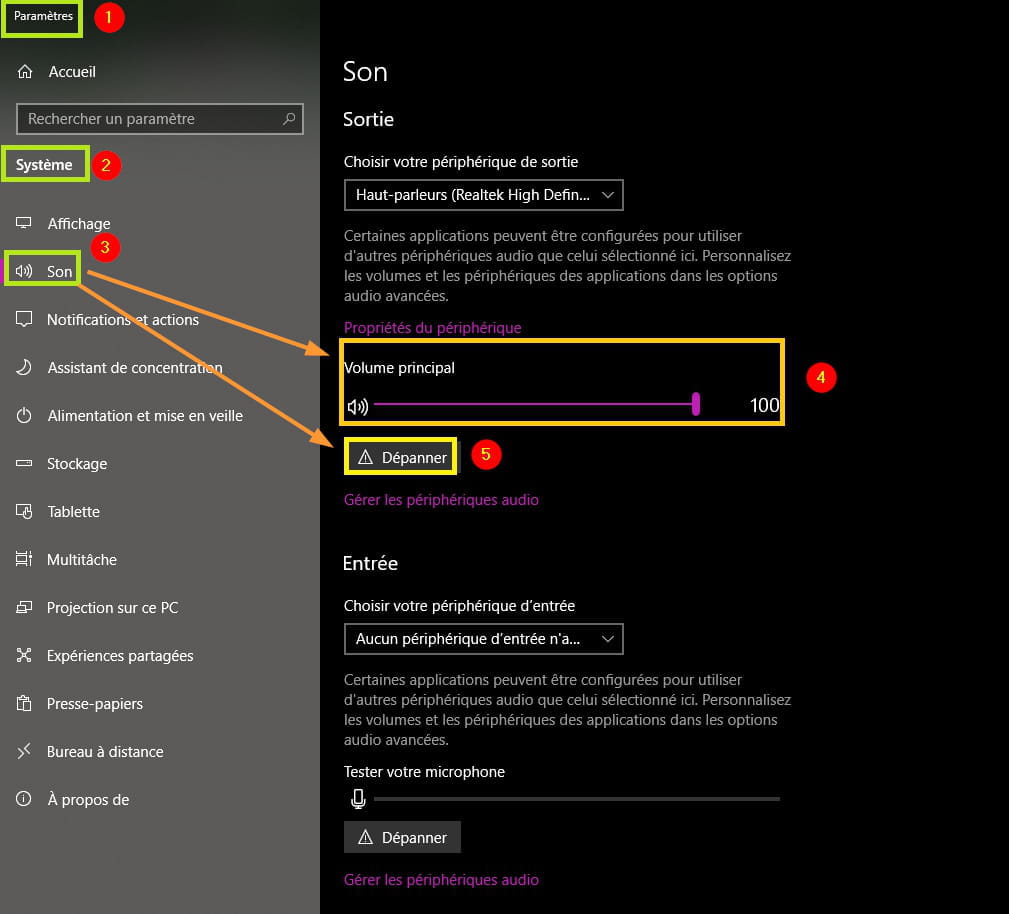
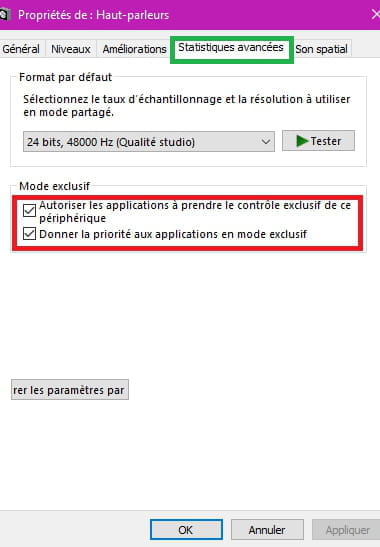
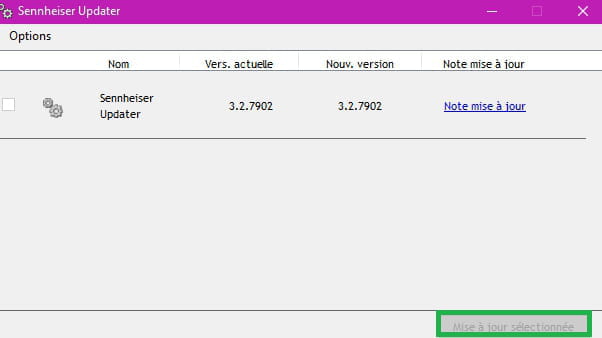
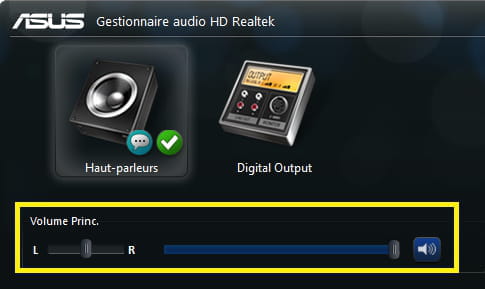
The level had been checked, I had followed the instructions from the screenshot (#5).
In any case, a big thank you to you Pistouri for your support, your patience, and your excellent follow-up to ultimately find the solution :)
Happy end-of-year celebrations to you as well!
Have a great day & a nice weekend :)
Best regards.


















- 1
- 2
- 3
Next