
Night lighting not working
Good evening, I am here because I am in distress, it has now been 1 year that I have been backing up all the Windows updates because my night light does not work. (It's grayed out, no way to activate it) I have tested absolutely all the solutions I could find online, but nothing works. My Windows is now forcing updates since my version is too old (the one where the night light works).
I really, really need help, I can't stand going in circles with this problem anymore.
(I use the night light permanently, spending several hours a day on the computer, my eyes thank me)
Thank you in advance for your feedback.
I really, really need help, I can't stand going in circles with this problem anymore.
(I use the night light permanently, spending several hours a day on the computer, my eyes thank me)
Thank you in advance for your feedback.
2 answers
-
ContributorHello
1- Try the registry method recommended by Microsoft.
HKEY_CURRENT_USER\Software\Microsoft\Windows\ CurrentVersion\CloudStore\Store\DefaultAccount\Cloud
Delete the following two folders:
"$$windows.data.bluelightreduction.bluelightreductionstate"
and
"$$windows.data.bluelightreduction.settings"
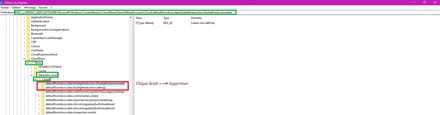
Close the Windows registry.
Restart the computer.
Check if the box is greyed out or not.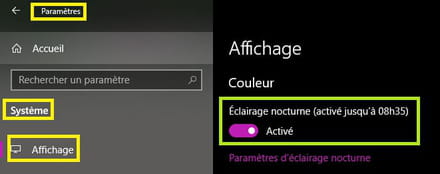
As a precaution, create a restore point.
2- Another solution:
==► Disable fast startup in Windows 10
3- If your toggle for night light above the link is greyed out, you may need to update your display driver (graphics card driver).
Source
4- Workaround ==► https://justgetflux.com/
5- Create a new user account (Administrator)
An outdated account can cause chaos.
Cheers



