Error No. 5174

calliewilliams
Posted messages
40
Status
Member
-
bazfile Posted messages 58529 Registration date Status Moderator Last intervention -
bazfile Posted messages 58529 Registration date Status Moderator Last intervention -
Hello,
With Office 365 (Word, PowerPoint, etc.), a message appears every time I open a Word document, here it is:
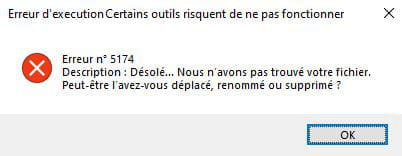
"Error number 5174
Description: Sorry … We couldn't find your file. Maybe you moved, renamed, or deleted it?"
Yet, when I click OK, I can access my file normally; but it’s just extremely annoying to have this message every time I open a document or create a new Word file.
Thank you in advance and have a nice day;)
2 answers
-
Hello,
Test your hard drive with CrystalDiskInfo use the following color codes to interpret the results, click on the image to enlarge it:
If your drive is OK
Repair Office https://support.microsoft.com/fr-fr/office/r%c3%a9parer-des-programmes-office-7821d4b6-7c1d-4205-aa0e-a6b40c5bb88b?ui=fr-fr&rs=fr-fr&ad=fr solution 1 paragraph Repair Office from the Control Panel
bazfile
Moderator/Security Contributor.
a hello, a response, a thank you are always appreciated. -
Hello,
First of all, thank you very much^^
But unfortunately, I just followed the protocol, and Office indicates that it is "repaired", yet the same message still appears…